# PyHuskarUI
**Repository Path**: Egrt/PyHuskarUI
## Basic Information
- **Project Name**: PyHuskarUI
- **Description**: No description available
- **Primary Language**: Unknown
- **License**: Apache-2.0
- **Default Branch**: master
- **Homepage**: None
- **GVP Project**: No
## Statistics
- **Stars**: 0
- **Forks**: 0
- **Created**: 2025-12-15
- **Last Updated**: 2025-12-15
## Categories & Tags
**Categories**: Uncategorized
**Tags**: None
## README

# 「 PyHuskarUI 」 Modern UI for PySide6 and Qml
![win-badge] ![linux-badge] ![macos-badge] ![android-badge]
[![Issues][issues-open-image]][issues-open-url] [![Issues][issues-close-image]][issues-close-url] [![Release][release-image]][release-url]
[![QQGroup][qqgroup-image]][qqgroup-url]
English | [中文](./README-zh_CN.md)
[win-badge]: https://img.shields.io/badge/Windows-passing-brightgreen?style=flat-square
[linux-badge]: https://img.shields.io/badge/Linux-passing-brightgreen?style=flat-square
[macos-badge]: https://img.shields.io/badge/MacOS-passing-brightgreen?style=flat-square
[android-badge]: https://img.shields.io/badge/Android-passing-brightgreen?style=flat-square
[issues-open-image]: https://img.shields.io/github/issues/mengps/PyHuskarUI?label=Issue&style=flat-square
[issues-open-url]: https://github.com/mengps/PyHuskarUI/issues
[issues-close-image]: https://img.shields.io/github/issues-closed/mengps/PyHuskarUI?color=brightgreen&label=Issue&style=flat-square
[issues-close-url]: https://github.com/mengps/PyHuskarUI/issues?q=is%3Aissue%20state%3Aclosed
[release-image]: https://img.shields.io/github/v/release/mengps/PyHuskarUI?label=Release&style=flat-square
[release-url]: https://github.com/mengps/PyHuskarUI/releases
[qqgroup-image]: https://img.shields.io/badge/QQGroup-490328047-f74658?style=flat-square
[qqgroup-url]: https://qm.qq.com/q/cMNHn2tWeY
## ✨ Features
- 📦 A set of high-quality Qml components out of the box.
- 🎨 Powerful theme customization system.
- 💻 Based on Qml, completely cross platform.
- 🔧 Highly flexible delegate based component customization.
## 🗺️ Roadmap
The development plan can be found here: [Component Roadmap](https://github.com/mengps/PyHuskarUI/discussions/5).
Anyone can discuss through issues, QQ groups, or WeChat groups, and ultimately meaningful components/functions will be added to the development plan.
## 🌐 Online wiki
- [PyHuskarUI Online wiki (AI)](https://deepwiki.com/mengps/PyHuskarUI)
## 📺 Online Demo
- [BiliBili](https://www.bilibili.com/video/BV1jodhYhE8a/?spm_id_from=333.1387.homepage.video_card.click)
## 🗂️ Precompiled package
Precompiled packages and binary libraries for two platforms, `Windows / MacOS / Linux`, have been created.
Please visit [Release](https://github.com/mengps/PyHuskarUI/releases) to download.
## 🔨 How to Build
- Clone
```auto
git clone --recursive https://github.com/mengps/PyHuskarUI.git
```
- Build
```auto
uv sync
uv run init
uv build pyhuskarui
```
- Install
- use pypi package
```auto
uv pip install pyhuskarui
```
- use source code
```auto
uv pip install [-e] ./pyhuskarui
```
- Run Gallery
```auto
uv run ./gallery/main.py
```
## 📦 Get started
- Create QtQuick application `QtVersion >= 6.8`
- Add the following code to your `main.py`
```python
from pyhuskarui.husapp import HusApp
if __name__ == "__main__":
...
app = QGuiApplication(sys.argv)
engine = QQmlApplicationEngine()
HusApp.initialize(engine)
...
```
- Add the following code to your `.qml`
```qml
import HuskarUI.Basic
HusWindow {
...
}
```
Alright, you can now enjoy using PyHuskarUI.
## 🚩 Reference
- Ant-d Components: https://ant-design.antgroup.com/components/overview
- Ant Design: https://ant-design.antgroup.com/docs/spec/introduce
## 💓 LICENSE
Use ` Apache License 2.0`
## 🎉 Star History
[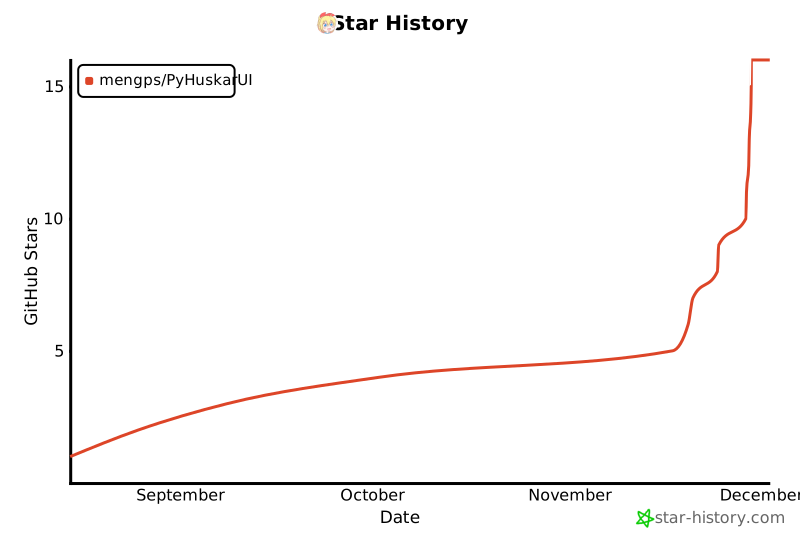](https://star-history.com/#mengps/PyHuskarUI&Date) 

