# LightGaussian
**Repository Path**: Jerrisk/LightGaussian
## Basic Information
- **Project Name**: LightGaussian
- **Description**: No description available
- **Primary Language**: Unknown
- **License**: Not specified
- **Default Branch**: main
- **Homepage**: None
- **GVP Project**: No
## Statistics
- **Stars**: 0
- **Forks**: 0
- **Created**: 2024-06-11
- **Last Updated**: 2024-06-11
## Categories & Tags
**Categories**: Uncategorized
**Tags**: None
## README
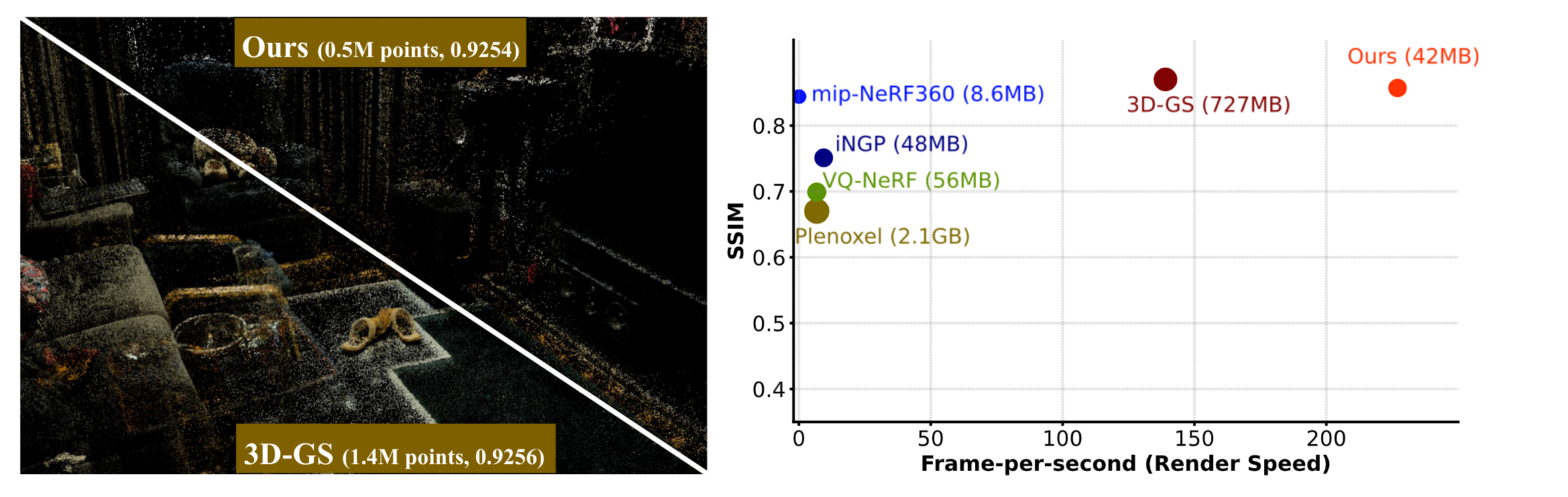
# LightGaussian: Unbounded 3D Gaussian Compression with 15x Reduction and 200+ FPS


## User Guidance
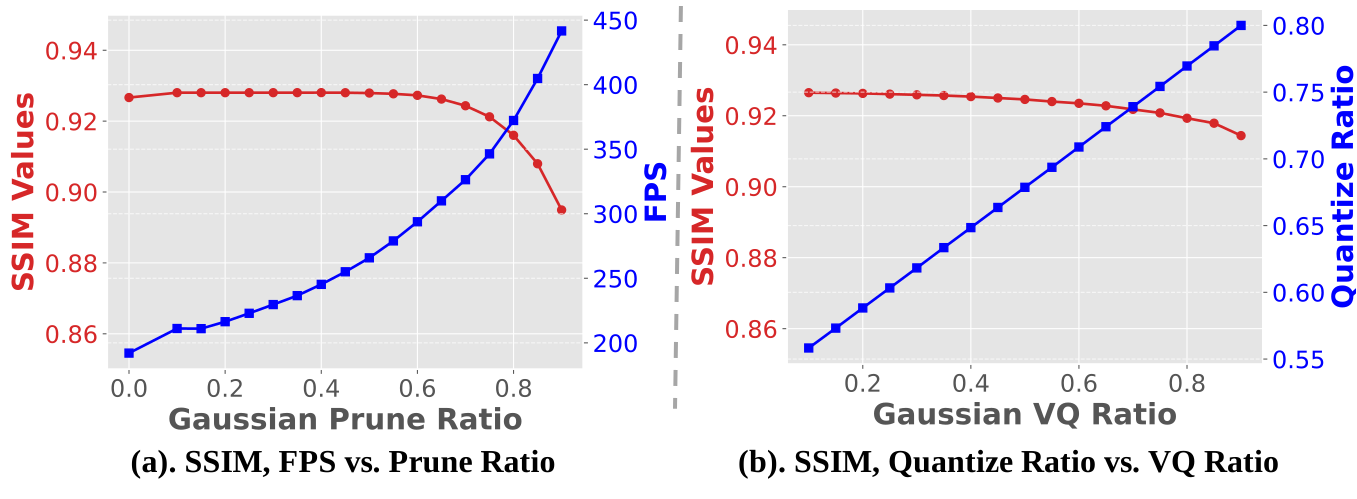
#### Gaussian Prune Ratio, Vector Quantization Ratio vs. FPS, SSIM
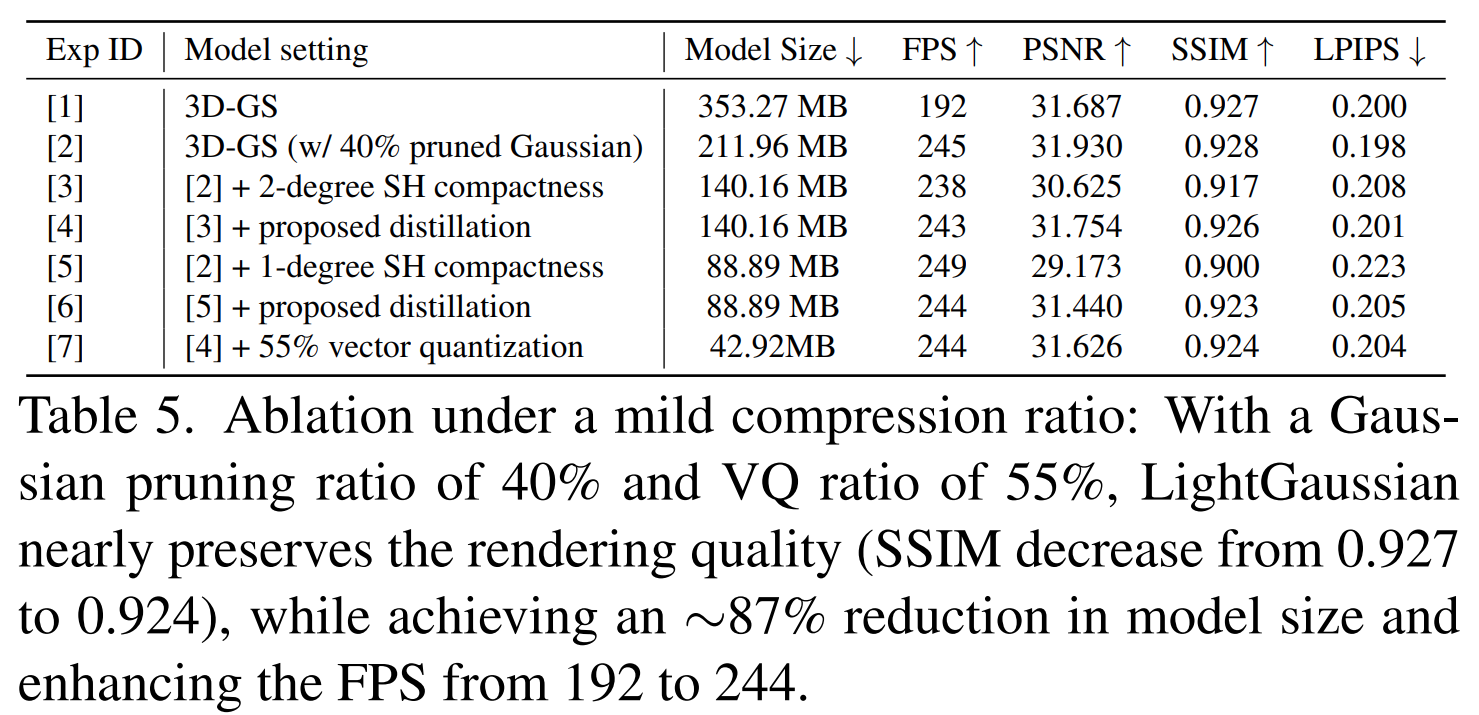
#### Mild Compression Ratio, with Minimum Accuracy Degradation
## Setup
#### Local Setup
The codebase is based on [gaussian-splatting](https://github.com/graphdeco-inria/gaussian-splatting)
The used datasets, MipNeRF360 and Tank & Temple, are hosted by the paper authors [here](https://jonbarron.info/mipnerf360/).
For installation:
```shell
conda env create --file environment.yml
conda activate lightgaussian
```
note: we modified the "diff-gaussian-rasterization" in the submodule to get the Global Significant Score.
## Compress to Compact Representation
Lightgaussian includes **3 ways** to make the 3D Gaussians be compact
#### Option 1 Prune & Recovery
Users can directly prune a trained 3D-GS checkpoint using the following command (default setting):
```
bash scripts/run_prune_finetune.sh
```
Users can also train from scratch and jointly prune redundant Gaussians in training using the following command (different setting from the paper):
```
bash scripts/run_train_densify_prune.sh
```
note: 3D-GS is trained for 20,000 iterations and then prune it. The resulting ply file is approximately 35% of the size of the original 3D-GS while ensuring a comparable quality level.
#### Option 2 SH distillation
Users can distill 3D-GS checkpoint using the following command (default setting):
```
bash scripts/run_distill_finetune.sh
```
#### Option 3 VecTree Quantization
Users can quantize a pruned and distilled 3D-GS checkpoint using the following command (default setting):
```
bash scripts/run_vectree_quantize.sh
```
## Render
Render with trajectory. By default ellipse, you can change it to spiral or others trajectory by changing to corresponding function.
```
python render_video.py --source_path PATH/TO/DATASET --model_path PATH/TO/MODEL --skip_train --skip_test --video
```
For render after the Vectree Quantization stage, you could render them through
```
python render_video.py --load_vq
```
## Example
An example ckpt for room scene can be downloaded [here](), which mainly includes the following several parts:
- point_cloud.ply —— Pruned, distilled and quantized 3D-GS checkpoint.
- extreme_saving —— Relevant files obtained after vectree quantization.
- imp_score.npz —— Global significance used in vectree quantization.
## TODO List
- [x] Upload module 1: Prune & recovery
- [x] Upload module 2: SH distillation
- [x] Upload module 3: Vectree Quantization
- [ ] Upload docker image
## Acknowledgements
We would like to express our gratitude to [Yueyu Hu](https://huzi96.github.io/) from NYU for the invaluable discussion on our project.
## BibTeX
If you find our work useful for your project, please consider citing the following paper.
```
@misc{fan2023lightgaussian,
title={LightGaussian: Unbounded 3D Gaussian Compression with 15x Reduction and 200+ FPS},
author={Zhiwen Fan and Kevin Wang and Kairun Wen and Zehao Zhu and Dejia Xu and Zhangyang Wang},
year={2023},
eprint={2311.17245},
archivePrefix={arXiv},
primaryClass={cs.CV} }
```