# CAP
**Repository Path**: Relict/CAP
## Basic Information
- **Project Name**: CAP
- **Description**: CAP 是一个在分布式系统中(SOA,MicroService)实现事件总线及最终一致性(分布式事务)的一个开源的 C# 库,她具有轻量级,高性能,易使用等特点
- **Primary Language**: C#
- **License**: MIT
- **Default Branch**: master
- **Homepage**: https://www.oschina.net/p/dotnetcore-cap
- **GVP Project**: No
## Statistics
- **Stars**: 1
- **Forks**: 2
- **Created**: 2024-05-27
- **Last Updated**: 2025-12-10
## Categories & Tags
**Categories**: Uncategorized
**Tags**: 事件总线, 微服务, 通讯
## README

# CAP [English](https://github.com/dotnetcore/CAP/blob/master/README.md)
[](https://github.com/dotnetcore/CAP/actions/workflows/deploy-docs-and-dashboard.yml)
[](https://ci.appveyor.com/project/yang-xiaodong/cap)
[](https://www.nuget.org/packages/DotNetCore.CAP/)
[](https://www.nuget.org/packages/DotNetCore.CAP/)
[](https://github.com/dotnetcore)
[](https://raw.githubusercontent.com/dotnetcore/CAP/master/LICENSE.txt)
CAP 是一个基于 .NET Standard 的 C# 库,它是一种处理分布式事务的解决方案,同样具有 EventBus 的功能,它具有轻量级、易使用、高性能等特点。
你可以在这里 [CAP docs](http://cap.dotnetcore.xyz) 看到更多详细资料。
你可以在这里看到 [CAP 视频教程](https://www.cnblogs.com/savorboard/p/cap-video-1.html),学习如何在项目中集成CAP。
在我们构建 SOA 或者 微服务系统的过程中,我们通常需要使用事件来对各个服务进行集成,在这过程中简单的使用消息队列并不能保证数据的最终一致性,
CAP 采用的是和当前数据库集成的本地消息表的方案来解决在分布式系统互相调用的各个环节可能出现的异常,它能够保证任何情况下事件消息都是不会丢失的。
你同样可以把 CAP 当做 EventBus 来使用,CAP提供了一种更加简单的方式来实现事件消息的发布和订阅,在订阅以及发布的过程中,你不需要继承或实现任何接口。
这是 CAP 集在ASP.NET Core 微服务架构中的一个示意图:
## 架构预览
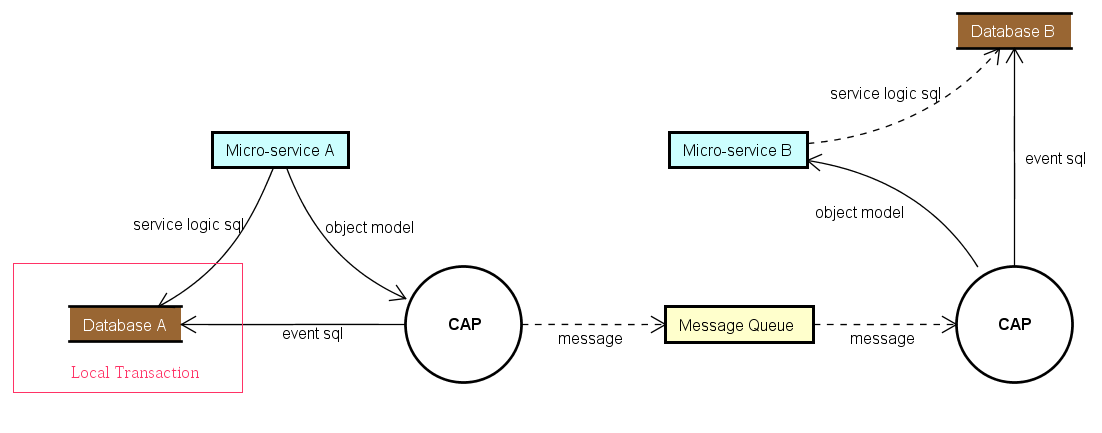
> CAP 实现了 [eShop 电子书](https://docs.microsoft.com/en-us/dotnet/standard/microservices-architecture/multi-container-microservice-net-applications/subscribe-events#designing-atomicity-and-resiliency-when-publishing-to-the-event-bus) 中描述的发件箱模式
## Getting Started
### NuGet
你可以运行以下下命令在你的项目中安装 CAP。
```
PM> Install-Package DotNetCore.CAP
```
CAP 支持主流的消息队列作为传输器,你可以按需选择下面的包进行安装:
```
PM> Install-Package DotNetCore.CAP.Kafka
PM> Install-Package DotNetCore.CAP.RabbitMQ
PM> Install-Package DotNetCore.CAP.AzureServiceBus
PM> Install-Package DotNetCore.CAP.AmazonSQS
PM> Install-Package DotNetCore.CAP.NATS
PM> Install-Package DotNetCore.CAP.RedisStreams
PM> Install-Package DotNetCore.CAP.Pulsar
```
CAP 提供了主流数据库作为存储,你可以按需选择下面的包进行安装:
```
// 按需选择安装你正在使用的数据库
PM> Install-Package DotNetCore.CAP.SqlServer
PM> Install-Package DotNetCore.CAP.MySql
PM> Install-Package DotNetCore.CAP.PostgreSql
PM> Install-Package DotNetCore.CAP.MongoDB
```
### Configuration
首先配置CAP到 Startup.cs 文件中,如下:
```c#
public void ConfigureServices(IServiceCollection services)
{
......
services.AddDbContext();
services.AddCap(x =>
{
//如果你使用的 EF 进行数据操作,你需要添加如下配置:
x.UseEntityFramework(); //可选项,你不需要再次配置 x.UseSqlServer 了
//如果你使用的ADO.NET,根据数据库选择进行配置:
x.UseSqlServer("数据库连接字符串");
x.UseMySql("数据库连接字符串");
x.UsePostgreSql("数据库连接字符串");
//如果你使用的 MongoDB,你可以添加如下配置:
x.UseMongoDB("ConnectionStrings"); //注意,仅支持MongoDB 4.0+集群
//CAP支持 RabbitMQ、Kafka、AzureServiceBus、AmazonSQS 等作为MQ,根据使用选择配置:
x.UseRabbitMQ("ConnectionStrings");
x.UseKafka("ConnectionStrings");
x.UseAzureServiceBus("ConnectionStrings");
x.UseAmazonSQS();
});
}
```
### 发布
在 Controller 中注入 `ICapPublisher` 然后使用 `ICapPublisher` 进行消息发送。
> 版本 7.0+ 支持发送延迟消息。
```c#
public class PublishController : Controller
{
private readonly ICapPublisher _capBus;
public PublishController(ICapPublisher capPublisher)
{
_capBus = capPublisher;
}
//不使用事务
[Route("~/without/transaction")]
public IActionResult WithoutTransaction()
{
_capBus.Publish("xxx.services.show.time", DateTime.Now);
// Publish delay message
_capBus.PublishDelayAsync(TimeSpan.FromSeconds(delaySeconds), "xxx.services.show.time", DateTime.Now);
return Ok();
}
//Ado.Net 中使用事务,自动提交
[Route("~/adonet/transaction")]
public IActionResult AdonetWithTransaction()
{
using (var connection = new MySqlConnection(ConnectionString))
{
using (var transaction = connection.BeginTransaction(_capBus, autoCommit: true))
{
//业务代码
_capBus.Publish("xxx.services.show.time", DateTime.Now);
}
}
return Ok();
}
//EntityFramework 中使用事务,自动提交
[Route("~/ef/transaction")]
public IActionResult EntityFrameworkWithTransaction([FromServices]AppDbContext dbContext)
{
using (var trans = dbContext.Database.BeginTransaction(_capBus, autoCommit: true))
{
//业务代码
_capBus.Publish("xxx.services.show.time", DateTime.Now);
}
return Ok();
}
}
```
### 订阅
**Action Method**
在 Action 上添加 CapSubscribeAttribute 来订阅相关消息。
```c#
public class PublishController : Controller
{
[CapSubscribe("xxx.services.show.time")]
public void CheckReceivedMessage(DateTime datetime)
{
Console.WriteLine(datetime);
}
}
```
**Service Method**
如果你的订阅方法没有位于 Controller 中,则你订阅的类需要继承 `ICapSubscribe`:
```c#
namespace xxx.Service
{
public interface ISubscriberService
{
void CheckReceivedMessage(DateTime datetime);
}
public class SubscriberService: ISubscriberService, ICapSubscribe
{
[CapSubscribe("xxx.services.show.time")]
public void CheckReceivedMessage(DateTime datetime)
{
}
}
}
```
然后在 Startup.cs 中的 `ConfigureServices()` 中注入你的 `ISubscriberService` 类
```c#
public void ConfigureServices(IServiceCollection services)
{
services.AddTransient();
services.AddCap(x=>{});
}
```
#### 异步订阅
你能够实现异步订阅。订阅方法应返回 `Task` 并接收 `CancellationToken` 作为参数。
```c#
public class AsyncSubscriber : ICapSubscribe
{
[CapSubscribe("name")]
public async Task ProcessAsync(Message message, CancellationToken cancellationToken)
{
await SomeOperationAsync(message, cancellationToken);
}
}
```
#### 使用多部分订阅名
要在类级别对订阅的Topic进行分组,您可以将在方法上的订阅设置为部分订阅。 消息队列上的订阅将是类上定义的topic加上方法上定义的topic的拼合。
在下面的示例中,当收到关于 `customers.create` 的消息时,将调用 `Create(..)` 函数
```c#
[CapSubscribe("customers")]
public class CustomersSubscriberService : ICapSubscribe
{
[CapSubscribe("create", isPartial: true)]
public void Create(Customer customer)
{
}
}
```
#### 订阅者组
订阅者组的概念类似于 Kafka 中的消费者组,它和消息队列中的广播模式相同,用来处理不同微服务实例之间同时消费相同的消息。
当CAP启动的时候,她将创建一个默认的消费者组,如果多个相同消费者组的消费者消费同一个Topic消息的时候,只会有一个消费者被执行。
相反,如果消费者都位于不同的消费者组,则所有的消费者都会被执行。
相同的实例中,你可以通过下面的方式来指定他们位于不同的消费者组。
```C#
[CapSubscribe("xxx.services.show.time", Group = "group1" )]
public void ShowTime1(DateTime datetime)
{
}
[CapSubscribe("xxx.services.show.time", Group = "group2")]
public void ShowTime2(DateTime datetime)
{
}
```
`ShowTime1` 和 `ShowTime2` 将被同时调用。
PS,你可以通过下面的方式来指定默认的消费者组名称:
```C#
services.AddCap(x =>
{
x.DefaultGroup = "default-group-name";
});
```
### Dashboard
CAP 同时提供了仪表盘(Dashboard)功能,你可以很方便的查看发出和接收到的消息。 除此之外,你还可以在仪表盘中实时查看发送或者接收到的消息。
使用以下命令安装 Dashboard:
```
PM> Install-Package DotNetCore.CAP.Dashboard
```
在分布式环境中,仪表盘内置集成了 [Consul](http://consul.io) 作为节点的注册发现,同时实现了网关代理功能,你同样可以方便的查看本节点或者其他节点的数据,它就像你访问本地资源一样。
[查看 Consul 配置文档](https://cap.dotnetcore.xyz/user-guide/en/monitoring/consul)
如果你的服务部署在Kubernetes中,请使用我们为Kubernetes专门提供的发现包。
```
PM> Install-Package DotNetCore.CAP.Dashboard.K8s
```
[查看 Kubernetes 配置文档](https://cap.dotnetcore.xyz/user-guide/en/monitoring/kubernetes/)
仪表盘默认的访问地址是:[http://localhost:xxx/cap](http://localhost:xxx/cap),你可以在`d.MatchPath`配置项中修改`cap`路径后缀为其他的名字。
## 贡献
贡献的最简单的方法之一就是是参与讨论和讨论问题(issue)。你也可以通过提交的 Pull Request 代码变更作出贡献。
### License
MIT