



Powered by OPACTOR
 - **Powerful Agent Performance**: Leverage the full power of Claude Code and Cursor CLI Agent capabilities with native MCP support
- **Natural Language to Code**: Simply describe what you want to build, and Claudable generates production-ready Next.js code
- **Instant Preview**: See your changes immediately with hot-reload as AI builds your app
- **Zero Setup, Instant Launch**: No complex sandboxes, no API key, no database headaches - just start building immediately
- **Beautiful UI**: Generate beautiful UI with Tailwind CSS and shadcn/ui
- **Deploy to Vercel**: Push your app live with a single click, no configuration needed
- **GitHub Integration**: Automatic version control and continuous deployment setup
- **Supabase Database**: Connect production PostgreSQL with authentication ready to use
- **Automated Error Detection**: Detect errors in your app and fix them automatically
## Demo Examples
### Codex CLI Example
- **Powerful Agent Performance**: Leverage the full power of Claude Code and Cursor CLI Agent capabilities with native MCP support
- **Natural Language to Code**: Simply describe what you want to build, and Claudable generates production-ready Next.js code
- **Instant Preview**: See your changes immediately with hot-reload as AI builds your app
- **Zero Setup, Instant Launch**: No complex sandboxes, no API key, no database headaches - just start building immediately
- **Beautiful UI**: Generate beautiful UI with Tailwind CSS and shadcn/ui
- **Deploy to Vercel**: Push your app live with a single click, no configuration needed
- **GitHub Integration**: Automatic version control and continuous deployment setup
- **Supabase Database**: Connect production PostgreSQL with authentication ready to use
- **Automated Error Detection**: Detect errors in your app and fix them automatically
## Demo Examples
### Codex CLI Example
 ### Qwen Code Example
 ## Supported AI Coding Agents
Claudable supports multiple AI coding agents, giving you the flexibility to choose the best tool for your needs:
- **Claude Code** - Anthropic's advanced AI coding agent
- **Codex CLI** - OpenAI's lightweight coding agent
- **Cursor CLI** - Powerful multi-model AI agent
- **Gemini CLI** - Google's open-source AI agent
- **Qwen Code** - Alibaba's open-source coding CLI
### Claude Code (Recommended)
**[Claude Code](https://docs.anthropic.com/en/docs/claude-code/setup)** - Anthropic's advanced AI coding agent with Claude Opus 4.1
- **Features**: Deep codebase awareness, MCP support, Unix philosophy, direct terminal integration
- **Context**: Native 256K tokens
- **Pricing**: Included with ChatGPT Plus/Pro/Team/Edu/Enterprise plans
- **Installation**:
```bash
npm install -g @anthropic-ai/claude-code
claude # then > /login
```
### Codex CLI
**[Codex CLI](https://github.com/openai/codex)** - OpenAI's lightweight coding agent with GPT-5 support
- **Features**: High reasoning capabilities, local execution, multiple operating modes (interactive, auto-edit, full-auto)
- **Context**: Varies by model
- **Pricing**: Included with ChatGPT Plus/Pro/Business/Edu/Enterprise plans
- **Installation**:
```bash
npm install -g @openai/codex
codex # login with ChatGPT account
```
### Cursor CLI
**[Cursor CLI](https://cursor.com/en/cli)** - Powerful AI agent with access to cutting-edge models
- **Features**: Multi-model support (Anthropic, OpenAI, Gemini), MCP integration, AGENTS.md support
- **Context**: Model dependent
- **Pricing**: Free tier available, Pro plans for advanced features
- **Installation**:
```bash
curl https://cursor.com/install -fsS | bash
cursor-agent login
```
### Gemini CLI
**[Gemini CLI](https://developers.google.com/gemini-code-assist/docs/gemini-cli)** - Google's open-source AI agent with Gemini 2.5 Pro
- **Features**: 1M token context window, Google Search grounding, MCP support, extensible architecture
- **Context**: 1M tokens (with free tier: 60 req/min, 1000 req/day)
- **Pricing**: Free with Google account, paid tiers for higher limits
- **Installation**:
```bash
npm install -g @google/gemini-cli
gemini # follow authentication flow
```
### Qwen Code
**[Qwen Code](https://github.com/QwenLM/qwen-code)** - Alibaba's open-source CLI for Qwen3-Coder models
- **Features**: 256K-1M token context, multiple model sizes (0.5B to 480B), Apache 2.0 license
- **Context**: 256K native, 1M with extrapolation
- **Pricing**: Completely free and open-source
- **Installation**:
```bash
npm install -g @qwen-code/qwen-code@latest
qwen --version
```
## Technology Stack
**Database & Deployment:**
- **[Supabase](https://supabase.com/)**: Connect production-ready PostgreSQL database directly to your project.
- **[Vercel](https://vercel.com/)**: Publish your work immediately with one-click deployment
**There is no additional subscription cost and built just for YOU.**
## Prerequisites
Before you begin, ensure you have the following installed:
- Node.js 18+
- Python 3.10+
- Claude Code or Cursor CLI (already logged in)
- Git
## Quick Start
Get Claudable running on your local machine in minutes:
```bash
# Clone the repository
git clone https://github.com/opactorai/Claudable.git
cd Claudable
# Install all dependencies (Node.js and Python)
npm install
# Start development servers
npm run dev
```
Your application will be available at:
- Frontend: http://localhost:3000
- API Server: http://localhost:8080
- API Documentation: http://localhost:8080/docs
**Note**: Ports are automatically detected. If the default ports are in use, the next available ports will be assigned.
## Setup
### Manual Setup
You can also manually setup the project.
```bash
# Frontend setup
cd apps/web
npm install
# Backend setup
cd ../api
python3 -m venv .venv
source .venv/bin/activate # On Windows: .venv\Scripts\activate
pip install -r requirements.txt
```
The `npm install` command automatically handles the complete setup:
1. **Port Configuration**: Detects available ports and creates `.env` files
2. **Node.js Dependencies**: Installs packages including workspace dependencies
3. **Python Environment**: Creates virtual environment in `apps/api/.venv`
4. **Python Dependencies**: Installs packages using `uv` (if available) or `pip`
5. **Database Setup**: SQLite database auto-creates at `data/cc.db` on first run
### Additional Commands
```bash
npm run db:backup # Create a backup of your SQLite database
# Use when: Before major changes or deployments
# Creates: data/backups/cc_backup_[timestamp].db
npm run db:reset # Reset database to initial state
# Use when: Need fresh start or corrupted data
# Warning: This will delete all your data!
npm run clean # Remove all dependencies and virtual environments
# Use when: Dependencies conflict or need fresh install
# Removes: node_modules/, apps/api/.venv/, package-lock.json
# After running: npm install to reinstall everything
```
## Usage
### Getting Started with Development
1. **Connect Claude Code**: Link your Claude Code CLI to enable AI assistance
2. **Describe Your Project**: Use natural language to describe what you want to build
3. **AI Generation**: Watch as the AI generates your project structure and code
4. **Live Preview**: See changes instantly with hot reload functionality
5. **Deploy**: Push to production with Vercel integration
### API Development
Access the interactive API documentation at http://localhost:8080/docs to explore available endpoints and test API functionality.
### Database Operations
Claudable uses SQLite for local development and can be configured for PostgreSQL in production. The database automatically initializes on first run.
## Troubleshooting
### Port Already in Use
The application automatically finds available ports. Check the `.env` file to see which ports were assigned.
### Installation Failures
```bash
# Clean all dependencies and retry
npm run clean
npm install
```
### Permission Errors (macOS/Linux)
If you encounter permission errors:
```bash
cd apps/api
python3 -m venv .venv
source .venv/bin/activate
pip install -r requirements.txt
```
### Claude Code Permission Issues (Windows/WSL)
If you encounter the error: `Error output dangerously skip permissions cannot be used which is root sudo privileges for security reasons`
**Solution:**
1. Do not run Claude Code with `sudo` or as root user
2. Ensure proper file ownership in WSL:
```bash
# Check current user
whoami
# Change ownership of project directory to current user
sudo chown -R $(whoami):$(whoami) ~/Claudable
```
3. If using WSL, make sure you're running Claude Code from your user account, not root
4. Verify Claude Code installation permissions:
```bash
# Reinstall Claude Code without sudo
npm install -g @anthropic-ai/claude-code --unsafe-perm=false
```
## Integration Guide
### GitHub
**Get Token:** [GitHub Personal Access Tokens](https://github.com/settings/tokens) → Generate new token (classic) → Select `repo` scope
**Connect:** Settings → Service Integrations → GitHub → Enter token → Create or connect repository
### Vercel
**Get Token:** [Vercel Account Settings](https://vercel.com/account/tokens) → Create Token
**Connect:** Settings → Service Integrations → Vercel → Enter token → Create new project for deployment
### Supabase
**Get Credentials:** [Supabase Dashboard](https://supabase.com/dashboard) → Your Project → Settings → API
- Project URL: `https://xxxxx.supabase.co`
- Anon Key: Public key for client-side
- Service Role Key: Secret key for server-side
## License
MIT License.
## Upcoming Features
These features are in development and will be opened soon.
- **New CLI Agents** - Trust us, you're going to LOVE this!
- **Checkpoints for Chat** - Save and restore conversation/codebase states
- **Advanced MCP Integration** - Native integration with MCP
- **Enhanced Agent System** - Subagents, AGENTS.md integration
- **Website Cloning** - You can start a project from a reference URL.
- Various bug fixes and community PR merges
We're working hard to deliver the features you've been asking for. Stay tuned!
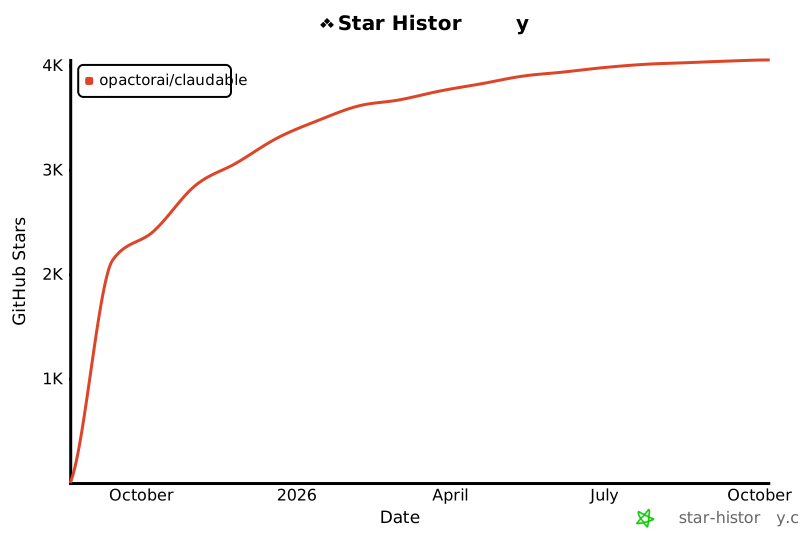
## Star History
[](https://www.star-history.com/#opactorai/Claudable&Date)
## Supported AI Coding Agents
Claudable supports multiple AI coding agents, giving you the flexibility to choose the best tool for your needs:
- **Claude Code** - Anthropic's advanced AI coding agent
- **Codex CLI** - OpenAI's lightweight coding agent
- **Cursor CLI** - Powerful multi-model AI agent
- **Gemini CLI** - Google's open-source AI agent
- **Qwen Code** - Alibaba's open-source coding CLI
### Claude Code (Recommended)
**[Claude Code](https://docs.anthropic.com/en/docs/claude-code/setup)** - Anthropic's advanced AI coding agent with Claude Opus 4.1
- **Features**: Deep codebase awareness, MCP support, Unix philosophy, direct terminal integration
- **Context**: Native 256K tokens
- **Pricing**: Included with ChatGPT Plus/Pro/Team/Edu/Enterprise plans
- **Installation**:
```bash
npm install -g @anthropic-ai/claude-code
claude # then > /login
```
### Codex CLI
**[Codex CLI](https://github.com/openai/codex)** - OpenAI's lightweight coding agent with GPT-5 support
- **Features**: High reasoning capabilities, local execution, multiple operating modes (interactive, auto-edit, full-auto)
- **Context**: Varies by model
- **Pricing**: Included with ChatGPT Plus/Pro/Business/Edu/Enterprise plans
- **Installation**:
```bash
npm install -g @openai/codex
codex # login with ChatGPT account
```
### Cursor CLI
**[Cursor CLI](https://cursor.com/en/cli)** - Powerful AI agent with access to cutting-edge models
- **Features**: Multi-model support (Anthropic, OpenAI, Gemini), MCP integration, AGENTS.md support
- **Context**: Model dependent
- **Pricing**: Free tier available, Pro plans for advanced features
- **Installation**:
```bash
curl https://cursor.com/install -fsS | bash
cursor-agent login
```
### Gemini CLI
**[Gemini CLI](https://developers.google.com/gemini-code-assist/docs/gemini-cli)** - Google's open-source AI agent with Gemini 2.5 Pro
- **Features**: 1M token context window, Google Search grounding, MCP support, extensible architecture
- **Context**: 1M tokens (with free tier: 60 req/min, 1000 req/day)
- **Pricing**: Free with Google account, paid tiers for higher limits
- **Installation**:
```bash
npm install -g @google/gemini-cli
gemini # follow authentication flow
```
### Qwen Code
**[Qwen Code](https://github.com/QwenLM/qwen-code)** - Alibaba's open-source CLI for Qwen3-Coder models
- **Features**: 256K-1M token context, multiple model sizes (0.5B to 480B), Apache 2.0 license
- **Context**: 256K native, 1M with extrapolation
- **Pricing**: Completely free and open-source
- **Installation**:
```bash
npm install -g @qwen-code/qwen-code@latest
qwen --version
```
## Technology Stack
**Database & Deployment:**
- **[Supabase](https://supabase.com/)**: Connect production-ready PostgreSQL database directly to your project.
- **[Vercel](https://vercel.com/)**: Publish your work immediately with one-click deployment
**There is no additional subscription cost and built just for YOU.**
## Prerequisites
Before you begin, ensure you have the following installed:
- Node.js 18+
- Python 3.10+
- Claude Code or Cursor CLI (already logged in)
- Git
## Quick Start
Get Claudable running on your local machine in minutes:
```bash
# Clone the repository
git clone https://github.com/opactorai/Claudable.git
cd Claudable
# Install all dependencies (Node.js and Python)
npm install
# Start development servers
npm run dev
```
Your application will be available at:
- Frontend: http://localhost:3000
- API Server: http://localhost:8080
- API Documentation: http://localhost:8080/docs
**Note**: Ports are automatically detected. If the default ports are in use, the next available ports will be assigned.
## Setup
### Manual Setup
You can also manually setup the project.
```bash
# Frontend setup
cd apps/web
npm install
# Backend setup
cd ../api
python3 -m venv .venv
source .venv/bin/activate # On Windows: .venv\Scripts\activate
pip install -r requirements.txt
```
The `npm install` command automatically handles the complete setup:
1. **Port Configuration**: Detects available ports and creates `.env` files
2. **Node.js Dependencies**: Installs packages including workspace dependencies
3. **Python Environment**: Creates virtual environment in `apps/api/.venv`
4. **Python Dependencies**: Installs packages using `uv` (if available) or `pip`
5. **Database Setup**: SQLite database auto-creates at `data/cc.db` on first run
### Additional Commands
```bash
npm run db:backup # Create a backup of your SQLite database
# Use when: Before major changes or deployments
# Creates: data/backups/cc_backup_[timestamp].db
npm run db:reset # Reset database to initial state
# Use when: Need fresh start or corrupted data
# Warning: This will delete all your data!
npm run clean # Remove all dependencies and virtual environments
# Use when: Dependencies conflict or need fresh install
# Removes: node_modules/, apps/api/.venv/, package-lock.json
# After running: npm install to reinstall everything
```
## Usage
### Getting Started with Development
1. **Connect Claude Code**: Link your Claude Code CLI to enable AI assistance
2. **Describe Your Project**: Use natural language to describe what you want to build
3. **AI Generation**: Watch as the AI generates your project structure and code
4. **Live Preview**: See changes instantly with hot reload functionality
5. **Deploy**: Push to production with Vercel integration
### API Development
Access the interactive API documentation at http://localhost:8080/docs to explore available endpoints and test API functionality.
### Database Operations
Claudable uses SQLite for local development and can be configured for PostgreSQL in production. The database automatically initializes on first run.
## Troubleshooting
### Port Already in Use
The application automatically finds available ports. Check the `.env` file to see which ports were assigned.
### Installation Failures
```bash
# Clean all dependencies and retry
npm run clean
npm install
```
### Permission Errors (macOS/Linux)
If you encounter permission errors:
```bash
cd apps/api
python3 -m venv .venv
source .venv/bin/activate
pip install -r requirements.txt
```
### Claude Code Permission Issues (Windows/WSL)
If you encounter the error: `Error output dangerously skip permissions cannot be used which is root sudo privileges for security reasons`
**Solution:**
1. Do not run Claude Code with `sudo` or as root user
2. Ensure proper file ownership in WSL:
```bash
# Check current user
whoami
# Change ownership of project directory to current user
sudo chown -R $(whoami):$(whoami) ~/Claudable
```
3. If using WSL, make sure you're running Claude Code from your user account, not root
4. Verify Claude Code installation permissions:
```bash
# Reinstall Claude Code without sudo
npm install -g @anthropic-ai/claude-code --unsafe-perm=false
```
## Integration Guide
### GitHub
**Get Token:** [GitHub Personal Access Tokens](https://github.com/settings/tokens) → Generate new token (classic) → Select `repo` scope
**Connect:** Settings → Service Integrations → GitHub → Enter token → Create or connect repository
### Vercel
**Get Token:** [Vercel Account Settings](https://vercel.com/account/tokens) → Create Token
**Connect:** Settings → Service Integrations → Vercel → Enter token → Create new project for deployment
### Supabase
**Get Credentials:** [Supabase Dashboard](https://supabase.com/dashboard) → Your Project → Settings → API
- Project URL: `https://xxxxx.supabase.co`
- Anon Key: Public key for client-side
- Service Role Key: Secret key for server-side
## License
MIT License.
## Upcoming Features
These features are in development and will be opened soon.
- **New CLI Agents** - Trust us, you're going to LOVE this!
- **Checkpoints for Chat** - Save and restore conversation/codebase states
- **Advanced MCP Integration** - Native integration with MCP
- **Enhanced Agent System** - Subagents, AGENTS.md integration
- **Website Cloning** - You can start a project from a reference URL.
- Various bug fixes and community PR merges
We're working hard to deliver the features you've been asking for. Stay tuned!
## Star History
[](https://www.star-history.com/#opactorai/Claudable&Date)