# YTThirdPlatformManager
**Repository Path**: alsow/YTThirdPlatformManager
## Basic Information
- **Project Name**: YTThirdPlatformManager
- **Description**: iOS平台以组件化和插件化的方式集成第三方平台
- **Primary Language**: Objective-C
- **License**: Not specified
- **Default Branch**: master
- **Homepage**: None
- **GVP Project**: No
## Statistics
- **Stars**: 0
- **Forks**: 7
- **Created**: 2018-08-02
- **Last Updated**: 2020-12-19
## Categories & Tags
**Categories**: Uncategorized
**Tags**: None
## README
# YTThirdPlatformManager
iOS第三方平台集成组件化(1.0.1 版本)
**历史版本**
[iOS第三方平台集成组件化(1.0.0 版本)](https://gitee.com/dhar/YTThirdPlatformManager/wikis/ytthirdplatformmanager-1.0.0-readme)
### 原理分析
参考我的博客文章[iOS第三方平台集成组件化](https://my.oschina.net/u/1242477/blog/1557875) 和 [iOS第三方平台集成组件化续集](https://my.oschina.net/FEEDFACF/blog/1573080)
### 怎么使用
#### 安装依赖库
定位到Demo所在的Example目录
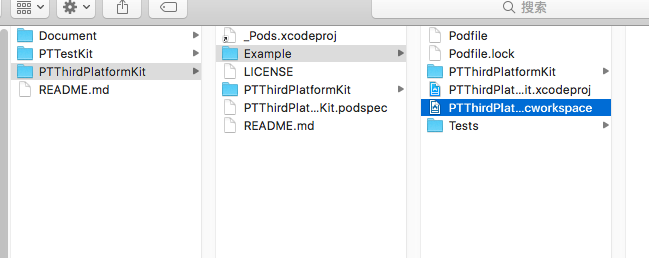
运行 `pod install` 命令安装依赖库
```ruby
➜ Example git:(master) ✗ pod install
Analyzing dependencies
Fetching podspec for `PTTestKit` from `../../PTTestKit`
Fetching podspec for `PTThirdPlatformKit` from `../`
Downloading dependencies
Using PTTestKit (0.1.0)
Using PTThirdPlatformKit (0.1.0)
Using SDWebImage (4.0.0)
Using WechatOpenSDK (1.7.7)
Using WeiboSDK (3.1.3)
Generating Pods project
Integrating client project
Sending stats
Pod installation complete! There are 6 dependencies from the Podfile and 5 total pods installed.
```
安装完成打开 `PTThirdPlatformKit.xcworkspace` 文件即可.
默认安装所有的平台,可以修改podfile配置一个或者多个平台,具体可以查看 [选择需要的第三方平台](#Mark) 的介绍
#### 第三方平台配置
1、在AppDelegate的`didFinishLaunchingWithOptions`方法中进行平台的配置
```objc
- (BOOL)application:(UIApplication *)application didFinishLaunchingWithOptions:(NSDictionary *)launchOptions
{
// 自定义的第三方平台以插件的方式添加
PTThirdPlatformManager* configInstance = [PTThirdPlatformManager sharedInstance];
[configInstance addCustomSharePlatform:PTCustumShareTypeDingTalk
managerClass:PTDingTalkManager.class];
[configInstance setPlaform:PTCustumShareTypeDingTalk
appID:kDingTalkAppID
appKey:nil
appSecret:nil
redirectURL:nil
URLSchemes:nil];
// 第三方平台注册
[configInstance setPlaform:PTThirdPlatformTypeWechat
appID:kWXAppID
appKey:nil
appSecret:kWXAppSecret
redirectURL:nil
URLSchemes:nil];
[configInstance setPlaform:PTThirdPlatformTypeTencentQQ
appID:kTencentAppID
appKey:kTencentAppKey
appSecret:kTencentAppSecret
redirectURL:nil
URLSchemes:nil];
[configInstance setPlaform:PTThirdPlatformTypeWeibo
appID:kWeiboAppID
appKey:kWeiboAppKey
appSecret:kWeiboAppSecret
redirectURL:kWeiboRedirectURI
URLSchemes:nil];
[configInstance setPlaform:PTThirdPlatformTypeAlipay
appID:nil
appKey:nil
appSecret:nil
redirectURL:nil
URLSchemes:kAlipayURLScheme];
[configInstance thirdPlatConfigWithApplication:application
didFinishLaunchingWithOptions:launchOptions];
return YES;
}
```
2、在AppDelegate的`openURL`方法中配置URL回调
```objc
- (BOOL)application:(UIApplication *)application openURL:(NSURL *)url sourceApplication:(NSString *)sourceApplication annotation:(id)annotation {
return [[PTThirdPlatformConfigManager sharedInstance] thirdPlatCanOpenUrlWithApplication:application openURL:url sourceApplication:sourceApplication annotation:annotation];
}
```
3、功能调用
下面是不同平台调用第三发SDK的登录、分享、支付的功能示例代码,具体的可以下载项目代码查看。
```objc
- (void)viewDidLoad {
[super viewDidLoad];
typeof(self) __weak weakSelf = self;
[self addActionWithName:@"QQ Login" callback:^{
[[PTThirdPlatformConfigManager sharedInstance] signInWithType:PTThirdPlatformTypeTencentQQ fromViewController:weakSelf callback:^(ThirdPlatformUserInfo *userInfo, NSError *err) {
}];
}];
[self addActionWithName:@"Wechat Login" callback:^{
[[PTThirdPlatformConfigManager sharedInstance] signInWithType:PTThirdPlatformTypeWechat fromViewController:weakSelf callback:^(ThirdPlatformUserInfo *userInfo, NSError *err) {
}];
}];
[self addActionWithName:@"Weibo Login" callback:^{
[[PTThirdPlatformConfigManager sharedInstance] signInWithType:PTThirdPlatformTypeWeibo fromViewController:weakSelf callback:^(ThirdPlatformUserInfo *userInfo, NSError *err) {
}];
}];
// 分享模型
ThirdPlatformShareModel* shareModel = [[ThirdPlatformShareModel alloc] init];
shareModel.image = nil;
shareModel.imageUrlString = @"";
shareModel.title = @"title";
shareModel.text = @"text";
shareModel.weiboText = @"weibo text";
shareModel.urlString = @"http://www.baidu.com";
shareModel.fromViewController = self;
shareModel.shareResultBlock = ^(PTShareType pplatform, PTShareResult result, NSError * error) {
};
[self addActionWithName:@"QQ Share" callback:^{
shareModel.platform = PTShareTypeQQ;
[[PTThirdPlatformConfigManager sharedInstance] shareWithModel:shareModel];
}];
[self addActionWithName:@"Wechat Share" callback:^{
shareModel.platform = PTShareTypeWechat;
[[PTThirdPlatformConfigManager sharedInstance] shareWithModel:shareModel];
}];
[self addActionWithName:@"Weibo Share" callback:^{
shareModel.platform = PTShareTypeWeibo;
[[PTThirdPlatformConfigManager sharedInstance] shareWithModel:shareModel];
}];
[self addActionWithName:@"Wechat Pay" callback:^{
PTOrderModel* order = [[PTOrderModel alloc] init];
[[PTThirdPlatformConfigManager sharedInstance] payWithPlateform:PaymentMethodTypeWechat order:order paymentBlock:^(BOOL result) {
}];
}];
[self addActionWithName:@"Alipay Pay" callback:^{
PTOrderModel* order = [[PTOrderModel alloc] init];
[[PTThirdPlatformConfigManager sharedInstance] payWithPlateform:PaymentMethodTypeAlipay order:order paymentBlock:^(BOOL result) {
}];
}];
```
#### SDK配置
项目已经添加了微信、微博、QQ的第三方SDK了,支付宝和QQ是使用framework包的方式导入,微信和微博使用Pod的方式导入,运行 `pod install` 即可导入微信和微博的SDK。这些平台的依赖库已经配置好了,所以不需要再次配置即可使用。
#### URL Types 配置
这些配置使用到的key或者APPID部分需要自行完善,其中,**调用支付宝支付的 URL Schemes 代码调用和URL Types中的配置要保持一致**。
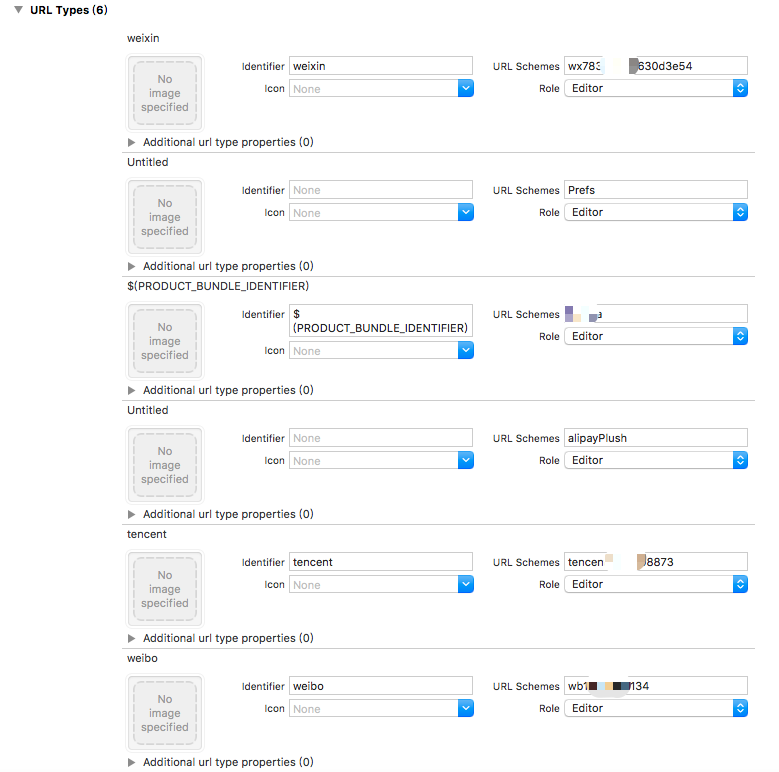
可以复制以下配置文件的内容,配置文件中只包含了微信、微博、QQ、支付宝的配置,修改对应平台的配置,粘贴到info.plist文件中,更多平台的配置需要参考对应平台的文档说明
```ruby
CFBundleURLTypes
CFBundleTypeRole
Editor
CFBundleURLName
weixin
CFBundleURLSchemes
你的微信APPID
CFBundleTypeRole
Editor
CFBundleURLSchemes
alipayPlush
CFBundleTypeRole
Editor
CFBundleURLName
tencent
CFBundleURLSchemes
你的QQAPPID
CFBundleTypeRole
Editor
CFBundleURLName
weibo
CFBundleURLSchemes
你的微博APPKEY
```
#### QueriesSchemes配置
APP调用第三方APP需要用到的,下面的配置文件配置了微信、微博、QQ、支付宝这几个第三方APP的调用,其中微信的配置需要填写你的微信APPID,如需要更多的其他第三方APP调用,参考第三方平台的配置添加即可。
```ruby
LSApplicationQueriesSchemes
wechat
weixin
你的微信APPID
mqqapi
mqq
mqqOpensdkSSoLogin
mqqconnect
mqqopensdkdataline
mqqopensdkgrouptribeshare
mqqopensdkfriend
mqqopensdkapi
mqqopensdkapiV2
mqqopensdkapiV3
mqzoneopensdk
mqqopensdkapiV3
mqqopensdkapiV3
mqzone
mqzonev2
mqzoneshare
wtloginqzone
mqzonewx
mqzoneopensdkapiV2
mqzoneopensdkapi19
mqzoneopensdkapi
mqzoneopensdk
tim
sinaweibohd
sinaweibo
sinaweibosso
weibosdk
weibosdk2.5
dingtalk
dingtalk-open
```
#### 选择需要的第三方平台
可以通过podfile配置不同的第三方平台,下面的配置是配置内置的所有的第三方平台:支付宝、QQ、微博、微信。可以选择其中的一个或多个配置,修改podfile之后需要运行`pod install`让配置生效。
```ruby
#use_frameworks!
platform :ios, '8.0'
target 'PTThirdPlatformKit_Example' do
pod 'PTTestKit', :path => '../../PTTestKit'
pod 'PTThirdPlatformKit', :path => '../'
pod 'PTThirdPlatformKit/AlipayManager', :path => '../'
pod 'PTThirdPlatformKit/TencentManager', :path => '../'
pod 'PTThirdPlatformKit/WeiboManager', :path => '../'
pod 'PTThirdPlatformKit/WXManager', :path => '../'
target 'PTThirdPlatformKit_Tests' do
inherit! :search_paths
end
end
```
#### 扩展第三方SDK
可以以插件的方式添加了自定义的第三方SDK,在SDK配置这个步骤好了之后,需要一下步骤
- 继承`PTBaseThirdPlatformManager`类生成一个第三方SDK的管理器
- 实现`PTAbsThirdPlatformRequestHandler`接口生成一个第三发SDK的底层调用
- 继承`PTBaseThirdPlatformRespManager`类生成一个第三方SDK的响应回调
以钉钉平台为例,生成三个平台相关的类文件:
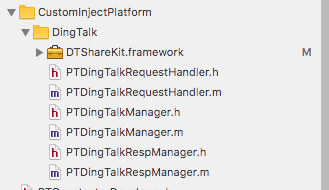
调用 `PTThirdPlatformManager`类的两个接口 `addCustomPlatform`、 `addCustomSharePlatform` 添加自定义的第三方平台。
```objc
// 自定义的第三方平台以插件的方式添加
[[PTThirdPlatformManager sharedInstance] addCustomSharePlatform:PTCustumShareTypeDingTalk managerClass:PTDingTalkManager.class];
[[PTThirdPlatformManager sharedInstance] setPlaform:PTCustumShareTypeDingTalk appID:kDingTalkAppID appKey:nil appSecret:nil redirectURL:nil];
```
完了之后可以回到`怎么使用`步骤查看怎么使用了。