⚡️ LightX2V:
轻量级视频生成推理框架

[](https://opensource.org/licenses/Apache-2.0)
[](https://deepwiki.com/ModelTC/lightx2v)
[](https://lightx2v-en.readthedocs.io/en/latest)
[](https://lightx2v-zhcn.readthedocs.io/zh-cn/latest)
[](https://lightx2v-papers-zhcn.readthedocs.io/zh-cn/latest)
[](https://hub.docker.com/r/lightx2v/lightx2v/tags)
**\[ [English](README.md) | 中文 \]**
--------------------------------------------------------------------------------
**LightX2V** 是一个先进的轻量级视频生成推理框架,专为提供高效、高性能的视频合成解决方案而设计。该统一平台集成了多种前沿的视频生成技术,支持文本生成视频(T2V)和图像生成视频(I2V)等多样化生成任务。**X2V 表示将不同的输入模态(X,如文本或图像)转换为视频输出(V)**。
## :fire: 最新动态
- **2025年12月4日:** 🚀 支持 GGUF 格式模型推理,以及在寒武纪 MLU590、MetaX C500 硬件上的部署。
- **2025年11月24日:** 🚀 我们发布了HunyuanVideo-1.5的4步蒸馏模型!这些模型支持**超快速4步推理**,无需CFG配置,相比标准50步推理可实现约**25倍加速**。现已提供基础版本和FP8量化版本:[Hy1.5-Distill-Models](https://huggingface.co/lightx2v/Hy1.5-Distill-Models)。
- **2025年11月21日:** 🚀 我们Day0支持了[HunyuanVideo-1.5](https://huggingface.co/tencent/HunyuanVideo-1.5)的视频生成模型,同样GPU数量,LightX2V可带来约2倍以上的速度提升,并支持更低显存GPU部署(如24G RTX4090)。支持CFG并行/Ulysses并行,高效Offload,TeaCache/MagCache等技术。同时支持沐曦,寒武纪等国产芯片部署。我们很快将在我们的[HuggingFace主页](https://huggingface.co/lightx2v)更新更多模型,包括步数蒸馏,VAE蒸馏等相关模型。量化模型和轻量VAE模型现已可用:[Hy1.5-Quantized-Models](https://huggingface.co/lightx2v/Hy1.5-Quantized-Models)用于量化推理,[HunyuanVideo-1.5轻量TAE](https://huggingface.co/lightx2v/Autoencoders/blob/main/lighttaehy1_5.safetensors)用于快速VAE解码。使用教程参考[这里](https://github.com/ModelTC/LightX2V/tree/main/scripts/hunyuan_video_15),或查看[示例目录](https://github.com/ModelTC/LightX2V/tree/main/examples)获取代码示例。
## 🏆 性能测试数据 (更新于 2025.12.01)
### 📊 推理框架之间性能对比 (H100)
| Framework | GPUs | Step Time | Speedup |
|-----------|---------|---------|---------|
| Diffusers | 1 | 9.77s/it | 1x |
| xDiT | 1 | 8.93s/it | 1.1x |
| FastVideo | 1 | 7.35s/it | 1.3x |
| SGL-Diffusion | 1 | 6.13s/it | 1.6x |
| **LightX2V** | 1 | **5.18s/it** | **1.9x** 🚀 |
| FastVideo | 8 | 2.94s/it | 1x |
| xDiT | 8 | 2.70s/it | 1.1x |
| SGL-Diffusion | 8 | 1.19s/it | 2.5x |
| **LightX2V** | 8 | **0.75s/it** | **3.9x** 🚀 |
### 📊 推理框架之间性能对比 (RTX 4090D)
| Framework | GPUs | Step Time | Speedup |
|-----------|---------|---------|---------|
| Diffusers | 1 | 30.50s/it | 1x |
| FastVideo | 1 | 22.66s/it | 1.3x |
| xDiT | 1 | OOM | OOM |
| SGL-Diffusion | 1 | OOM | OOM |
| **LightX2V** | 1 | **20.26s/it** | **1.5x** 🚀 |
| FastVideo | 8 | 15.48s/it | 1x |
| xDiT | 8 | OOM | OOM |
| SGL-Diffusion | 8 | OOM | OOM |
| **LightX2V** | 8 | **4.75s/it** | **3.3x** 🚀 |
### 📊 LightX2V不同配置之间性能对比
| Framework | GPU | Configuration | Step Time | Speedup |
|-----------|-----|---------------|-----------|---------------|
| **LightX2V** | H100 | 8 GPUs + cfg | 0.75s/it | 1x |
| **LightX2V** | H100 | 8 GPUs + no cfg | 0.39s/it | 1.9x |
| **LightX2V** | H100 | **8 GPUs + no cfg + fp8** | **0.35s/it** | **2.1x** 🚀 |
| **LightX2V** | 4090D | 8 GPUs + cfg | 4.75s/it | 1x |
| **LightX2V** | 4090D | 8 GPUs + no cfg | 3.13s/it | 1.5x |
| **LightX2V** | 4090D | **8 GPUs + no cfg + fp8** | **2.35s/it** | **2.0x** 🚀 |
**注意**: 所有以上性能数据均在 Wan2.1-I2V-14B-480P(40 steps, 81 frames) 上测试。此外,我们[HuggingFace 主页](https://huggingface.co/lightx2v)还提供了4步蒸馏模型。
## 💡 快速开始
> 🌐 **立即在线体验!** 无需安装即可体验 LightX2V:**[LightX2V 在线服务](https://x2v.light-ai.top/login)** - 免费、轻量、快速的AI数字人视频生成平台。
详细使用说明请参考我们的文档:**[英文文档](https://lightx2v-en.readthedocs.io/en/latest/) | [中文文档](https://lightx2v-zhcn.readthedocs.io/zh-cn/latest/)**
**我们强烈推荐使用 Docker 环境,这是最简单快捷的环境安装方式。具体参考:文档中的快速入门章节。**
### 从 Git 安装
```bash
pip install -v git+https://github.com/ModelTC/LightX2V.git
```
### 从源码构建
```bash
git clone https://github.com/ModelTC/LightX2V.git
cd LightX2V
uv pip install -v . # pip install -v .
```
### (可选)安装注意力/量化算子
注意力算子安装说明请参考我们的文档:**[英文文档](https://lightx2v-en.readthedocs.io/en/latest/getting_started/quickstart.html#step-4-install-attention-operators) | [中文文档](https://lightx2v-zhcn.readthedocs.io/zh-cn/latest/getting_started/quickstart.html#id9)**
### 使用示例
```python
# examples/wan/wan_i2v.py
"""
Wan2.2 image-to-video generation example.
This example demonstrates how to use LightX2V with Wan2.2 model for I2V generation.
"""
from lightx2v import LightX2VPipeline
# Initialize pipeline for Wan2.2 I2V task
# For wan2.1, use model_cls="wan2.1"
pipe = LightX2VPipeline(
model_path="/path/to/Wan2.2-I2V-A14B",
model_cls="wan2.2_moe",
task="i2v",
)
# Alternative: create generator from config JSON file
# pipe.create_generator(
# config_json="configs/wan22/wan_moe_i2v.json"
# )
# Enable offloading to significantly reduce VRAM usage with minimal speed impact
# Suitable for RTX 30/40/50 consumer GPUs
pipe.enable_offload(
cpu_offload=True,
offload_granularity="block", # For Wan models, supports both "block" and "phase"
text_encoder_offload=True,
image_encoder_offload=False,
vae_offload=False,
)
# Create generator manually with specified parameters
pipe.create_generator(
attn_mode="sage_attn2",
infer_steps=40,
height=480, # Can be set to 720 for higher resolution
width=832, # Can be set to 1280 for higher resolution
num_frames=81,
guidance_scale=[3.5, 3.5], # For wan2.1, guidance_scale is a scalar (e.g., 5.0)
sample_shift=5.0,
)
# Generation parameters
seed = 42
prompt = "Summer beach vacation style, a white cat wearing sunglasses sits on a surfboard. The fluffy-furred feline gazes directly at the camera with a relaxed expression. Blurred beach scenery forms the background featuring crystal-clear waters, distant green hills, and a blue sky dotted with white clouds. The cat assumes a naturally relaxed posture, as if savoring the sea breeze and warm sunlight. A close-up shot highlights the feline's intricate details and the refreshing atmosphere of the seaside."
negative_prompt = "镜头晃动,色调艳丽,过曝,静态,细节模糊不清,字幕,风格,作品,画作,画面,静止,整体发灰,最差质量,低质量,JPEG压缩残留,丑陋的,残缺的,多余的手指,画得不好的手部,画得不好的脸部,畸形的,毁容的,形态畸形的肢体,手指融合,静止不动的画面,杂乱的背景,三条腿,背景人很多,倒着走"
image_path="/path/to/img_0.jpg"
save_result_path = "/path/to/save_results/output.mp4"
# Generate video
pipe.generate(
seed=seed,
image_path=image_path,
prompt=prompt,
negative_prompt=negative_prompt,
save_result_path=save_result_path,
)
```
> 💡 **更多示例**: 更多使用案例,包括量化、卸载、缓存等进阶配置,请参考 [examples 目录](https://github.com/ModelTC/LightX2V/tree/main/examples)。
## 🤖 支持的模型生态
### 官方开源模型
- ✅ [HunyuanVideo-1.5](https://huggingface.co/tencent/HunyuanVideo-1.5)
- ✅ [Wan2.1 & Wan2.2](https://huggingface.co/Wan-AI/)
- ✅ [Qwen-Image](https://huggingface.co/Qwen/Qwen-Image)
- ✅ [Qwen-Image-Edit](https://huggingface.co/spaces/Qwen/Qwen-Image-Edit)
- ✅ [Qwen-Image-Edit-2509](https://huggingface.co/Qwen/Qwen-Image-Edit-2509)
### 量化模型和蒸馏模型/Lora (**🚀 推荐:4步推理**)
- ✅ [Wan2.1-Distill-Models](https://huggingface.co/lightx2v/Wan2.1-Distill-Models)
- ✅ [Wan2.2-Distill-Models](https://huggingface.co/lightx2v/Wan2.2-Distill-Models)
- ✅ [Wan2.1-Distill-Loras](https://huggingface.co/lightx2v/Wan2.1-Distill-Loras)
- ✅ [Wan2.2-Distill-Loras](https://huggingface.co/lightx2v/Wan2.2-Distill-Loras)
### 轻量级自编码器模型(**🚀 推荐:推理快速 + 内存占用低**)
- ✅ [Autoencoders](https://huggingface.co/lightx2v/Autoencoders)
### 自回归模型
- ✅ [Wan2.1-T2V-CausVid](https://huggingface.co/lightx2v/Wan2.1-T2V-14B-CausVid)
- ✅ [Self-Forcing](https://github.com/guandeh17/Self-Forcing)
- ✅ [Matrix-Game-2.0](https://huggingface.co/Skywork/Matrix-Game-2.0)
🔔 可以关注我们的[HuggingFace主页](https://huggingface.co/lightx2v),及时获取我们团队的模型。
💡 参考[模型结构文档](https://lightx2v-zhcn.readthedocs.io/zh-cn/latest/getting_started/model_structure.html)快速上手 LightX2V
## 🚀 前端展示
我们提供了多种前端界面部署方式:
- **🎨 Gradio界面**: 简洁易用的Web界面,适合快速体验和原型开发
- 📖 [Gradio部署文档](https://lightx2v-zhcn.readthedocs.io/zh-cn/latest/deploy_guides/deploy_gradio.html)
- **🎯 ComfyUI界面**: 强大的节点式工作流界面,支持复杂的视频生成任务
- 📖 [ComfyUI部署文档](https://lightx2v-zhcn.readthedocs.io/zh-cn/latest/deploy_guides/deploy_comfyui.html)
- **🚀 Windows一键部署**: 专为Windows用户设计的便捷部署方案,支持自动环境配置和智能参数优化
- 📖 [Windows一键部署文档](https://lightx2v-zhcn.readthedocs.io/zh-cn/latest/deploy_guides/deploy_local_windows.html)
**💡 推荐方案**:
- **首次使用**: 建议选择Windows一键部署方案
- **高级用户**: 推荐使用ComfyUI界面获得更多自定义选项
- **快速体验**: Gradio界面提供最直观的操作体验
## 🚀 核心特性
### 🎯 **极致性能优化**
- **🔥 SOTA推理速度**: 通过步数蒸馏和系统优化实现**20倍**极速加速(单GPU)
- **⚡️ 革命性4步蒸馏**: 将原始40-50步推理压缩至仅需4步,且无需CFG配置
- **🛠️ 先进算子支持**: 集成顶尖算子,包括[Sage Attention](https://github.com/thu-ml/SageAttention)、[Flash Attention](https://github.com/Dao-AILab/flash-attention)、[Radial Attention](https://github.com/mit-han-lab/radial-attention)、[q8-kernel](https://github.com/KONAKONA666/q8_kernels)、[sgl-kernel](https://github.com/sgl-project/sglang/tree/main/sgl-kernel)、[vllm](https://github.com/vllm-project/vllm)
### 💾 **资源高效部署**
- **💡 突破硬件限制**: **仅需8GB显存 + 16GB内存**即可运行14B模型生成480P/720P视频
- **🔧 智能参数卸载**: 先进的磁盘-CPU-GPU三级卸载架构,支持阶段/块级别的精细化管理
- **⚙️ 全面量化支持**: 支持`w8a8-int8`、`w8a8-fp8`、`w4a4-nvfp4`等多种量化策略
### 🎨 **丰富功能生态**
- **📈 智能特征缓存**: 智能缓存机制,消除冗余计算,提升效率
- **🔄 并行推理加速**: 多GPU并行处理,显著提升性能表现
- **📱 灵活部署选择**: 支持Gradio、服务化部署、ComfyUI等多种部署方式
- **🎛️ 动态分辨率推理**: 自适应分辨率调整,优化生成质量
- **🎞️ 视频帧插值**: 基于RIFE的帧插值技术,实现流畅的帧率提升
## 📚 技术文档
### 📖 **方法教程**
- [模型量化](https://lightx2v-zhcn.readthedocs.io/zh-cn/latest/method_tutorials/quantization.html) - 量化策略全面指南
- [特征缓存](https://lightx2v-zhcn.readthedocs.io/zh-cn/latest/method_tutorials/cache.html) - 智能缓存机制详解
- [注意力机制](https://lightx2v-zhcn.readthedocs.io/zh-cn/latest/method_tutorials/attention.html) - 前沿注意力算子
- [参数卸载](https://lightx2v-zhcn.readthedocs.io/zh-cn/latest/method_tutorials/offload.html) - 三级存储架构
- [并行推理](https://lightx2v-zhcn.readthedocs.io/zh-cn/latest/method_tutorials/parallel.html) - 多GPU加速策略
- [变分辨率推理](https://lightx2v-zhcn.readthedocs.io/zh-cn/latest/method_tutorials/changing_resolution.html) - U型分辨率策略
- [步数蒸馏](https://lightx2v-zhcn.readthedocs.io/zh-cn/latest/method_tutorials/step_distill.html) - 4步推理技术
- [视频帧插值](https://lightx2v-zhcn.readthedocs.io/zh-cn/latest/method_tutorials/video_frame_interpolation.html) - 基于RIFE的帧插值技术
### 🛠️ **部署指南**
- [低资源场景部署](https://lightx2v-zhcn.readthedocs.io/zh-cn/latest/deploy_guides/for_low_resource.html) - 优化的8GB显存解决方案
- [低延迟场景部署](https://lightx2v-zhcn.readthedocs.io/zh-cn/latest/deploy_guides/for_low_latency.html) - 极速推理优化
- [Gradio部署](https://lightx2v-zhcn.readthedocs.io/zh-cn/latest/deploy_guides/deploy_gradio.html) - Web界面搭建
- [服务化部署](https://lightx2v-zhcn.readthedocs.io/zh-cn/latest/deploy_guides/deploy_service.html) - 生产级API服务部署
- [Lora模型部署](https://lightx2v-zhcn.readthedocs.io/zh-cn/latest/deploy_guides/lora_deploy.html) - Lora灵活部署
## 🧾 代码贡献指南
我们通过自动化的预提交钩子来保证代码质量,确保项目代码格式的一致性。
> [!TIP]
> **安装说明:**
>
> 1. 安装必要的依赖:
> ```shell
> pip install ruff pre-commit
> ```
>
> 2. 提交前运行:
> ```shell
> pre-commit run --all-files
> ```
感谢您为LightX2V的改进做出贡献!
## 🤝 致谢
我们向所有启发和促进LightX2V开发的模型仓库和研究社区表示诚挚的感谢。此框架基于开源社区的集体努力而构建。
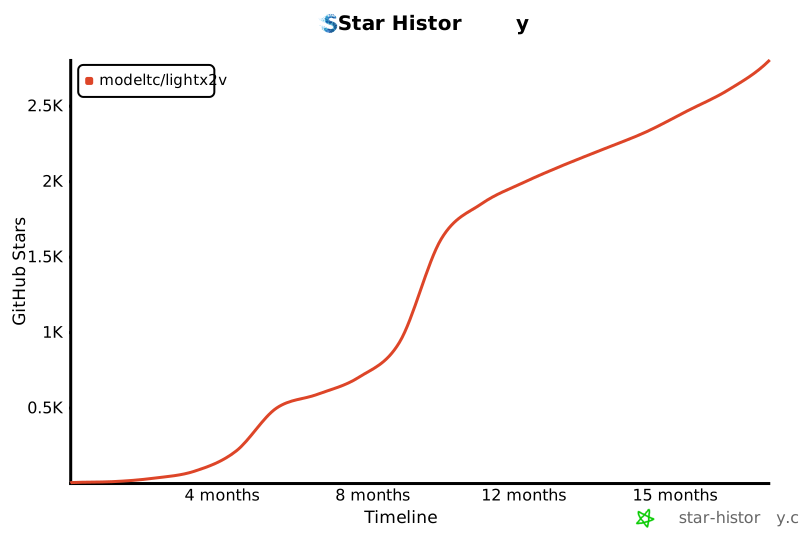
## 🌟 Star 历史
[](https://star-history.com/#ModelTC/lightx2v&Timeline)
## ✏️ 引用
如果您发现LightX2V对您的研究有用,请考虑引用我们的工作:
```bibtex
@misc{lightx2v,
author = {LightX2V Contributors},
title = {LightX2V: Light Video Generation Inference Framework},
year = {2025},
publisher = {GitHub},
journal = {GitHub repository},
howpublished = {\url{https://github.com/ModelTC/lightx2v}},
}
```
## 📞 联系与支持
如有任何问题、建议或需要支持,欢迎通过以下方式联系我们:
- 🐛 [GitHub Issues](https://github.com/ModelTC/lightx2v/issues) - 错误报告和功能请求
---