

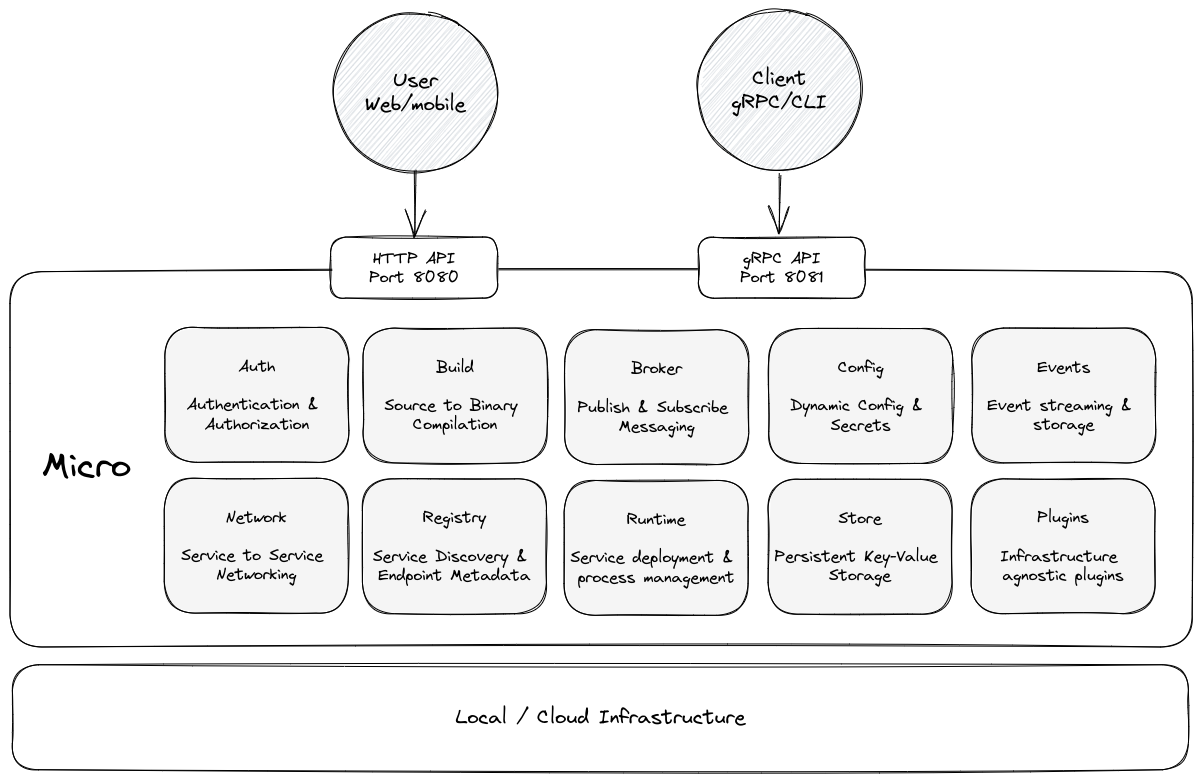
 Below are the core components that make up Micro
### Server
Micro is built as a microkernel architecture. It abstracts away the complexity of the underlying infrastructure by providing
a set of building block services composed as a single logical server for the end user to consume via an api, cli or sdks.
### API
The server embeds a HTTP API (on port 8080) which can be used to make requests as simple JSON.
The API automatically maps HTTP Paths and POST requests to internal RPC service names and endpoints.
### Proxy
Additionally there's a gRPC proxy (on port 8081) which used to make requests via the CLI or externally.
The proxy is identity aware which means it can be used to gatekeep remote access to Micro running anywhere.
### Go SDK
Micro comes with a built in Go framework for service based development.
The framework lets you write services without piecing together endless lines of boilerplate code.
Configured and initialised by default, import it and get started.
### CLI
The command line interface includes dynamic command mapping for all services running on the platform. It turns any service instantly into a CLI command along with flag parsing
for inputs. Includes support for environments, namespaces, creating and running services, status info and logs.
### Environments
Micro bakes in the concept of `Environments`. Run your server locally for development and in the cloud for production,
seamlessly switch between them using the CLI command `micro env set [environment]`.
## Install
### From Source
```
make build
```
### Prebuilt Binaries
#### Windows
```sh
powershell -Command "iwr -useb https://raw.githubusercontent.com/micro/micro/master/scripts/install.ps1 | iex"
```
#### Linux
```sh
wget -q https://raw.githubusercontent.com/micro/micro/master/scripts/install.sh -O - | /bin/bash
```
#### MacOS
```sh
curl -fsSL https://raw.githubusercontent.com/micro/micro/master/scripts/install.sh | /bin/bash
```
### Run the server
The server starts with a single command ready to use
```sh
micro server
```
Now go to [localhost:8080](http://localhost:8080) and make sure the output is something like `{"version": "v3.10.1"}`.
## Usage
Set the environment e.g local
```
micro env set local
```
### Login to Micro
Default username/password: `admin/micro`
```sh
$ micro login
Enter username: admin
Enter password:
Successfully logged in.
```
See what's running:
```sh
$ micro services
auth
broker
config
events
network
registry
runtime
store
```
### Create a Service
Generate a service using the template
```
micro new helloworld
```
Output
```
Creating service helloworld
.
├── main.go
├── handler
│ └── helloworld.go
├── proto
│ └── helloworld.proto
├── Makefile
├── README.md
├── .gitignore
└── go.mod
download protoc zip packages (protoc-$VERSION-$PLATFORM.zip) and install:
visit https://github.com/protocolbuffers/protobuf/releases
compile the proto file helloworld.proto:
cd helloworld
make init
go mod vendor
make proto
```
### Edit the code
Edit the protobuf definition in `proto/helloworld.proto` and run `make proto` to recompile
Go to `handler/helloworld.go` to make changes to the response handler
```go
type Helloworld struct{}
func New() *Helloworld {
return &Helloworld{}
}
func (h *Helloworld) Call(ctx context.Context, req *pb.Request, rsp *pb.Response) error {
rsp.Msg = "Hello " + req.Name
return nil
}
```
### Run the service
Run from local dir
```
micro run .
```
Or from a git url
```sh
micro run github.com/micro/services/helloworld
```
### Check service status
```sh
$ micro status
NAME VERSION SOURCE STATUS BUILD UPDATED METADATA
helloworld latest github.com/micro/services/helloworld running n/a 4s ago owner=admin, group=micro
```
### View service logs
```sh
$ micro logs helloworld
2020-10-06 17:52:21 file=service/service.go:195 level=info Starting [service] helloworld
2020-10-06 17:52:21 file=grpc/grpc.go:902 level=info Server [grpc] Listening on [::]:33975
2020-10-06 17:52:21 file=grpc/grpc.go:732 level=info Registry [service] Registering node: helloworld-67627b23-3336-4b92-a032-09d8d13ecf95
```
### Call via CLI
```sh
$ micro helloworld call --name=Jane
{
"msg": "Hello Jane"
}
```
### Call via API
```
curl "http://localhost:8080/helloworld/Call?name=John"
```
### Call via SDK
A proto SDK client is used within a service and must be run by micro
```go
package main
import (
"context"
"fmt"
"time"
"micro.dev/v4/service"
pb "github.com/micro/services/helloworld/proto"
)
func callService(hw pb.HelloworldService) {
for {
// call an endpoint on the service
rsp, err := hw.Call(context.Background(), &pb.CallRequest{
Name: "John",
})
if err != nil {
fmt.Println("Error calling helloworld: ", err)
return
}
// print the response
fmt.Println("Response: ", rsp.Message)
time.Sleep(time.Second)
}
}
func main() {
// create and initialise a new service
srv := service.New(
service.Name("caller"),
)
// new helloworld client
hw := pb.NewHelloworldService("helloworld", srv.Client())
// run the client caller
go callService(hw)
// run the service
service.Run()
}
```
Run it
```
micro run .
```
### Call via Go
Get your user token
```
export TOKEN=`micro user token`
```
Call helloworld
```go
package main
import (
"fmt"
"os"
"github.com/micro/micro-go"
)
type Request struct {
Name string `json:"name"`
}
type Response struct {
Msg string `json:"msg"`
}
func main() {
token := os.Getenv("TOKEN")
c := micro.NewClient(nil)
// set your api token
c.SetToken(token)
req := &Request{
Name: "John",
}
var rsp Response
if err := c.Call("helloworld", "Call", req, &rsp); err != nil {
fmt.Println(err)
return
}
fmt.Println(rsp)
}
```
Run it
```
go run main.go
```
### Call via JavaScript
```js
const micro = require('micro-js-client');
new micro.Client({ token: process.env.TOKEN })
.call('helloworld', 'Call', {"name": "Alice"})
.then((response) => {
console.log(response);
});
```
## Learn More
See the [getting started](https://micro.dev/getting-started) guide to learn more.
## Cloud Environment
[1 click deploy](https://marketplace.digitalocean.com/apps/micro?refcode=1eb1b2aca272&action=deploy) Micro on DigitalOcean
Below are the core components that make up Micro
### Server
Micro is built as a microkernel architecture. It abstracts away the complexity of the underlying infrastructure by providing
a set of building block services composed as a single logical server for the end user to consume via an api, cli or sdks.
### API
The server embeds a HTTP API (on port 8080) which can be used to make requests as simple JSON.
The API automatically maps HTTP Paths and POST requests to internal RPC service names and endpoints.
### Proxy
Additionally there's a gRPC proxy (on port 8081) which used to make requests via the CLI or externally.
The proxy is identity aware which means it can be used to gatekeep remote access to Micro running anywhere.
### Go SDK
Micro comes with a built in Go framework for service based development.
The framework lets you write services without piecing together endless lines of boilerplate code.
Configured and initialised by default, import it and get started.
### CLI
The command line interface includes dynamic command mapping for all services running on the platform. It turns any service instantly into a CLI command along with flag parsing
for inputs. Includes support for environments, namespaces, creating and running services, status info and logs.
### Environments
Micro bakes in the concept of `Environments`. Run your server locally for development and in the cloud for production,
seamlessly switch between them using the CLI command `micro env set [environment]`.
## Install
### From Source
```
make build
```
### Prebuilt Binaries
#### Windows
```sh
powershell -Command "iwr -useb https://raw.githubusercontent.com/micro/micro/master/scripts/install.ps1 | iex"
```
#### Linux
```sh
wget -q https://raw.githubusercontent.com/micro/micro/master/scripts/install.sh -O - | /bin/bash
```
#### MacOS
```sh
curl -fsSL https://raw.githubusercontent.com/micro/micro/master/scripts/install.sh | /bin/bash
```
### Run the server
The server starts with a single command ready to use
```sh
micro server
```
Now go to [localhost:8080](http://localhost:8080) and make sure the output is something like `{"version": "v3.10.1"}`.
## Usage
Set the environment e.g local
```
micro env set local
```
### Login to Micro
Default username/password: `admin/micro`
```sh
$ micro login
Enter username: admin
Enter password:
Successfully logged in.
```
See what's running:
```sh
$ micro services
auth
broker
config
events
network
registry
runtime
store
```
### Create a Service
Generate a service using the template
```
micro new helloworld
```
Output
```
Creating service helloworld
.
├── main.go
├── handler
│ └── helloworld.go
├── proto
│ └── helloworld.proto
├── Makefile
├── README.md
├── .gitignore
└── go.mod
download protoc zip packages (protoc-$VERSION-$PLATFORM.zip) and install:
visit https://github.com/protocolbuffers/protobuf/releases
compile the proto file helloworld.proto:
cd helloworld
make init
go mod vendor
make proto
```
### Edit the code
Edit the protobuf definition in `proto/helloworld.proto` and run `make proto` to recompile
Go to `handler/helloworld.go` to make changes to the response handler
```go
type Helloworld struct{}
func New() *Helloworld {
return &Helloworld{}
}
func (h *Helloworld) Call(ctx context.Context, req *pb.Request, rsp *pb.Response) error {
rsp.Msg = "Hello " + req.Name
return nil
}
```
### Run the service
Run from local dir
```
micro run .
```
Or from a git url
```sh
micro run github.com/micro/services/helloworld
```
### Check service status
```sh
$ micro status
NAME VERSION SOURCE STATUS BUILD UPDATED METADATA
helloworld latest github.com/micro/services/helloworld running n/a 4s ago owner=admin, group=micro
```
### View service logs
```sh
$ micro logs helloworld
2020-10-06 17:52:21 file=service/service.go:195 level=info Starting [service] helloworld
2020-10-06 17:52:21 file=grpc/grpc.go:902 level=info Server [grpc] Listening on [::]:33975
2020-10-06 17:52:21 file=grpc/grpc.go:732 level=info Registry [service] Registering node: helloworld-67627b23-3336-4b92-a032-09d8d13ecf95
```
### Call via CLI
```sh
$ micro helloworld call --name=Jane
{
"msg": "Hello Jane"
}
```
### Call via API
```
curl "http://localhost:8080/helloworld/Call?name=John"
```
### Call via SDK
A proto SDK client is used within a service and must be run by micro
```go
package main
import (
"context"
"fmt"
"time"
"micro.dev/v4/service"
pb "github.com/micro/services/helloworld/proto"
)
func callService(hw pb.HelloworldService) {
for {
// call an endpoint on the service
rsp, err := hw.Call(context.Background(), &pb.CallRequest{
Name: "John",
})
if err != nil {
fmt.Println("Error calling helloworld: ", err)
return
}
// print the response
fmt.Println("Response: ", rsp.Message)
time.Sleep(time.Second)
}
}
func main() {
// create and initialise a new service
srv := service.New(
service.Name("caller"),
)
// new helloworld client
hw := pb.NewHelloworldService("helloworld", srv.Client())
// run the client caller
go callService(hw)
// run the service
service.Run()
}
```
Run it
```
micro run .
```
### Call via Go
Get your user token
```
export TOKEN=`micro user token`
```
Call helloworld
```go
package main
import (
"fmt"
"os"
"github.com/micro/micro-go"
)
type Request struct {
Name string `json:"name"`
}
type Response struct {
Msg string `json:"msg"`
}
func main() {
token := os.Getenv("TOKEN")
c := micro.NewClient(nil)
// set your api token
c.SetToken(token)
req := &Request{
Name: "John",
}
var rsp Response
if err := c.Call("helloworld", "Call", req, &rsp); err != nil {
fmt.Println(err)
return
}
fmt.Println(rsp)
}
```
Run it
```
go run main.go
```
### Call via JavaScript
```js
const micro = require('micro-js-client');
new micro.Client({ token: process.env.TOKEN })
.call('helloworld', 'Call', {"name": "Alice"})
.then((response) => {
console.log(response);
});
```
## Learn More
See the [getting started](https://micro.dev/getting-started) guide to learn more.
## Cloud Environment
[1 click deploy](https://marketplace.digitalocean.com/apps/micro?refcode=1eb1b2aca272&action=deploy) Micro on DigitalOcean