# ChatGPT-Desktop
**Repository Path**: ayangweb/ChatGPT-Desktop
## Basic Information
- **Project Name**: ChatGPT-Desktop
- **Description**: ChatGPT 跨平台客户端,快捷键快速唤醒窗口,问答快人一步!
- **Primary Language**: JavaScript
- **License**: MIT
- **Default Branch**: master
- **Homepage**: https://github.com/ChatGPT-Desktop/ChatGPT-Desktop
- **GVP Project**: No
## Statistics
- **Stars**: 371
- **Forks**: 90
- **Created**: 2023-03-18
- **Last Updated**: 2026-01-15
## Categories & Tags
**Categories**: ai
**Tags**: tauri, chatGPT, chatgpt-desktop, AI
## README
 ## Features
- Support for multiple platforms, minimal resource usage, ideal for 24/7 use
- Easily configurable proxy settings, bypass network restrictions with ease
- Wake up at any time with a customizable shortcut key, boost your productivity
- Support for multiple conversations, integrated with `GPT-3.5-turbo` memory mode, never forget what you've said
- Robust prompt management, build your own role preset library
- Share your moments with just one click
- Automatic updates, local conversation history storage, your privacy is our priority
- And much more to explore...
## Download
Supported Platforms:
- **MacOS**: [Apple Silicon](https://github.com/ChatGPT-Desktop/ChatGPT-Desktop/releases/download/v1.0.4/ChatGPT-Desktop_1.0.4_aarch64.dmg) | [Intel](https://github.com/ChatGPT-Desktop/ChatGPT-Desktop/releases/download/v1.0.4/ChatGPT-Desktop_1.0.4_x64.dmg)
- **Windows**: [Windows](https://github.com/ChatGPT-Desktop/ChatGPT-Desktop/releases/download/v1.0.4/ChatGPT-Desktop_1.0.4_x64_zh-CN.msi)
- **Linux**: [Linux](https://github.com/ChatGPT-Desktop/ChatGPT-Desktop/releases/download/v1.0.4/chat-gpt-desktop_1.0.4_amd64.deb)
## Features
- Support for multiple platforms, minimal resource usage, ideal for 24/7 use
- Easily configurable proxy settings, bypass network restrictions with ease
- Wake up at any time with a customizable shortcut key, boost your productivity
- Support for multiple conversations, integrated with `GPT-3.5-turbo` memory mode, never forget what you've said
- Robust prompt management, build your own role preset library
- Share your moments with just one click
- Automatic updates, local conversation history storage, your privacy is our priority
- And much more to explore...
## Download
Supported Platforms:
- **MacOS**: [Apple Silicon](https://github.com/ChatGPT-Desktop/ChatGPT-Desktop/releases/download/v1.0.4/ChatGPT-Desktop_1.0.4_aarch64.dmg) | [Intel](https://github.com/ChatGPT-Desktop/ChatGPT-Desktop/releases/download/v1.0.4/ChatGPT-Desktop_1.0.4_x64.dmg)
- **Windows**: [Windows](https://github.com/ChatGPT-Desktop/ChatGPT-Desktop/releases/download/v1.0.4/ChatGPT-Desktop_1.0.4_x64_zh-CN.msi)
- **Linux**: [Linux](https://github.com/ChatGPT-Desktop/ChatGPT-Desktop/releases/download/v1.0.4/chat-gpt-desktop_1.0.4_amd64.deb)
 ## Screenshots
Detail


## Q & A
1. There are network restrictions in my area, how can I use it properly?
You can try our provided [soulution](https://github.com/ChatGPT-Desktop/ChatGPT-Desktop-Porxy).
Detailed deployment tutorial on [Discord](https://discord.com/channels/1074429768063262791/1090723974650015857).
2. "App Is Damaged and Can't Be Opened" on MacOS
 Reference [solution](https://zhuanlan.zhihu.com/p/135948430).
## How to Contribute
#### Development environment requirements
Please install `Rust` & `NodeJS` according to the steps on the official websites
- [Rust](https://tauri.app/v1/guides/getting-started/prerequisites/)
- [Node.js](https://nodejs.org/en/)
#### Download project dependencies
```shell
npm install
```
#### Run the project on the development mode
```shell
npm run tauri dev
```
#### Build the project
Debug after build, please add flag `--debug`
```shell
npm run tauri build
```
#### To generate your own application icon, please replace `src-tauri/assets/icon.png`, only `.png` format is supported
```shell
npm run build:icon
```
`yarn` OR `pnpm` is also supported.
### Contributions of any kind are welcome,
- Issue
- Pull request
- Feature request
- Bug report
- Documentation
- Translation
- etc.
## Contact Us
- [Discord](https://discord.gg/jg4waryfA6)
## Star History
[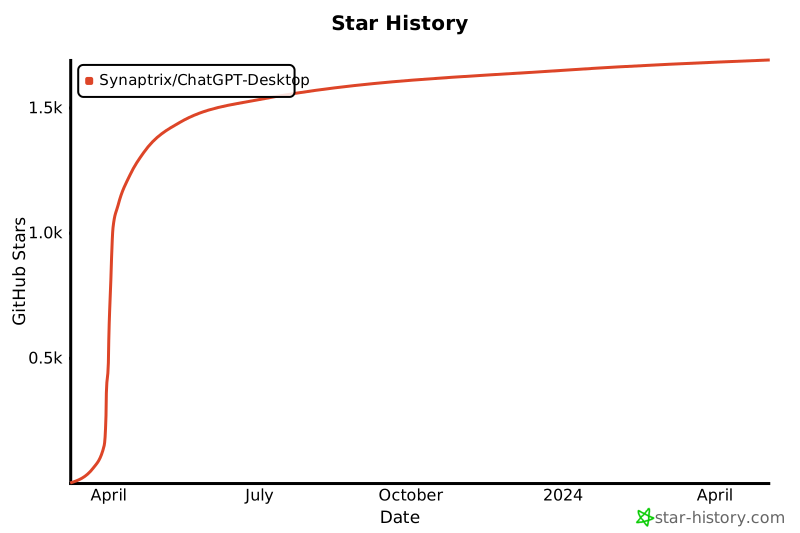](https://star-history.com/#Synaptrix/ChatGPT-Desktop&Date)
## Contributors
 ## License
[MIT License](./LICENSE)
## License
[MIT License](./LICENSE)