# ai-trend-publish
**Repository Path**: bin-bin-binbin/ai-trend-publish
## Basic Information
- **Project Name**: ai-trend-publish
- **Description**: TrendPublish: 全自动 AI 内容生成与发布系统 | 微信公众号自动化 | 多源数据抓取 (Twitter/X、网站) | DeepseekAI、千问、讯飞模型 | 智能内容分析排序 | 定时发布 | 多模板支持 | Node.js | TypeScript | AI 技术趋势跟踪工具
- **Primary Language**: Unknown
- **License**: MIT
- **Default Branch**: main
- **Homepage**: None
- **GVP Project**: No
## Statistics
- **Stars**: 0
- **Forks**: 2
- **Created**: 2025-11-23
- **Last Updated**: 2025-11-23
## Categories & Tags
**Categories**: Uncategorized
**Tags**: None
## README
# TrendPublish
基于 Deno
开发的趋势发现和内容发布系统,支持多源数据采集、智能总结和自动发布到微信公众号。
> 🌰 示例公众号:**AISPACE科技空间**

点击链接加入群聊【AI-Trend-Publish】:https://qm.qq.com/q/EsiP8ZlEFa
> 即刻关注,体验 AI 智能创作的内容~
## 🛠 开发环境
- **运行环境**: [Deno](https://deno.land/) v2.0.0 或更高版本
- **开发语言**: TypeScript
- **操作系统**: Windows/Linux/MacOS
## 🚀 快速开始
### 1. 安装 Deno
Windows (PowerShell):
```powershell
irm https://deno.land/install.ps1 | iex
```
MacOS/Linux:
```bash
curl -fsSL https://deno.land/install.sh | sh
```
### 2. 克隆项目
```bash
git clone https://github.com/OpenAISpace/ai-trend-publish
cd ai-trend-publish
```
### 3. 配置环境变量
```bash
cp .env.example .env
# 编辑 .env 文件配置必要的环境变量
# Key environment variables include API keys for various AI services.
# For Jina AI functionalities (scraping, search, embeddings, reranking),
# ensure JINA_API_KEY is set. See the .env.example file and the
# Jina Integration Guide for more details.
```
### 4. 开发和运行
```bash
# 开发模式(支持热重载)
deno task start
# 测试运行
deno task test
# 编译Windows版本
deno task build:win
# 编译Mac版本
deno task build:mac-x64 # Intel芯片
deno task build:mac-arm64 # M系列芯片
# 编译Linux版本
deno task build:linux-x64 # x64架构
deno task build:linux-arm64 # ARM架构
# 编译所有平台版本
deno task build:all
```
## 🌟 主要功能
- 🤖 多源数据采集
- Twitter/X 内容抓取
- 网站内容抓取 (基于 FireCrawl)
- 支持自定义数据源配置
- Advanced scraping and search via Jina AI
- 🧠 AI 智能处理
- 使用 DeepseekAI Together 千问 万象 讯飞 进行内容总结
- 关键信息提取
- 智能标题生成
- Text embeddings and reranking via Jina AI
- 📢 自动发布
- 微信公众号文章发布
- 自定义文章模板
- 定时发布任务
- 📱 通知系统
- Bark 通知集成
- 钉钉通知集成
- 飞书通知集成
- 任务执行状态通知
- 错误告警
## 📝 文章模板
TrendPublish 提供了多种精美的文章模板。查看
[模板展示页面](https://openaispace.github.io/ai-trend-publish/templates.html)
了解更多详情。
## DONE
- [x] 微信公众号文章发布
- [x] 大模型每周排行榜
- [x] 热门AI相关仓库推荐
- [x] 添加通义千问(Qwen)支持
- [x] 支持多模型配置(如 DEEPSEEK_MODEL="deepseek-chat|deepseek-reasoner")
- [x] 支持指定特定模型(如
AI_CONTENT_RANKER_LLM_PROVIDER="DEEPSEEK:deepseek-reasoner")
## Todo
- [ ] 热门AI相关论文推荐
- [ ] 热门AI相关工具推荐
- [ ] FireCrawl 自动注册免费续期
## 优化项
- [ ] 内容插入相关图片
- [x] 内容去重
- [ ] 降低AI率
- [ ] 文章图片优化
- [ ] ...
## 进阶
- [ ] 提供exe可视化界面
## 🛠 技术栈
- **运行环境**: Deno + TypeScript
- **AI 服务**: DeepseekAI Together 千问 万象 讯飞 Jina AI (see [Integration Guide](docs/jina_integration_guide.md))
- **数据源**:
- Twitter/X API
- FireCrawl
- Jina AI (for scraping and search, see [Integration Guide](docs/jina_integration_guide.md))
- **模板引擎**: EJS
- **开发工具**:
- Deno
- TypeScript
## 🚀 快速开始
### 环境要求
- Deno (v2+)
- TypeScript
### 安装
1. 克隆项目
```bash
git clone https://github.com/OpenAISpace/ai-trend-publish
```
2. 配置环境变量
```bash
cp .env.example .env
# 编辑 .env 文件配置必要的环境变量
# Key environment variables include API keys for various AI services.
# For Jina AI functionalities (scraping, search, embeddings, reranking),
# ensure JINA_API_KEY is set. See the .env.example file and the
# Jina Integration Guide (docs/jina_integration_guide.md) for more details.
```
## ⚙️ 环境变量配置
在 `.env` 文件中配置必要的环境变量:
(Refer to `.env.example` for a comprehensive list of environment variables. For details on Jina AI specific setup, see the [Jina Integration Guide](docs/jina_integration_guide.md)).
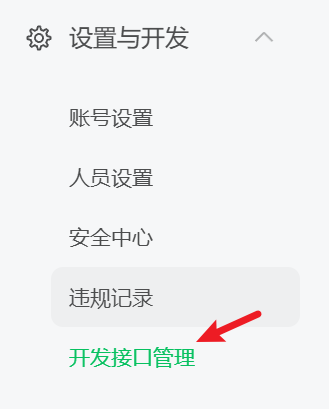
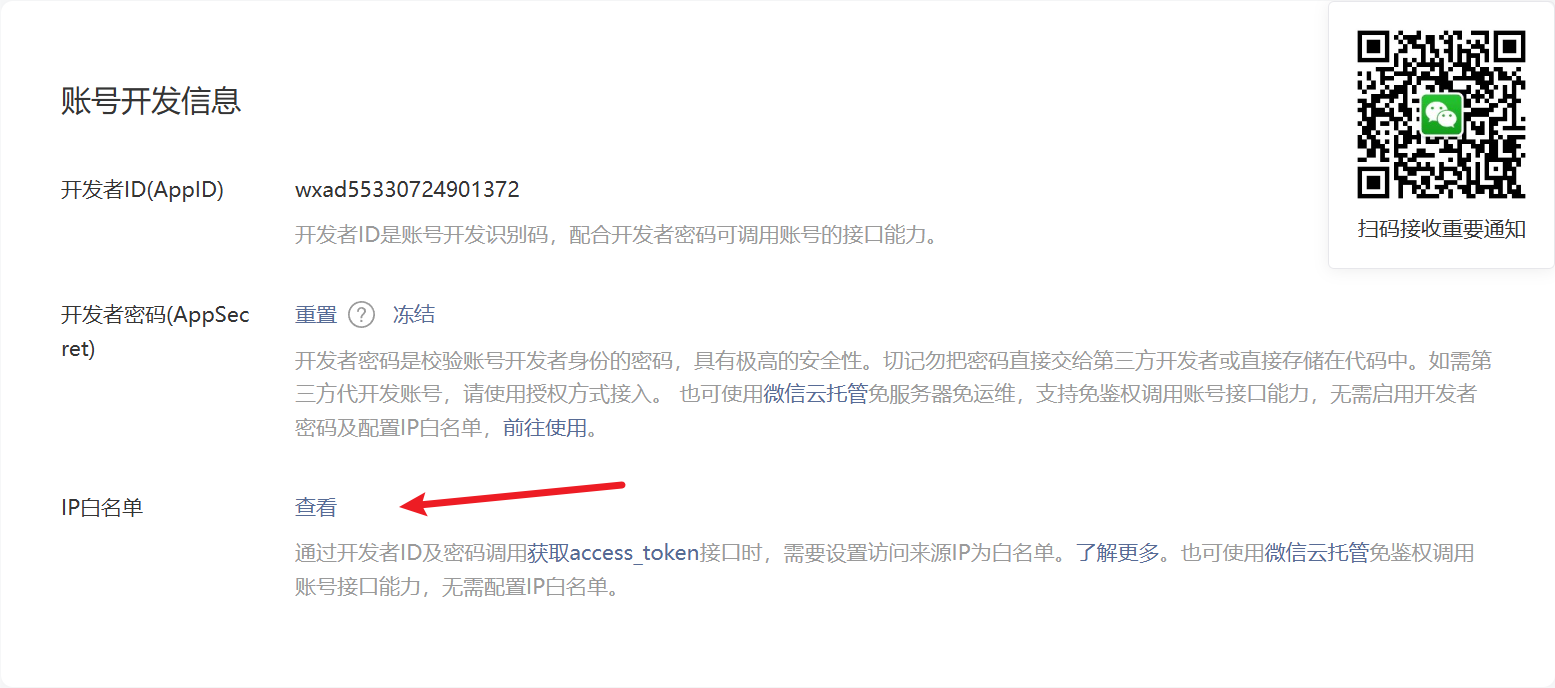
## ⚠️ 配置IP白名单
在使用微信公众号相关功能前,请先将本机IP添加到公众号后台的IP白名单中。
### 操作步骤
1. 查看本机IP: [IP查询工具](https://tool.lu/ip/)
2. 登录微信公众号后台,添加IP白名单
### 图文指南
4. 启动项目
```bash
# 测试模式
deno task test
# 运行
deno start start
详细运行时间见 src\controllers\cron.ts
```
## 📦 部署指南
### 方式一:直接部署
1. 在服务器上安装 Deno
Windows:
```powershell
irm https://deno.land/install.ps1 | iex
```
Linux/MacOS:
```bash
curl -fsSL https://deno.land/install.sh | sh
```
2. 克隆项目
```bash
git clone https://github.com/OpenAISpace/ai-trend-publish.git
cd ai-trend-publish
```
3. 配置环境变量
```bash
cp .env.example .env
# 编辑 .env 文件配置必要的环境变量
```
4. 启动服务
```bash
# 开发模式(支持热重载)
deno task start
# 测试模式运行
deno task test
# 使用PM2进行进程管理(推荐)
npm install -g pm2
pm2 start --interpreter="deno" --interpreter-args="run --allow-all" src/main.ts
```
5. 设置开机自启(可选)
```bash
# 使用PM2设置开机自启
pm2 startup
pm2 save
```
### 方式二:Docker 部署
1. 拉取代码
```bash
git clone https://github.com/OpenAISpace/ai-trend-publish.git
```
2. 构建 Docker 镜像:
```bash
# 构建镜像
docker build -t ai-trend-publish .
```
4. 运行容器:
```bash
# 方式1:通过环境变量文件运行
docker run -d --env-file .env --name ai-trend-publish-container ai-trend-publish
# 方式2:直接指定环境变量运行
docker run -d \
-e XXXX=XXXX \
...其他环境变量... \
--name ai-trend-publish-container \
ai-trend-publish
```
### CI/CD 自动部署
项目已配置 GitHub Actions 自动部署流程:
1. 推送代码到 main 分支会自动触发部署
2. 也可以在 GitHub Actions 页面手动触发部署
3. 确保在 GitHub Secrets 中配置以下环境变量:
- `SERVER_HOST`: 服务器地址
- `SERVER_USER`: 服务器用户名
- `SSH_PRIVATE_KEY`: SSH 私钥
- 其他必要的环境变量(参考 .env.example)
## 模板开发指南
本项目支持自定义模板开发,主要包含以下几个部分:
### 1. 了解数据结构
查看 `src/modules/render/interfaces`
目录下的类型定义文件,了解各个渲染模块需要的数据结构
### 2. 开发模板
在 `src/templates` 目录下按照对应模块开发 EJS 模板
### 3. 注册模板
在对应的渲染器类中注册新模板,如 `WeixinArticleTemplateRenderer`:
### 4. 测试渲染效果
```
npx ts-node -r tsconfig-paths/register src\modules\render\test\test.weixin.template.ts
```
## 🤝 贡献指南
1. Fork 本仓库
2. 创建特性分支 (`git checkout -b feature/amazing-feature`)
3. 提交更改 (`git commit -m 'Add some amazing feature'`)
4. 推送到分支 (`git push origin feature/amazing-feature`)
5. 提交 Pull Request
## ❤️ 特别感谢
感谢以下贡献者对项目的支持:
 ## Star History
[](https://star-history.com/#OpenAISpace/ai-trend-publish&Date)
## 📄 许可证
本项目采用 MIT 许可证 - 详见 [LICENSE](LICENSE) 文件
### JSON-RPC API
提供了基于 JSON-RPC 2.0 协议的 API,支持手动触发工作流。
- 端点: `/api/workflow`
- 支持方法: `triggerWorkflow`
- 详细文档: [JSON-RPC API 文档](https://openaispace.github.io/ai-trend-publish/json-rpc-api.html )

## Star History
[](https://star-history.com/#OpenAISpace/ai-trend-publish&Date)
## 📄 许可证
本项目采用 MIT 许可证 - 详见 [LICENSE](LICENSE) 文件
### JSON-RPC API
提供了基于 JSON-RPC 2.0 协议的 API,支持手动触发工作流。
- 端点: `/api/workflow`
- 支持方法: `triggerWorkflow`
- 详细文档: [JSON-RPC API 文档](https://openaispace.github.io/ai-trend-publish/json-rpc-api.html )