# vtkplotter
**Repository Path**: cadgit-dev/vtkplotter
## Basic Information
- **Project Name**: vtkplotter
- **Description**: No description available
- **Primary Language**: Unknown
- **License**: MIT
- **Default Branch**: master
- **Homepage**: None
- **GVP Project**: No
## Statistics
- **Stars**: 0
- **Forks**: 0
- **Created**: 2019-07-19
- **Last Updated**: 2020-12-19
## Categories & Tags
**Categories**: Uncategorized
**Tags**: None
## README

[](https://app.codacy.com/app/marcomusy/vtkplotter?utm_source=github.com&utm_medium=referral&utm_content=marcomusy/vtkplotter&utm_campaign=Badge_Grade_Dashboard)
[](https://pepy.tech/project/vtkplotter)
[](https://en.wikipedia.org/wiki/MIT_License)
[](https://pypi.org/project/vtkplotter)
[](https://gendocs.readthedocs.io/en/latest)
[](https://doi.org/10.5281/zenodo.2561402)
A pure python module for scientific visualization, analysis and animation of 3D objects
and *point clouds* based on [VTK](https://www.vtk.org/) and [numpy](http://www.numpy.org/).
## Download and Install:
Use [pip](https://projects.raspberrypi.org/en/projects/using-pip-on-windows) to install:
```bash
pip install vtkplotter
```
*Windows-10 users* can place this file
[vtkplotter.bat](https://github.com/marcomusy/vtkplotter/blob/master/vtkplotter.bat)
on the desktop to *drag&drop* files to visualize.
(Need to edit the path of the local Anaconda installation).
## Documentation
Automatically generated documentation can be found [**here**](https://vtkplotter.embl.es).
#### Need help?
Have any question, or wish to suggest or ask for a missing feature?
Do not hesitate to open a [**issue**](https://github.com/marcomusy/vtkplotter/issues)
or send an [email](mailto:marco.musy@embl.es).
## Features
Intuitive and straightforward API which can be combined with VTK seamlessly
in a program, whilst mantaining access to the full range of VTK native classes.
It includes a [**large set of working examples**](https://github.com/marcomusy/vtkplotter/tree/master/examples)
for all the following functionalities:
- Import meshes from VTK format, STL, Wavefront OBJ, 3DS, XML, Neutral, GMSH, OFF, PCD (PointCloud), volumetric TIFF stacks, DICOM, SLC, MHD, 2D images PNG, JPEG.
- Export meshes as ASCII or binary to VTK, STL, OBJ, PLY formats.
- Mesh analysis through the built-in methods of VTK package. Additional analysis tools like *Moving Least Squares*, mesh morphing.
- Tools to visualize and edit meshes (cutting a mesh with another mesh, slicing, normalizing, moving vertex positions, etc..). Interactive cutter widget.
- Split mesh based on surface connectivity. Extract the largest connected area.
- Calculate mass properties, like area, volume, center of mass, average size etc.
- Calculate vertex and face normals, curvatures, feature edges. Fill mesh holes.
- Subdivide faces of a mesh, increasing the number of vertex points. Mesh simplification.
- Coloring and thresholding of meshes based on associated scalar or vectorial data.
- Point-surface operations: find nearest points, determine if a point lies inside or outside a mesh.
- Create primitive objects like: spheres, arrows, cubes, torus, ellipsoids...
- Generate *glyphs* (associating a mesh to each vertex of a source mesh).
- Create animations easily by just defining the position of the displayed objects in the 3D scene. Add trailing lines and shadows to moving objects is also supported.
- Straightforward support for multiple *sync-ed* or independent renderers in the same window.
- Registration (alignment) of meshes with different techniques.
- Mesh smoothing with *Laplacian* and *WindowedSinc* algorithms.
- Delaunay triangulation in 2D and 3D.
- Generate meshes by joining nearby lines in space.
- Find the closest path from one point to another, travelling along the edges of a mesh.
- Find the intersection of a mesh with a line (or with another mesh).
- Analysis of *Point Clouds*:
- *Moving Least Squares* smoothing of 2D, 3D and 4D clouds
- Fit lines, planes and spheres and ellipses in space
- Identify outliers in a distribution of points
- Decimate a cloud to a uniform distribution.
- Histogramming and function plotting in 1D and 2D.
- Interpolate scalar and vectorial fields with *Radial Basis Functions* and *Thin Plate Splines*.
- Analysis of volumetric datasets:
- Isosurfacing of volumes
- Direct maximum projection rendering
- Generate volumetric signed-distance data from an input surface mesh
- Probe a volume with lines and planes
- Generate stream-lines and stream-tubes from vectorial fields
- Add sliders and buttons to interact with the scene and the individual objects.
- Fully customizable axis style.
- Draw `latex`-formatted formulas on the rending window.
- Examples using [SHTools](https://shtools.oca.eu/shtools) package for *spherical harmonics* expansion of a mesh shape.
- Integration with the *Qt5* framework.
- Support for [FEniCS/Dolfin](https://fenicsproject.org/) platform for visualization of finite-element calculations.
- Visualization of tensors.
- Export a 3D scene and embed it into a [web page](https://vtkplotter.embl.es/examples/fenics_elasticity.html).
- Embed the 3D rendering in a *jupyter* notebook with [K3D](https://github.com/K3D-tools/K3D-jupyter) (can export an interactive 3D-snapshot page [here](https://vtkplotter.embl.es/examples/K3D_snapshot.html)).
- Interoperability with the [trimesh](https://trimsh.org/) library.
## Command Line Interface
Visualize a mesh from a terminal window with:
```bash
vtkplotter mesh.obj
# valid formats: [vtk,vtu,vts,vtp,vtm,ply,obj,stl,3ds,dolfin-xml,neutral,gmsh,
# pcd,xyz,txt,byu,tif,off,slc,vti,mhd,dcm,dem,nrrd,nii,bmp,png,jpg]
```
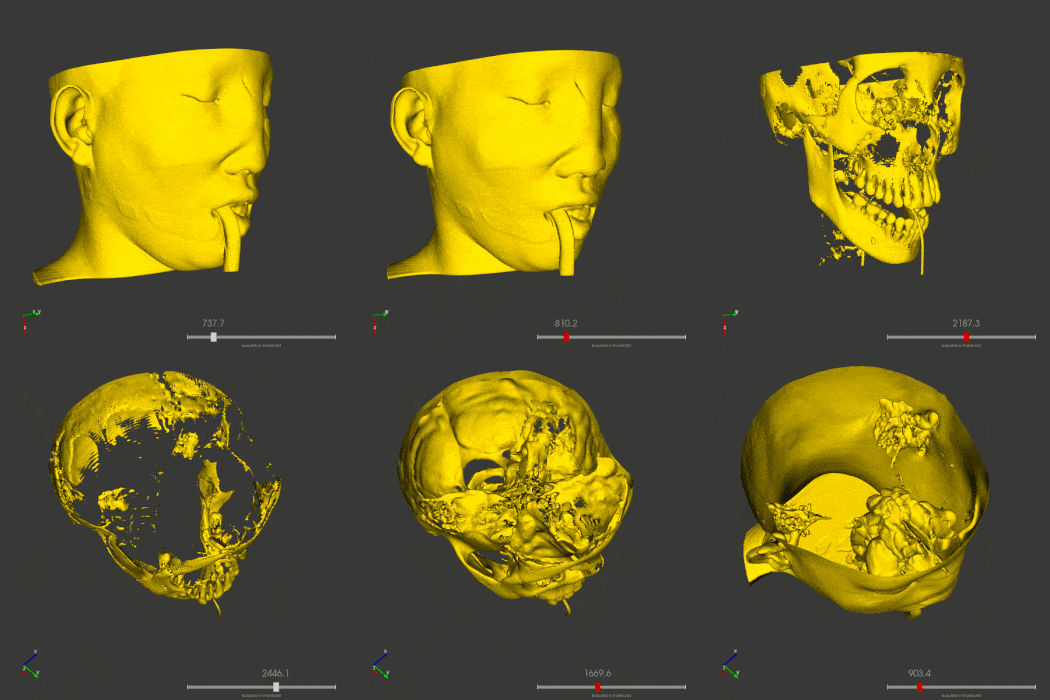
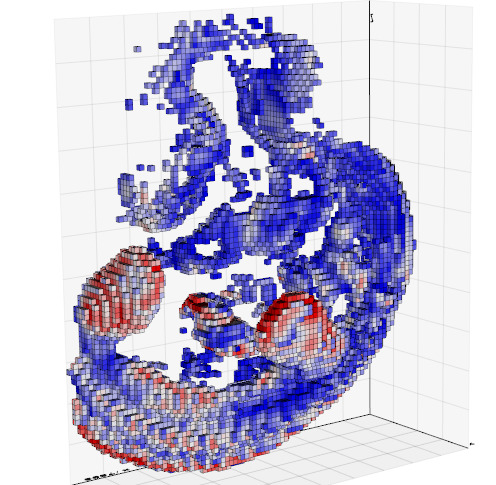
Voxel-data (_mhd, vti, slc, tiff, dicom etc.._) files can be visualized with options `-g`. E.g.:
`vtkplotter -g examples/data/embryo.slc`

To visualize multiple files or files time-sequences try `-n` or `-s` options. Use `-h` for the complete list of options.
| Use a slider to control isosurfacing of a volume:| Load and browse a sequence of meshes:| Slice a 3D volume with a plane:| Visualize colorized voxels:|
|:--------|:-----|:----|:----|
|`vtkplotter head.vti` |`vtkplotter -s *.vtk` |`vtkplotter `
`--slicer embr.slc` | `vtkplotter --lego embryo.slc`|
||  |  | |
## GUI
A Graphic User Interface is available (mainly useful to *Windows 10* users):

## Examples Gallery
A get-started tutorial script is available for download:
```bash
git clone https://github.com/marcomusy/vtkplotter.git
cd vtkplotter/examples
python tutorial.py
```
**More than 280 working examples can be found in directories** _(scroll down to see the screenshots):_
[**examples/basic**](https://github.com/marcomusy/vtkplotter/blob/master/examples/basic)
[**examples/advanced**](https://github.com/marcomusy/vtkplotter/blob/master/examples/advanced)
[**examples/volumetric**](https://github.com/marcomusy/vtkplotter/blob/master/examples/volumetric)
[**examples/simulations**](https://github.com/marcomusy/vtkplotter/blob/master/examples/simulations)
[**examples/plotting2d**](https://github.com/marcomusy/vtkplotter/blob/master/examples/plotting2d)
[**examples/other**](https://github.com/marcomusy/vtkplotter/blob/master/examples/other)
[**examples/other/dolfin**](https://github.com/marcomusy/vtkplotter/blob/master/examples/other/dolfin)
[**examples/other/trimesh**](https://github.com/marcomusy/vtkplotter/blob/master/examples/other/trimesh)
[**examples/notebooks**](https://github.com/marcomusy/vtkplotter/blob/master/examples/notebooks).
| | |
|:--------|:-----|
|Apply a *Moving Least Squares* algorithm to obtain a smooth surface from a to a large cloud of scattered points in space ([script](https://github.com/marcomusy/vtkplotter/blob/master/examples/advanced/moving_least_squares2D.py))
 | 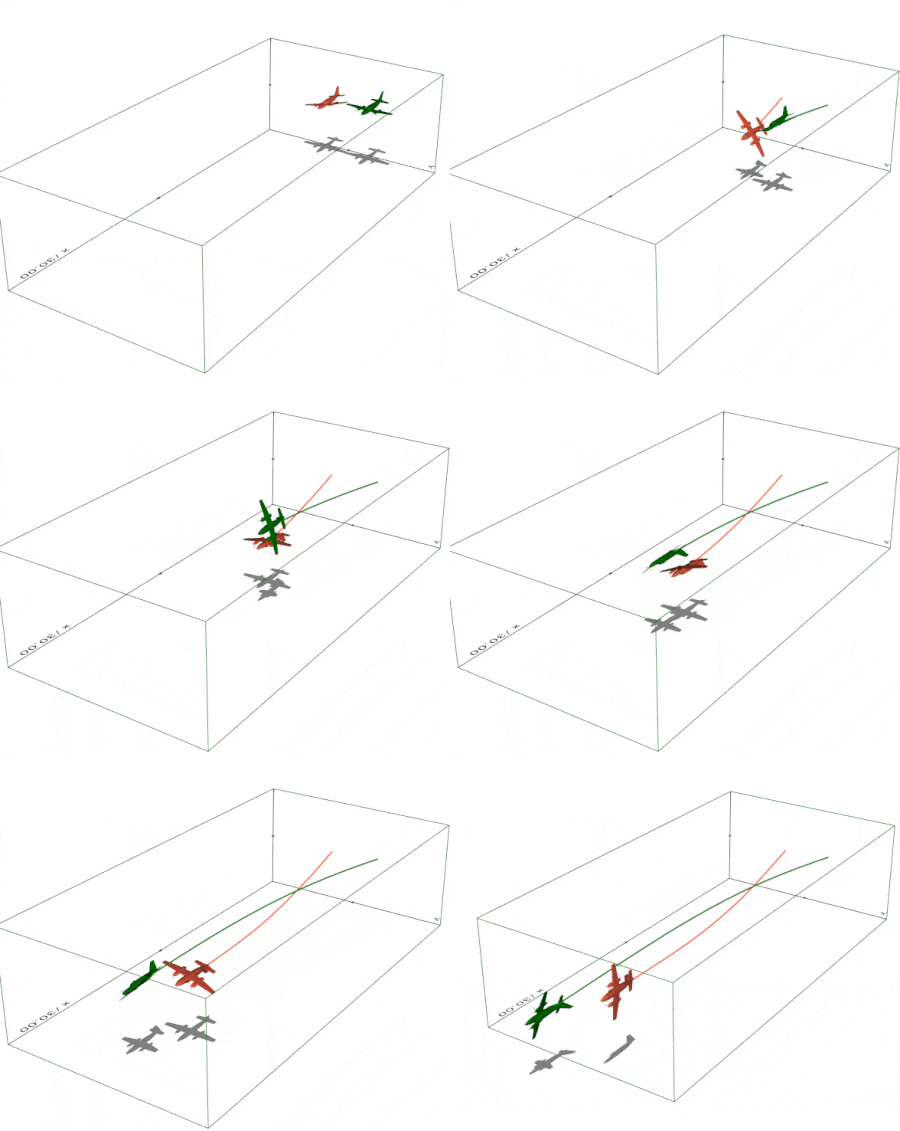
Create a simple 3D animation in exactly 10 lines of code ([script](https://github.com/marcomusy/vtkplotter/blob/master/examples/simulations/airplanes.py)).
Trails and shadows can be added to moving objects easily.|
| | |
| Simulation of a gyroscope hanging from a spring ([script](https://github.com/marcomusy/vtkplotter/blob/master/examples/simulations/gyroscope1.py)).
 | 
Quantum-tunnelling effect integrating the Schroedinger equation with 4th order Runge-Kutta method. The animation shows the evolution of a particle in a box hitting a sinusoidal potential barrier. ([script](https://github.com/marcomusy/vtkplotter/blob/master/examples/simulations/tunnelling2.py)) |
| | |
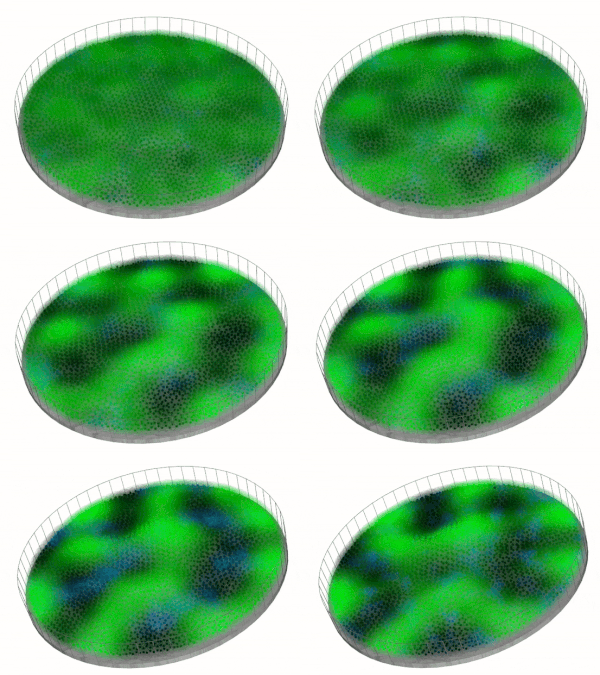
|Visualizing a Turing system of reaction-diffusion between two molecules1 ([script](https://github.com/marcomusy/vtkplotter/blob/master/examples/simulations/turing.py))
 | 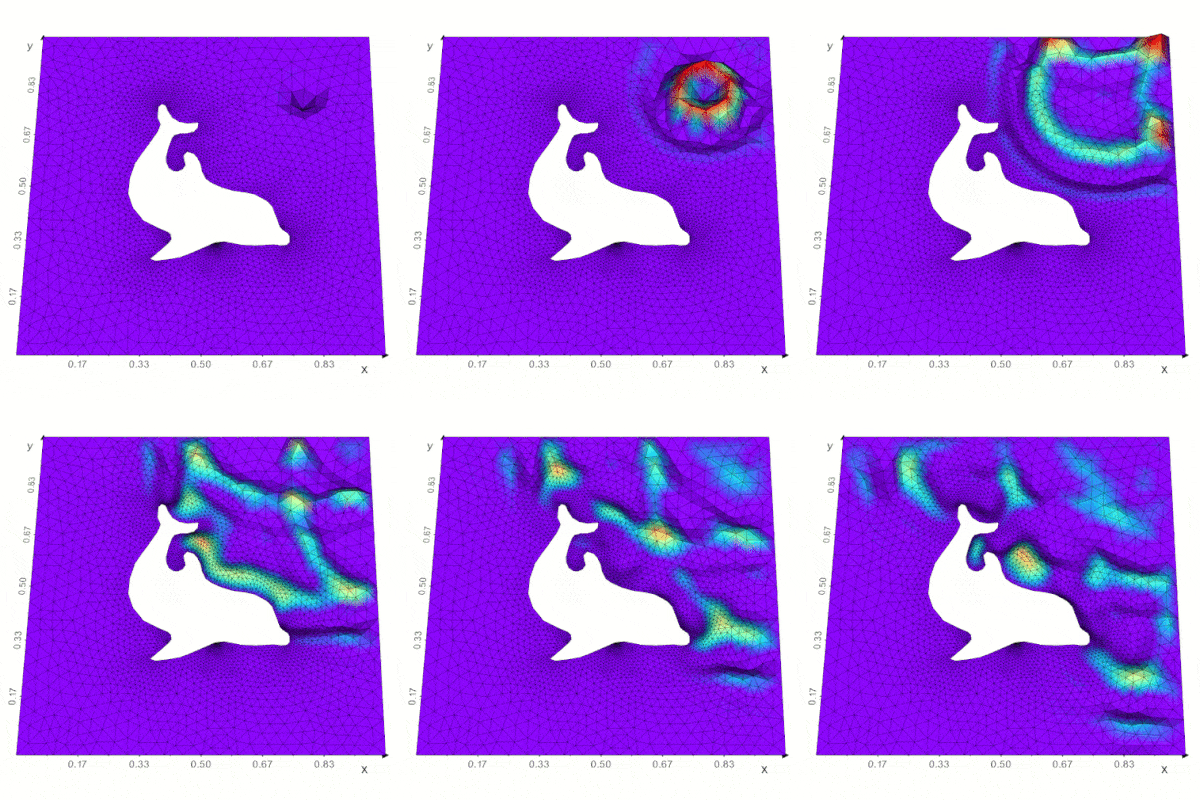
Support for the [FEniCS/Dolfin](https://fenicsproject.org/) platform for visualization of PDE and finite element solutions ([see here](https://github.com/marcomusy/vtkplotter/blob/master/examples/other/dolfin)) |
## References
- M. Musy, G. Dalmasso, J. Sharpe and N. Sime, "`vtkplotter`*: plotting in FEniCS with python*", ([link](https://github.com/marcomusy/vtkplotter/blob/master/docs/fenics_poster.pdf)).
Poster at the [FEniCS'2019](https://fenicsproject.org/fenics19/) Conference,
Carnegie Institution for Science Department of Terrestrial Magnetism, Washington DC, June 2019.
- G. Dalmasso, *"Evolution in space and time of 3D volumetric images"*. Talk at the Conference for [Image-based Modeling and Simulation of Morphogenesis](https://www.pks.mpg.de/imsm19/).
Max Planck Institute for the Physics of Complex Systems, Dresden, Germany, March 2019.
Scientific publications using `vtkplotter` so far:
1. X. Diego _et al._:
*"Key features of Turing systems are determined purely by network topology"*,
[Physical Review X, 20 June 2018](https://journals.aps.org/prx/abstract/10.1103/PhysRevX.8.021071).
2. M. Musy, K. Flaherty _et al._:
*"A Quantitative Method for Staging Mouse Limb Embryos based on Limb Morphometry"*,
Development, 5 April 2018, [doi: 10.1242/dev.154856](http://dev.biologists.org/content/145/7/dev154856).
3. G. Dalmasso *et al.*, *"Evolution in space and time of 3D volumetric images"*, in preparation.
**Have you found this software useful for your research? Please cite it as:**
M. Musy _et al._
"`vtkplotter`*, a python module for scientific visualization and analysis of 3D objects
and point clouds based on VTK (Visualization Toolkit)*",
Zenodo, 10 February 2019, [doi: 10.5281/zenodo.2561402](http://doi.org/10.5281/zenodo.2561402).
[](https://www.embl.es)