# ReMe
**Repository Path**: chenfei6095/ReMe
## Basic Information
- **Project Name**: ReMe
- **Description**: ReMe: Memory Management Kit for Agents
ReMe provides AI agents with a unified memory system—enabling the ability to extract, reuse, and share memories across users, tasks, and agents.
- **Primary Language**: Unknown
- **License**: Apache-2.0
- **Default Branch**: main
- **Homepage**: https://reme.agentscope.io
- **GVP Project**: No
## Statistics
- **Stars**: 1
- **Forks**: 0
- **Created**: 2026-01-05
- **Last Updated**: 2026-01-29
## Categories & Tags
**Categories**: Uncategorized
**Tags**: agentscope, ReMe, memory
## README









面向智能体的记忆管理工具包, Remember Me, Refine Me.
如果 ReMe 对你有帮助,欢迎点一个 ⭐ Star,你的支持是我们持续改进的动力。
---
ReMe 是一个**模块化的记忆管理工具包**,为 AI 智能体提供统一的记忆能力——支持在用户、任务与智能体之间提取、复用与共享记忆。
智能体的记忆可以被视为:
```text
Agent Memory = Long-Term Memory + Short-Term Memory
= (Personal + Task + Tool) Memory + (Working Memory)
```
- **个人记忆(Personal Memory)**:理解用户偏好并适应上下文
- **任务记忆(Task Memory)**:从经验中学习并在类似任务中表现更好
- **工具记忆(Tool Memory)**:基于历史表现优化工具选择和参数使用
- **工作记忆(Working Memory)**:管理长运行智能体的短期上下文,避免上下文溢出
---
## 📰 最新进展
- **[2025-12]** 📄 我们的程序性(任务)记忆论文已在 [arXiv](https://arxiv.org/abs/2512.10696) 发布
- **[2025-11]** 🧠 基于工作记忆的 react-agent demo([介绍](docs/work_memory/message_offload.md)、[Quick Start](docs/cookbook/working/quick_start.md)、[代码](cookbook/working_memory/work_memory_demo.py))
- **[2025-10]** 🚀 直接 Python 导入:支持 `from reme_ai import ReMeApp`,无需 HTTP/MCP 服务
- **[2025-10]** 🔧 工具记忆:支持基于数据驱动的工具选择与参数优化([指南](docs/tool_memory/tool_memory.md))
- **[2025-09]** 🎉 支持异步操作,并已集成至 agentscope-runtime
- **[2025-09]** 🎉 集成任务记忆与个人记忆
- **[2025-09]** 🧪 在 appworld、bfcl(v3)、frozenlake 等环境中验证有效性([实验文档](docs/cookbook))
- **[2025-08]** 🚀 支持 MCP 协议([快速开始](docs/mcp_quick_start.md))
- **[2025-06]** 🚀 支持多种向量存储后端(Elasticsearch & ChromaDB)([向量库指南](docs/vector_store_api_guide.md))
- **[2024-09]** 🧠 支持个性化与时间敏感的记忆存储
---
## ✨ 架构设计

ReMe 提供了一个**模块化的记忆管理工具包**,具有可插拔的组件,可以集成到任何智能体框架中。系统包括:
#### 🧠 **任务记忆 / 经验记忆(Task Memory/Experience)**
可在不同智能体之间复用的程序性知识:
- **成功模式识别**:识别有效策略并理解其背后的原理
- **失败分析学习**:从错误中学习,避免重复踩坑
- **对比式模式**:通过多条采样轨迹的对比获取更有价值的记忆
- **验证模式**:通过验证模块确认提炼出的经验是否有效
了解如何使用任务记忆可参考:[任务记忆文档](docs/task_memory/task_memory.md)
#### 👤 **个人记忆(Personal Memory)**
面向特定用户的情境化长期记忆:
- **个体偏好**:记录用户的习惯、偏好与交互风格
- **情境自适应**:基于时间与上下文动态管理记忆
- **渐进式学习**:在长期多轮交互中不断加深对用户的理解
- **时间敏感**:在记忆检索与整合中考虑时间因素
了解如何使用个人记忆可参考:[个人记忆文档](docs/personal_memory/personal_memory.md)
#### 🔧 **工具记忆(Tool Memory)**
基于真实调用数据的工具选择与使用优化:
- **历史表现追踪**:记录成功率、调用耗时与 Token 成本
- **LLM-as-Judge 评估**:提供工具成功 / 失败原因的定性洞察
- **参数优化**:从历史成功调用中学习最优参数配置
- **动态指南**:将静态工具描述演化为可持续更新的「活文档」
了解如何使用工具记忆可参考:[工具记忆文档](docs/tool_memory/tool_memory.md)
#### 🧠 **工作记忆(Working Memory)**
面向长流程智能体的短期上下文记忆,通过**消息卸载与重载(message offload & reload)**实现:
- **消息卸载(Message Offload)**:将体积巨大的工具输出压缩为外部文件或 LLM 摘要
- **消息重载(Message Reload)**:按需搜索(`grep_working_memory`)并读取(`read_working_memory`)已卸载的内容
📖 **概念与 API:**
- 消息卸载概览:[Message Offload](docs/work_memory/message_offload.md)
- 卸载 / 重载算子:[Message Offload Ops](docs/work_memory/message_offload_ops.md)、[Message Reload Ops](docs/work_memory/message_reload_ops.md)
💻 **端到端 Demo:**
- 工作记忆快速上手:[Working Memory Quick Start](docs/cookbook/working/quick_start.md)
- 带工作记忆的 ReAct 智能体:[react_agent_with_working_memory.py](cookbook/working_memory/react_agent_with_working_memory.py)
- 可运行 Demo:[work_memory_demo.py](cookbook/working_memory/work_memory_demo.py)
---
## 🛠️ 安装
### 通过 PyPI 安装(推荐)
```bash
pip install reme-ai
```
### 从源码安装
```bash
git clone https://github.com/agentscope-ai/ReMe.git
cd ReMe
pip install .
```
### 环境变量配置
复制 `example.env` 为 `.env` 并按需修改:
```bash
FLOW_LLM_API_KEY=sk-xxxx
FLOW_LLM_BASE_URL=https://xxxx/v1
FLOW_EMBEDDING_API_KEY=sk-xxxx
FLOW_EMBEDDING_BASE_URL=https://xxxx/v1
```
---
## 🚀 快速开始
### 启动 HTTP 服务
```bash
reme \
backend=http \
http.port=8002 \
llm.default.model_name=qwen3-30b-a3b-thinking-2507 \
embedding_model.default.model_name=text-embedding-v4 \
vector_store.default.backend=local
```
### 启动 MCP Server
```bash
reme \
backend=mcp \
mcp.transport=stdio \
llm.default.model_name=qwen3-30b-a3b-thinking-2507 \
embedding_model.default.model_name=text-embedding-v4 \
vector_store.default.backend=local
```
### 核心 API 用法
#### 任务记忆管理
```python
import requests
# 经验总结:从执行轨迹中学习
response = requests.post("http://localhost:8002/summary_task_memory", json={
"workspace_id": "task_workspace",
"trajectories": [
{"messages": [{"role": "user", "content": "Help me create a project plan"}], "score": 1.0}
]
})
# 记忆检索:获取相关经验
response = requests.post("http://localhost:8002/retrieve_task_memory", json={
"workspace_id": "task_workspace",
"query": "How to efficiently manage project progress?",
"top_k": 1
})
```
Python 导入版本
```python
import asyncio
from reme_ai import ReMeApp
async def main():
async with ReMeApp(
"llm.default.model_name=qwen3-30b-a3b-thinking-2507",
"embedding_model.default.model_name=text-embedding-v4",
"vector_store.default.backend=memory"
) as app:
# 经验总结:从执行轨迹中学习
result = await app.async_execute(
name="summary_task_memory",
workspace_id="task_workspace",
trajectories=[
{
"messages": [
{"role": "user", "content": "Help me create a project plan"}
],
"score": 1.0
}
]
)
print(result)
# 记忆检索:获取相关经验
result = await app.async_execute(
name="retrieve_task_memory",
workspace_id="task_workspace",
query="How to efficiently manage project progress?",
top_k=1
)
print(result)
if __name__ == "__main__":
asyncio.run(main())
```
curl 版本
```bash
# 经验总结:从执行轨迹中学习
curl -X POST http://localhost:8002/summary_task_memory \
-H "Content-Type: application/json" \
-d '{
"workspace_id": "task_workspace",
"trajectories": [
{"messages": [{"role": "user", "content": "Help me create a project plan"}], "score": 1.0}
]
}'
# 记忆检索:获取相关经验
curl -X POST http://localhost:8002/retrieve_task_memory \
-H "Content-Type: application/json" \
-d '{
"workspace_id": "task_workspace",
"query": "How to efficiently manage project progress?",
"top_k": 1
}'
```
#### 个人记忆管理
```python
# 记忆整合:从用户交互中学习
response = requests.post("http://localhost:8002/summary_personal_memory", json={
"workspace_id": "task_workspace",
"trajectories": [
{"messages":
[
{"role": "user", "content": "I like to drink coffee while working in the morning"},
{"role": "assistant",
"content": "I understand, you prefer to start your workday with coffee to stay energized"}
]
}
]
})
# 记忆检索:获取个人记忆片段
response = requests.post("http://localhost:8002/retrieve_personal_memory", json={
"workspace_id": "task_workspace",
"query": "What are the user's work habits?",
"top_k": 5
})
```
Python 导入版本
```python
import asyncio
from reme_ai import ReMeApp
async def main():
async with ReMeApp(
"llm.default.model_name=qwen3-30b-a3b-thinking-2507",
"embedding_model.default.model_name=text-embedding-v4",
"vector_store.default.backend=memory"
) as app:
# 记忆整合:从用户交互中学习
result = await app.async_execute(
name="summary_personal_memory",
workspace_id="task_workspace",
trajectories=[
{
"messages": [
{"role": "user", "content": "I like to drink coffee while working in the morning"},
{"role": "assistant",
"content": "I understand, you prefer to start your workday with coffee to stay energized"}
]
}
]
)
print(result)
# 记忆检索:获取个人记忆片段
result = await app.async_execute(
name="retrieve_personal_memory",
workspace_id="task_workspace",
query="What are the user's work habits?",
top_k=5
)
print(result)
if __name__ == "__main__":
asyncio.run(main())
```
curl 版本
```bash
# 记忆整合:从用户交互中学习
curl -X POST http://localhost:8002/summary_personal_memory \
-H "Content-Type: application/json" \
-d '{
"workspace_id": "task_workspace",
"trajectories": [
{"messages": [
{"role": "user", "content": "I like to drink coffee while working in the morning"},
{"role": "assistant", "content": "I understand, you prefer to start your workday with coffee to stay energized"}
]}
]
}'
# 记忆检索:获取个人记忆片段
curl -X POST http://localhost:8002/retrieve_personal_memory \
-H "Content-Type: application/json" \
-d '{
"workspace_id": "task_workspace",
"query": "What are the user'\''s work habits?",
"top_k": 5
}'
```
#### 工具记忆管理
```python
import requests
# 记录工具调用结果
response = requests.post("http://localhost:8002/add_tool_call_result", json={
"workspace_id": "tool_workspace",
"tool_call_results": [
{
"create_time": "2025-10-21 10:30:00",
"tool_name": "web_search",
"input": {"query": "Python asyncio tutorial", "max_results": 10},
"output": "Found 10 relevant results...",
"token_cost": 150,
"success": True,
"time_cost": 2.3
}
]
})
# 从历史生成使用指南
response = requests.post("http://localhost:8002/summary_tool_memory", json={
"workspace_id": "tool_workspace",
"tool_names": "web_search"
})
# 在使用前检索工具指南
response = requests.post("http://localhost:8002/retrieve_tool_memory", json={
"workspace_id": "tool_workspace",
"tool_names": "web_search"
})
```
Python 导入版本
```python
import asyncio
from reme_ai import ReMeApp
async def main():
async with ReMeApp(
"llm.default.model_name=qwen3-30b-a3b-thinking-2507",
"embedding_model.default.model_name=text-embedding-v4",
"vector_store.default.backend=memory"
) as app:
# 记录工具调用结果
result = await app.async_execute(
name="add_tool_call_result",
workspace_id="tool_workspace",
tool_call_results=[
{
"create_time": "2025-10-21 10:30:00",
"tool_name": "web_search",
"input": {"query": "Python asyncio tutorial", "max_results": 10},
"output": "Found 10 relevant results...",
"token_cost": 150,
"success": True,
"time_cost": 2.3
}
]
)
print(result)
# 从历史生成使用指南
result = await app.async_execute(
name="summary_tool_memory",
workspace_id="tool_workspace",
tool_names="web_search"
)
print(result)
# 在使用前检索工具指南
result = await app.async_execute(
name="retrieve_tool_memory",
workspace_id="tool_workspace",
tool_names="web_search"
)
print(result)
if __name__ == "__main__":
asyncio.run(main())
```
curl 版本
```bash
# 记录工具调用结果
curl -X POST http://localhost:8002/add_tool_call_result \
-H "Content-Type: application/json" \
-d '{
"workspace_id": "tool_workspace",
"tool_call_results": [
{
"create_time": "2025-10-21 10:30:00",
"tool_name": "web_search",
"input": {"query": "Python asyncio tutorial", "max_results": 10},
"output": "Found 10 relevant results...",
"token_cost": 150,
"success": true,
"time_cost": 2.3
}
]
}'
# 从历史生成使用指南
curl -X POST http://localhost:8002/summary_tool_memory \
-H "Content-Type: application/json" \
-d '{
"workspace_id": "tool_workspace",
"tool_names": "web_search"
}'
# 在使用前检索工具指南
curl -X POST http://localhost:8002/retrieve_tool_memory \
-H "Content-Type: application/json" \
-d '{
"workspace_id": "tool_workspace",
"tool_names": "web_search"
}'
```
#### 工作记忆管理
```python
import requests
# 对长对话 / 长流程的工作记忆进行压缩与总结
response = requests.post("http://localhost:8002/summary_working_memory", json={
"messages": [
{
"role": "system",
"content": "You are a helpful assistant. First use `Grep` to find the line numbers that match the keywords or regular expressions, and then use `ReadFile` to read the code around those locations. If no matches are found, never give up; try different parameters, such as searching with only part of the keywords. After `Grep`, use the `ReadFile` command to view content starting from a specified `offset` and `limit`, and do not exceed 100 lines. If the current content is insufficient, you can continue trying different `offset` and `limit` values with the `ReadFile` command."
},
{
"role": "user",
"content": "搜索下reme项目的的README内容"
},
{
"role": "assistant",
"content": "",
"tool_calls": [
{
"index": 0,
"id": "call_6596dafa2a6a46f7a217da",
"function": {
"arguments": "{\"query\": \"readme\"}",
"name": "web_search"
},
"type": "function"
}
]
},
{
"role": "tool",
"content": "ultra large context , over 50000 tokens......"
},
{
"role": "user",
"content": "根据readme回答task memory在appworld的效果是多少,需要具体的数值"
}
],
"working_summary_mode": "auto",
"compact_ratio_threshold": 0.75,
"max_total_tokens": 20000,
"max_tool_message_tokens": 2000,
"group_token_threshold": 4000,
"keep_recent_count": 2,
"store_dir": "test_working_memory",
"chat_id": "demo_chat_id"
})
```
Python 导入版本
```python
import asyncio
from reme_ai import ReMeApp
async def main():
async with ReMeApp(
"llm.default.model_name=qwen3-30b-a3b-thinking-2507",
"embedding_model.default.model_name=text-embedding-v4",
"vector_store.default.backend=memory"
) as app:
# 对长对话 / 长流程的工作记忆进行压缩与总结
result = await app.async_execute(
name="summary_working_memory",
messages=[
{
"role": "system",
"content": "You are a helpful assistant. First use `Grep` to find the line numbers that match the keywords or regular expressions, and then use `ReadFile` to read the code around those locations. If no matches are found, never give up; try different parameters, such as searching with only part of the keywords. After `Grep`, use the `ReadFile` command to view content starting from a specified `offset` and `limit`, and do not exceed 100 lines. If the current content is insufficient, you can continue trying different `offset` and `limit` values with the `ReadFile` command."
},
{
"role": "user",
"content": "搜索下reme项目的的README内容"
},
{
"role": "assistant",
"content": "",
"tool_calls": [
{
"index": 0,
"id": "call_6596dafa2a6a46f7a217da",
"function": {
"arguments": "{\"query\": \"readme\"}",
"name": "web_search"
},
"type": "function"
}
]
},
{
"role": "tool",
"content": "ultra large context , over 50000 tokens......"
},
{
"role": "user",
"content": "根据readme回答task memory在appworld的效果是多少,需要具体的数值"
}
],
working_summary_mode="auto",
compact_ratio_threshold=0.75,
max_total_tokens=20000,
max_tool_message_tokens=2000,
group_token_threshold=4000,
keep_recent_count=2,
store_dir="test_working_memory",
chat_id="demo_chat_id",
)
print(result)
if __name__ == "__main__":
asyncio.run(main())
```
curl 版本
```bash
curl -X POST http://localhost:8002/summary_working_memory \
-H "Content-Type: application/json" \
-d '{
"messages": [
{
"role": "system",
"content": "You are a helpful assistant. First use `Grep` to find the line numbers that match the keywords or regular expressions, and then use `ReadFile` to read the code around those locations. If no matches are found, never give up; try different parameters, such as searching with only part of the keywords. After `Grep`, use the `ReadFile` command to view content starting from a specified `offset` and `limit`, and do not exceed 100 lines. If the current content is insufficient, you can continue trying different `offset` and `limit` values with the `ReadFile` command."
},
{
"role": "user",
"content": "搜索下reme项目的的README内容"
},
{
"role": "assistant",
"content": "",
"tool_calls": [
{
"index": 0,
"id": "call_6596dafa2a6a46f7a217da",
"function": {
"arguments": "{\"query\": \"readme\"}",
"name": "web_search"
},
"type": "function"
}
]
},
{
"role": "tool",
"content": "ultra large context , over 50000 tokens......"
},
{
"role": "user",
"content": "根据readme回答task memory在appworld的效果是多少,需要具体的数值"
}
],
"working_summary_mode": "auto",
"compact_ratio_threshold": 0.75,
"max_total_tokens": 20000,
"max_tool_message_tokens": 2000,
"group_token_threshold": 4000,
"keep_recent_count": 2,
"store_dir": "test_working_memory",
"chat_id": "demo_chat_id"
}'
```
---
## 📦 开箱即用的记忆库
ReMe 提供一个**记忆库**,包含预先提取的、生产就绪的记忆,智能体可以立即加载和使用:
### 可用记忆包
| 记忆包 | 领域 | 规模 | 描述 |
|----------------------|------------|----------------|--------------------------------------------------------|
| **`appworld.jsonl`** | 任务执行 | ~100 条记忆 | 复杂任务规划模式、多步骤工作流和错误恢复策略 |
| **`bfcl_v3.jsonl`** | 工具使用 | ~150 条记忆 | 函数调用模式、参数优化和工具选择策略 |
### 加载预构建记忆
```python
# 加载内置记忆
response = requests.post("http://localhost:8002/vector_store", json={
"workspace_id": "appworld",
"action": "load",
"path": "./docs/library/"
})
# 查询相关记忆
response = requests.post("http://localhost:8002/retrieve_task_memory", json={
"workspace_id": "appworld",
"query": "How to navigate to settings and update user profile?",
"top_k": 1
})
```
Python 导入版本
```python
import asyncio
from reme_ai import ReMeApp
async def main():
async with ReMeApp(
"llm.default.model_name=qwen3-30b-a3b-thinking-2507",
"embedding_model.default.model_name=text-embedding-v4",
"vector_store.default.backend=memory"
) as app:
# 加载内置记忆
result = await app.async_execute(
name="vector_store",
workspace_id="appworld",
action="load",
path="./docs/library/"
)
print(result)
# 查询相关记忆
result = await app.async_execute(
name="retrieve_task_memory",
workspace_id="appworld",
query="How to navigate to settings and update user profile?",
top_k=1
)
print(result)
if __name__ == "__main__":
asyncio.run(main())
```
---
## 🧪 实验结果
### 🌍 [Appworld 实验](docs/cookbook/appworld/quickstart.md)
我们在 Appworld 环境上使用 Qwen3-8B(非思考模式)进行评测:
| 方法 | Avg@4 | Pass@4 |
|-----------|-------------------|-------------------|
| 无 ReMe | 0.1497 | 0.3285 |
| 使用 ReMe | 0.1706 **(+2.09%)** | 0.3631 **(+3.46%)** |
Pass@K 衡量在生成 K 个候选中,至少一个成功完成任务(score=1)的概率。
当前实验使用的是内部 AppWorld 环境,可能与对外版本存在轻微差异。
关于如何复现实验的更多细节,见 [quickstart.md](docs/cookbook/appworld/quickstart.md)。
### 🔧 [BFCL-V3 实验](docs/cookbook/bfcl/quickstart.md)
我们在 BFCL-V3 multi-turn-base 任务(随机划分 50 train / 150 val)上,使用 Qwen3-8B(思考模式)进行评测:
| 方法 | Avg@4 | Pass@4 |
|------------|-----------------|---------------------|
| 无 ReMe | 0.4033 | 0.5955 |
| 使用 ReMe | 0.4450 **(+4.17%)** | 0.6577 **(+6.22%)** |
### 🧊 [Frozenlake 实验](docs/cookbook/frozenlake/quickstart.md)
| 无 ReMe | 使用 ReMe |
|:------------------------------------------------------------------------------------------------:|:----------------------------------------------------------------------------------------------------:|
| 
| 
|
我们在 100 张随机 frozenlake 地图上,使用 qwen3-8b 进行测试:
| 方法 | 通过率 |
|------------|-----------------|
| 无 ReMe | 0.66 |
| 使用 ReMe | 0.72 **(+6.0%)** |
更多复现实验细节见 [quickstart.md](docs/cookbook/frozenlake/quickstart.md)。
### 🛠️ [工具记忆基准](docs/tool_memory/tool_bench.md)
我们在一个受控基准上,使用三个模拟搜索工具与 Qwen3-30B-Instruct 评估工具记忆的效果:
| 场景 | 平均分 | 提升 |
|-----------------------|--------|------------|
| 训练集(无记忆) | 0.650 | - |
| 测试集(无记忆) | 0.672 | 基线 |
| **测试集(使用记忆)** | **0.772** | **+14.88%** |
**关键结论:**
- 工具记忆可以基于历史表现进行数据驱动的工具选择
- 通过学习参数配置,成功率约提升 15%
更多细节见 [tool_bench.md](docs/tool_memory/tool_bench.md) 与实现代码 [run_reme_tool_bench.py](cookbook/tool_memory/run_reme_tool_bench.py)。
---
## 📚 资源
### 快速入门
- **[Quick Start](./cookbook/simple_demo)**:实用示例,可立即使用
- [工具记忆 Demo](cookbook/simple_demo/use_tool_memory_demo.py):工具记忆的完整生命周期演示
- [工具记忆基准](cookbook/tool_memory/run_reme_tool_bench.py):评估工具记忆效果
### 集成指南
- **[直接 Python 导入](docs/cookbook/working/quick_start.md)**:将 ReMe 直接嵌入到你的智能体代码中
- **[HTTP 服务 API](docs/vector_store_api_guide.md)**:用于多智能体系统的 RESTful API
- **[MCP 协议](docs/mcp_quick_start.md)**:与 Claude Desktop 和 MCP 兼容客户端集成
### 记忆系统配置
- **[个人记忆](docs/personal_memory)**:用户偏好学习和上下文自适应
- **[任务记忆](docs/task_memory)**:程序性知识提取和复用
- **[工具记忆](docs/tool_memory)**:数据驱动的工具选择和优化
- **[工作记忆](docs/work_memory/message_offload.md)**:长流程智能体的短期上下文管理
### 高级主题
- **[算子管道](reme_ai/config/default.yaml)**:通过修改算子链来自定义记忆处理工作流
- **[向量存储后端](docs/vector_store_api_guide.md)**:配置本地、Elasticsearch、Qdrant 或 ChromaDB 存储
- **[案例集](./cookbook)**:真实场景的用例和最佳实践
---
## ⭐ 社区与支持
- **Star & Watch**:Star 可以让更多智能体开发者发现 ReMe;Watch 能帮助你第一时间获知新版本与特性。
- **分享你的成果**:在 Issue 或 Discussion 中分享 ReMe 为你的智能体解锁了什么——我们非常乐意展示社区的优秀案例。
- **需要新功能?** 提交 Feature Request,我们将一起完善它。
---
## 🤝 参与贡献
我们相信,最好的记忆系统来自社区的集体智慧。欢迎贡献 👉[贡献指南](docs/contribution.md):
### 代码贡献
- **新算子**:开发自定义记忆处理算子(检索、总结等)
- **后端实现**:添加对新向量存储或 LLM 提供商的支持
- **记忆服务**:扩展新的记忆类型或能力
- **API 增强**:改进现有端点或添加新端点
### 文档改进
- **集成示例**:展示如何将 ReMe 与不同智能体框架集成
- **算子教程**:记录自定义算子开发
- **最佳实践指南**:分享有效的记忆管理模式
- **用例研究**:展示 ReMe 在实际应用中的使用
---
## 📄 引用
```bibtex
@software{AgentscopeReMe2025,
title = {AgentscopeReMe: Memory Management Kit for Agents},
author = {Li Yu and
Jiaji Deng and
Zouying Cao and
Weikang Zhou and
Tiancheng Qin and
Qingxu Fu and
Sen Huang and
Xianzhe Xu and
Zhaoyang Liu and
Boyin Liu},
url = {https://reme.agentscope.io},
year = {2025}
}
@misc{AgentscopeReMe2025Paper,
title={Remember Me, Refine Me: A Dynamic Procedural Memory Framework for Experience-Driven Agent Evolution},
author={Zouying Cao and
Jiaji Deng and
Li Yu and
Weikang Zhou and
Zhaoyang Liu and
Bolin Ding and
Hai Zhao},
year={2025},
eprint={2512.10696},
archivePrefix={arXiv},
primaryClass={cs.AI},
url={https://arxiv.org/abs/2512.10696},
}
```
---
## ⚖️ 许可证
本项目基于 Apache License 2.0 开源,详情参见 [LICENSE](./LICENSE) 文件。
---
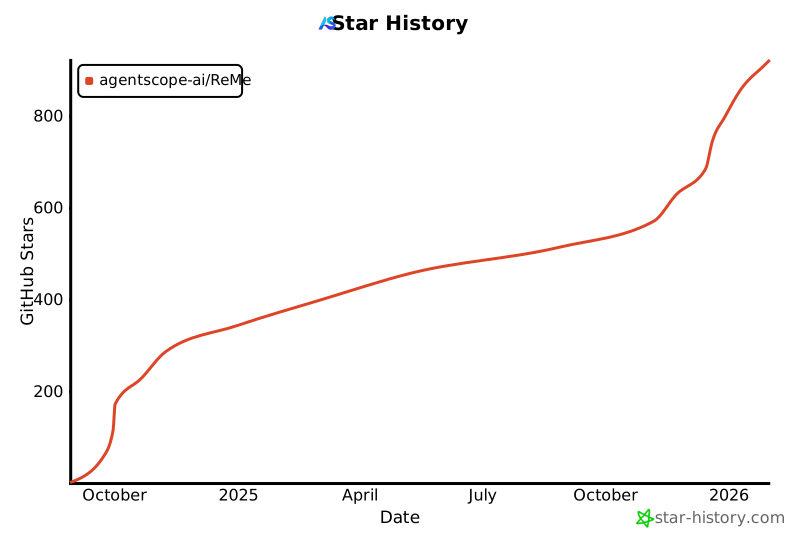
## Star 历史
[](https://www.star-history.com/#agentscope-ai/ReMe&Date)