# PartCrafter
**Repository Path**: cool_c0de/PartCrafter
## Basic Information
- **Project Name**: PartCrafter
- **Description**: from https://github.com/wgsxm/PartCrafter 20251024
- **Primary Language**: Unknown
- **License**: MIT
- **Default Branch**: main
- **Homepage**: None
- **GVP Project**: No
## Statistics
- **Stars**: 0
- **Forks**: 0
- **Created**: 2025-10-24
- **Last Updated**: 2025-10-24
## Categories & Tags
**Categories**: Uncategorized
**Tags**: None
## README
# [NeurIPS 2025] PartCrafter: Structured 3D Mesh Generation via Compositional Latent Diffusion Transformers
[Yuchen Lin*](https://wgsxm.github.io), [Chenguo Lin*](https://chenguolin.github.io), [Panwang Pan†](https://paulpanwang.github.io), [Honglei Yan](https://openreview.net/profile?id=~Honglei_Yan1), [Yiqiang Feng](https://openreview.net/profile?id=~Feng_Yiqiang1), [Yadong Mu](http://www.muyadong.com), [Katerina Fragkiadaki](https://www.cs.cmu.edu/~katef/)
[](https://arxiv.org/abs/2506.05573)
[](https://wgsxm.github.io/projects/partcrafter)
[ ](https://www.youtube.com/watch?v=ZaZHbkkPtXY)
[](https://huggingface.co/wgsxm/PartCrafter)
[](https://huggingface.co/wgsxm/PartCrafter-Scene)
[](https://huggingface.co/spaces/alexnasa/PartCrafter)
](https://www.youtube.com/watch?v=ZaZHbkkPtXY)
[](https://huggingface.co/wgsxm/PartCrafter)
[](https://huggingface.co/wgsxm/PartCrafter-Scene)
[](https://huggingface.co/spaces/alexnasa/PartCrafter)

This repository contains the official implementation of the paper: [PartCrafter: Structured 3D Mesh Generation via Compositional Latent Diffusion Transformers](https://wgsxm.github.io/projects/partcrafter/).
PartCrafter is a structured 3D generative model that jointly generates multiple parts and objects from a single RGB image in one shot.
Here is our [Project Page](https://wgsxm.github.io/projects/partcrafter).
Feel free to contact me (linyuchen@stu.pku.edu.cn) or open an issue if you have any questions or suggestions.
## 📢 News
- **2025-09-18**: PartCrafter is accepted to NeurIPS 2025.
- **2025-08-15**: PartCrafter HuggingFace🤗 demo is available [here](https://huggingface.co/spaces/alexnasa/PartCrafter). Thanks to [alexnasa](https://huggingface.co/alexnasa).
- **2025-07-23**: The 3D scene version of PartCrafter is released, which is trained on [3D-Front](https://huggingface.co/datasets/huanngzh/3D-Front).
- **2025-07-20**: A guide for installing PartCrafter on Windows is available in [this fork](https://github.com/JackDainzh/PartCrafter-Windows/tree/windows-main). Thanks to [JackDainzh](https://github.com/JackDainzh)!
- **2025-07-13**: PartCrafter is fully open-sourced 🚀.
- **2025-06-09**: PartCrafter is on arXiv.
## 📋 TODO
- [x] Release inference scripts.
- [x] Release training code and data preprocessing scripts.
- [x] Release pretrained checkpoints on both object and scene level.
- [x] Provide a HuggingFace🤗 demo.
- [ ] Release preprocessed dataset.
## 🔧 Installation
We use `torch-2.5.1+cu124` and `python-3.11`. But it should also work with other versions. Create a conda environment with the following command (optional):
```
conda create -n partcrafter python=3.11.13
conda activate partcrafter
pip install torch==2.5.1 torchvision==0.20.1 torchaudio==2.5.1 --index-url https://download.pytorch.org/whl/cu124
```
Then, install other dependencies with the following command:
```
git clone https://github.com/wgsxm/PartCrafter.git
cd PartCrafter
bash settings/setup.sh
```
If you do not have root access and use conda environment, you can install required graphics libraries with the following command:
```
conda install -c conda-forge libegl libglu pyopengl
```
We test the above installation on Debian 12 with NVIDIA H20 GPUs. For Windows users, you can try to set up the environment according to [this pull request](https://github.com/wgsxm/PartCrafter/pull/24) and [this fork](https://github.com/JackDainzh/PartCrafter-Windows/tree/windows-main). We sincerely thank [JackDainzh](https://github.com/JackDainzh) for contributing to the Windows support!
## 💡 Quick Start
### 3D Part-Level Object Generation

Generate a 3D part-level object from an image:
```
python scripts/inference_partcrafter.py \
--image_path assets/images/np3_2f6ab901c5a84ed6bbdf85a67b22a2ee.png \
--num_parts 3 --tag robot --render
```
The required model weights will be automatically downloaded:
- PartCrafter model from [wgsxm/PartCrafter](https://huggingface.co/wgsxm/PartCrafter) → pretrained_weights/PartCrafter
- RMBG model from [briaai/RMBG-1.4](http://huggingface.co/briaai/RMBG-1.4) → pretrained_weights/RMBG-1.4
The generated results will be saved to `./results/robot`. We provide several example images from Objaverse and ABO in `./assets/images`. Their filenames start with recommended number of parts, e.g., `np3` which means 3 parts. You can also try other part count for the same input images.
Specify `--rmbg` if you use custom images. **This will remove the background of the input image and resize it appropriately.**
### 3D Scene Generation

Generate a 3D scene from an image:
```
python scripts/inference_partcrafter_scene.py \
--image_path assets/images_scene/np6_0192a842-531c-419a-923e-28db4add8656_DiningRoom-31158.png \
--num_parts 6 --tag dining_room --render
```
The required model weights will be automatically downloaded:
- PartCrafter-Scene model from [wgsxm/PartCrafter-Scene](https://huggingface.co/wgsxm/PartCrafter-Scene) → pretrained_weights/PartCrafter-Scene
The generated results will be saved to `./results/dining_room`. We provide several example images from 3D-Front in `./assets/images_scene`. Their filenames start with recommended number of parts, e.g., `np3` which means 3 parts. You can also try other part count for the same input images.
## 💻 System Requirements
A CUDA-enabled GPU with at least 8GB VRAM. You can reduce number of parts or number of tokens to save GPU memory. We set the number of tokens per part to `1024` on object level and `2048` on scene level by default for better quality.
## 📊 Dataset
Please refer to [Dataset README](./datasets/README.md) to download and preprocess the dataset. To generate a minimal dataset, you can run:
```
python datasets/preprocess/preprocess.py --input assets/objects --output preprocessed_data
```
This script preprocesses GLB files in `./assets/objects` and saves the preprocessed data to `./preprocessed_data`. We provide a pseudo data configuration [here](./datasets/object_part_configs.json), which makes use of the minimal preprocessed data and is compatible with the training settings.
## 🦾 Training
To train PartCrafter from scratch, you first need to download TripoSG from [VAST-AI/TripoSG](https://huggingface.co/VAST-AI/TripoSG) and store the weights in `./pretrained_models/TripoSG`.
```
huggingface-cli download VAST-AI/TripoSG --local-dir pretrained_weights/TripoSG
```
Our training scripts are suitable for training with 8 H20 GPUs (96G VRAM each). Currently, we only finetune the DiT of TripoSG and keep the VAE fixed. But you can also finetune the VAE of TripoSG, which should improve the quality of the generated 3D parts. PartCrafter is compatible with all 3D object generative models based on vector sets such as [Hunyuan3D-2.1](https://github.com/Tencent-Hunyuan/Hunyuan3D-2.1). We warmly welcome pull requests from the community.
We provide several training configurations [here](./configs). You should modify the path of dataset configs in the training config files, which is currently set to `./datasets/object_part_configs.json`.
If you use `wandb`, you should also modify the `WANDB_API_KEY` in the training script. If you have trouble connecting to `wandb`, try `export WANDB_BASE_URL=https://api.bandw.top`.
Train PartCrafter from TripoSG:
```
bash scripts/train_partcrafter.sh --config configs/mp8_nt512.yaml --use_ema \
--gradient_accumulation_steps 4 \
--output_dir output_partcrafter \
--tag scaleup_mp8_nt512
```
Finetune PartCrafter with larger number of parts:
```
bash scripts/train_partcrafter.sh --config configs/mp16_nt512.yaml --use_ema \
--gradient_accumulation_steps 4 \
--output_dir output_partcrafter \
--load_pretrained_model scaleup_mp8_nt512 \
--load_pretrained_model_ckpt 10 \
--tag scaleup_mp16_nt512
```
Finetune PartCrafter with more tokens:
```
bash scripts/train_partcrafter.sh --config configs/mp16_nt1024.yaml --use_ema \
--gradient_accumulation_steps 4 \
--output_dir output_partcrafter \
--load_pretrained_model scaleup_mp16_nt512 \
--load_pretrained_model_ckpt 10 \
--tag scaleup_mp16_nt1024
```
## 😊 Acknowledgement
We would like to thank the authors of [DiffSplat](https://chenguolin.github.io/projects/DiffSplat/), [TripoSG](https://yg256li.github.io/TripoSG-Page/), [HoloPart](https://vast-ai-research.github.io/HoloPart/), and [MIDI-3D](https://huanngzh.github.io/MIDI-Page/)
for their great work and generously providing source codes, which inspired our work and helped us a lot in the implementation.
## 📚 Citation
If you find our work helpful, please consider citing:
```bibtex
@misc{lin2025partcrafter,
title={PartCrafter: Structured 3D Mesh Generation via Compositional Latent Diffusion Transformers},
author={Yuchen Lin and Chenguo Lin and Panwang Pan and Honglei Yan and Yiqiang Feng and Yadong Mu and Katerina Fragkiadaki},
year={2025},
eprint={2506.05573},
url={https://arxiv.org/abs/2506.05573}
}
```
## 🌟 Star History
[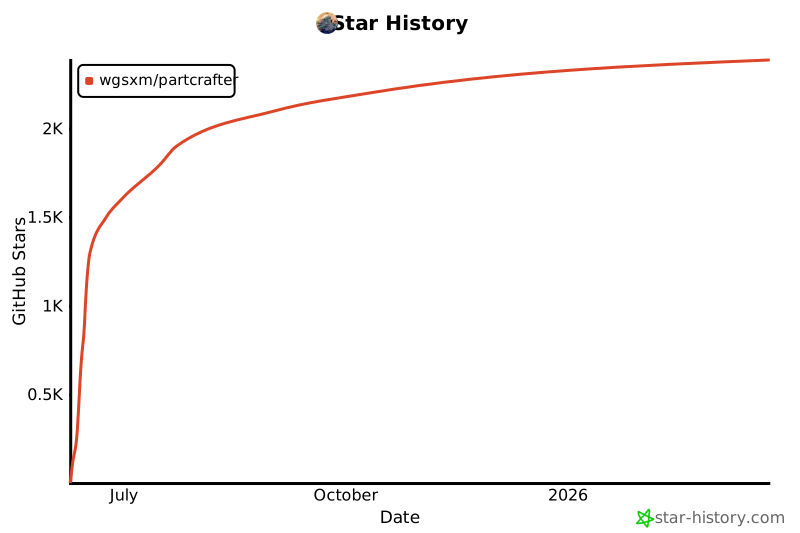](https://www.star-history.com/#wgsxm/PartCrafter&Date)