# zinit-annex-bin-gem-node
**Repository Path**: ct_java/zinit-annex-bin-gem-node
## Basic Information
- **Project Name**: zinit-annex-bin-gem-node
- **Description**: linux ls命令替代工具
- **Primary Language**: Unknown
- **License**: MIT
- **Default Branch**: docs/update-README.md
- **Homepage**: None
- **GVP Project**: No
## Statistics
- **Stars**: 0
- **Forks**: 0
- **Created**: 2023-08-05
- **Last Updated**: 2024-06-17
## Categories & Tags
**Categories**: Uncategorized
**Tags**: None
## README
# zinit-annex-bin-gem-node
- [zinit-annex-bin-gem-node](#zinit-annex-bin-gem-node)
- [Installation](#installation)
- [Overview](#overview)
- [Technical details](#technical-details)
- [Binary shim via `sbin`](#binary-shim-via-sbin)
- [`fbin'[{g|n|c|N|E|O}:]{path-to-binary}[ -> {name-of-the-function}]; …'`**](#fbingncneopath-to-binary---name-of-the-function-%E2%80%A6)
- [**`gem`**ice](#gemice)
- [`npm` ice](#npm-ice)
- [`pip` ice](#pip-ice)
- [`fmod'[{g|n|c|N|E|O}:]{function-name};'`**](#fmodgncneofunction-name)
- [7. `fsrc'[{g|n|c|N|E|O}:]{path-to-script}[ -> {name-of-the-function}];'`](#7-fsrcgncneopath-to-script---name-of-the-function)
- [8. `ferc'[{g|n|c|N|E|O}:]{path-to-script}[ -> {name-of-the-function}];'`](#8-fercgncneopath-to-script---name-of-the-function)
- [Additional Zinit commands](#additional-zinit-commands)
- [Cygwin Support](#cygwin-support)
A Zsh-Zinit annex that adds the following functionality:
1. Run programs and scripts without adding anything to `$PATH`,
2. Install and run Ruby [gems](https://github.com/rubygems/rubygems),
[Node](https://github.com/npm/cli), and [Python](https://python.org) modules from within a local
directory with [$GEM_HOME](https://guides.rubygems.org/command-reference/#gem-environment) ,
[$NODE_PATH](https://nodejs.org/api/modules.html#modules_loading_from_the_global_folders) and
[$VIRTUALENV](https://docs.python.org/3/tutorial/venv.html) automatically set,
3. Run programs, scripts and functions with automatic `cd` into the plugin or snippet directory,
plus also with automatic standard output & standard error redirecting.
4. Source scripts through an automatically created function with the above `$GEM_HOME`,
`$NODE_PATH`, `$VIRTUALENV` and `cd` features available,
5. Create the so called `shims` known from [rbenv](https://github.com/rbenv/rbenv) – the same
feature as the first item of this enumeration – of running a program without adding anything to
`$PATH` with all of the above features, however through an automatic **script** created in
`$ZPFX/bin`, not a **function** (the first item uses a function-based mechanism),
6. Automatic updates of Ruby gems and Node modules during regular plugin and snippet updates with
`zinit update`.
## Installation
```zsh
zinit light zdharma-continuum/zinit-annex-bin-gem-node
```
After executing this command you can then use the new ice-mods provided by the annex.
## Overview
**Note:** the README is somewhat outdated – the `sbin''` ice that creates forwarder-scripts instead
of forwarder-functions (created by the `fbin''` ice and elaborated in this `How it works …` section)
turned out to be the proper, best method for exposing binary programs and scripts. You can jump to
the `sbin''` ice [section](#5-sbingncneopath-to-binary---name-of-the-script-) if you want or read
on, as the forwarder-scripts are pretty similar to the forwarder-functions elaborated on in the
following text:
Below is a diagram explaining the major feature – exposing a binary program or script through a Zsh
function of the same name:
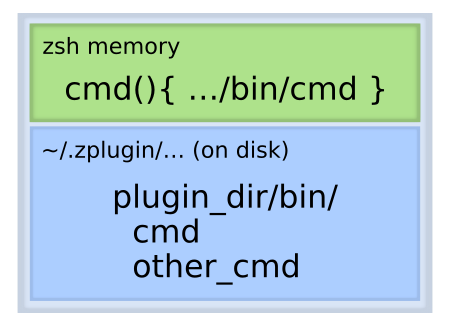
This way there is no need to add anything to `$PATH` – `zinit-annex-bin-gem-node` will automatically
create a function that will wrap the binary and provide it on the command line like if it was being
placed in the `$PATH`.
Also, like mentioned in the enumeration, the function can automatically export `$GEM_HOME`,
`$NODE_PATH`, `$VIRTUALENV` shell variables and also automatically cd into the plugin or snippet
directory right before executing the binary and then `cd` back to the original directory after the
execution is finished.
Also, like already mentioned, instead of the function an automatically created script – so called
`shim` – can be used for the same purpose and with the same functionality, so that the command is
being accessible practically fully normally – not only in the live Zsh session (only within which
the functions created by `fbin''` exist), but also from any Zsh script.
## Technical details
Suppose that you would want to install `junegunn/fzf-bin` plugin from GitHub Releases, which
contains only single file – the `fzf` binary for the selected architecture. It is possible to do it
in the standard way – by adding the plugin's directory to the `$PATH`:
```zsh
zinit ice as"command" from"github-rel"
zinit load junegunn/fzf-bin
```
After this command, the `$PATH` variable will contain e.g.:
```zsh
% print $PATH
/home/sg/.zinit/plugins/junegunn---fzf-bin:/bin:/usr/bin:/usr/sbin:/sbin
```
For many such programs loaded as plugins the PATH can become quite cluttered. I've had 26 entries
before switching to `zinit-annex-bin-gem-node`. To solve this, load with use of `sbin''` ice
provided and handled by `zinit-annex-bin-gem-node`:
```zsh
zinit ice from"gh-r" sbin"fzf"
zinit load junegunn/fzf-bin
```
The `$PATH` will remain unchanged and a `fzf` forwarder-script, so called *shim* will be created in
`$ZPFX/bin` (`~/.zinit/polaris/bin` by default), which is being already added to the `$PATH` by
Zinit when it is being sourced:
```zsh
% cat $ZPFX/bin/fzf
#!/usr/bin/env zsh
function fzf {
local bindir="/home/sg/.zinit/plugins/junegunn---fzf-bin"
"$bindir"/"fzf" "$@"
}
fzf "$@"
```
Running the script will forward the call to the program accessed through an embedded path to it.
Thus, no `$PATH` changes are needed!
There are 7 ice-modifiers provided and handled by the annex. They are:
| Ice | Description |
| -------- | -------------------------------------------------------------------------------------------------------- |
| `sbin''` | creates `shims` for binaries and scripts. |
| `fbin''` | creates functions for binaries and scripts. |
| `gem''` | installs and updates gems + creates functions for gems' binaries. |
| `node''` | installs and updates node_modules + creates functions for binaries of the modules. |
| `pip''` | installs and updates python packages into a virtualenv + creates functions for binaries of the packages. |
| `fmod''` | creates wrapping functions for other functions. |
| `fsrc''` | creates functions that source given scripts. |
| `ferc''` | the same as `fsrc''`, but using an alternate script-loading method. |
## Binary shim via `sbin`
\[{g|n|c|N|E|O}:\]{path-to-binary}\[ -> {name-of-the-script}\];
…'\`\*\*
It creates the so called `shim` known from `rbenv` – a wrapper script that forwards the call to the
actual binary. The script is created always under the same, standard and single `$PATH` entry:
`$ZPFX/bin` (which is `~/.zinit/polaris/bin` by default).
The flags have the same meaning as with `fbin''` ice.
Example:
```zsh
% zinit delete junegunn/fzf-bin
Delete /home/sg/.zinit/plugins/junegunn---fzf-bin?
[yY/n…]
y
Done (action executed, exit code: 0)
% zinit ice from"gh-r" sbin"fzf"
% zinit load junegunn/fzf-bin
…installation messages…
% cat $ZPFX/bin/fzf
#!/usr/bin/env zsh
function fzf {
local bindir="/home/sg/.zinit/plugins/junegunn---fzf-bin"
"$bindir"/"fzf" "$@"
}
fzf "$@"
```
**The ice can be empty**. It will then try to create the shim for:
- trailing component of the `id_as` ice, e.g.: `id_as'exts/git-my'` → it'll check if a file `git-my`
exists and if yes, create the shim `git-my`,
- the plugin name, e.g.: for `paulirish/git-open` it'll check if a file `git-open` exists and if
yes, create the shim `git-open`,
- trailing component of the snippet URL,
- for any alphabetically first executable file.
## `fbin'[{g|n|c|N|E|O}:]{path-to-binary}[ -> {name-of-the-function}]; …'`\*\*
Creates a wrapper function of the name the same as the last segment of the path or as
`{name-of-the-function}`. The optional preceding flags mean:
- `g` – set `$GEM_HOME` variable to `{plugin-dir}`,
- `n` – set `$NODE_PATH` variable to `{plugin-dir}/node_modules`,
- `p` – set `$VIRTUALENV` variable to `{plugin-dir}/venv`,
- `c` – cd to the plugin's directory before running the program and then cd back after it has been
run,
- `N` – append `&>/dev/null` to the call of the binary, i.e. redirect both standard output and
standard error to `/dev/null`,
- `E` – append `2>/dev/null` to the call of the binary, i.e. redirect standard error to `/dev/null`,
- `O` – append `>/dev/null` to the call of the binary, i.e. redirect standard output to `/dev/null`.
Example:
```zsh
% zinit ice from"gh-r" fbin"g:fzf -> myfzf"
% zinit load junegunn/fzf-bin
% which myfzf
myfzf () {
local bindir="/home/sg/.zinit/plugins/junegunn---fzf-bin"
local -x GEM_HOME="/home/sg/.zinit/plugins/junegunn---fzf-bin"
"$bindir"/"fzf" "$@"
}
```
**The ice can be empty**. It will then try to create the function for:
- trailing component of the `id_as` ice, e.g.: `id_as'exts/git-my'` → it'll check if a file `git-my`
exists and if yes, create the function `git-my`,
- the plugin name, e.g.: for `paulirish/git-open` it'll check if a file `git-open` exists and if
yes, create the function `git-open`,
- trailing component of the snippet URL,
- for any alphabetically first executable file.
## \*\*`gem`\*\*ice
| `gem` ice options |
| --------------------------------------------------------------------- |
| `gem'[{path-to-binary} <-] !{gem-name} [-> {name-of-the-function}];'` |
Installs the gem of name `{gem-name}` with `$GEM_HOME` set to the plugin's or snippet's directory.
In other words, the gem and its dependencies will be installed locally in that directory.
In the second form it also creates a wrapper function identical to the one created with `fbin''`
ice.
Example:
```zsh
% zinit ice gem'!asciidoctor'
% zinit load zdharma/null
% which asciidoctor
asciidoctor () {
local bindir="/home/sg/.zinit/plugins/zdharma---null/bin"
local -x GEM_HOME="/home/sg/.zinit/plugins/zdharma---null"
"$bindir"/"asciidoctor" "$@"
}
```
## **`npm`** ice
| `node` ice options |
| ------------------------------------------------------------------------- |
| `node'[{path-to-binary} <-] !{node-module} [-> {name-of-the-function}];'` |
Installs the node module of name `{node-module}` inside the plugin's or snippet's directory.
In the second form it also creates a wrapper function identical to the one created with `fbin''`
ice.
Example:
```zsh
% zinit delete zdharma/null
Delete /home/sg/.zinit/plugins/zdharma---null?
[yY/n…]
y
Done (action executed, exit code: 0)
% zinit ice node'remark <- !remark-cli -> remark; remark-man'
% zinit load zdharma/null
…installation messages…
% which remark
remark () {
local bindir="/home/sg/.zinit/plugins/zdharma---null/node_modules/.bin"
local -x NODE_PATH="/home/sg/.zinit/plugins/zdharma---null"/node_modules
"$bindir"/"remark" "$@"
}
```
In this case the name of the binary program provided by the node module is different from its name,
hence the second form with the `b <- a -> c` syntax has been used.
## **`pip`** ice
| `pip` ice options |
| ----------------------------------------------------------------------- |
| `pip'[{path-to-binary} <-] !{pip-package} [-> {name-of-the-function}]'` |
Installs the node module of name `{pip-package}` inside the plugin's or snippet's directory.
In the second form it also creates a wrapper function identical to the one created with `fbin''`
ice.
Example:
```zsh
% zinit delete zdharma/null
Delete /home/sg/.zinit/plugins/zdharma---null?
[yY/n…]
y
Done (action executed, exit code: 0)
% zinit ice node'ansible <- !ansible -> ansible; ansible-lint'
% zinit load zdharma/null
…installation messages…
% which remark
ansible () {
local bindir="/home/sg/.zinit/plugins/zdharma---null/venv/bin"
local -x VIRTUALENV="/home/sg/.zinit/plugins/zdharma---null"/venv
"$bindir"/"ansible" "$@"
}
```
In this case the name of the binary program provided by the node module is different from its name,
hence the second form with the `b <- a -> c` syntax has been used.
## `fmod'[{g|n|c|N|E|O}:]{function-name};'`\*\*
**`fmod'[{g|n|c|N|E|O}:]{function-name} -> {wrapping-function-name};'`**
It wraps given function with the ability to set `$GEM_HOME`, etc. – the meaning of the `g`,`n` and
`c` flags is the same as in the `fbin''` ice.
Example:
```zsh
% myfun() { pwd; ls -1 }
% zinit ice fmod'cgn:myfun'
% zinit load zdharma/null
% which myfun
myfun () {
local -x GEM_HOME="/home/sg/.zinit/plugins/zdharma---null"
local -x NODE_PATH="/home/sg/.zinit/plugins/zdharma---null"/node_modules
local oldpwd="/home/sg/.zinit/plugins/zinit---zinit-annex-bin-gem-node"
() {
setopt localoptions noautopushd
builtin cd -q "/home/sg/.zinit/plugins/zdharma---null"
}
"myfun--za-bgn-orig" "$@"
() {
setopt localoptions noautopushd
builtin cd -q "$oldpwd"
}
}
% myfun
/home/sg/.zinit/plugins/zdharma---null
LICENSE
README.md
```
## 7. **`fsrc'[{g|n|c|N|E|O}:]{path-to-script}[ -> {name-of-the-function}];'`**
## 8. **`ferc'[{g|n|c|N|E|O}:]{path-to-script}[ -> {name-of-the-function}];'`**
Creates a wrapper function that at each invocation sources the given file. The second ice, `ferc''`
works the same with the single difference that it uses `eval "$(<{path-to-script})"` instead of
`source "{path-to-script}"` to load the script.
Example:
```zsh
% zinit ice fsrc"myscript -> myfunc" ferc"myscript"
% zinit load zdharma/null
% which myfunc
myfunc () {
local bindir="/home/sg/.zinit/plugins/zdharma---null"
() {
source "$bindir"/"myscript"
} "$@"
}
% which myscript
myscript () {
local bindir="/home/sg/.zinit/snippets/OMZ::plugins--git/git.plugin.zsh"
() {
eval "$(<"$bindir"/"myscript")"
} "$@"
}
```
**The ices can be empty**. They will then try to create the function for trailing component of the
`id-as` ice and the other cases, in the same way as with the `fbin` ice.
# Additional Zinit commands
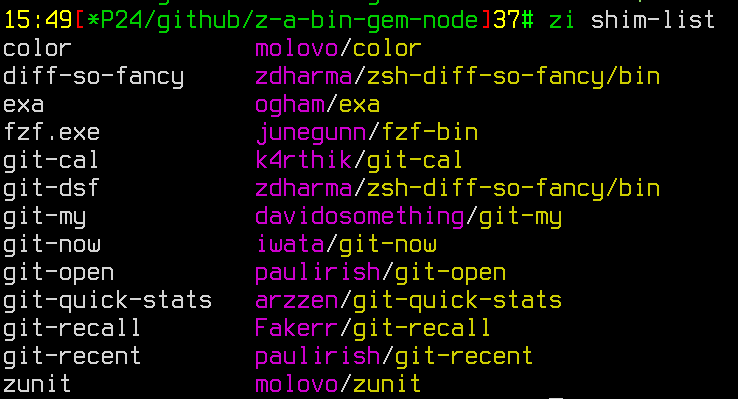
There's an additional Zinit command that's provided by this annex –`shim-list`. It searches for and
displays any shims that are being currently stored under `$ZPFX/bin`. Example invocation:
Available options are:
```zsh
zinit shim-list [-h/--help] [-t|--this-dir] [-i|--from-ices] \
[-o|--one-line] [-s|--short] [-c|--cat]
```
The options' meanings:
- `-h/--help` – shows a usage information,
- `-t/--this-dir` – instructs Zinit to look for shims in the current directory instead of
`$ZPFX/bin`,
- `-i/--from-ices` – normally the code looks for the shim files by examining their contents (shims
created by BGN annex have a fixed structure); this option instructs Zinit to show the list of
shims that results from the `sbin''` ice of the loaded plugins; i.e.: if a plugin has
`sbin'git-open'`, for example, then this means that there has to be such shim already created,
- `-o/--one-line` – display the list of shim files without line breaks, in single line, after
spaces,
- `-s/--short` – don't show the plugin/snippet that the shim belongs to,
- `-c/--cat` – displays contents of each of the found shim (unimplemented yet).
## Cygwin Support
The `sbin''` ice has an explicit Cygwin support – it creates additional, **extra shim files** –
Windows batch scripts that allow to run the shielded applications from e.g.: Windows run dialog – if
the `~/.zinit/polaris/bin` directory is being added to the Windows `PATH` environment variable, for
example (it is a good idea to do so, IMHO). The Windows shims have the same name as the standard
ones (which are also being created, normally) plus the `.cmd` extension. You can test the feature by
e.g.: installing Firefox from the Zinit package via:
```zsh
zinit pack=bgn for firefox
```