# ui-ux-pro-max-skill
**Repository Path**: dale_github/ui-ux-pro-max-skill
## Basic Information
- **Project Name**: ui-ux-pro-max-skill
- **Description**: No description available
- **Primary Language**: Unknown
- **License**: MIT
- **Default Branch**: main
- **Homepage**: None
- **GVP Project**: No
## Statistics
- **Stars**: 0
- **Forks**: 0
- **Created**: 2026-01-20
- **Last Updated**: 2026-01-20
## Categories & Tags
**Categories**: Uncategorized
**Tags**: None
## README
# UI UX Pro Max









An AI skill that provides design intelligence for building professional UI/UX across multiple platforms and frameworks.

If you find this useful, consider supporting the project:

## What's New in v2.0
### Intelligent Design System Generation
The flagship feature of v2.0 is the **Design System Generator** - an AI-powered reasoning engine that analyzes your project requirements and generates a complete, tailored design system in seconds.
```
+----------------------------------------------------------------------------------------+
| TARGET: Serenity Spa - RECOMMENDED DESIGN SYSTEM |
+----------------------------------------------------------------------------------------+
| |
| PATTERN: Hero-Centric + Social Proof |
| Conversion: Emotion-driven with trust elements |
| CTA: Above fold, repeated after testimonials |
| Sections: |
| 1. Hero |
| 2. Services |
| 3. Testimonials |
| 4. Booking |
| 5. Contact |
| |
| STYLE: Soft UI Evolution |
| Keywords: Soft shadows, subtle depth, calming, premium feel, organic shapes |
| Best For: Wellness, beauty, lifestyle brands, premium services |
| Performance: Excellent | Accessibility: WCAG AA |
| |
| COLORS: |
| Primary: #E8B4B8 (Soft Pink) |
| Secondary: #A8D5BA (Sage Green) |
| CTA: #D4AF37 (Gold) |
| Background: #FFF5F5 (Warm White) |
| Text: #2D3436 (Charcoal) |
| Notes: Calming palette with gold accents for luxury feel |
| |
| TYPOGRAPHY: Cormorant Garamond / Montserrat |
| Mood: Elegant, calming, sophisticated |
| Best For: Luxury brands, wellness, beauty, editorial |
| Google Fonts: https://fonts.google.com/share?selection.family=... |
| |
| KEY EFFECTS: |
| Soft shadows + Smooth transitions (200-300ms) + Gentle hover states |
| |
| AVOID (Anti-patterns): |
| Bright neon colors + Harsh animations + Dark mode + AI purple/pink gradients |
| |
| PRE-DELIVERY CHECKLIST: |
| [ ] No emojis as icons (use SVG: Heroicons/Lucide) |
| [ ] cursor-pointer on all clickable elements |
| [ ] Hover states with smooth transitions (150-300ms) |
| [ ] Light mode: text contrast 4.5:1 minimum |
| [ ] Focus states visible for keyboard nav |
| [ ] prefers-reduced-motion respected |
| [ ] Responsive: 375px, 768px, 1024px, 1440px |
| |
+----------------------------------------------------------------------------------------+
```
### How Design System Generation Works
```
┌─────────────────────────────────────────────────────────────────┐
│ 1. USER REQUEST │
│ "Build a landing page for my beauty spa" │
└─────────────────────────────────────────────────────────────────┘
│
▼
┌─────────────────────────────────────────────────────────────────┐
│ 2. MULTI-DOMAIN SEARCH (5 parallel searches) │
│ • Product type matching (100 categories) │
│ • Style recommendations (57 styles) │
│ • Color palette selection (95 palettes) │
│ • Landing page patterns (24 patterns) │
│ • Typography pairing (56 font combinations) │
└─────────────────────────────────────────────────────────────────┘
│
▼
┌─────────────────────────────────────────────────────────────────┐
│ 3. REASONING ENGINE │
│ • Match product → UI category rules │
│ • Apply style priorities (BM25 ranking) │
│ • Filter anti-patterns for industry │
│ • Process decision rules (JSON conditions) │
└─────────────────────────────────────────────────────────────────┘
│
▼
┌─────────────────────────────────────────────────────────────────┐
│ 4. COMPLETE DESIGN SYSTEM OUTPUT │
│ Pattern + Style + Colors + Typography + Effects │
│ + Anti-patterns to avoid + Pre-delivery checklist │
└─────────────────────────────────────────────────────────────────┘
```
### 100 Industry-Specific Reasoning Rules
The reasoning engine includes specialized rules for:
| Category | Examples |
|----------|----------|
| **Tech & SaaS** | SaaS, Micro SaaS, B2B Enterprise, Developer Tools, AI/Chatbot Platform |
| **Finance** | Fintech, Banking, Crypto, Insurance, Trading Dashboard |
| **Healthcare** | Medical Clinic, Pharmacy, Dental, Veterinary, Mental Health |
| **E-commerce** | General, Luxury, Marketplace, Subscription Box |
| **Services** | Beauty/Spa, Restaurant, Hotel, Legal, Consulting |
| **Creative** | Portfolio, Agency, Photography, Gaming, Music Streaming |
| **Emerging Tech** | Web3/NFT, Spatial Computing, Quantum Computing, Autonomous Systems |
Each rule includes:
- **Recommended Pattern** - Landing page structure
- **Style Priority** - Best matching UI styles
- **Color Mood** - Industry-appropriate palettes
- **Typography Mood** - Font personality matching
- **Key Effects** - Animations and interactions
- **Anti-Patterns** - What NOT to do (e.g., "AI purple/pink gradients" for banking)
## Features
- **57 UI Styles** - Glassmorphism, Claymorphism, Minimalism, Brutalism, Neumorphism, Bento Grid, Dark Mode, AI-Native UI, and more
- **95 Color Palettes** - Industry-specific palettes for SaaS, E-commerce, Healthcare, Fintech, Beauty, etc.
- **56 Font Pairings** - Curated typography combinations with Google Fonts imports
- **24 Chart Types** - Recommendations for dashboards and analytics
- **11 Tech Stacks** - React, Next.js, Vue, Nuxt.js, Nuxt UI, Svelte, SwiftUI, React Native, Flutter, HTML+Tailwind, shadcn/ui
- **98 UX Guidelines** - Best practices, anti-patterns, and accessibility rules
- **100 Reasoning Rules** - Industry-specific design system generation (NEW in v2.0)
## Installation
### Using Claude Marketplace (Claude Code)
Install directly in Claude Code with two commands:
```
/plugin marketplace add nextlevelbuilder/ui-ux-pro-max-skill
/plugin install ui-ux-pro-max@ui-ux-pro-max-skill
```
### Using CLI (Recommended)
```bash
# Install CLI globally
npm install -g uipro-cli
# Go to your project
cd /path/to/your/project
# Install for your AI assistant
uipro init --ai claude # Claude Code
uipro init --ai cursor # Cursor
uipro init --ai windsurf # Windsurf
uipro init --ai antigravity # Antigravity (.agent + .shared)
uipro init --ai copilot # GitHub Copilot
uipro init --ai kiro # Kiro
uipro init --ai codex # Codex CLI
uipro init --ai qoder # Qoder
uipro init --ai roocode # Roo Code
uipro init --ai gemini # Gemini CLI
uipro init --ai trae # Trae
uipro init --ai opencode # OpenCode
uipro init --ai continue # Continue (Skills)
uipro init --ai all # All assistants
```
### Other CLI Commands
```bash
uipro versions # List available versions
uipro update # Update to latest version
uipro init --offline # Skip GitHub download, use bundled assets
```
### Manual Installation
Copy the appropriate folders to your project:
| AI Assistant | Folders to Copy |
| -------------- | -------------------------------------------------------------------- |
| Claude Code | `.claude/skills/ui-ux-pro-max/` |
| Cursor | `.cursor/commands/ui-ux-pro-max.md` + `.shared/ui-ux-pro-max/` |
| Windsurf | `.windsurf/workflows/ui-ux-pro-max.md` + `.shared/ui-ux-pro-max/` |
| Antigravity | `.agent/workflows/ui-ux-pro-max.md` + `.shared/ui-ux-pro-max/` |
| GitHub Copilot | `.github/prompts/ui-ux-pro-max.prompt.md` + `.shared/ui-ux-pro-max/` |
| Kiro | `.kiro/steering/ui-ux-pro-max.md` + `.shared/ui-ux-pro-max/` |
| Codex CLI | `.codex/skills/ui-ux-pro-max/` |
| Qoder | `.qoder/skills/ui-ux-pro-max.md` + `.shared/ui-ux-pro-max/` |
| Roo Code | `.roo/rules/ui-ux-pro-max.md` + `.shared/ui-ux-pro-max/` |
| Gemini CLI | `.gemini/skills/ui-ux-pro-max/` + `.shared/ui-ux-pro-max/` |
| Trae | `.trae/skills/ui-ux-pro-max/` + `.shared/ui-ux-pro-max/` |
| Continue | `.continue/skills/ui-ux-pro-max/` |
## Prerequisites
Python 3.x is required for the search script.
```bash
# Check if Python is installed
python3 --version
# macOS
brew install python3
# Ubuntu/Debian
sudo apt update && sudo apt install python3
# Windows
winget install Python.Python.3.12
```
## Usage
### Claude Code
The skill activates automatically when you request UI/UX work. Just chat naturally:
```
Build a landing page for my SaaS product
```
### Cursor / Windsurf / Antigravity
Use the slash command to invoke the skill:
```
/ui-ux-pro-max Build a landing page for my SaaS product
```
### Kiro
Type `/` in chat to see available commands, then select `ui-ux-pro-max`:
```
/ui-ux-pro-max Build a landing page for my SaaS product
```
### GitHub Copilot
In VS Code with Copilot, type `/` in chat to see available prompts, then select `ui-ux-pro-max`:
```
/ui-ux-pro-max Build a landing page for my SaaS product
```
### Codex CLI
The skill activates automatically for UI/UX requests. You can also invoke it explicitly:
```
$ui-ux-pro-max Build a landing page for my SaaS product
```
### Continue
The skill activates automatically for UI/UX requests once installed to `.continue/skills/`:
```
Build a landing page for my SaaS product
```
### Qoder
The skill activates automatically when you request UI/UX work:
```
Build a landing page for my SaaS product
```
### Roo Code
The skill activates automatically when you request UI/UX work:
```
Build a landing page for my SaaS product
```
### Gemini CLI
The skill activates automatically when you request UI/UX work:
```
Build a landing page for my SaaS product
```
### Trae
_Disclaimer: Trae skill is in beta. Please report any issues or feedback._
To use Trae skill, you need to switch to **SOLO** mode. If your request is related to skills, skills will be used:
```
Build a landing page (frontend ONLY) for my SaaS product.
```
### Example Prompts
```
Build a landing page for my SaaS product
Create a dashboard for healthcare analytics
Design a portfolio website with dark mode
Make a mobile app UI for e-commerce
Build a fintech banking app with dark theme
```
### How It Works
1. **You ask** - Request any UI/UX task (build, design, create, implement, review, fix, improve)
2. **Design System Generated** - The AI automatically generates a complete design system using the reasoning engine
3. **Smart recommendations** - Based on your product type and requirements, it finds the best matching styles, colors, and typography
4. **Code generation** - Implements the UI with proper colors, fonts, spacing, and best practices
5. **Pre-delivery checks** - Validates against common UI/UX anti-patterns
### Supported Stacks
The skill provides stack-specific guidelines for:
- **HTML + Tailwind** (default)
- **React** / **Next.js** / **shadcn/ui**
- **Vue** / **Nuxt.js** / **Nuxt UI** / **Svelte**
- **SwiftUI** / **React Native** / **Flutter**
Just mention your preferred stack in the prompt, or let it default to HTML + Tailwind.
## Design System Command (Advanced)
For direct access to the design system generator:
> Note: If you installed via Continue, replace `.claude/skills/` with `.continue/skills/` in the commands below.
```bash
# Generate design system with ASCII output
python3 .claude/skills/ui-ux-pro-max/scripts/search.py "beauty spa wellness" --design-system -p "Serenity Spa"
# Generate with Markdown output
python3 .claude/skills/ui-ux-pro-max/scripts/search.py "fintech banking" --design-system -f markdown
# Domain-specific search
python3 .claude/skills/ui-ux-pro-max/scripts/search.py "glassmorphism" --domain style
python3 .claude/skills/ui-ux-pro-max/scripts/search.py "elegant serif" --domain typography
python3 .claude/skills/ui-ux-pro-max/scripts/search.py "dashboard" --domain chart
# Stack-specific guidelines
python3 .claude/skills/ui-ux-pro-max/scripts/search.py "form validation" --stack react
python3 .claude/skills/ui-ux-pro-max/scripts/search.py "responsive layout" --stack html-tailwind
```
### Persist Design System (Master + Overrides Pattern)
Save your design system to files for **hierarchical retrieval across sessions**:
```bash
# Generate and persist to design-system/MASTER.md
python3 .claude/skills/ui-ux-pro-max/scripts/search.py "SaaS dashboard" --design-system --persist -p "MyApp"
# Also create a page-specific override file
python3 .claude/skills/ui-ux-pro-max/scripts/search.py "SaaS dashboard" --design-system --persist -p "MyApp" --page "dashboard"
```
This creates a `design-system/` folder structure:
```
design-system/
├── MASTER.md # Global Source of Truth (colors, typography, spacing, components)
└── pages/
└── dashboard.md # Page-specific overrides (only deviations from Master)
```
**How hierarchical retrieval works:**
1. When building a specific page (e.g., "Checkout"), first check `design-system/pages/checkout.md`
2. If the page file exists, its rules **override** the Master file
3. If not, use `design-system/MASTER.md` exclusively
**Context-aware retrieval prompt:**
```
I am building the [Page Name] page. Please read design-system/MASTER.md.
Also check if design-system/pages/[page-name].md exists.
If the page file exists, prioritize its rules.
If not, use the Master rules exclusively.
Now, generate the code...
```
## Star History
[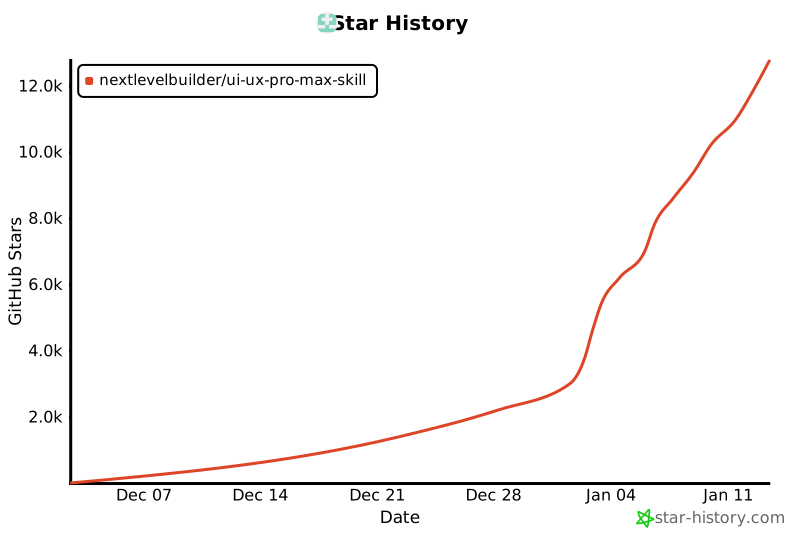](https://star-history.com/#nextlevelbuilder/ui-ux-pro-max-skill&Date)
## License
This project is licensed under the [MIT License](LICENSE).