` 都会触发一个完整的重建流程;
- 当卸载一棵树时,对应的 DOM 节点也会被销毁,组件实例将执行 `componentWillUnmount()` 方法;
- 当建立一棵新的树时,对应的 DOM 节点会被创建以及插入到 DOM 中,组件实例将执行 `componentWillMount()` 方法,紧接着 `componentDidMount()` 方法;
比如下面的代码更改:
- React 会销毁 `Counter` 组件并且重新装载一个新的组件,而不会对 Counter 进行复用;
```html
```
#### 2.2.2. 对比同一类型的元素
当比对两个相同类型的 React 元素时,React 会保留 DOM 节点,仅比对及更新有改变的属性。
比如下面的代码更改:
- 通过比对这两个元素,React 知道只需要修改 DOM 元素上的 `className` 属性;
```html
```
比如下面的代码更改:
- 当更新 `style` 属性时,React 仅更新有所更变的属性。
- 通过比对这两个元素,React 知道只需要修改 DOM 元素上的 `color` 样式,无需修改 `fontWeight`。
```html
```
如果是同类型的组件元素:
- 组件会保持不变,React 会更新该组件的 props,并且调用`componentWillReceiveProps()` 和 `componentWillUpdate()` 方法;
- 下一步,调用 `render()` 方法,diff 算法将在之前的结果以及新的结果中进行递归;
#### 2.2.3. 对子节点进行递归
在默认条件下,当递归 DOM 节点的子元素时,React 会同时遍历两个子元素的列表;当产生差异时,生成一个 mutation。
我们来看一下在最后插入一条数据的情况:
- 前面两个比较是完全相同的,所以不会产生 mutation;
- 最后一个比较,产生一个 mutation,将其插入到新的 DOM 树中即可;
```html
```
但是如果我们是在中间插入一条数据:
- React 会对每一个子元素产生一个 mutation,而不是保持 `
星际穿越`和`
盗梦空间`的不变;
- 这种低效的比较方式会带来一定的性能问题;
```html
```
### 2.3. keys 的优化
我们在前面遍历列表时,总是会提示一个警告,让我们加入一个 key 属性:
key 的警告
我们来看一个案例:
```jsx
import React, { Component } from "react";
export default class App extends Component {
constructor(props) {
super(props);
this.state = {
movies: ["星际穿越", "盗梦空间"],
};
}
render() {
return (
电影列表
{this.state.movies.map((item, index) => {
return - {item}
;
})}
);
}
insertMovie() {}
}
```
方式一:在最后位置插入数据
- 这种情况,有无 key 意义并不大
```jsx
insertMovie() {
const newMovies = [...this.state.movies, "大话西游"];
this.setState({
movies: newMovies
})
}
```
方式二:在前面插入数据
- 这种做法,在没有 key 的情况下,所有的 li 都需要进行修改;
```js
insertMovie() {
const newMovies = ["大话西游", ...this.state.movies];
this.setState({
movies: newMovies
})
}
```
当子元素(这里的 li)拥有 key 时,React 使用 key 来匹配原有树上的子元素以及最新树上的子元素:
- 在下面这种场景下,key 为 111 和 222 的元素仅仅进行位移,不需要进行任何的修改;
- 将 key 为 333 的元素插入到最前面的位置即可;
```html
```
key 的注意事项:
- key 应该是唯一的;
- key 不要使用随机数(随机数在下一次 render 时,会重新生成一个数字);
- 使用 index 作为 key,对性能是没有优化的;
### 2.4. SCU 的优化
#### 2.4.1. render 函数被调用
我们使用之前的一个嵌套案例:
- 在 App 中,我们增加了一个计数器的代码;
- 当点击+1 时,会重新调用 App 的 render 函数;
- 而当 App 的 render 函数被调用时,所有的子组件的 render 函数都会被重新调用;
```jsx
import React, { Component } from "react";
function Header() {
console.log("Header Render 被调用");
return
Header
;
}
class Main extends Component {
render() {
console.log("Main Render 被调用");
return (
);
}
}
function Banner() {
console.log("Banner Render 被调用");
return
Banner
;
}
function ProductList() {
console.log("ProductList Render 被调用");
return (
);
}
function Footer() {
console.log("Footer Render 被调用");
return
Footer
;
}
export default class App extends Component {
constructor(props) {
super(props);
this.state = {
counter: 0,
};
}
render() {
console.log("App Render 被调用");
return (
当前计数: {this.state.counter}
);
}
increment() {
this.setState({
counter: this.state.counter + 1,
});
}
}
```
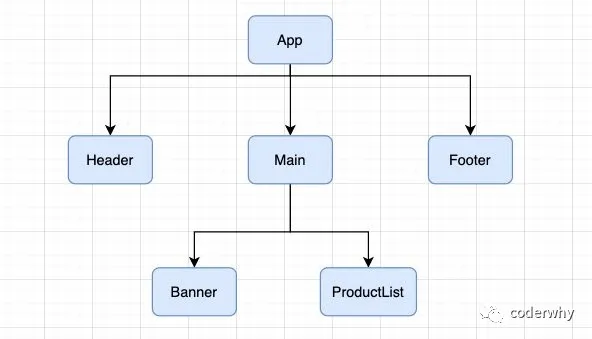嵌套树结构
那么,我们可以思考一下,在以后的开发中,我们只要是修改了 App 中的数据,所有的组件都需要重新 render,进行 diff 算法,性能必然是很低的:
- 事实上,很多的组件没有必须要重新 render;
- 它们调用 render 应该有一个前提,就是依赖的数据(state、props)发生改变时,再调用自己的 render 方法;
如何来控制 render 方法是否被调用呢?
- 通过`shouldComponentUpdate`方法即可;
#### 2.4.2. shouldComponentUpdate
React 给我们提供了一个生命周期方法 `shouldComponentUpdate`(很多时候,我们简称为 SCU),这个方法接受参数,并且需要有返回值:
- 该方法有两个参数:
- - 参数一:nextProps 修改之后,最新的 props 属性
- 参数二:nextState 修改之后,最新的 state 属性
- 该方法返回值是一个 boolean 类型
- - 返回值为 true,那么就需要调用 render 方法;
- 返回值为 false,那么久不需要调用 render 方法;
- 默认返回的是 true,也就是只要 state 发生改变,就会调用 render 方法;
```
shouldComponentUpdate(nextProps, nextState) {
return true;
}
```
我们可以控制它返回的内容,来决定是否需要重新渲染。
比如我们在 App 中增加一个 message 属性:
- jsx 中并没有依赖这个 message,那么它的改变不应该引起重新渲染;
- 但是因为 render 监听到 state 的改变,就会重新 render,所以最后 render 方法还是被重新调用了;
```jsx
export default class App extends Component {
constructor(props) {
super(props);
this.state = {
counter: 0,
message: "Hello World",
};
}
render() {
console.log("App Render 被调用");
return (
当前计数: {this.state.counter}
);
}
increment() {
this.setState({
counter: this.state.counter + 1,
});
}
changeText() {
this.setState({
message: "你好啊,李银河",
});
}
}
```
这个时候,我们可以通过实现 shouldComponentUpdate 来决定要不要重新调用 render 方法:
- 这个时候,我们改变 counter 时,会重新渲染;
- 如果,我们改变的是 message,那么默认返回的是 false,那么就不会重新渲染;
```jsx
shouldComponentUpdate(nextProps, nextState) {
if (nextState.counter !== this.state.counter) {
return true;
}
return false;
}
```
但是我们的代码依然没有优化到最好,因为当 counter 改变时,所有的子组件依然重新渲染了:
- 所以,事实上,我们应该实现所有的子组件的 shouldComponentUpdate;
比如 Main 组件,可以进行如下实现:
- `shouldComponentUpdate`默认返回一个 false;
- 在特定情况下,需要更新时,我们在上面添加对应的条件即可;
```jsx
class Main extends Component {
shouldComponentUpdate(nextProps, nextState) {
return false;
}
render() {
console.log("Main Render 被调用");
return (
);
}
}
```
#### 2.4.3. PureComponent 和 memo
如果所有的类,我们都需要手动来实现 shouldComponentUpdate,那么会给我们开发者增加非常多的工作量。
我们来设想一下 shouldComponentUpdate 中的各种判断的目的是什么?
- props 或者 state 中的数据是否发生了改变,来决定 shouldComponentUpdate 返回 true 或者 false;
事实上 React 已经考虑到了这一点,所以 React 已经默认帮我们实现好了,如何实现呢?
- 将 class 基础自 PureComponent。
比如我们修改 Main 组件的代码:
```jsx
class Main extends PureComponent {
render() {
console.log("Main Render 被调用");
return (
);
}
}
```
PureComponent 的原理是什么呢?
- 对 props 和 state 进行浅层比较;
**查看 PureComponent 相关的源码:**
react/ReactBaseClasses.js 中:
- 在 PureComponent 的原型上增加一个 isPureReactComponent 为 true 的属性
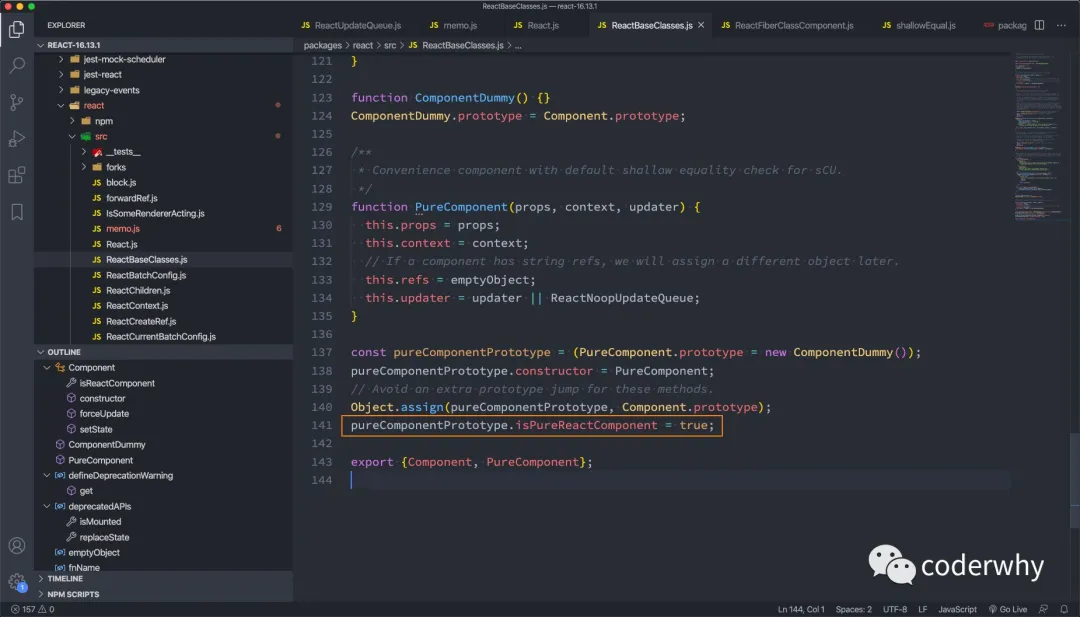PureComponent
React-reconcilier/ReactFiberClassComponent.js:
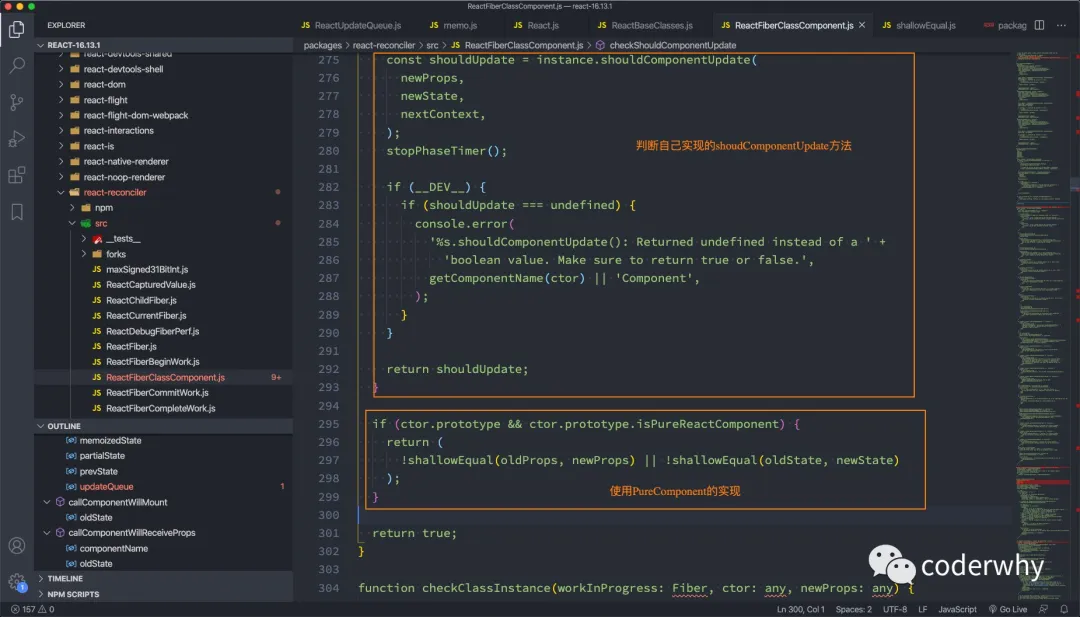checkShouldComponentUpdate
这个方法中,调用 `!shallowEqual(oldProps, newProps) || !shallowEqual(oldState, newState)`,这个 shallowEqual 就是进行浅层比较:
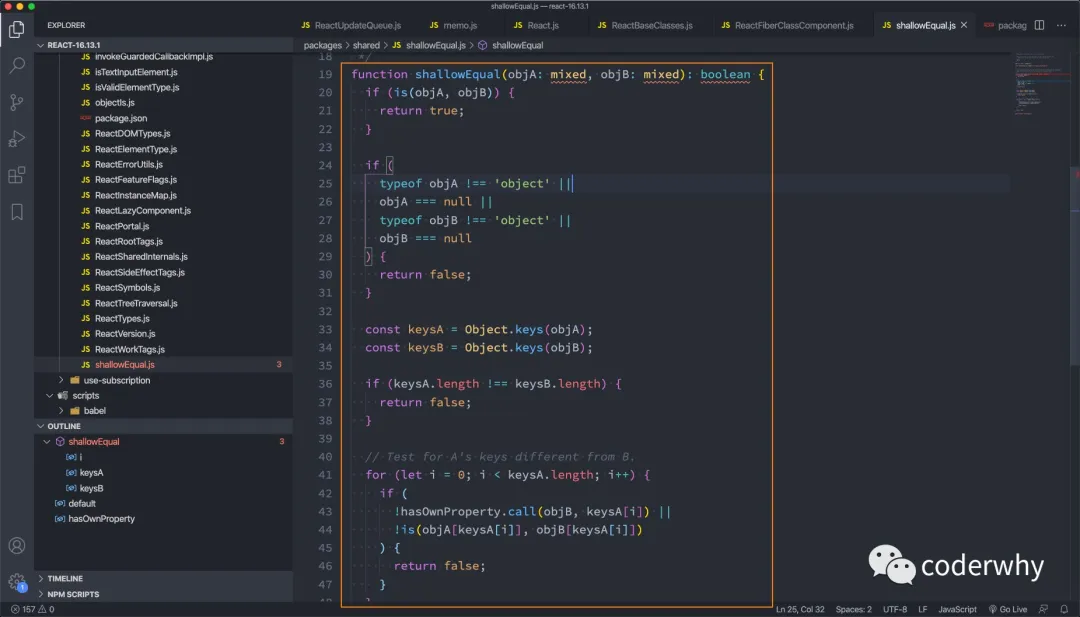shallowEqual
**那么,如果是一个函数式组件呢?**
我们需要使用一个高阶组件 memo:
- 我们将之前的 Header、Banner、ProductList 都通过 memo 函数进行一层包裹;
- Footer 没有使用 memo 函数进行包裹;
- 最终的效果是,当 counter 发生改变时,Header、Banner、ProductList 的函数不会重新执行,而 Footer 的函数会被重新执行;
```jsx
import React, { Component, PureComponent, memo } from "react";
const MemoHeader = memo(function () {
console.log("Header Render 被调用");
return
Header
;
});
class Main extends PureComponent {
render() {
console.log("Main Render 被调用");
return (
);
}
}
const MemoBanner = memo(function () {
console.log("Banner Render 被调用");
return
Banner
;
});
const MemoProductList = memo(function () {
console.log("ProductList Render 被调用");
return (
);
});
function Footer() {
console.log("Footer Render 被调用");
return
Footer
;
}
export default class App extends Component {
constructor(props) {
super(props);
this.state = {
counter: 0,
message: "Hello World",
};
}
render() {
console.log("App Render 被调用");
return (
当前计数: {this.state.counter}
);
}
increment() {
this.setState({
counter: this.state.counter + 1,
});
}
shouldComponentUpdate(nextProps, nextState) {
if (nextState.counter !== this.state.counter) {
return true;
}
return false;
}
changeText() {
this.setState({
message: "你好啊,李银河",
});
}
}
```
**memo 的原理是什么呢?**
react/memo.js:
- 最终返回一个对象,这个对象中有一个 compare 函数
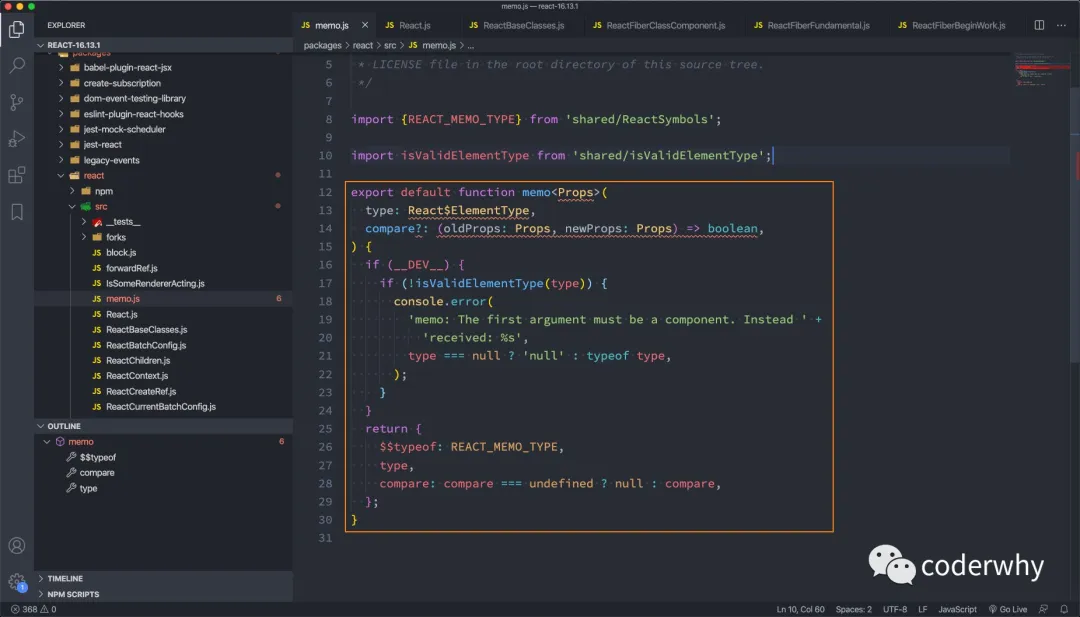memo 函数
#### 2.4.4. 不可变数据的力量
我们通过一个案例来演练我们之前说的不可变数据的重要性:
```jsx
import React, { PureComponent } from "react";
export default class App extends PureComponent {
constructor(props) {
super(props);
this.state = {
friends: [
{ name: "lilei", age: 20, height: 1.76 },
{ name: "lucy", age: 18, height: 1.65 },
{ name: "tom", age: 30, height: 1.78 },
],
};
}
render() {
return (
朋友列表
{this.state.friends.map((item, index) => {
return (
-
{`姓名:${item.name} 年龄: ${item.age}`}
);
})}
);
}
insertFriend() {}
incrementAge(index) {}
}
```
**我们来思考一下 inertFriend 应该如何实现?**
实现方式一:
- 这种方式会造成界面不会发生刷新,添加新的数据;
- 原因是继承自 PureComponent,会进行浅层比较,浅层比较过程中两个 friends 是相同的对象;
```jsx
insertFriend() {
this.state.friends.push({name: "why", age: 18, height: 1.88});
this.setState({
friends: this.state.friends
})
}
```
实现方式二:
- `[...this.state.friends, {name: "why", age: 18, height: 1.88}]`会生成一个新的数组引用;
- 在进行浅层比较时,两个引用的是不同的数组,所以它们是不相同的;
```jsx
insertFriend() {
this.setState({
friends: [...this.state.friends, {name: "why", age: 18, height: 1.88}]
})
}
```
**我们再来思考一下 incrementAge 应该如何实现?**
实现方式一:
- 和上面方式一类似
```jsx
incrementAge(index) {
this.state.friends[index].age += 1;
this.setState({
friends: this.state.friends
})
}
```
实现方式二:
- 和上面方式二类似
```jsx
incrementAge(index) {
const newFriends = [...this.state.friends];
newFriends[index].age += 1;
this.setState({
friends: newFriends
})
}
```
所以,在真实开发中,我们要尽量保证 state、props 中的数据不可变性,这样我们才能合理和安全的使用 PureComponent 和 memo。
当然,后面项目中我会结合 immutable.js 来保证数据的不可变性。
# 受控非受控组件
## 一. refs 的使用
在 React 的开发模式中,通常情况下不需要、也不建议直接操作 DOM 原生,但是某些特殊的情况,确实需要获取到 DOM 进行某些操作:
- 管理焦点,文本选择或媒体播放。
- 触发强制动画。
- 集成第三方 DOM 库。
### 1.1. 创建 ref 的方式
如何创建 refs 来获取对应的 DOM 呢?目前有三种方式:
- 方式一:传入字符串
- - 使用时通过 `this.refs.传入的字符串`格式获取对应的元素;
- 方式二:传入一个对象
- - 对象是通过 `React.createRef()` 方式创建出来的;
- 使用时获取到创建的对象其中有一个`current`属性就是对应的元素;
- 方式三:传入一个函数
- - 该函数会在 DOM 被挂载时进行回调,这个函数会传入一个 元素对象,我们可以自己保存;
- 使用时,直接拿到之前保存的元素对象即可;
代码演练:
```
import React, { PureComponent, createRef } from 'react'
export default class App extends PureComponent {
constructor(props) {
super(props);
this.titleRef = createRef();
this.titleEl = null;
}
render() {
return (
String Ref
Hello Create Ref
this.titleEl = element}>Callback Ref
)
}
changeText() {
this.refs.title.innerHTML = "你好啊,李银河";
this.titleRef.current.innerHTML = "你好啊,李银河";
this.titleEl.innerHTML = "你好啊,李银河";
}
}
```
### 1.2. ref 节点的类型
ref 的值根据节点的类型而有所不同:
- 当 `ref` 属性用于 HTML 元素时,构造函数中使用 `React.createRef()` 创建的 `ref` 接收底层 DOM 元素作为其 `current` 属性;
- 当 `ref` 属性用于自定义 class 组件时,`ref` 对象接收组件的挂载实例作为其 `current` 属性;
- **你不能在函数组件上使用 `ref` 属性**,因为他们没有实例;
这里我们演示一下 ref 引用一个 class 组件对象:
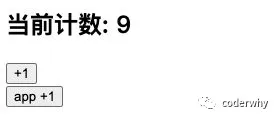class 组件案例
```
import React, { PureComponent, createRef } from 'react';
class Counter extends PureComponent {
constructor(props) {
super(props);
this.state = {
counter: 0
}
}
render() {
return (
当前计数: {this.state.counter}
)
}
increment() {
this.setState({
counter: this.state.counter + 1
})
}
}
export default class App extends PureComponent {
constructor(props) {
super(props);
this.counterRef = createRef();
}
render() {
return (
)
}
increment() {
this.counterRef.current.increment();
}
}
```
函数式组件是没有实例的,所以无法通过 ref 获取他们的实例:
- 但是某些时候,我们可能想要获取函数式组件中的某个 DOM 元素;
- 这个时候我们可以通过 `React.forwardRef` ,后面我们也会学习 hooks 中如何使用 ref;
## 二. 受控组件
### 2.1. 认识受控组件
#### 2.1.1. 默认提交表单方式
在 React 中,HTML 表单的处理方式和普通的 DOM 元素不太一样:表单元素通常会保存在一些内部的 state。
比如下面的 HTML 表单元素:
- 这个处理方式是 DOM 默认处理 HTML 表单的行为,在用户点击提交时会提交到某个服务器中,并且刷新页面;
- 在 React 中,并没有禁止这个行为,它依然是有效的;
- 但是通常情况下会使用 JavaScript 函数来方便的处理表单提交,同时还可以访问用户填写的表单数据;
- 实现这种效果的标准方式是使用“受控组件”;
```
```
#### 2.1.2. 受控组件提交表单
在 HTML 中,表单元素(如`
`、 `
 百度一下
百度一下