# spike
**Repository Path**: flyelement/spike
## Basic Information
- **Project Name**: spike
- **Description**: Spike是一个可以用来将你的内网服务暴露在公网的快速的反向代理,基于ReactPHP,采用IO多路复用模型
- **Primary Language**: Unknown
- **License**: Not specified
- **Default Branch**: master
- **Homepage**: None
- **GVP Project**: No
## Statistics
- **Stars**: 0
- **Forks**: 3
- **Created**: 2020-08-18
- **Last Updated**: 2024-11-23
## Categories & Tags
**Categories**: Uncategorized
**Tags**: None
## README






Spike is a fast reverse proxy built on top of [ReactPHP](https://github.com/reactphp) that helps to expose your local services to the internet.
[简体中文](./README-zh_CN.md)
## Installation
Install via composer
```bash
composer global require slince/spike
```
> Both the server and local machine need to install this.
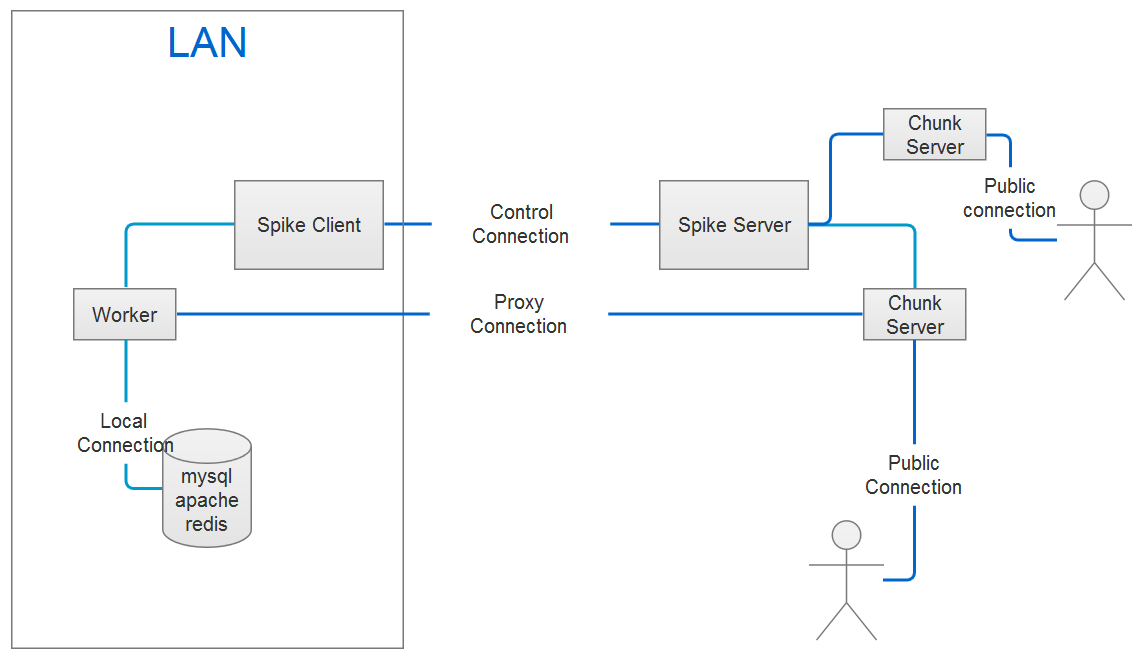
## Schematic diagram
## Configure the server
A public machine that can be accessed on the internet is needed. Assuming already. There are two ways to start the server
### Based on defaults
Use the following command to start the server
```bash
$ spiked --address=127.0.0.1:8088
```
The above command can create a basic service. If you want to customize more information, you should start the server based on
the configuration file.
### Based on the configuration file.
- Creates a configuration file
Execute the following command to create it.
```bash
$ spiked init --dir=/home/conf --format=json
```
Yaml,Xml,Ini and Json(default) files are supported. Use the following command for help.
```bash
$ spiked init -h
```
- Open the configuration file and modify the parameters.
- Executes the following command to start the service.
```bash
$ spiked --config=/home/conf/spiked.json
```
## Configure the client.
You should first create a configuration file for the client.
- Execute the following command to create it
```bash
$ spike init --dir=/home/conf --format=json
```
Use the following command for help about this command
```bash
$ spike init -h
```
- Open the configuration file and modify the parameters.
- Start the client service.
```bash
$ spike --config=/home/conf/spike.json
```
## Tunnel
The definition of the tunnel only in the client, the server does not need to do any configuration, so as to achieve the most simplified configuration.
> Now supports both http and tcp tunnels
Open the configuration file for the client and modify the parameters for "tunnel".
- Add an HTTP tunnel
```json
{
"protocol": "http",
"serverPort": 8086,
"proxyHosts": {
"www.foo.com": "127.0.0.1:80",
"www.bar.com": "192.168.1.101:8080"
}
}
```
Restarts the client service. Visit "http://www.foo.com:8086", the service will be forwarded to the local "127.0.0.1:80";
Note that resolve "www.foo.com" to the server IP.
- Add a TCP tunnel
The services based on the tcp can use the tunnel, such as: mysql, redis, ssh and so on; The following is an example of proxy mysql service
```json
{
"protocol": "tcp",
"serverPort": 8087,
"host": "127.0.0.1:3306"
}
```
Execute the following command to visit the local mysql service.
```bash
$ mysql -h SERVER IP -P 8087
```
## Client authentication
The authentication is not enabled on the server based on defaults.You should start the server based on configuration file,
if you want to enable this.
- Enable authentication
Open the configuration file for the server and modify parameters for "auth" and restart the service.
> Currently only supports a simple user name password authentication, more authentication methods will be added later.
- Modify the client identity information
Open the configuration file for the client and modify parameters for "auth". Keep the same parameters as the server.
## Configure log
The default to open the console and file two forms of the log; the first will print the logs to the console; the second
will write all the logs to the specified file; Default log level is "info"; You can adjust this in the configuration file.
## List Commands
```bash
$ spike list
_____ _____ _ _ _ _____
/ ___/ | _ \ | | | | / / | ____|
| |___ | |_| | | | | |/ / | |__
\___ \ | ___/ | | | |\ \ | __|
___| | | | | | | | \ \ | |___
/_____/ |_| |_| |_| \_\ |_____|
Spike Client 0.0.1
Usage:
command [options] [arguments]
Options:
-h, --help Display this help message
-q, --quiet Do not output any message
-V, --version Display this application version
--ansi Force ANSI output
--no-ansi Disable ANSI output
-n, --no-interaction Do not ask any interactive question
-v|vv|vvv, --verbose Increase the verbosity of messages: 1 for normal output, 2 for more verbose output and 3 for debug
Available commands:
help Displays help for a command
init Create a configuration file in the specified directory
list Lists commands
list-proxy Lists all supported proxy hosts by the client
```
## Changelog
See [CHANGELOG.md](./CHANGELOG.md)
## License
The MIT license. See [MIT](https://opensource.org/licenses/MIT)