# SeeAct_code
**Repository Path**: gabrielaliu/see-act_code
## Basic Information
- **Project Name**: SeeAct_code
- **Description**: No description available
- **Primary Language**: Unknown
- **License**: Not specified
- **Default Branch**: main
- **Homepage**: None
- **GVP Project**: No
## Statistics
- **Stars**: 0
- **Forks**: 0
- **Created**: 2024-01-22
- **Last Updated**: 2024-01-23
## Categories & Tags
**Categories**: Uncategorized
**Tags**: None
## README
[//]: # (# SeeAct
GPT-4V(ision) is a Generalist Web Agent, if Grounded)
SeeAct
GPT-4V(ision) is a Generalist Web Agent, if Grounded





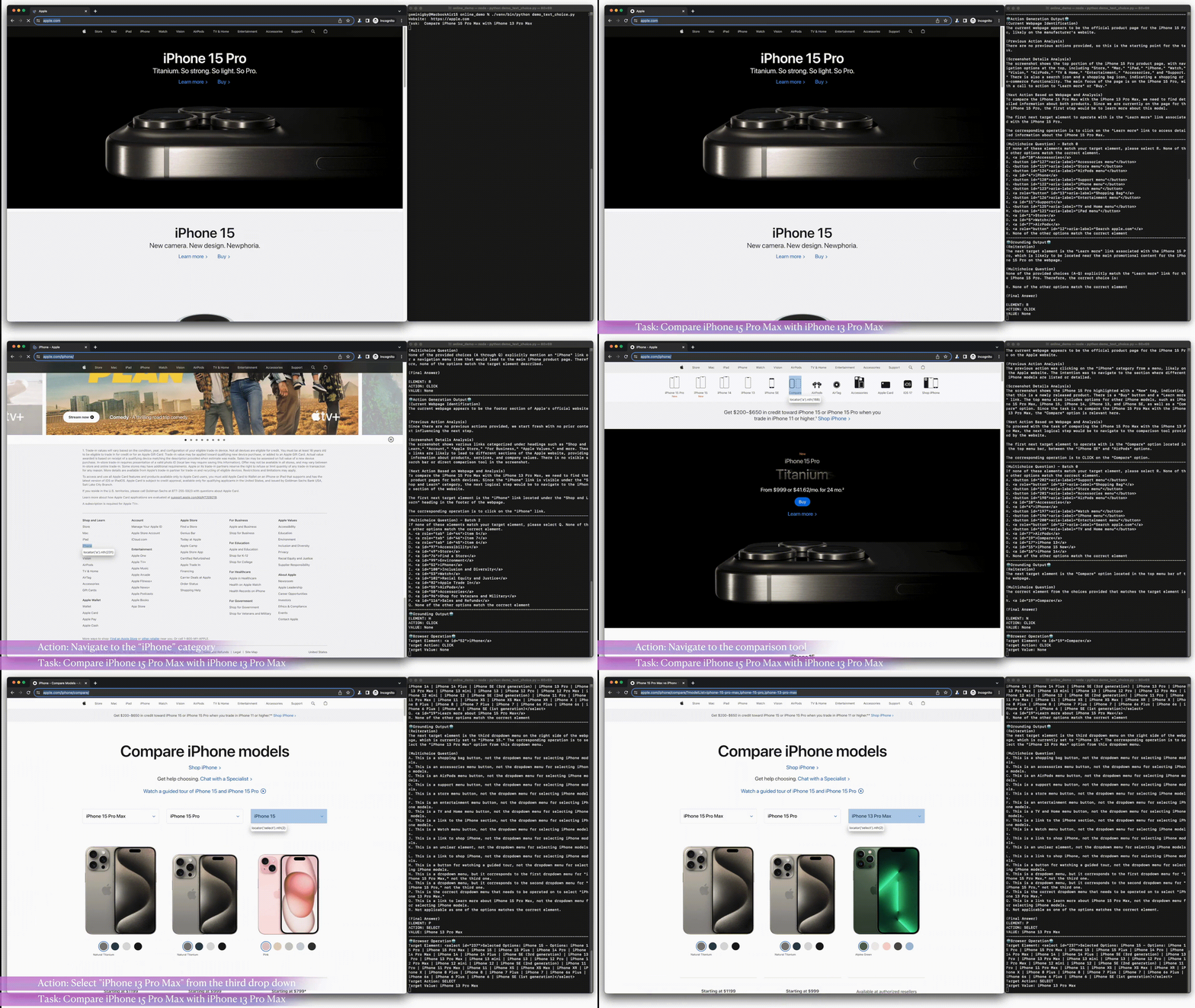
SeeAct is a system for generalist web agents that autonomously carry out tasks on any given website,
with a focus on large multimodal models (LMMs) such as GPT-4V(ision).
It consists of two main components:
(1) A robust codebase that supports running web agents on live websites, and
(2) an innovative framework that utilizes LMMs as generalist web agents.
Website •
Paper •
Twitter
# SeeAct Tool
The SeeAct tool enables running web agents on live websites through [PlayWright](https://playwright.dev/),
serving as an interface between an agent and a web browser.
It efficiently tunnels inputs from the browser to the agent, and translates predicted actions of the agent into browser events for execution.
This tool can be used for running web agent demos and evaluating their performance on live websites.
## Setup Environment
1. Create a conda environment and install dependency:
```bash
conda create -n seeact python=3.10
conda activate seeact
pip install -r requirements.txt
```
2. Set up PlayWright and install the browser kernels.
```bash
playwright install
```
## Running Web Agent
**Please fill in the OpenAI API Key in the configuration file at `src/config/demo_mode.toml` before running SeeAct.
Your API key is available through your [OpenAI account page](https://platform.openai.com/account/api-keys).
Note that the key is only stored locally and will NOT be shared anywhere.**
### Demo Mode
In the demo mode, SeeAct takes `task` and `website` from user terminal input. Run SeeAct in demo mode with the following command:
```bash
cd src
python seeact.py
```
Demo mode will use the default configuration file at `src/config/demo_mode.toml`.
#### Configuration
SeeAct is configurable through TOML files in `src/config/`.
These files enable you to customize various aspects of the system's behavior
via the following parameters:
- `is_demo`: Set `true` to allow task and website from user terminal input, set `false` to run tasks and websites from a JSON file (useful for batch evaluation).
- `default_task` and `default_website`: Default task and website used in the demo mode.
- `max_op`: Maximum number of actions the agent can take for a task.
- `api_key`: OpenAI API key.
- `save_file_dir`: Directory path to save output results, including terminal logs and screenshot images.
#### Terminal User Input
After starting SeeAct, you'll be required to enter a `task description`
or you can press `Enter` to use the default task of finding our paper on arXiv.
Next, you need to input the `website URL` (please ensure it includes all necessary prefixes (https, www))
or you can press `Enter` to use the default Google homepage (https://www.google.com/).
### Auto Mode
You can also automatically run SeeAct on a list of tasks and websites in a JSON file.
Run SeeAct with the following command:
```bash
cd src
python seeact.py -c config/auto_mode.toml
```
In the configuration file, `task_file_path` defines the path of the JSON file.
It is default to `../data/online_tasks/sample_tasks.json`, which contains a variety of task examples.
### Customized Usage
For custom scenarios, modify the configuration files to adapt the tool
to your specific requirements.
This includes setting up custom tasks, adjusting experiment parameters,
and configuring Playwright options for more precise control over the web browsing experience.
## Safety and Monitoring
The current version is research/experimental in nature and by no means perfect. Please always be very cautious of safety risks and closely monitor the agent.
In the default setting (`monitor = true`), the agent will prompt for confirmation before executing every operation.
This setting pauses the agent before each operation, allowing for close examination, action rejection, and other human intervention like manually doing some operation when needed.
**You should always monitor the agent's predictions before execution to prevent harmful outcomes. Please reject any action that may cause any potential harm.**
You can monitor and intervene actions through terminal input before each execution:
- `Y` or `Enter`: Accept this action.
- `n`: Reject this action and record it in the action history.
- `i`: Reject this action and pause for human intervention.
- During the pause, you can do anything, such as opening or closing tabs, opening another link, and so on, except for directly closing the browser. If the current active tab is closed, the active tab will default to the last tab in the browser. If all tabs are closed, the browser will reopen a Google page.
- You can leave a message after manual operations, which will be injected into the prompt of the agent, for better human-agent cooperation.
- `e`: Terminate the session and save results.
We do not support direct login actions to safeguard your personal information
and prevent exposure to potential safety and legal risks.
**To prevent unintended consequential errors, we advise against using SeeAct for tasks that require account login.**
# Experiments
## Dataset
The dataset is derived from Mind2Web by pairing each HTML text with the rendered webpage screenshots.
The screenshot image data comes from the [Raw Dump with Full Traces and Snapshots](https://github.com/OSU-NLP-Group/Mind2Web?tab=readme-ov-file#raw-dump-with-full-traces-and-snapshots) captured with PlayWright during data annotation.
### Screenshot Generation
You can also generate screenshot image and query text data from the Mind2Web raw dump.
Run the following commands to generate screenshot images and overlay image annotation for each grounding method:
```
cd src/offline_experiments/screenshot_generation
# Textual Choices
python textual_choices.py
# Element Attributes
python element_attributes.py
# Image Annotation
python image_annotation.py
```
## Online Evaluation of Mind2Web Tasks
To reproduce the online evaluation experiments in the paper, run the following command to run SeeAct in auto mode:
```
python src/seeact.py -c config/online_exp.toml
```
Note: Some tasks may require manual updates to the task descriptions due to time sensitivity.
We followed the 2-stage strategy of [MindAct](https://github.com/OSU-NLP-Group/Mind2Web) for fair comparison. You can find the trained ranker model [DeBERTa-v3-base](https://huggingface.co/osunlp/MindAct_CandidateGeneration_deberta-v3-base) in the Huggingface Model Hub.
## Licensing Information
The code under this repo is licensed under an [OPEN RAIL-S License](https://www.licenses.ai/ai-pubs-open-rails-vz1).
The data under this repo is licensed under an [OPEN RAIL-D License](https://huggingface.co/blog/open_rail).
The model weight and parameters under this repo are licensed under an [OPEN RAIL-M License](https://www.licenses.ai/ai-pubs-open-railm-vz1).
## Disclaimer
The code was released solely for research purposes, with the goal of making the web more accessible via language technologies.
The authors are strongly against any potentially harmful use of the data or technology by any party.
## Acknowledgment
We extend our heartfelt thanks to Xiang Deng for his original contributions to the SeeAct system.
Additionally, we are grateful to our colleagues from the OSU NLP group for
testing the SeeAct system and offering valuable feedback.
## Contact
Questions or issues? File an issue or contact
[Boyuan Zheng](mailto:zheng.2372@osu.edu),
[Boyu Gou](mailto:gou.43@osu.edu),
[Huan Sun](mailto:sun.397@osu.edu),
[Yu Su](mailto:su.809@osu.edu),
The Ohio State University
## Citation Information
If you find this work useful, please consider starring our repos and citing our papers:

 ```
@article{zheng2023seeact,
title={GPT-4V(ision) is a Generalist Web Agent, if Grounded},
author={Boyuan Zheng and Boyu Gou and Jihyung Kil and Huan Sun and Yu Su},
journal={arXiv preprint arXiv:2401.01614},
year={2024},
}
@inproceedings{deng2023mindweb,
title={Mind2Web: Towards a Generalist Agent for the Web},
author={Xiang Deng and Yu Gu and Boyuan Zheng and Shijie Chen and Samuel Stevens and Boshi Wang and Huan Sun and Yu Su},
booktitle={Thirty-seventh Conference on Neural Information Processing Systems},
year={2023},
url={https://openreview.net/forum?id=kiYqbO3wqw}
}
```
```
@article{zheng2023seeact,
title={GPT-4V(ision) is a Generalist Web Agent, if Grounded},
author={Boyuan Zheng and Boyu Gou and Jihyung Kil and Huan Sun and Yu Su},
journal={arXiv preprint arXiv:2401.01614},
year={2024},
}
@inproceedings{deng2023mindweb,
title={Mind2Web: Towards a Generalist Agent for the Web},
author={Xiang Deng and Yu Gu and Boyuan Zheng and Shijie Chen and Samuel Stevens and Boshi Wang and Huan Sun and Yu Su},
booktitle={Thirty-seventh Conference on Neural Information Processing Systems},
year={2023},
url={https://openreview.net/forum?id=kiYqbO3wqw}
}
```