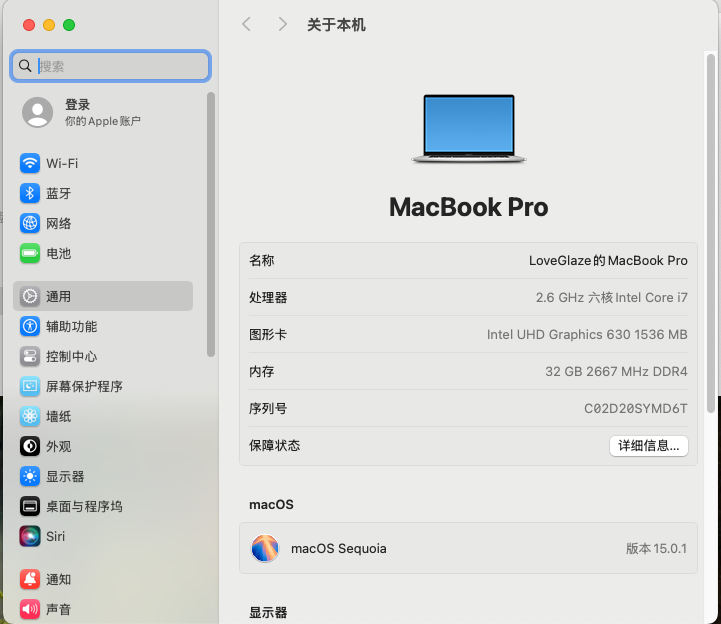
# Hackintosh-LEGION-Y7000P-I7-9750H
**Repository Path**: gclm/Hackintosh-LEGION-Y7000P-I7-9750H
## Basic Information
- **Project Name**: Hackintosh-LEGION-Y7000P-I7-9750H
- **Description**: 联想拯救者Y7000P I7-9750H 准完美级 EFI
- **Primary Language**: Unknown
- **License**: AGPL-3.0
- **Default Branch**: master
- **Homepage**: None
- **GVP Project**: No
## Statistics
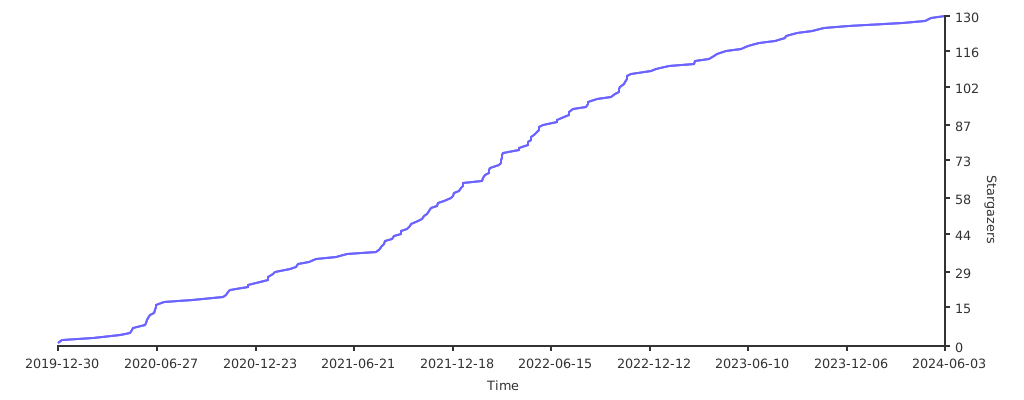
- **Stars**: 3
- **Forks**: 1
- **Created**: 2022-12-20
- **Last Updated**: 2026-01-07
## Categories & Tags
**Categories**: Uncategorized
**Tags**: None
## README
# Hackintosh-LEGION-Y7000P-I7-9750H
> 联想拯救者 Y7000P I7-9750H 准完美级 EFI

### 安装教程
[](https://github.com/gclm/Hackintosh-LEGION-Y7000P-I7-9750H/tree/master/Course/README.md)
[](https://gitee.com/gclm/Hackintosh-LEGION-Y7000P-I7-9750H/tree/master/Course/README.md)
[](https://loveglaze.cn/TOOLS/Hackintosh/Hackintosh-LEGION-Y7000P-I7-9750H)
### OC更新教程
[](https://github.com/gclm/Hackintosh-LEGION-Y7000P-I7-9750H/tree/master/Course/OCAuxiliaryTools/README.md)
[](https://gitee.com/gclm/Hackintosh-LEGION-Y7000P-I7-9750H/tree/master/Course/OCAuxiliaryTools/README.md)
[](https://loveglaze.cn/TOOLS/Hackintosh/Hackintosh-LEGION-Y7000P-I7-9750H/Course/OCAuxiliaryTools)
## 仓库
[](https://github.com/gclm/Hackintosh-LEGION-Y7000P-I7-9750H)
[](https://gitee.com/gclm/Hackintosh-LEGION-Y7000P-I7-9750H)
## 电脑配置
```
电脑型号 联想 81T1
操作系统 Microsoft Windows 11 企业版 Insider Preview (64位)
CPU (英特尔)Intel(R) Core(TM) i7-9750H CPU @ 2.60GHz(2592 MHz)
主板 联想 LNVNB161216
内存 32.00 GB ( 2667 MHz)
硬盘 Lenovo SSD SL700 480G
显卡 NVIDIA GeForce GTX 1650,核显 Intel(R) UHD Graphics 630
显示器 京东方 BOE HF 32位真彩色 144Hz
声卡 Realtek High Definition Audio
网卡 Intel(R) Wi-Fi 6 AX200 160MHz
```
## EFI 信息
- 配置: i7-9750H/UHD630/AX200
- 屏蔽 PM981 补丁
- 电源管理/蓝牙/WIFI 状态良好,睡眠正常
- 触摸板支持多指操作
- 屏蔽独显,不支持 HDMI(以咨询过联想客服 HDMI、DP、Type-C 都是连接的独显)
- 支持 FN 热键,可以使用系统组合键调节亮度、声音等
- 有任何问题下方加群解决
## 项目结构
```
..
├── Clover Clover引导(已过时)
├── LICENSE 开发协议
├── Course 安装教程
├── OpenCore OC引导
├── README.md 说明文档
└── Script 修复补丁
```
## 更新日志
| 时间 | 版本 | 更新日志 |
| ---------- | ---- | ------------------------------------------------------------ |
| 2019.12.09 | v1.0 | 发布第一版目前只支持 10.14.6,10.15.x 没进行测试 |
| 2019.12.28 | v1.1 | 进行了大量更新 |
| 2020.02.20 | v1.2 | 全面适配10.15.x(10.15.1、10.15.2、10.15.3) |
| 2020.03.27 | v1.3 | 优化小太阳和小键盘驱动等问题 |
| 2020.05.04 | v1.4 | 优化UI和更新相关依赖 |
| 2020.10.11 | v1.6 | 优化UI和三码相关信息 |
| 2021.01.31 | v2.0 | 新增OpenCore配置,支持11.x |
| 2021.10.30 | v2.4 | OpenCore 0.7.5,支持Monterey,修复蓝牙问题 |
| 2022.01.22 | v2.5 | OpenCore 0.7.7,CLOVER 5143,支持Monterey |
| 2022.06.12 | v2.6 | OpenCore 0.8.2(开发版),支持Ventura |
| 2024.10.21 | v2.7 | OpenCore 1.0.2,支持MacOS Sequoia 15.0.1,WiFi蓝牙需要[OCLP补丁](https://github.com/laobamac/OCLP-Mod/releases)驱动 |
| 2025.12.07 | v2.8 | OpenCore 1.0.6,支持MacOS Sequoia/Tahoe,WiFi蓝牙需要[OCLP3.0.0补丁](https://github.com/lzhoang2801/OpenCore-Legacy-Patcher/releases/tag/3.0.0) |
更新简介:
```
OpenCore:
更新至1.0.6
支持MacOS Tahoe,WiFi声卡需要安装好Tahoe后,需要使用OC目录下的仿冒博通卡.plist进入系统,然后使用OCLP3.0.0打完补丁(不要重启),
换回之前的config.plist(或者注释掉仿冒的网卡),再重启。因为在本机上测试AppleVTD开启会产生冲突导致无法加载wifi,重构DMAR.aml、勾
选DisableioMapping依旧不行,因此勾选Kernel-Quirks-DisableioMapper禁用AppleVTD。若使用MacOS Sequoia系统则不需要仿冒,直接打补丁
即可使用。
CLOVER(停更):
更新至5143,睡眠、触控、蓝牙一切正常。
```


## 问题修复
#### 若有小键盘无法驱动、扬声器无声或杂音、时间同步等问题,请运行以下命令修复
使用方法:运行命令修复后(建议使用gitee),输入0退出,会弹出补丁窗口,打开设置-隐私与安全-辅助功能,将补丁拖入窗口即可
- github命令
```
sudo sh -c "$(curl -fsSL https://github.com/gclm/Hackintosh-LEGION-Y7000P-I7-9750H/raw/master/Script/Optimize.sh)"
```
- gitee命令
```
sudo sh -c "$(curl -fsSL https://gitee.com/gclm/Hackintosh-LEGION-Y7000P-I7-9750H/raw/master/Script/Optimize.sh)"
```
##### 修复Y9000X Mac OS 扬声器无声:
```
sudo sh -c "$(curl -fsSL https://gitee.com/gclm/Hackintosh-LEGION-Y7000P-I7-9750H/raw/master/Script/FixSpeaker-Y9000X/FixSpeaker-Y9000X.sh)"
```
- 在OC引导`config.plist`配置文件`PciRoot(0x0)/Pci(0x1f,0x3)`项添加:
```
layout-id
66
alc-verbs
AQAAAA==
```
## 开启HIDPI
### 打开Hackintool

```
将导出后的DisplayVendorID-xxxx文件夹及lcons.plist放入以下位置
访达—安装盘名—资源库—Displays—Contents—Resources—Overrides (如果没有这个文件夹手动创建一个)将文件拖入进去即可
重启,在RDM上选用带闪电⚡️的1080P即可
```
- [Hackintool下载](https://github.com/headkaze/Hackintool)
- [RDM下载](https://github.com/avibrazil/RDM)
- 开启前

- 开启后

#### [偷偷扔一个超频工具](https://github.com/LoveGlaze/Y7000P-Memory-overclocking)
## 反馈
- 反馈建议地址:
- Email:[gclm159@gmail.com](mailto:gclm159@gmail.com)
- 交流 QQ 群:724052199 ## 赞赏
## 赞赏
 ## 贡献者
 ## Star
**📣如果帮助到你了,请帮忙点亮[Github](https://github.com/gclm/Hackintosh-LEGION-Y7000P-I7-9750H)右上角小星星,这将是我持续更新的动力!**
[](https://starchart.cc/gclm/Hackintosh-LEGION-Y7000P-I7-9750H.svg)
## 鸣谢
- [zxystd](https://github.com/zxystd)的[itlwm](https://github.com/OpenIntelWireless/itlwm)及蓝牙驱动
- [Acidanthera](https://github.com/acidanthera)的OpenCore及其他驱动
- [YasuStudio](https://gitee.com/YasuStudio/fix-speaker-y9000x)整合的[Y9000X](https://github.com/SukkaW/Lenovo-Y9000X-Hackintosh)扬声器修复
- [damieng](https://github.com/damieng/setledsmac)的小键盘驱动
- [goodwin](https://github.com/goodwin/ALCPlugFix)的声卡修复以及[jief666](https://github.com/jief666/ALC298PlugFix)的改进
- [harmc0re](https://www.insanelymac.com/forum/topic/264769-fix-the-time-difference-between-osx86-and-windows-in-multiboot-setups)的时间同步
- 感谢远景论坛等网上大佬们的各种帖子方法驱动
- 感谢群友一起吹水聊天爬贴解决问题(PS:懒得写名字)
## Star
**📣如果帮助到你了,请帮忙点亮[Github](https://github.com/gclm/Hackintosh-LEGION-Y7000P-I7-9750H)右上角小星星,这将是我持续更新的动力!**
[](https://starchart.cc/gclm/Hackintosh-LEGION-Y7000P-I7-9750H.svg)
## 鸣谢
- [zxystd](https://github.com/zxystd)的[itlwm](https://github.com/OpenIntelWireless/itlwm)及蓝牙驱动
- [Acidanthera](https://github.com/acidanthera)的OpenCore及其他驱动
- [YasuStudio](https://gitee.com/YasuStudio/fix-speaker-y9000x)整合的[Y9000X](https://github.com/SukkaW/Lenovo-Y9000X-Hackintosh)扬声器修复
- [damieng](https://github.com/damieng/setledsmac)的小键盘驱动
- [goodwin](https://github.com/goodwin/ALCPlugFix)的声卡修复以及[jief666](https://github.com/jief666/ALC298PlugFix)的改进
- [harmc0re](https://www.insanelymac.com/forum/topic/264769-fix-the-time-difference-between-osx86-and-windows-in-multiboot-setups)的时间同步
- 感谢远景论坛等网上大佬们的各种帖子方法驱动
- 感谢群友一起吹水聊天爬贴解决问题(PS:懒得写名字)