# transparent-background
**Repository Path**: grayloach/transparent-background
## Basic Information
- **Project Name**: transparent-background
- **Description**: 一个基于深度学习的背景移除工具,由 InSPyReNet (ACCV 2022) 模型驱动。
- **Primary Language**: Python
- **License**: MIT
- **Default Branch**: main
- **Homepage**: None
- **GVP Project**: No
## Statistics
- **Stars**: 0
- **Forks**: 0
- **Created**: 2025-06-14
- **Last Updated**: 2025-06-14
## Categories & Tags
**Categories**: Uncategorized
**Tags**: None
## README
# Transparent Background





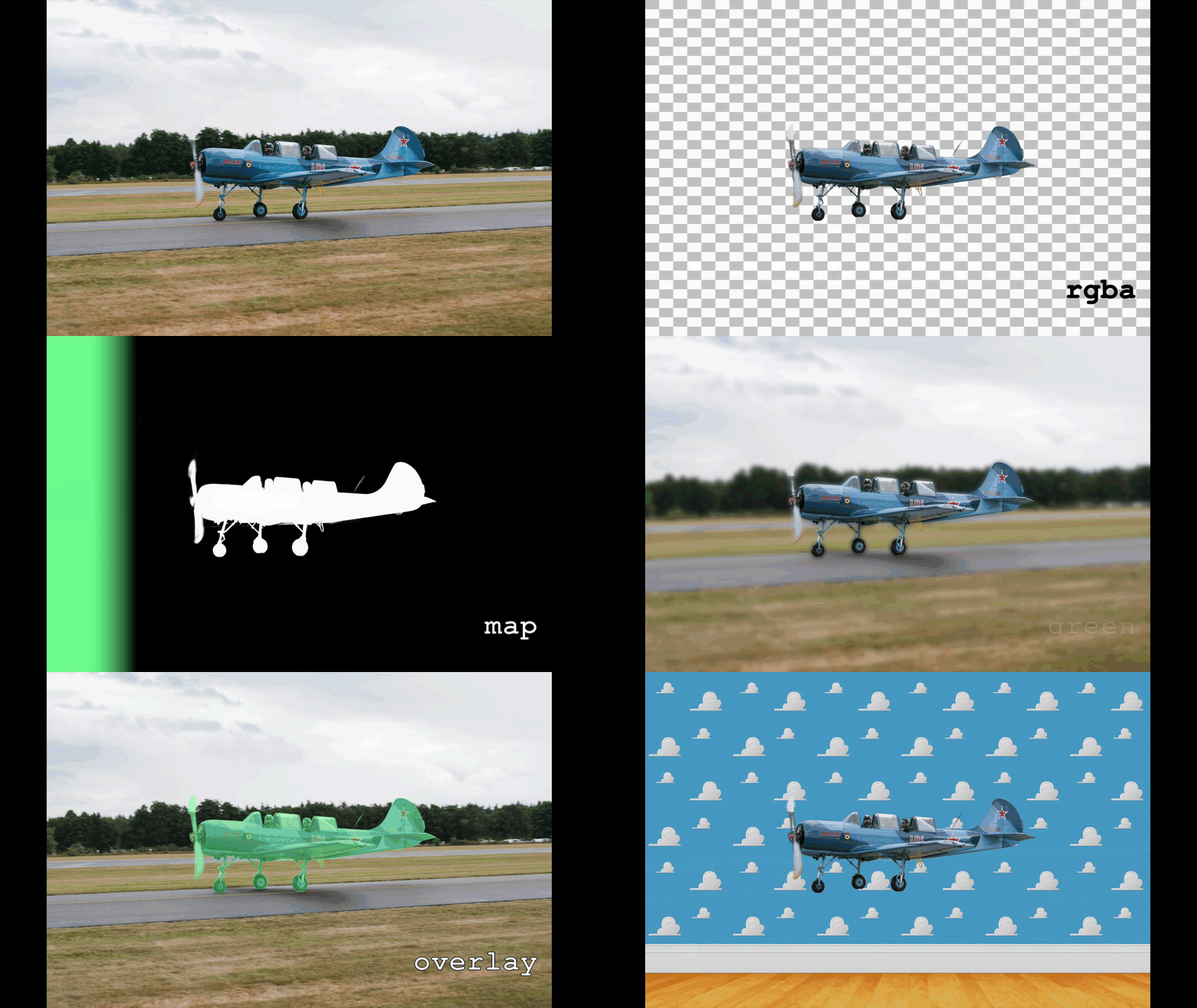
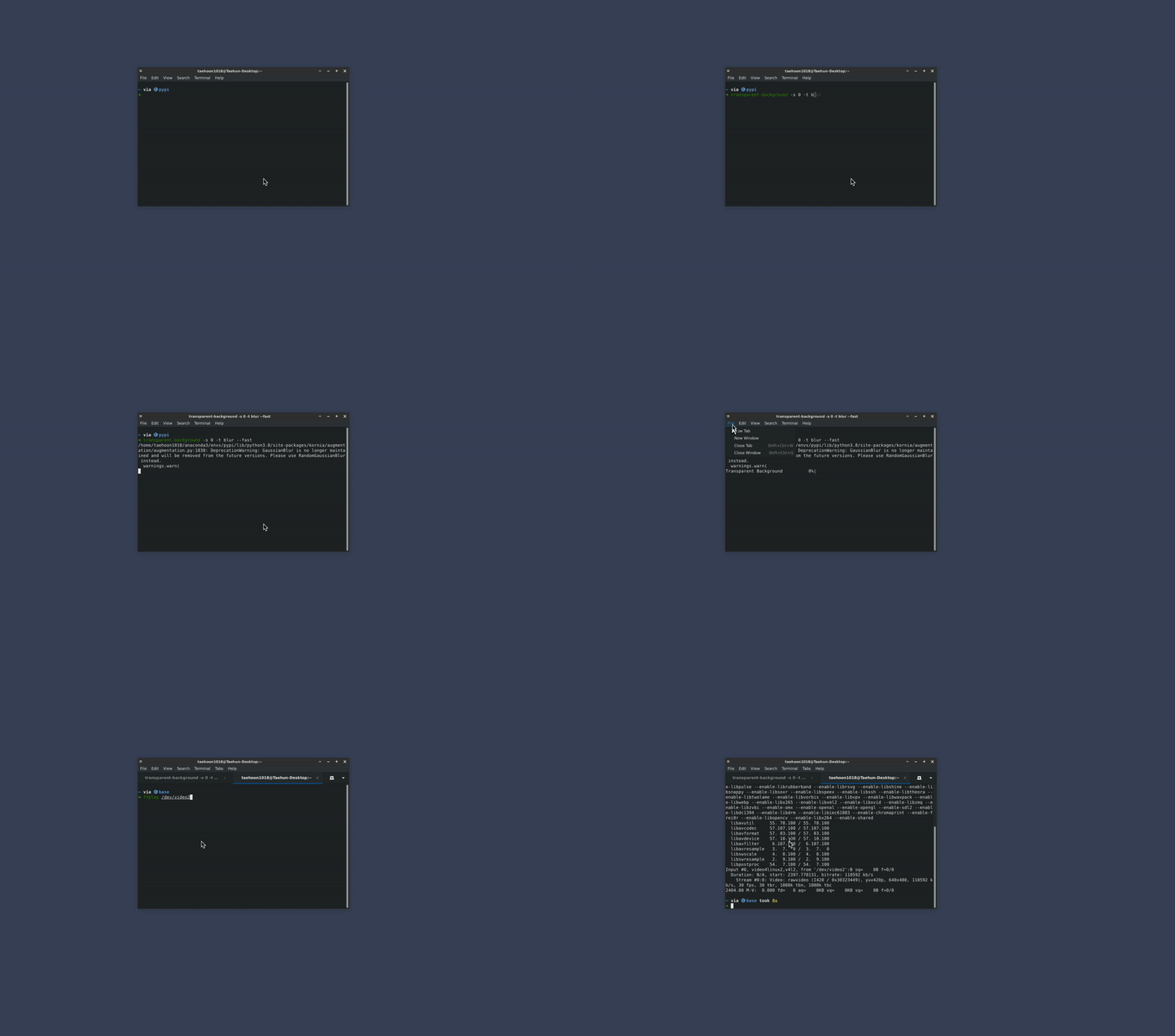
This is a background removing tool powered by [InSPyReNet (ACCV 2022)](https://github.com/plemeri/InSPyReNet.git). You can easily remove background from the image or video or bunch of other stuffs when you can make the background transparent!
Image | Video | Webcam
:-:|:-:|:-:
 |
|  |
|  ## ©️ Citation
If you make use of this work, please cite our work.
```
@inproceedings{kim2022revisiting,
title={Revisiting Image Pyramid Structure for High Resolution Salient Object Detection},
author={Kim, Taehun and Kim, Kunhee and Lee, Joonyeong and Cha, Dongmin and Lee, Jiho and Kim, Daijin},
booktitle={Proceedings of the Asian Conference on Computer Vision},
pages={108--124},
year={2022}
}
```
## :rotating_light: Notice
* `--jit` option, also known as TorchScript option is widely used recently for disabling dynamic resizing for stable output. Since it wasn't mean to be used in this way, I added `--resize` option. For those who used `--jit` option because of the stability, you don't have to specify anymore. You may also access to this option in python API and GUI mode.
* Default option is `--resize static` which provides less detailed prediction but more stable
* `--resize dynamic` option was the previous default option which was disabled by `--jit` option previously. This will provide more detailed prediction but less stable than `--resize static` option.
* `flet` has been moved to extra dependency since GUI mode is not used for most active users, and causing import error for latest version. Please install with `pip install transparent-background[gui]`
## :newspaper: News
* Our package is currently not working properly on small images without `--fast` argument. Sorry for the inconvenience and we'll fix this issue with better algorithm coming out shortly.
* [2023.09.22] For the issue with small images without `--fast` argument, please download [This Checkpoint](https://drive.google.com/file/d/13YER0ri0RZkTdGQqWiwK795i39FrXNKL/view?usp=sharing). After some user feedback (create issue or contact me), I'll decide to substitute the current checkpoint to the newer one or train again with different approach.
* [2023.09.25] The above checkpoint is now available with `--mode base-nightly` argument. `--fast` argument is deprecated. Use `--mode [MODE]` instead. `--mode` argument supports `base`, `fast` and `base-nightly`. Note that `base-nightly` can be changed without any notice.
* [2023.10.19] Webcam support is not stable currently. We remove the dependency for the latest release. Install with extra dependency option `pip install transparent-background[webcam]` if you want to use webcam input.
* [2024.02.14] I added a [github sponsor badge](https://github.com/sponsors/plemeri). Please help maintaining this project if you think this package is useful!
* [2024.08.22] [ComfyUI-Inspyrenet-Rembg](https://github.com/john-mnz/ComfyUI-Inspyrenet-Rembg) is implemented by [john-mnz](https://github.com/john-mnz). Thank you for sharing great work!
* [2024.09.06] `transparent-background` total download counts reached 500,000 and ranked 5969 on [🏆top=pypi-package](https://hugovk.github.io/top-pypi-packages/). Thank you all for your huge support!
## ©️ Citation
If you make use of this work, please cite our work.
```
@inproceedings{kim2022revisiting,
title={Revisiting Image Pyramid Structure for High Resolution Salient Object Detection},
author={Kim, Taehun and Kim, Kunhee and Lee, Joonyeong and Cha, Dongmin and Lee, Jiho and Kim, Daijin},
booktitle={Proceedings of the Asian Conference on Computer Vision},
pages={108--124},
year={2022}
}
```
## :rotating_light: Notice
* `--jit` option, also known as TorchScript option is widely used recently for disabling dynamic resizing for stable output. Since it wasn't mean to be used in this way, I added `--resize` option. For those who used `--jit` option because of the stability, you don't have to specify anymore. You may also access to this option in python API and GUI mode.
* Default option is `--resize static` which provides less detailed prediction but more stable
* `--resize dynamic` option was the previous default option which was disabled by `--jit` option previously. This will provide more detailed prediction but less stable than `--resize static` option.
* `flet` has been moved to extra dependency since GUI mode is not used for most active users, and causing import error for latest version. Please install with `pip install transparent-background[gui]`
## :newspaper: News
* Our package is currently not working properly on small images without `--fast` argument. Sorry for the inconvenience and we'll fix this issue with better algorithm coming out shortly.
* [2023.09.22] For the issue with small images without `--fast` argument, please download [This Checkpoint](https://drive.google.com/file/d/13YER0ri0RZkTdGQqWiwK795i39FrXNKL/view?usp=sharing). After some user feedback (create issue or contact me), I'll decide to substitute the current checkpoint to the newer one or train again with different approach.
* [2023.09.25] The above checkpoint is now available with `--mode base-nightly` argument. `--fast` argument is deprecated. Use `--mode [MODE]` instead. `--mode` argument supports `base`, `fast` and `base-nightly`. Note that `base-nightly` can be changed without any notice.
* [2023.10.19] Webcam support is not stable currently. We remove the dependency for the latest release. Install with extra dependency option `pip install transparent-background[webcam]` if you want to use webcam input.
* [2024.02.14] I added a [github sponsor badge](https://github.com/sponsors/plemeri). Please help maintaining this project if you think this package is useful!
* [2024.08.22] [ComfyUI-Inspyrenet-Rembg](https://github.com/john-mnz/ComfyUI-Inspyrenet-Rembg) is implemented by [john-mnz](https://github.com/john-mnz). Thank you for sharing great work!
* [2024.09.06] `transparent-background` total download counts reached 500,000 and ranked 5969 on [🏆top=pypi-package](https://hugovk.github.io/top-pypi-packages/). Thank you all for your huge support!
 * [2024.10.05] `--format`, `--resize` and `--reverse` options are implemented. See Command Line and Usage sections for more details.
## :inbox_tray: Installation
### Dependencies (python packages)
package | version (>=)
:-|:-
`pytorch` | `1.7.1`
`torchvision` | `0.8.2`
`opencv-python` | `4.6.0.66`
`timm` | `1.0.3`
`tqdm` | `4.64.1`
`kornia` | `0.5.4`
`gdown` | `4.5.4`
`pyvirtualcam` (optional) | `0.6.0`
Note: If you have any problem with [`pyvirtualcam`](https://pypi.org/project/pyvirtualcam/), please visit their github repository or pypi homepage. Due to the backend workflow for Windows and macOS, we only support Linux for webcam input.
### Dependencies
#### 1. Webcam input
We basically follow the virtual camera settings from [`pyvirtualcam`](https://pypi.org/project/pyvirtualcam/). If you do not choose to install virtual camera, it will visualize real-time output with `cv2.imshow`.
##### A. Linux (v4l2loopback)
```bash
# Install v4l2loopback for webcam relay
$ git clone https://github.com/umlaeute/v4l2loopback.git && cd v4l2loopback
$ make && sudo make install
$ sudo depmod -a
# Create virtual webcam
$ sudo modprobe v4l2loopback devices=1
```
* Note: If you have any problem with installing [`v4l2loopback`](https://github.com/umlaeute/v4l2loopback), please visit their github repository.
##### B. Windows (OBS)
Install OBS virtual camera from [install OBS](https://obsproject.com/).
##### C. macOS (OBS) [not stable]
Follow the steps below.
* [Install OBS](https://obsproject.com/).
* Start OBS.
* Click "Start Virtual Camera" (bottom right), then "Stop Virtual Camera".
* Close OBS.
#### 2. File explorer for GUI
##### A. Linux
You need to install `zenity` to open files and directories on Linux
```bash
sudo apt install zenity
```
### Install `transparent-background`
* Note: please specify `extra-index-url` as below if you want to use gpu, particularly on Windows.
* CUDA 11.8
```
--extra-index-url https://download.pytorch.org/whl/cu118
```
* CUDA 12.8
```
--extra-index-url https://download.pytorch.org/whl/cu128
```
#### Install from `pypi`
```bash
pip install --extra-index-url https://download.pytorch.org/whl/cu118 transparent-background # install with official pytorch
```
##### With webcam support (not stable)
```bash
pip install --extra-index-url https://download.pytorch.org/whl/cu118 transparent-background[webcam] # with webcam dependency
```
##### With gui support
```bash
pip install --extra-index-url https://download.pytorch.org/whl/cu118 transparent-background[gui] # with gui dependency (flet)
```
#### Install from Github
```bash
pip install --extra-index-url https://download.pytorch.org/whl/cu118 git+https://github.com/plemeri/transparent-background.git
```
#### Install from local
```bash
git clone https://github.com/plemeri/transparent-background.git
cd transparent-background
pip install --extra-index-url https://download.pytorch.org/whl/cu118 .
```
#### Install CPU version only
```bash
# On Windows
pip install transparent-background
pip uninstall torch torchvision torchaudio
pip install torch torchvision torchaudio
# On Linux
pip install transparent-background
pip uninstall torch torchvision torchaudio
pip install torch torchvision torchaudio --index-url https://download.pytorch.org/whl/cpu
```
#### Install GPU acceleration for RGBA output
When generating RGBA output, the foreground color is estimated using [`pymatting.estimate_foreground_ml`](https://pymatting.github.io/foreground.html#estimate_foreground_ml), which implements [Germer et al., 2020](https://arxiv.org/abs/2006.14970). [pymatting](https://pymatting.github.io/)'s optional GPU acceleration requires installing [CuPy](https://docs.cupy.dev/en/stable/install.html) (if the GPU supports CUDA) or [pyopencl](https://pypi.org/project/pyopencl/). These packages are detected at runtime if available.
### [New] Configuration
`transparent-background` now supports external configuration rather than hard coded assets (e.g., checkpoint download url).
* The config file will be added in your home directory `~/.transparent-background/config.yaml` by default. The directory location can be customized by setting the desired file path under the environment variable `TRANSPARENT_BACKGROUND_FILE_PATH`. (Contributed by [kwokster10](https://github.com/kwokster10))
* You may change the `url` argument to your Google Drive download link. (Please note that only Google Drive is supported.)
* You may change the `md5` argument to your file's md5 checksum. Or, set `md5` to `NULL` to skip verification.
* You may add `http_proxy` argument to specify the proxy address as you need. If your internet connection is behind a HTTP proxy (e.g. `http://192.168.1.80:8080`), you can set this argument. (Contributed by [bombless](https://github.com/bombless))
```yaml
base:
url: "https://drive.google.com/file/d/13oBl5MTVcWER3YU4fSxW3ATlVfueFQPY/view?usp=share_link" # google drive url
md5: "d692e3dd5fa1b9658949d452bebf1cda" # md5 hash (optional)
ckpt_name: "ckpt_base.pth" # file name
http_proxy: NULL # specify if needed (Contributed by bombless)
base_size: [1024, 1024]
fast:
url: "https://drive.google.com/file/d/1iRX-0MVbUjvAVns5MtVdng6CQlGOIo3m/view?usp=share_link"
md5: NULL # change md5 to NULL if you want to suppress md5 checksum process
ckpt_name: "ckpt_fast.pth"
http_proxy: "http://192.168.1.80:8080"
base_size: [384, 384]
```
* If you are an advanced user, maybe you can try making `custom` mode by training custom model from [InSPyReNet](https://github.com/plemeri/InSPyReNet.git).
```yaml
custom:
url: [your google drive url]
md5: NULL
ckpt_name: "ckpt_custom.pth"
http_proxy: "http://192.168.1.81:8080"
base_size: [768, 768]
```
```bash
$ transparent-background --source test.png --mode custom
```
## :pencil2: Usage
### :+1: GUI
You can use gui with following command after installation.
```bash
transparent-background-gui
```

### :computer: Command Line
```bash
# for apple silicon mps backend, use "PYTORCH_ENABLE_MPS_FALLBACK=1" before the command (requires torch >= 1.13)
$ transparent-background --source [SOURCE]
$ transparent-background --source [SOURCE] --dest [DEST] --threshold [THRESHOLD] --type [TYPE] --ckpt [CKPT] --mode [MODE] --resize [RESIZE] --format [FORMAT] (--reverse) (--jit)
```
* `--source [SOURCE]`: Specify your data in this argument.
* Single image - `image.png`
* Folder containing images - `path/to/img/folder`
* Single video - `video.mp4`
* Folder containing videos - `path/to/vid/folder`
* Integer for webcam address - `0` (e.g., if your webcam is at `/dev/video0`.)
* `--dest [DEST]` (optional): Specify your destination folder. Default location is current directory.
* `--threshold [THRESHOLD]` (optional): Designate threshold value from `0.0` to `1.0` for hard prediction. Do not use if you want soft prediction.
* `--type [TYPE]` (optional): Choose between `rgba`, `map` `green`, `blur`, `overlay`, and another image file. Default is `rgba`.
* `rgba` will generate RGBA output regarding saliency score as an alpha map, and perform foreground color extraction using [pymatting](https://pymatting.github.io/foreground.html) if threshold is not set. Note that this will not work for video and webcam input.
* `map` will output saliency map only.
* `green` will change the background with green screen.
* `white` will change the background with white color. -> [2023.05.24] Contributed by [carpedm20](https://github.com/carpedm20)
* `'[255, 0, 0]'` will change the background with color code [255, 0, 0]. Please use with single quotes. -> [2023.05.24] Contributed by [carpedm20](https://github.com/carpedm20)
* `blur` will blur the background.
* `overlay` will cover the salient object with translucent green color, and highlight the edges.
* Another image file (e.g., `samples/backgroud.png`) will be used as a background, and the object will be overlapped on it.
* `--ckpt [CKPT]` (optional): Use other checkpoint file. Default is trained with composite dataset and will be automatically downloaded if not available. Please refer to [Model Zoo](https://github.com/plemeri/InSPyReNet/blob/main/docs/model_zoo.md) from [InSPyReNet](https://github.com/plemeri/InSPyReNet) for available pre-trained checkpoints.
* `--mode [MODE]` (optional): Choose from `base`, `base-nightly` and `fast` mode. Use `base-nightly` for nightly release checkpoint.
* :star: `--resize [RESIZE]` (optional): Choose between `static` and `dynamic`. Dynamic will produce better results in terms of sharper edges but maybe unstable. Default is `static`
* :star: `--format [FORMAT]` (optional): Specify output format. If not specified, the output format will be identical to the input format.
* :star: `--reverse` (optional): Reversing result. In other words, foreground will be removed instead of background. This will make our package's name `transparent-foreground`! :laughing:
* `--jit` (optional): Torchscript mode. If specified, it will trace model with pytorch built-in torchscript JIT compiler. May cause delay in initialization, but reduces inference time and gpu memory usage.
### :crystal_ball: Python API
* Usage Example
```python
import cv2
import numpy as np
from PIL import Image
from transparent_background import Remover
# Load model
remover = Remover() # default setting
remover = Remover(mode='fast', jit=True, device='cuda:0', ckpt='~/latest.pth') # custom setting
remover = Remover(mode='base-nightly') # nightly release checkpoint
remover = Remover(resize='dynamic') # use dynamic resizing instead of static resizing
# Usage for image
img = Image.open('samples/aeroplane.jpg').convert('RGB') # read image
out = remover.process(img) # default setting - transparent background
out = remover.process(img, type='rgba') # same as above
out = remover.process(img, type='map') # object map only
out = remover.process(img, type='green') # image matting - green screen
out = remover.process(img, type='white') # change background with white color
out = remover.process(img, type=[255, 0, 0]) # change background with color code [255, 0, 0]
out = remover.process(img, type='blur') # blur background
out = remover.process(img, type='overlay') # overlay object map onto the image
out = remover.process(img, type='samples/background.jpg') # use another image as a background
out = remover.process(img, threshold=0.5) # use threshold parameter for hard prediction.
out = remover.process(img, reverse=True) # reverse output. background -> foreground
out.save('output.png') # save result
out.save('output.jpg') # save as jpg
# Usage for video
cap = cv2.VideoCapture('samples/b5.mp4') # video reader for input
fps = cap.get(cv2.CAP_PROP_FPS)
writer = None
while cap.isOpened():
ret, frame = cap.read() # read video
if ret is False:
break
frame = cv2.cvtColor(frame, cv2.COLOR_BGR2RGB)
img = Image.fromarray(frame).convert('RGB')
if writer is None:
writer = cv2.VideoWriter('output.mp4', cv2.VideoWriter_fourcc(*'mp4v'), fps, img.size) # video writer for output
out = remover.process(img, type='map') # same as image, except for 'rgba' which is not for video.
writer.write(cv2.cvtColor(np.array(out), cv2.COLOR_BGR2RGB))
cap.release()
writer.release()
```
## :tv: Tutorial
[rsreetech](https://github.com/rsreetech) shared a tutorial using colab. [[Youtube](https://www.youtube.com/watch?v=jKuQEnKmv4A)]
## :outbox_tray: Uninstall
```
pip uninstall transparent-background
```
## :page_facing_up: Licence
See [LICENCE](https://github.com/plemeri/transparent-background/blob/main/LICENSE) for more details.
### Acknowledgement
This work was supported by Institute of Information & communications Technology Planning & Evaluation (IITP) grant funded by the Korea government (MSIT)
(No.2017-0-00897, Development of Object Detection and Recognition for Intelligent Vehicles) and
(No.B0101-15-0266, Development of High Performance Visual BigData Discovery Platform for Large-Scale Realtime Data Analysis)
* [2024.10.05] `--format`, `--resize` and `--reverse` options are implemented. See Command Line and Usage sections for more details.
## :inbox_tray: Installation
### Dependencies (python packages)
package | version (>=)
:-|:-
`pytorch` | `1.7.1`
`torchvision` | `0.8.2`
`opencv-python` | `4.6.0.66`
`timm` | `1.0.3`
`tqdm` | `4.64.1`
`kornia` | `0.5.4`
`gdown` | `4.5.4`
`pyvirtualcam` (optional) | `0.6.0`
Note: If you have any problem with [`pyvirtualcam`](https://pypi.org/project/pyvirtualcam/), please visit their github repository or pypi homepage. Due to the backend workflow for Windows and macOS, we only support Linux for webcam input.
### Dependencies
#### 1. Webcam input
We basically follow the virtual camera settings from [`pyvirtualcam`](https://pypi.org/project/pyvirtualcam/). If you do not choose to install virtual camera, it will visualize real-time output with `cv2.imshow`.
##### A. Linux (v4l2loopback)
```bash
# Install v4l2loopback for webcam relay
$ git clone https://github.com/umlaeute/v4l2loopback.git && cd v4l2loopback
$ make && sudo make install
$ sudo depmod -a
# Create virtual webcam
$ sudo modprobe v4l2loopback devices=1
```
* Note: If you have any problem with installing [`v4l2loopback`](https://github.com/umlaeute/v4l2loopback), please visit their github repository.
##### B. Windows (OBS)
Install OBS virtual camera from [install OBS](https://obsproject.com/).
##### C. macOS (OBS) [not stable]
Follow the steps below.
* [Install OBS](https://obsproject.com/).
* Start OBS.
* Click "Start Virtual Camera" (bottom right), then "Stop Virtual Camera".
* Close OBS.
#### 2. File explorer for GUI
##### A. Linux
You need to install `zenity` to open files and directories on Linux
```bash
sudo apt install zenity
```
### Install `transparent-background`
* Note: please specify `extra-index-url` as below if you want to use gpu, particularly on Windows.
* CUDA 11.8
```
--extra-index-url https://download.pytorch.org/whl/cu118
```
* CUDA 12.8
```
--extra-index-url https://download.pytorch.org/whl/cu128
```
#### Install from `pypi`
```bash
pip install --extra-index-url https://download.pytorch.org/whl/cu118 transparent-background # install with official pytorch
```
##### With webcam support (not stable)
```bash
pip install --extra-index-url https://download.pytorch.org/whl/cu118 transparent-background[webcam] # with webcam dependency
```
##### With gui support
```bash
pip install --extra-index-url https://download.pytorch.org/whl/cu118 transparent-background[gui] # with gui dependency (flet)
```
#### Install from Github
```bash
pip install --extra-index-url https://download.pytorch.org/whl/cu118 git+https://github.com/plemeri/transparent-background.git
```
#### Install from local
```bash
git clone https://github.com/plemeri/transparent-background.git
cd transparent-background
pip install --extra-index-url https://download.pytorch.org/whl/cu118 .
```
#### Install CPU version only
```bash
# On Windows
pip install transparent-background
pip uninstall torch torchvision torchaudio
pip install torch torchvision torchaudio
# On Linux
pip install transparent-background
pip uninstall torch torchvision torchaudio
pip install torch torchvision torchaudio --index-url https://download.pytorch.org/whl/cpu
```
#### Install GPU acceleration for RGBA output
When generating RGBA output, the foreground color is estimated using [`pymatting.estimate_foreground_ml`](https://pymatting.github.io/foreground.html#estimate_foreground_ml), which implements [Germer et al., 2020](https://arxiv.org/abs/2006.14970). [pymatting](https://pymatting.github.io/)'s optional GPU acceleration requires installing [CuPy](https://docs.cupy.dev/en/stable/install.html) (if the GPU supports CUDA) or [pyopencl](https://pypi.org/project/pyopencl/). These packages are detected at runtime if available.
### [New] Configuration
`transparent-background` now supports external configuration rather than hard coded assets (e.g., checkpoint download url).
* The config file will be added in your home directory `~/.transparent-background/config.yaml` by default. The directory location can be customized by setting the desired file path under the environment variable `TRANSPARENT_BACKGROUND_FILE_PATH`. (Contributed by [kwokster10](https://github.com/kwokster10))
* You may change the `url` argument to your Google Drive download link. (Please note that only Google Drive is supported.)
* You may change the `md5` argument to your file's md5 checksum. Or, set `md5` to `NULL` to skip verification.
* You may add `http_proxy` argument to specify the proxy address as you need. If your internet connection is behind a HTTP proxy (e.g. `http://192.168.1.80:8080`), you can set this argument. (Contributed by [bombless](https://github.com/bombless))
```yaml
base:
url: "https://drive.google.com/file/d/13oBl5MTVcWER3YU4fSxW3ATlVfueFQPY/view?usp=share_link" # google drive url
md5: "d692e3dd5fa1b9658949d452bebf1cda" # md5 hash (optional)
ckpt_name: "ckpt_base.pth" # file name
http_proxy: NULL # specify if needed (Contributed by bombless)
base_size: [1024, 1024]
fast:
url: "https://drive.google.com/file/d/1iRX-0MVbUjvAVns5MtVdng6CQlGOIo3m/view?usp=share_link"
md5: NULL # change md5 to NULL if you want to suppress md5 checksum process
ckpt_name: "ckpt_fast.pth"
http_proxy: "http://192.168.1.80:8080"
base_size: [384, 384]
```
* If you are an advanced user, maybe you can try making `custom` mode by training custom model from [InSPyReNet](https://github.com/plemeri/InSPyReNet.git).
```yaml
custom:
url: [your google drive url]
md5: NULL
ckpt_name: "ckpt_custom.pth"
http_proxy: "http://192.168.1.81:8080"
base_size: [768, 768]
```
```bash
$ transparent-background --source test.png --mode custom
```
## :pencil2: Usage
### :+1: GUI
You can use gui with following command after installation.
```bash
transparent-background-gui
```

### :computer: Command Line
```bash
# for apple silicon mps backend, use "PYTORCH_ENABLE_MPS_FALLBACK=1" before the command (requires torch >= 1.13)
$ transparent-background --source [SOURCE]
$ transparent-background --source [SOURCE] --dest [DEST] --threshold [THRESHOLD] --type [TYPE] --ckpt [CKPT] --mode [MODE] --resize [RESIZE] --format [FORMAT] (--reverse) (--jit)
```
* `--source [SOURCE]`: Specify your data in this argument.
* Single image - `image.png`
* Folder containing images - `path/to/img/folder`
* Single video - `video.mp4`
* Folder containing videos - `path/to/vid/folder`
* Integer for webcam address - `0` (e.g., if your webcam is at `/dev/video0`.)
* `--dest [DEST]` (optional): Specify your destination folder. Default location is current directory.
* `--threshold [THRESHOLD]` (optional): Designate threshold value from `0.0` to `1.0` for hard prediction. Do not use if you want soft prediction.
* `--type [TYPE]` (optional): Choose between `rgba`, `map` `green`, `blur`, `overlay`, and another image file. Default is `rgba`.
* `rgba` will generate RGBA output regarding saliency score as an alpha map, and perform foreground color extraction using [pymatting](https://pymatting.github.io/foreground.html) if threshold is not set. Note that this will not work for video and webcam input.
* `map` will output saliency map only.
* `green` will change the background with green screen.
* `white` will change the background with white color. -> [2023.05.24] Contributed by [carpedm20](https://github.com/carpedm20)
* `'[255, 0, 0]'` will change the background with color code [255, 0, 0]. Please use with single quotes. -> [2023.05.24] Contributed by [carpedm20](https://github.com/carpedm20)
* `blur` will blur the background.
* `overlay` will cover the salient object with translucent green color, and highlight the edges.
* Another image file (e.g., `samples/backgroud.png`) will be used as a background, and the object will be overlapped on it.
* `--ckpt [CKPT]` (optional): Use other checkpoint file. Default is trained with composite dataset and will be automatically downloaded if not available. Please refer to [Model Zoo](https://github.com/plemeri/InSPyReNet/blob/main/docs/model_zoo.md) from [InSPyReNet](https://github.com/plemeri/InSPyReNet) for available pre-trained checkpoints.
* `--mode [MODE]` (optional): Choose from `base`, `base-nightly` and `fast` mode. Use `base-nightly` for nightly release checkpoint.
* :star: `--resize [RESIZE]` (optional): Choose between `static` and `dynamic`. Dynamic will produce better results in terms of sharper edges but maybe unstable. Default is `static`
* :star: `--format [FORMAT]` (optional): Specify output format. If not specified, the output format will be identical to the input format.
* :star: `--reverse` (optional): Reversing result. In other words, foreground will be removed instead of background. This will make our package's name `transparent-foreground`! :laughing:
* `--jit` (optional): Torchscript mode. If specified, it will trace model with pytorch built-in torchscript JIT compiler. May cause delay in initialization, but reduces inference time and gpu memory usage.
### :crystal_ball: Python API
* Usage Example
```python
import cv2
import numpy as np
from PIL import Image
from transparent_background import Remover
# Load model
remover = Remover() # default setting
remover = Remover(mode='fast', jit=True, device='cuda:0', ckpt='~/latest.pth') # custom setting
remover = Remover(mode='base-nightly') # nightly release checkpoint
remover = Remover(resize='dynamic') # use dynamic resizing instead of static resizing
# Usage for image
img = Image.open('samples/aeroplane.jpg').convert('RGB') # read image
out = remover.process(img) # default setting - transparent background
out = remover.process(img, type='rgba') # same as above
out = remover.process(img, type='map') # object map only
out = remover.process(img, type='green') # image matting - green screen
out = remover.process(img, type='white') # change background with white color
out = remover.process(img, type=[255, 0, 0]) # change background with color code [255, 0, 0]
out = remover.process(img, type='blur') # blur background
out = remover.process(img, type='overlay') # overlay object map onto the image
out = remover.process(img, type='samples/background.jpg') # use another image as a background
out = remover.process(img, threshold=0.5) # use threshold parameter for hard prediction.
out = remover.process(img, reverse=True) # reverse output. background -> foreground
out.save('output.png') # save result
out.save('output.jpg') # save as jpg
# Usage for video
cap = cv2.VideoCapture('samples/b5.mp4') # video reader for input
fps = cap.get(cv2.CAP_PROP_FPS)
writer = None
while cap.isOpened():
ret, frame = cap.read() # read video
if ret is False:
break
frame = cv2.cvtColor(frame, cv2.COLOR_BGR2RGB)
img = Image.fromarray(frame).convert('RGB')
if writer is None:
writer = cv2.VideoWriter('output.mp4', cv2.VideoWriter_fourcc(*'mp4v'), fps, img.size) # video writer for output
out = remover.process(img, type='map') # same as image, except for 'rgba' which is not for video.
writer.write(cv2.cvtColor(np.array(out), cv2.COLOR_BGR2RGB))
cap.release()
writer.release()
```
## :tv: Tutorial
[rsreetech](https://github.com/rsreetech) shared a tutorial using colab. [[Youtube](https://www.youtube.com/watch?v=jKuQEnKmv4A)]
## :outbox_tray: Uninstall
```
pip uninstall transparent-background
```
## :page_facing_up: Licence
See [LICENCE](https://github.com/plemeri/transparent-background/blob/main/LICENSE) for more details.
### Acknowledgement
This work was supported by Institute of Information & communications Technology Planning & Evaluation (IITP) grant funded by the Korea government (MSIT)
(No.2017-0-00897, Development of Object Detection and Recognition for Intelligent Vehicles) and
(No.B0101-15-0266, Development of High Performance Visual BigData Discovery Platform for Large-Scale Realtime Data Analysis)