# engineercms
**Repository Path**: hotqin/EngineerCMS
## Basic Information
- **Project Name**: engineercms
- **Description**: 工程师知识管理系统——每个行业都有自己的知识管理系统,EngineerCMS旨在为土木工程师们打造一款适用的基于web的知识管理系统。它既可以用于管理个人的项目资料,也可以用于管理项目团队资料;它既可以运行于个人电脑,也可以放到服务器上。新增加支持onlyoffice实时文档协作功能。
- **Primary Language**: Go
- **License**: Apache-2.0
- **Default Branch**: master
- **Homepage**: https://zsj.itdos.com/
- **GVP Project**: No
## Statistics
- **Stars**: 38
- **Forks**: 15
- **Created**: 2017-08-10
- **Last Updated**: 2025-12-23
## Categories & Tags
**Categories**: Uncategorized
**Tags**: None
## README
## EngineerCMS
————工程师知识管理系统
[](LICENSE) [](https://travis-ci.org/3xxx/engineercms) [](https://godoc.org/github.com/3xxx/engineercms)
 [Demo](https://zsj.itdos.net/)
——基于engineercms的设代资料管理平台(真实应用环境)
```bash
# go mod使用
# https://www.jianshu.com/p/760c97ff644c
# 克隆源码
# git clone https://github.com/3xxx/engineercms.git
# go run main.go
# go包自动安装
# 设置go代理
# go env -w GO111MODULE=on
# go env -w GOPROXY=https://goproxy.io,direct
# 升级某个依赖
# 无需 clone 仓库中的代码,直接在项目目录中执行
# go get -u github.com/wechatpay-apiv3/wechatpay-go
# 来升级/添加依赖,自动完成 go.mod 修改与依赖的下载。
# 由于go.sum未更新,则运行go mod tidy更新go.sum文件
# 初始化mod:
# go mod init
# 代码中有新的库加入,需要更新mod:
# go mod tidy——下载新增的依赖包
# go mod vendor——更新
# 将新增的依赖包自动写入当前项目的 vendor 目录:
# go mod vendor
# 如果 go.mod 发生变化,应当重新执行 go mod vendor!
# 执行go mod vendor将删除项目中已存在的vendor目录;
# 永远不要对vendor中的依赖库进行二次修改、更改!
# go命令不检查vendor中的依赖库是否被修改
# 关闭——这个看情况,go mod vendor时,提示Get https://sum.golang.org/lookup/xxxxxx: dial tcp 216.58.200.49:443: i/o timeout
# go env -w GOSUMDB=off
```
```bash
# linux系统上编译:拷贝go.mod go.sum 以及其他文件,然后执行go mod vendor,
# 再执行bee generate docs
# bee generate routers
# 再执行bee run -gendoc=true -downdoc=true
# 编译(sqlite需要CGO支持)
# go build -ldflags "-w"
# 数据库初始化(此步骤执行之前,需配置`conf/app.conf`)
# ./engineercms install
# linux上升级,先杀死engineercms.exe进程,再拷贝新的engineercms.exe执行文件和路由swagger文件:
# killall engineercms
# 拷贝engineercms和swagger里的swagger.yml和swagger.json到服务器上对应文件夹里
# $ chmod +x engineercms
# $ nohup ./engineercms &
# $ systemctl stop firewalld.service // 关闭防火墙
```
```bash
# beego 2.0.0 升级指南
# 获取最新版本的 bee 工具 go install github.com/beego/bee/v2@latest
# 更新 beego 框架 go get -u github.com/beego/beego/v2
# 然后进入项目,执行: bee fix -t 2
# 需要注意的是,如果你是 windows 用户,那么你需要在 WSL 内部运行该命令。
# 在项目文件夹下鼠标右键——Git Bash Here
# 这里需要导入的包是
# github.com/beego/beego/v2/server/web/context
# 而不是
# ~ github.com/beego/beego/v2/adapter/context ~
# 目前来说因为你所有的包都切换过去了beego/beego/v2,所以你对应的context要使用beego/beego/v2/server/web/context下的这个。
# 我教你一个小技巧。当你发现依赖找不到的时候,你把import里面对应的东西删掉,IDE会帮你补全,或者给你提示。如果你用的GOLANG IDE,那么会自动帮你把对应依赖引入。
# 记住一个核心原则:如果你用的是adapter的包,那么所有的包都应该是adapter的;如果你用的是beego/beego/v2(非adapter),那么所有的都应该是beego/beego/v2下的。
# 手动执行 bee generate routers 重新生成commentsRouter_controllers.go,新版本删除了自动生成功能
# bee run -gendoc=true -downdoc=true
# go get 是拉取远程包的命令,还是继续使用的
# go install 是对项目进行编译并自动拉取所需包并生成 可执行文件的。
# 解决步骤:
# 1 go get -u github.com/beego/bee/v2
# 2 cd 到这个bee/v2版本中
# 3 go mod tidy 整理一下
# 4 go install
# 此时在 GOPATH目录bin文件夹下生成了bee.exe 。
# 测试 ./bee.exe new hello 已正常创建项目,自己将bin目录加入到全局即可。
```
```bash
# https://www.cnblogs.com/cqlb/p/13396107.html
# 一、创建标签
# 在Git中打标签非常简单,首先,切换到需要打标签的分支上:
# 要在engineercms文件夹下,鼠标右键,用“git bash here”来启动git,然后执行以下命令。
# 1 $ git branch
# 2 * dev
# 3 master
# 4 $ git checkout master
# 5 Switched to branch 'master'
# git add .
# git commit -m "update"
# 然后,敲命令git tag 就可以打一个新标签:
# $ git tag v2.0.5
# 因为创建的标签都只存储在本地,不会自动推送到远程。所以,打错的标签可以在本地安全删除。
# 如果要推送某个标签到远程,使用命令
# git push --tags
# $ git push origin
# git add .
# git commit -m "message"
# git push origin master
# 只不过20年10月之后的版本master一词都改成了main
```
```bash
# /d/engineercms (master|REBASE-i)
# $ git push --delete origin v2.0.0
# To https://github.com/3xxx/engineercms
# - [deleted] v2.0.0
# /d/engineercms (master|REBASE-i)
# $ git push --delete origin v2.0.2
# To https://github.com/3xxx/engineercms
# - [deleted] v2.0.2
# 如果有人想知道如何一次删除多个标签,你可以用空格简单地列出它们,例如git push --delete origin tag1 tag2。本地标签删除git tag -d tag1 tag2同样有效。
```
```bash
# 升级gorm——进入Git cmd
# D:\gowork\src\github.com\3xxx\engineercms>go get gorm.io/gorm
# go: downloading gorm.io/gorm v1.25.12
# go: upgraded gorm.io/gorm v1.24.3 => v1.25.12
#
# D:\gowork\src\github.com\3xxx\engineercms>go get gorm.io/driver/sqlite
# go: downloading gorm.io/driver/sqlite v1.5.6
# go: warning: github.com/mattn/go-sqlite3@v2.0.3+incompatible: retracted by module author: Accidental; no major changes or features.
# go: to switch to the latest unretracted version, run:
# go get github.com/mattn/go-sqlite3@latest
# go: upgraded gorm.io/driver/sqlite v1.4.4 => v1.5.6
#
# D:\gowork\src\github.com\3xxx\engineercms>go get github.com/mattn/go-sqlite3@latest
# go: downloading github.com/mattn/go-sqlite3 v1.14.24
# go: downloading github.com/onsi/ginkgo v1.7.0
# go: downloading github.com/onsi/gomega v1.4.3
# go: downloading gopkg.in/check.v1 v1.0.0-20190902080502-41f04d3bba15
# go: removed github.com/casbin/beego-orm-adapter/v3 v3.0.2
# go: downgraded github.com/mattn/go-sqlite3 v2.0.3+incompatible => v1.14.24
```
一 特性:
1. 本系统采用go语言(基于[beego](https://github.com/astaxie/beego)框架)开发,运行文件为编译后的二进制可执行文件,所以无需像其他语言(php、nodejs、java等语言)编写的web应用那样,需要配置运行服务环境。
2. 数据库采用sqlite嵌入式数据库,所以也无需配置数据库服务环境。
3. 开箱即用,无需网络开发知识。
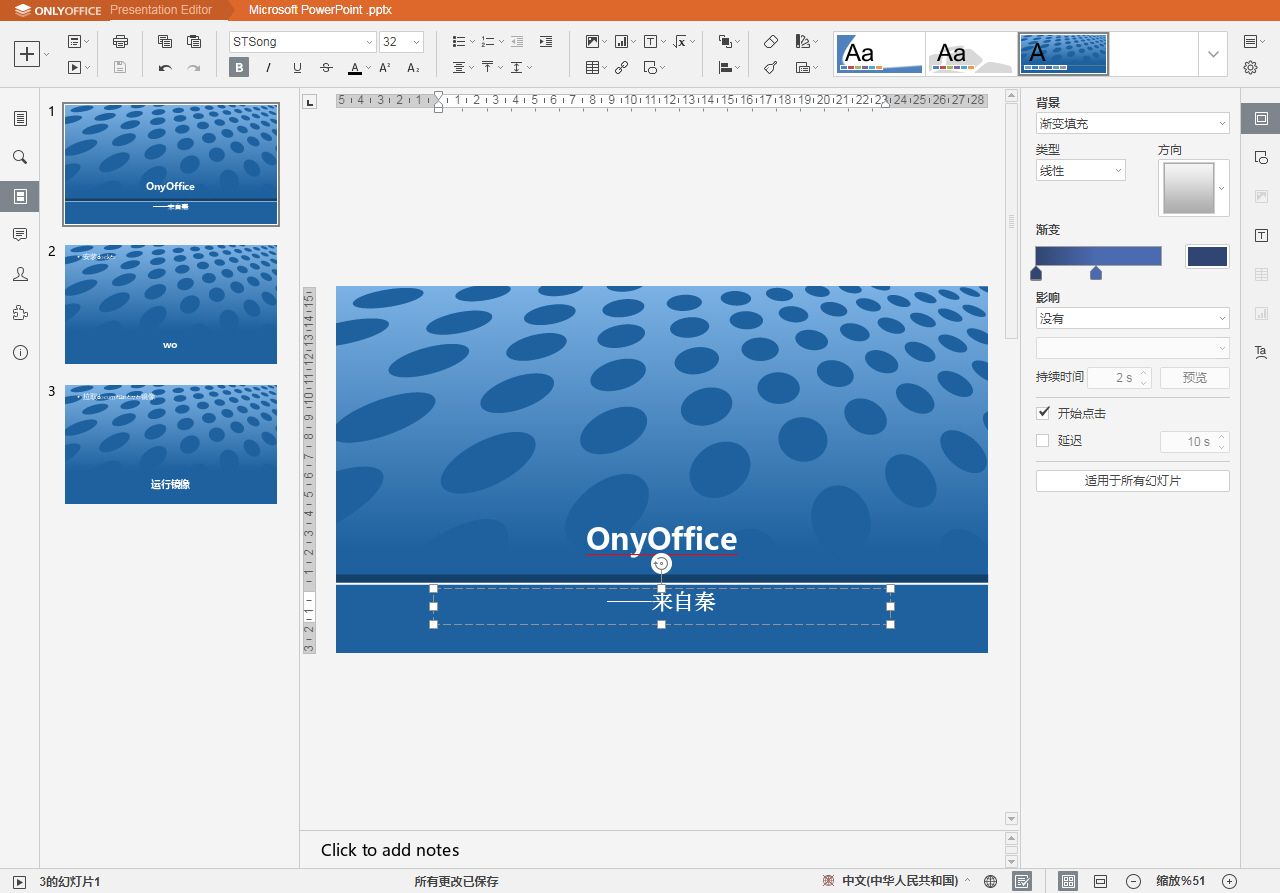
4. 对onlyoffice document server的二次开发,实现企业的实时文档协作,非常方便,避免了文档的汇总等繁琐事物,效率大大提高,协作更加优雅有趣。除了支持office的docx,xlsx及pptx格式外,还支持国产wps,et和dps格式。
5. ~在线直接预览dwg文件,避免了图纸转换成pdf的麻烦,也避免了先下载附件然后用本机电脑打开图纸的麻烦,方便设计人员查阅图纸。~
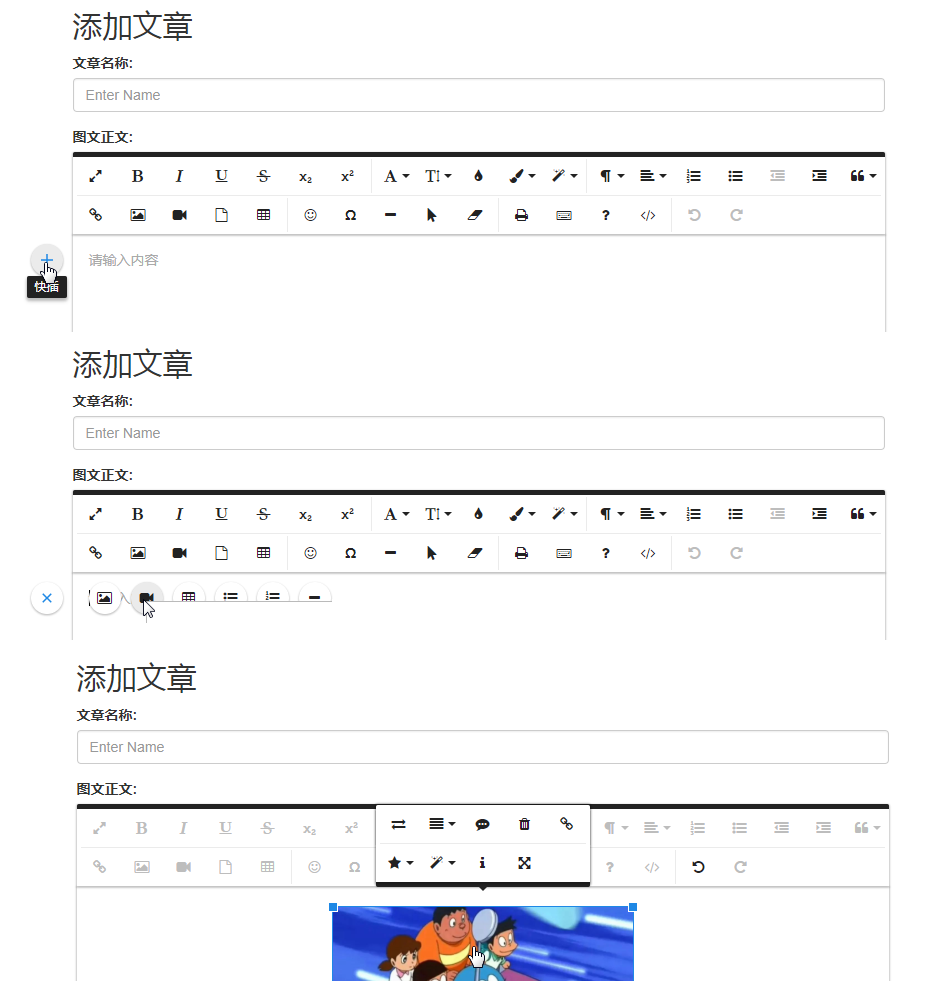
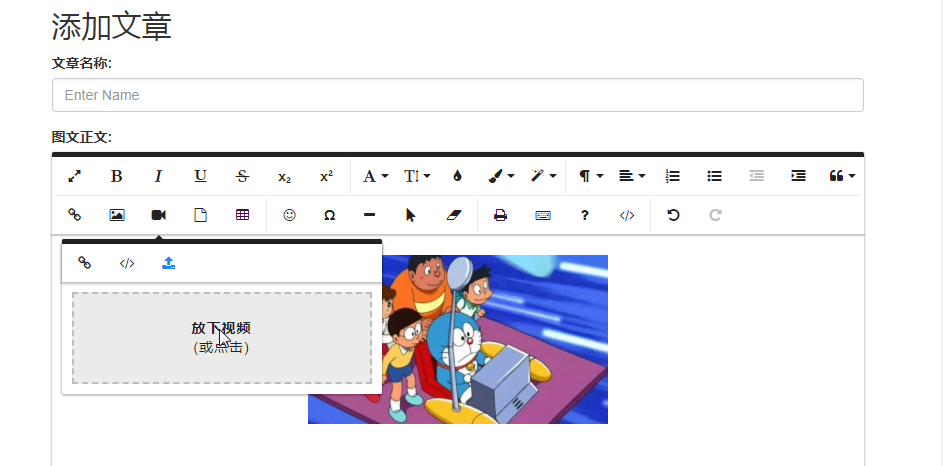
6. 采用最新的froala富文本编辑器,支持word图文直接粘贴发布,word中的图片自动上传,发布文章轻松快捷,文章支持视频和文件附件。
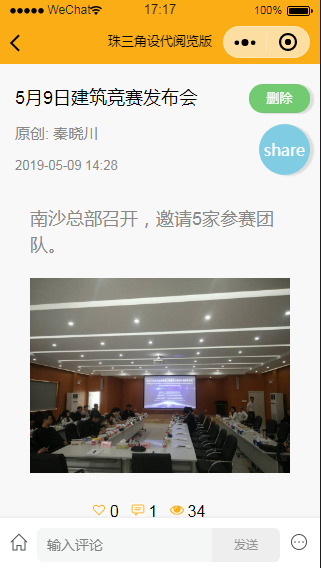
7. 微信小程序客户端访问和添加图文,打开微信,搜索“设计与管理”即可,小程序端也[开源](https://github.com/3xxx/wechatengineercms)。
8. web端和微信小程序多项目切换。
9. 可在conf里定制9个快捷导航条菜单。
10. 后台查看日志。
11. 通用的文档流程设置。文档审批,文档校审,合同评审流程,图纸校审流程,……
12. 整合了[mindoc](https://github.com/mindoc-org/mindoc),实现了在线创作、查阅、分享、导入、导出电子书籍。
13. 文件分享提取码。
14. 全文检索:上传office文档、pdf等,调用tika解析后存入elasticsearch(中文分词ik),实现全文检索。
15. supa-mapus地图协作,部分代替91地图功能,方便工程师查看现场定位、导航到建筑物。
16. 支持minio分布式文件存储,可集群部署文件存储服务。
17. 后台预定义工程目录类型和分层级别,支持无限级;目录采用懒加载模式;
18. 建立项目时选择已有项目作为模板,继承已有项目权限,或选择后台预定义的项目类型和目录层级,瞬间自动建立成百上千的树形目录,支持无限级目录;项目支持公开和私有;
19. 任意层级目录下可以添加任意成果;可对任意目录进行权限设置;
20. 成果包含文章、pdf附件和非pdf附件,并将它们分别列出;一个成果如果包含一个pdf文件则直接打开,如果多于一个则打开列表,非pdf附件也是一样;文章采用富文本编辑器froala,支持图文word直接黏贴,自动上传图片;
21. 成果间的关联:比如先出的施工图,然后一段时间后再出了对这个图纸的修改通知单,那么修改单关联上这个图纸后,每次看这个图纸,就知道这个图纸有修改了,需要引起注意;
22. 每个项目提供一个项目日程和大事记时间轴;
23. 成果统计,方便领导询问进度和填报周报月报;
二 应用案例:
我们做工程设计的,经常要做设代提供现场服务,工程资料很多参建方需要查阅,有一个资料平台会方便很多,并且支持多端:
√参建单位各自自由建立自己的目录,共享资料,避免大家重复存储项目资料,比如会议纪要,法律法规。
√图纸易得,能更好地控制工程质量——pdf设计文件参建单位都可以阅读,提高效率,减少障碍。
√基于“用户——角色——权限”的权限设置。独创的根据文件扩展名来进行权限管理。
√会议室和车辆的预定,用餐人数计划统计等常用功能。
√wiki技术讨论;websocket聊天室;。
√独创的pdf连续查阅;
√硬盘中的资料存储与页面的目录保持一致;设代日志等文章中照片按月度存储;
√ONLYOFFICE中文档的历史版本对照功能。
√ONLYOFFICE中文档的格式转换功能,如word转pdf。
√ONLYOFFICE中文档协作的权限设置,采用casbin。
√出差登记和打卡,考勤登记,值班安排;
√小程序多人写同一天的设代日志;
√工程图片相册服务;
√工程视频服务;
√mapus地图协作,现场定位工程建筑物;
二 todo:
× 读取文件属性——完成时间,作为月度统计依据,或提供选择,以上传时间为统计口径,生成某个目录下月度成果报表,与上个月对比柱状图;
× 项目目录编辑完善:ztree目录拖动;
× 多关键字检索;
× 项目合并和拆分:将2个项目目录合并起来,其中一个项目合并到另一个项目的子目录中,手动合并文件夹,自动修改数据库;
× 流媒体服务;
## 下载和安装
去百度网盘下载,直接运行。[链接:https://pan.baidu.com/s/1f4zuhoymaHMN_QAEgZLwOg 提取码:upvm ](https://pan.baidu.com/s/1f4zuhoymaHMN_QAEgZLwOg)
将二进制文件放到源码文件夹下直接运行即可。
Linux系统下请将执行文件engineercms(linux)放入engineercms文件夹内(即win系统下运行的整个解压包);swagger文件夹下的swagger.json和swagger.yml两个文件拷贝到engineercms目录里的swagger文件夹里
进入执行文件所在文件夹,运行engineercms如下:
```bash
# [root@localhost engineercms]# nohup ./engineercms &
# 如果出现:
# -bash: ./ engineercms: Permission denied
# 则说明需要修改权限,用下列命令:
# [root@……5 ~]# chmod +x engineercms
# —如果出现端口被占用,需要去conf文件夹内修改app.conf里的端口号,保存后重新运行。
# [root@……5 ~]# systemctl stop firewalld.service关闭防火墙,否则其他电脑访问不了。
# 停止engineercms进程的命令
# killall engineercms
# 查看进程的命令:
# ps aux
```
不清楚的,可以加我QQ504284或者微信hotqin999聊,也可参考[quickstart](https://github.com/3xxx/engineercms/blob/master/quickstart%E5%BF%AB%E9%80%9F%E5%BC%80%E5%A7%8B.txt)。
[wiki](https://github.com/3xxx/EngineerCMS/wiki)。包括linux系统下的编译。linux系统下的部署参见网盘中的文档。
技术开发过程详见[CSDN我的博客](https://blog.csdn.net/hotqin888)
系统简单使用见[mindoc文档](https://zsj.itdos.net/docs/engineercms_008)
## Quick Start
* 参见[quickstart](https://github.com/3xxx/engineercms/blob/master/quickstart%E5%BF%AB%E9%80%9F%E5%BC%80%E5%A7%8B.txt)快速开始。包括后台导入Excel用户,设置用户角色和权限。
* linux系统上的部署参见网盘中的文档。
## Documentation
* [中文文档]——请查阅document文件夹
* 系统简单使用见[mindoc文档](https://zsj.itdos.net/docs/engineercms_008)
## 免费开源和问题反馈
* 开源地址[https://github.com/3xxx/engineercms/](https://github.com/3xxx/engineercms/)
* 问题反馈: [https://github.com/3xxx/engineercms/issues](https://github.com/3xxx/engineercms/issues)
## 更新用到的pkg第三方模块
```sh
git submodule update --init
```
## 第三方包
1. [beego框架](https://github.com/astaxie/beego)
2. [casbin权限管理](https://github.com/casbin/casbin)
3. [simplejson](https://github.com/bitly/go-simplejson)
4. [excelize](https://github.com/360EntSecGroup-Skylar/excelize)
5. [xlsx](https://github.com/tealeg/xlsx)
6. [goquery](https://github.com/PuerkitoBio/goquery)
7. [go-sqlite](https://github.com/mattn/go-sqlite3)
8. [mahonia](https://github.com/axgle/mahonia)
9. [flow文档流程](https://github.com/js-ojus/flow)[我改造的flow文档流程](https://github.com/3xxx/flow)
10. [xorm](https://github.com/go-xorm/xorm)
11. [gorm](https://github.com/jinzhu/gorm)
12. [unioffice](github.com/unidoc/unioffice)
13. [pdfcpu](https://github.com/pdfcpu/pdfcpu)
## 前端
1. [onlyoffice document server文档协作](https://github.com/ONLYOFFICE/DocumentServer)
2. [pdf.js阅览pdf](https://github.com/mozilla/pdf.js)
3. [html2canvas](https://github.com/niklasvh/html2canvas)
4. [jQueryGantt甘特图](https://github.com/robicch/jQueryGantt)
5. [multyselect](https://github.com/davidstutz/bootstrap-multiselect)
6. [bootstrap treeview树状目录](https://github.com/patternfly/patternfly-bootstrap-treeview)
7. [fullcalendar日历](https://github.com/fullcalendar/fullcalendar)
8. [daterangerpicker](https://github.com/dangrossman/daterangepicker)
9. [datetimepicker](https://github.com/smalot/bootstrap-datetimepicker)
10. [datepicker](https://github.com/uxsolutions/bootstrap-datepicker)
11. [select2](https://github.com/select2/select2)
12. [x-editable表格在线编辑](https://github.com/vitalets/x-editable)
13. [ztree树状目录](https://github.com/zTree/zTree_v3)
14. [request](https://github.com/mozillazg/request)
15. [froala富文本编辑器](https://github.com/froala/wysiwyg-editor)
16. [ueditor百度富文本编辑器](https://github.com/fex-team/ueditor)
17. [webupload百度文件上传](https://github.com/fex-team/webuploader)
18. [jqfileupload](https://github.com/blueimp/jQuery-File-Upload)
19. [bootstrap-table表格](https://github.com/wenzhixin/bootstrap-table)
20. [jquery.form.js表单上传文件](http://jquery.malsup.com/form/)
21. [vue.js](https://github.com/vuejs/vue)
22. [axios](https://github.com/axios/axios)
23. [element组件](https://github.com/ElemeFE/element)
24. [vxe-table表格在线编辑](https://github.com/xuliangzhan/vxe-table)
25. [mapus地图协作](https://github.com/alyssaxuu/mapus)
## LICENSE
EngineerCMS source code is licensed under the Apache Licence, Version 2.0
(http://www.apache.org/licenses/LICENSE-2.0.html).
ONLYOFFICE实时文档协作效果——除了支持office的docx,xlsx及pptx格式外,还支持国产wps,et和dps格式。



在线直接预览dwg图纸文件:

手机端访问文章效果
微信小程序富文本编辑器添加文章:

IPAD移动端效果

项目进度展示

用户——角色——权限设置,树状目录权限,区分附件扩展名,基于casbin


froala富文本编辑器支持word图片自动上传,视频和附件
[mapus地图协作](https://pass.itdos.net/mapus?file=1),部分替代91地图
[mapus document](https://zsj.itdos.net/docs/supa-mapus)

[Demo](https://zsj.itdos.net/)
——基于engineercms的设代资料管理平台(真实应用环境)
```bash
# go mod使用
# https://www.jianshu.com/p/760c97ff644c
# 克隆源码
# git clone https://github.com/3xxx/engineercms.git
# go run main.go
# go包自动安装
# 设置go代理
# go env -w GO111MODULE=on
# go env -w GOPROXY=https://goproxy.io,direct
# 升级某个依赖
# 无需 clone 仓库中的代码,直接在项目目录中执行
# go get -u github.com/wechatpay-apiv3/wechatpay-go
# 来升级/添加依赖,自动完成 go.mod 修改与依赖的下载。
# 由于go.sum未更新,则运行go mod tidy更新go.sum文件
# 初始化mod:
# go mod init
# 代码中有新的库加入,需要更新mod:
# go mod tidy——下载新增的依赖包
# go mod vendor——更新
# 将新增的依赖包自动写入当前项目的 vendor 目录:
# go mod vendor
# 如果 go.mod 发生变化,应当重新执行 go mod vendor!
# 执行go mod vendor将删除项目中已存在的vendor目录;
# 永远不要对vendor中的依赖库进行二次修改、更改!
# go命令不检查vendor中的依赖库是否被修改
# 关闭——这个看情况,go mod vendor时,提示Get https://sum.golang.org/lookup/xxxxxx: dial tcp 216.58.200.49:443: i/o timeout
# go env -w GOSUMDB=off
```
```bash
# linux系统上编译:拷贝go.mod go.sum 以及其他文件,然后执行go mod vendor,
# 再执行bee generate docs
# bee generate routers
# 再执行bee run -gendoc=true -downdoc=true
# 编译(sqlite需要CGO支持)
# go build -ldflags "-w"
# 数据库初始化(此步骤执行之前,需配置`conf/app.conf`)
# ./engineercms install
# linux上升级,先杀死engineercms.exe进程,再拷贝新的engineercms.exe执行文件和路由swagger文件:
# killall engineercms
# 拷贝engineercms和swagger里的swagger.yml和swagger.json到服务器上对应文件夹里
# $ chmod +x engineercms
# $ nohup ./engineercms &
# $ systemctl stop firewalld.service // 关闭防火墙
```
```bash
# beego 2.0.0 升级指南
# 获取最新版本的 bee 工具 go install github.com/beego/bee/v2@latest
# 更新 beego 框架 go get -u github.com/beego/beego/v2
# 然后进入项目,执行: bee fix -t 2
# 需要注意的是,如果你是 windows 用户,那么你需要在 WSL 内部运行该命令。
# 在项目文件夹下鼠标右键——Git Bash Here
# 这里需要导入的包是
# github.com/beego/beego/v2/server/web/context
# 而不是
# ~ github.com/beego/beego/v2/adapter/context ~
# 目前来说因为你所有的包都切换过去了beego/beego/v2,所以你对应的context要使用beego/beego/v2/server/web/context下的这个。
# 我教你一个小技巧。当你发现依赖找不到的时候,你把import里面对应的东西删掉,IDE会帮你补全,或者给你提示。如果你用的GOLANG IDE,那么会自动帮你把对应依赖引入。
# 记住一个核心原则:如果你用的是adapter的包,那么所有的包都应该是adapter的;如果你用的是beego/beego/v2(非adapter),那么所有的都应该是beego/beego/v2下的。
# 手动执行 bee generate routers 重新生成commentsRouter_controllers.go,新版本删除了自动生成功能
# bee run -gendoc=true -downdoc=true
# go get 是拉取远程包的命令,还是继续使用的
# go install 是对项目进行编译并自动拉取所需包并生成 可执行文件的。
# 解决步骤:
# 1 go get -u github.com/beego/bee/v2
# 2 cd 到这个bee/v2版本中
# 3 go mod tidy 整理一下
# 4 go install
# 此时在 GOPATH目录bin文件夹下生成了bee.exe 。
# 测试 ./bee.exe new hello 已正常创建项目,自己将bin目录加入到全局即可。
```
```bash
# https://www.cnblogs.com/cqlb/p/13396107.html
# 一、创建标签
# 在Git中打标签非常简单,首先,切换到需要打标签的分支上:
# 要在engineercms文件夹下,鼠标右键,用“git bash here”来启动git,然后执行以下命令。
# 1 $ git branch
# 2 * dev
# 3 master
# 4 $ git checkout master
# 5 Switched to branch 'master'
# git add .
# git commit -m "update"
# 然后,敲命令git tag 就可以打一个新标签:
# $ git tag v2.0.5
# 因为创建的标签都只存储在本地,不会自动推送到远程。所以,打错的标签可以在本地安全删除。
# 如果要推送某个标签到远程,使用命令
# git push --tags
# $ git push origin
# git add .
# git commit -m "message"
# git push origin master
# 只不过20年10月之后的版本master一词都改成了main
```
```bash
# /d/engineercms (master|REBASE-i)
# $ git push --delete origin v2.0.0
# To https://github.com/3xxx/engineercms
# - [deleted] v2.0.0
# /d/engineercms (master|REBASE-i)
# $ git push --delete origin v2.0.2
# To https://github.com/3xxx/engineercms
# - [deleted] v2.0.2
# 如果有人想知道如何一次删除多个标签,你可以用空格简单地列出它们,例如git push --delete origin tag1 tag2。本地标签删除git tag -d tag1 tag2同样有效。
```
```bash
# 升级gorm——进入Git cmd
# D:\gowork\src\github.com\3xxx\engineercms>go get gorm.io/gorm
# go: downloading gorm.io/gorm v1.25.12
# go: upgraded gorm.io/gorm v1.24.3 => v1.25.12
#
# D:\gowork\src\github.com\3xxx\engineercms>go get gorm.io/driver/sqlite
# go: downloading gorm.io/driver/sqlite v1.5.6
# go: warning: github.com/mattn/go-sqlite3@v2.0.3+incompatible: retracted by module author: Accidental; no major changes or features.
# go: to switch to the latest unretracted version, run:
# go get github.com/mattn/go-sqlite3@latest
# go: upgraded gorm.io/driver/sqlite v1.4.4 => v1.5.6
#
# D:\gowork\src\github.com\3xxx\engineercms>go get github.com/mattn/go-sqlite3@latest
# go: downloading github.com/mattn/go-sqlite3 v1.14.24
# go: downloading github.com/onsi/ginkgo v1.7.0
# go: downloading github.com/onsi/gomega v1.4.3
# go: downloading gopkg.in/check.v1 v1.0.0-20190902080502-41f04d3bba15
# go: removed github.com/casbin/beego-orm-adapter/v3 v3.0.2
# go: downgraded github.com/mattn/go-sqlite3 v2.0.3+incompatible => v1.14.24
```
一 特性:
1. 本系统采用go语言(基于[beego](https://github.com/astaxie/beego)框架)开发,运行文件为编译后的二进制可执行文件,所以无需像其他语言(php、nodejs、java等语言)编写的web应用那样,需要配置运行服务环境。
2. 数据库采用sqlite嵌入式数据库,所以也无需配置数据库服务环境。
3. 开箱即用,无需网络开发知识。
4. 对onlyoffice document server的二次开发,实现企业的实时文档协作,非常方便,避免了文档的汇总等繁琐事物,效率大大提高,协作更加优雅有趣。除了支持office的docx,xlsx及pptx格式外,还支持国产wps,et和dps格式。
5. ~在线直接预览dwg文件,避免了图纸转换成pdf的麻烦,也避免了先下载附件然后用本机电脑打开图纸的麻烦,方便设计人员查阅图纸。~
6. 采用最新的froala富文本编辑器,支持word图文直接粘贴发布,word中的图片自动上传,发布文章轻松快捷,文章支持视频和文件附件。
7. 微信小程序客户端访问和添加图文,打开微信,搜索“设计与管理”即可,小程序端也[开源](https://github.com/3xxx/wechatengineercms)。
8. web端和微信小程序多项目切换。
9. 可在conf里定制9个快捷导航条菜单。
10. 后台查看日志。
11. 通用的文档流程设置。文档审批,文档校审,合同评审流程,图纸校审流程,……
12. 整合了[mindoc](https://github.com/mindoc-org/mindoc),实现了在线创作、查阅、分享、导入、导出电子书籍。
13. 文件分享提取码。
14. 全文检索:上传office文档、pdf等,调用tika解析后存入elasticsearch(中文分词ik),实现全文检索。
15. supa-mapus地图协作,部分代替91地图功能,方便工程师查看现场定位、导航到建筑物。
16. 支持minio分布式文件存储,可集群部署文件存储服务。
17. 后台预定义工程目录类型和分层级别,支持无限级;目录采用懒加载模式;
18. 建立项目时选择已有项目作为模板,继承已有项目权限,或选择后台预定义的项目类型和目录层级,瞬间自动建立成百上千的树形目录,支持无限级目录;项目支持公开和私有;
19. 任意层级目录下可以添加任意成果;可对任意目录进行权限设置;
20. 成果包含文章、pdf附件和非pdf附件,并将它们分别列出;一个成果如果包含一个pdf文件则直接打开,如果多于一个则打开列表,非pdf附件也是一样;文章采用富文本编辑器froala,支持图文word直接黏贴,自动上传图片;
21. 成果间的关联:比如先出的施工图,然后一段时间后再出了对这个图纸的修改通知单,那么修改单关联上这个图纸后,每次看这个图纸,就知道这个图纸有修改了,需要引起注意;
22. 每个项目提供一个项目日程和大事记时间轴;
23. 成果统计,方便领导询问进度和填报周报月报;
二 应用案例:
我们做工程设计的,经常要做设代提供现场服务,工程资料很多参建方需要查阅,有一个资料平台会方便很多,并且支持多端:
√参建单位各自自由建立自己的目录,共享资料,避免大家重复存储项目资料,比如会议纪要,法律法规。
√图纸易得,能更好地控制工程质量——pdf设计文件参建单位都可以阅读,提高效率,减少障碍。
√基于“用户——角色——权限”的权限设置。独创的根据文件扩展名来进行权限管理。
√会议室和车辆的预定,用餐人数计划统计等常用功能。
√wiki技术讨论;websocket聊天室;。
√独创的pdf连续查阅;
√硬盘中的资料存储与页面的目录保持一致;设代日志等文章中照片按月度存储;
√ONLYOFFICE中文档的历史版本对照功能。
√ONLYOFFICE中文档的格式转换功能,如word转pdf。
√ONLYOFFICE中文档协作的权限设置,采用casbin。
√出差登记和打卡,考勤登记,值班安排;
√小程序多人写同一天的设代日志;
√工程图片相册服务;
√工程视频服务;
√mapus地图协作,现场定位工程建筑物;
二 todo:
× 读取文件属性——完成时间,作为月度统计依据,或提供选择,以上传时间为统计口径,生成某个目录下月度成果报表,与上个月对比柱状图;
× 项目目录编辑完善:ztree目录拖动;
× 多关键字检索;
× 项目合并和拆分:将2个项目目录合并起来,其中一个项目合并到另一个项目的子目录中,手动合并文件夹,自动修改数据库;
× 流媒体服务;
## 下载和安装
去百度网盘下载,直接运行。[链接:https://pan.baidu.com/s/1f4zuhoymaHMN_QAEgZLwOg 提取码:upvm ](https://pan.baidu.com/s/1f4zuhoymaHMN_QAEgZLwOg)
将二进制文件放到源码文件夹下直接运行即可。
Linux系统下请将执行文件engineercms(linux)放入engineercms文件夹内(即win系统下运行的整个解压包);swagger文件夹下的swagger.json和swagger.yml两个文件拷贝到engineercms目录里的swagger文件夹里
进入执行文件所在文件夹,运行engineercms如下:
```bash
# [root@localhost engineercms]# nohup ./engineercms &
# 如果出现:
# -bash: ./ engineercms: Permission denied
# 则说明需要修改权限,用下列命令:
# [root@……5 ~]# chmod +x engineercms
# —如果出现端口被占用,需要去conf文件夹内修改app.conf里的端口号,保存后重新运行。
# [root@……5 ~]# systemctl stop firewalld.service关闭防火墙,否则其他电脑访问不了。
# 停止engineercms进程的命令
# killall engineercms
# 查看进程的命令:
# ps aux
```
不清楚的,可以加我QQ504284或者微信hotqin999聊,也可参考[quickstart](https://github.com/3xxx/engineercms/blob/master/quickstart%E5%BF%AB%E9%80%9F%E5%BC%80%E5%A7%8B.txt)。
[wiki](https://github.com/3xxx/EngineerCMS/wiki)。包括linux系统下的编译。linux系统下的部署参见网盘中的文档。
技术开发过程详见[CSDN我的博客](https://blog.csdn.net/hotqin888)
系统简单使用见[mindoc文档](https://zsj.itdos.net/docs/engineercms_008)
## Quick Start
* 参见[quickstart](https://github.com/3xxx/engineercms/blob/master/quickstart%E5%BF%AB%E9%80%9F%E5%BC%80%E5%A7%8B.txt)快速开始。包括后台导入Excel用户,设置用户角色和权限。
* linux系统上的部署参见网盘中的文档。
## Documentation
* [中文文档]——请查阅document文件夹
* 系统简单使用见[mindoc文档](https://zsj.itdos.net/docs/engineercms_008)
## 免费开源和问题反馈
* 开源地址[https://github.com/3xxx/engineercms/](https://github.com/3xxx/engineercms/)
* 问题反馈: [https://github.com/3xxx/engineercms/issues](https://github.com/3xxx/engineercms/issues)
## 更新用到的pkg第三方模块
```sh
git submodule update --init
```
## 第三方包
1. [beego框架](https://github.com/astaxie/beego)
2. [casbin权限管理](https://github.com/casbin/casbin)
3. [simplejson](https://github.com/bitly/go-simplejson)
4. [excelize](https://github.com/360EntSecGroup-Skylar/excelize)
5. [xlsx](https://github.com/tealeg/xlsx)
6. [goquery](https://github.com/PuerkitoBio/goquery)
7. [go-sqlite](https://github.com/mattn/go-sqlite3)
8. [mahonia](https://github.com/axgle/mahonia)
9. [flow文档流程](https://github.com/js-ojus/flow)[我改造的flow文档流程](https://github.com/3xxx/flow)
10. [xorm](https://github.com/go-xorm/xorm)
11. [gorm](https://github.com/jinzhu/gorm)
12. [unioffice](github.com/unidoc/unioffice)
13. [pdfcpu](https://github.com/pdfcpu/pdfcpu)
## 前端
1. [onlyoffice document server文档协作](https://github.com/ONLYOFFICE/DocumentServer)
2. [pdf.js阅览pdf](https://github.com/mozilla/pdf.js)
3. [html2canvas](https://github.com/niklasvh/html2canvas)
4. [jQueryGantt甘特图](https://github.com/robicch/jQueryGantt)
5. [multyselect](https://github.com/davidstutz/bootstrap-multiselect)
6. [bootstrap treeview树状目录](https://github.com/patternfly/patternfly-bootstrap-treeview)
7. [fullcalendar日历](https://github.com/fullcalendar/fullcalendar)
8. [daterangerpicker](https://github.com/dangrossman/daterangepicker)
9. [datetimepicker](https://github.com/smalot/bootstrap-datetimepicker)
10. [datepicker](https://github.com/uxsolutions/bootstrap-datepicker)
11. [select2](https://github.com/select2/select2)
12. [x-editable表格在线编辑](https://github.com/vitalets/x-editable)
13. [ztree树状目录](https://github.com/zTree/zTree_v3)
14. [request](https://github.com/mozillazg/request)
15. [froala富文本编辑器](https://github.com/froala/wysiwyg-editor)
16. [ueditor百度富文本编辑器](https://github.com/fex-team/ueditor)
17. [webupload百度文件上传](https://github.com/fex-team/webuploader)
18. [jqfileupload](https://github.com/blueimp/jQuery-File-Upload)
19. [bootstrap-table表格](https://github.com/wenzhixin/bootstrap-table)
20. [jquery.form.js表单上传文件](http://jquery.malsup.com/form/)
21. [vue.js](https://github.com/vuejs/vue)
22. [axios](https://github.com/axios/axios)
23. [element组件](https://github.com/ElemeFE/element)
24. [vxe-table表格在线编辑](https://github.com/xuliangzhan/vxe-table)
25. [mapus地图协作](https://github.com/alyssaxuu/mapus)
## LICENSE
EngineerCMS source code is licensed under the Apache Licence, Version 2.0
(http://www.apache.org/licenses/LICENSE-2.0.html).
ONLYOFFICE实时文档协作效果——除了支持office的docx,xlsx及pptx格式外,还支持国产wps,et和dps格式。




在线直接预览dwg图纸文件:

手机端访问文章效果

微信小程序富文本编辑器添加文章:

IPAD移动端效果

项目进度展示

用户——角色——权限设置,树状目录权限,区分附件扩展名,基于casbin


froala富文本编辑器支持word图片自动上传,视频和附件


[mapus地图协作](https://pass.itdos.net/mapus?file=1),部分替代91地图
[mapus document](https://zsj.itdos.net/docs/supa-mapus)
