# face-api.js
**Repository Path**: iloseall/face-api.js
## Basic Information
- **Project Name**: face-api.js
- **Description**: JavaScript API for face detection and face recognition in the browser and nodejs with tensorflow.js
- **Primary Language**: TypeScript
- **License**: MIT
- **Default Branch**: master
- **Homepage**: None
- **GVP Project**: No
## Statistics
- **Stars**: 0
- **Forks**: 0
- **Created**: 2020-06-21
- **Last Updated**: 2021-03-09
## Categories & Tags
**Categories**: Uncategorized
**Tags**: None
## README
# face-api.js
[](https://travis-ci.org/justadudewhohacks/face-api.js)
[](https://slack.bri.im)
**JavaScript API for face detection and face recognition in the browser implemented on top of the tensorflow.js core API ([tensorflow/tfjs-core](https://github.com/tensorflow/tfjs-core))**
Table of Contents:
* **[Resources](#resources)**
* **[Live Demos](#live-demos)**
* **[Tutorials](#tutorials)**
* **[Examples](#examples)**
* **[Running the Examples](#running-the-examples)**
* **[Available Models](#models)**
* **[Face Detection Models](#models-face-detection)**
* **[68 Point Face Landmark Detection Models](#models-face-landmark-detection)**
* **[Face Recognition Model](#models-face-recognition)**
* **[Face Expression Recognition Model](#models-face-expression-recognition)**
* **[Getting Started](#getting-started)**
* **[face-api.js for the Browser](#getting-started-browser)**
* **[face-api.js for Nodejs](#getting-started-nodejs)**
* **[Usage](#usage)**
* **[Loading the Models](#usage-loading-models)**
* **[High Level API](#usage-high-level-api)**
* **[Displaying Detection Results](#usage-displaying-detection-results)**
* **[Face Detection Options](#usage-face-detection-options)**
* **[Utility Classes](#usage-utility-classes)**
* **[Other Useful Utility](#other-useful-utility)**
* **[API Documentation](https://justadudewhohacks.github.io/face-api.js/docs/globals.html)**
# Resources
## Live Demos
**[Check out the live demos!](https://justadudewhohacks.github.io/face-api.js/)**
## Tutorials
Check out my face-api.js tutorials:
* **[face-api.js — JavaScript API for Face Recognition in the Browser with tensorflow.js](https://itnext.io/face-api-js-javascript-api-for-face-recognition-in-the-browser-with-tensorflow-js-bcc2a6c4cf07)**
* **[Realtime JavaScript Face Tracking and Face Recognition using face-api.js’ MTCNN Face Detector](https://itnext.io/realtime-javascript-face-tracking-and-face-recognition-using-face-api-js-mtcnn-face-detector-d924dd8b5740)**
# Examples
## Face Recognition
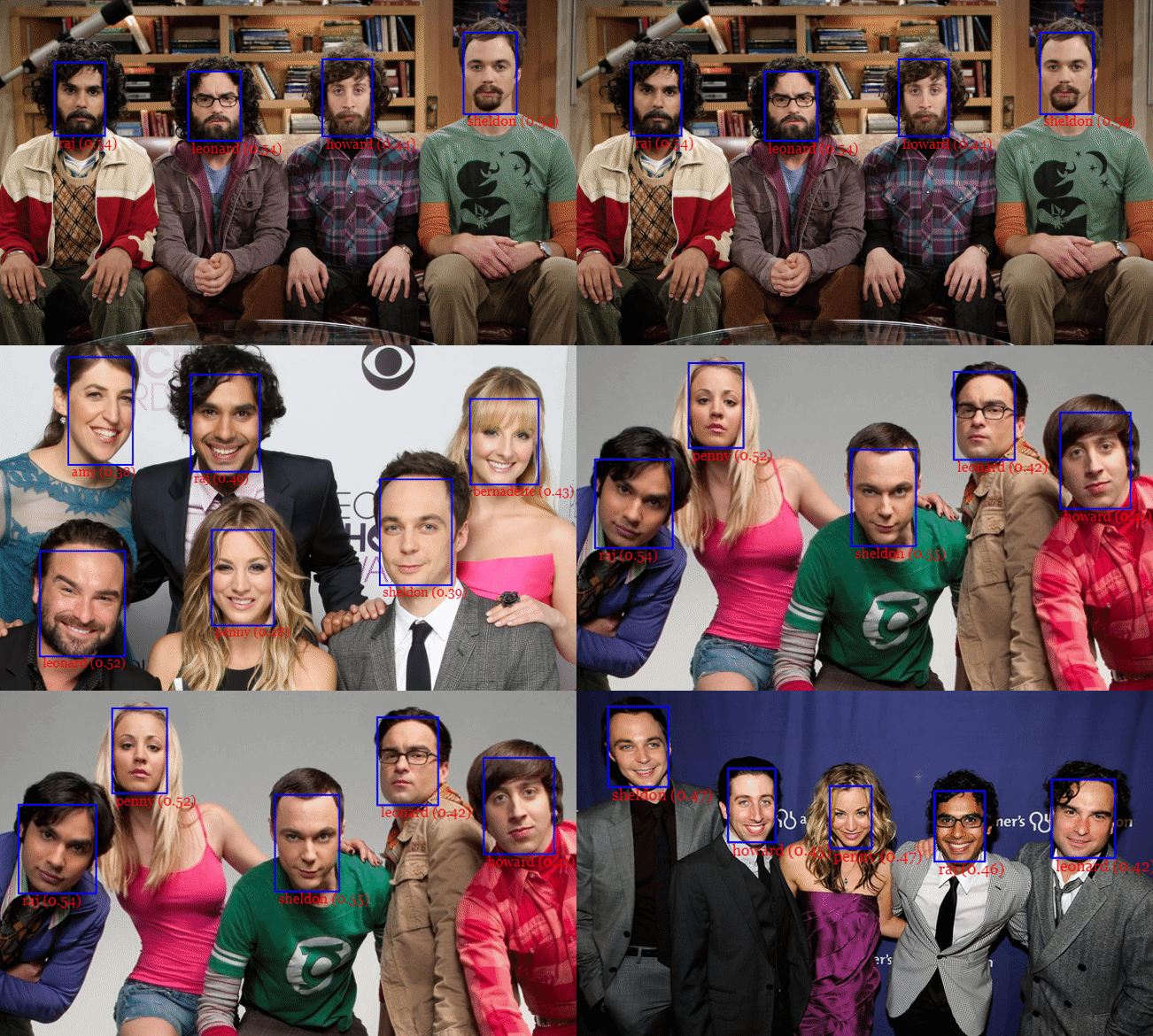
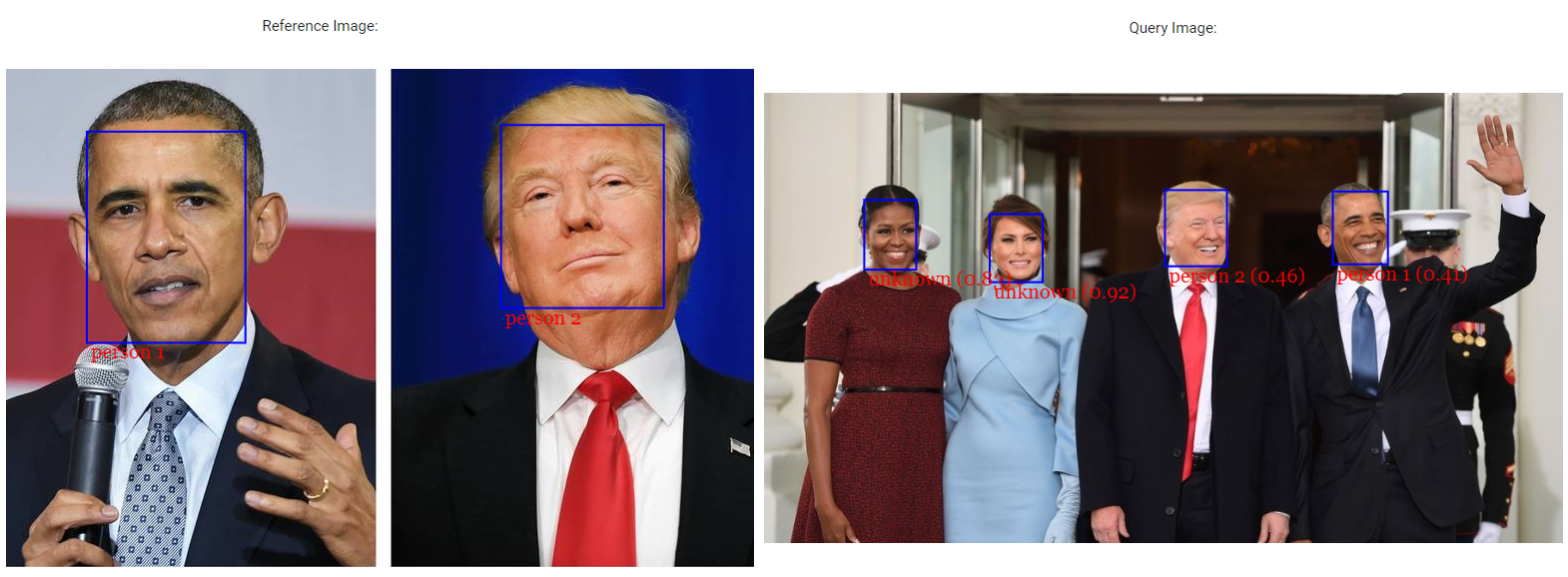
## Face Similarity
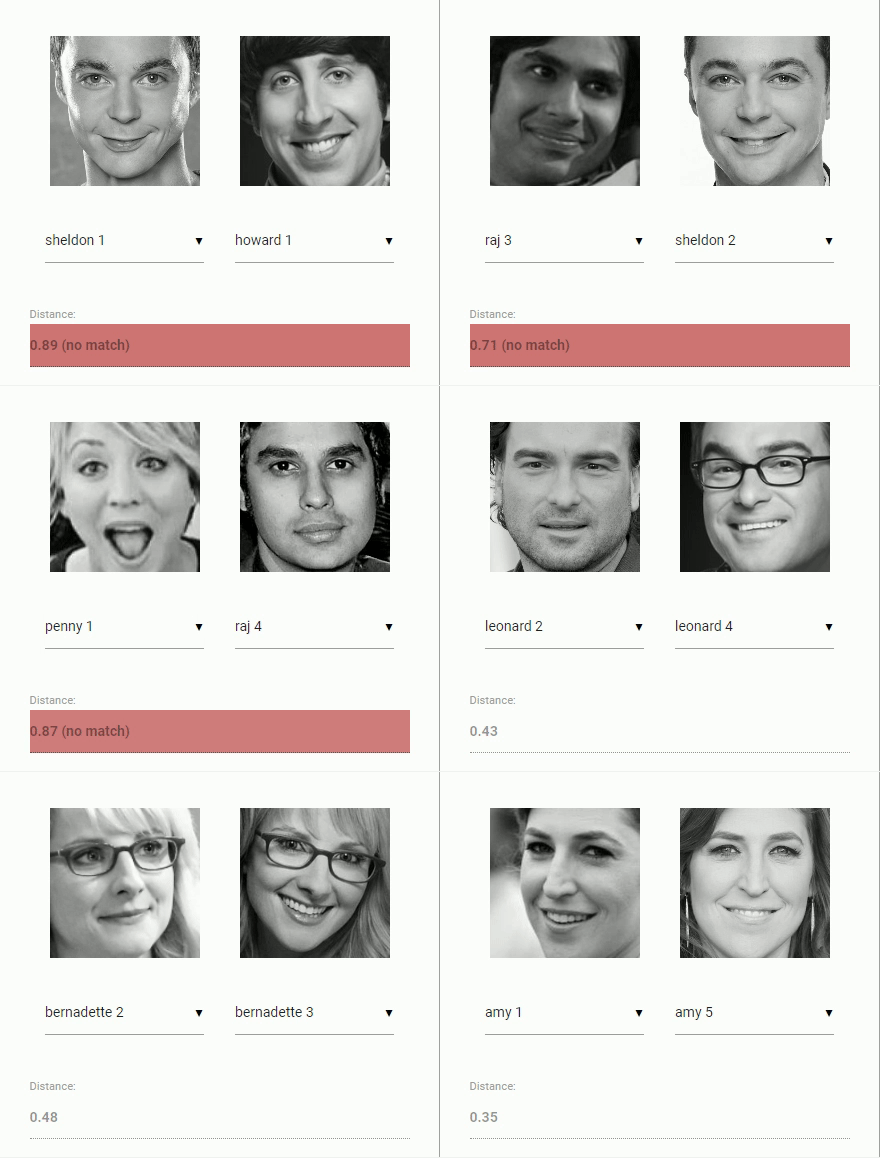
## Face Expression Recognition
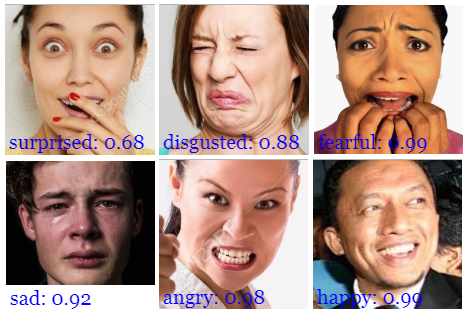
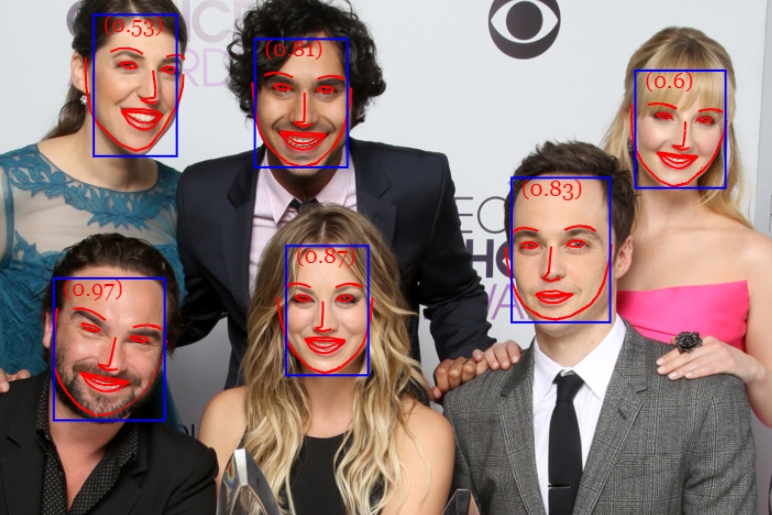
## Face Landmark Detection

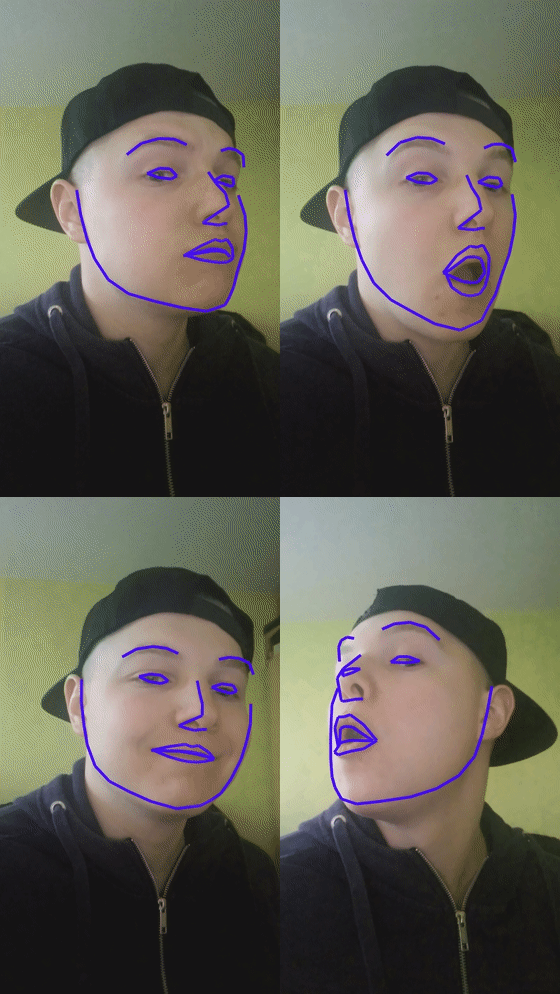
## Realtime Face Tracking
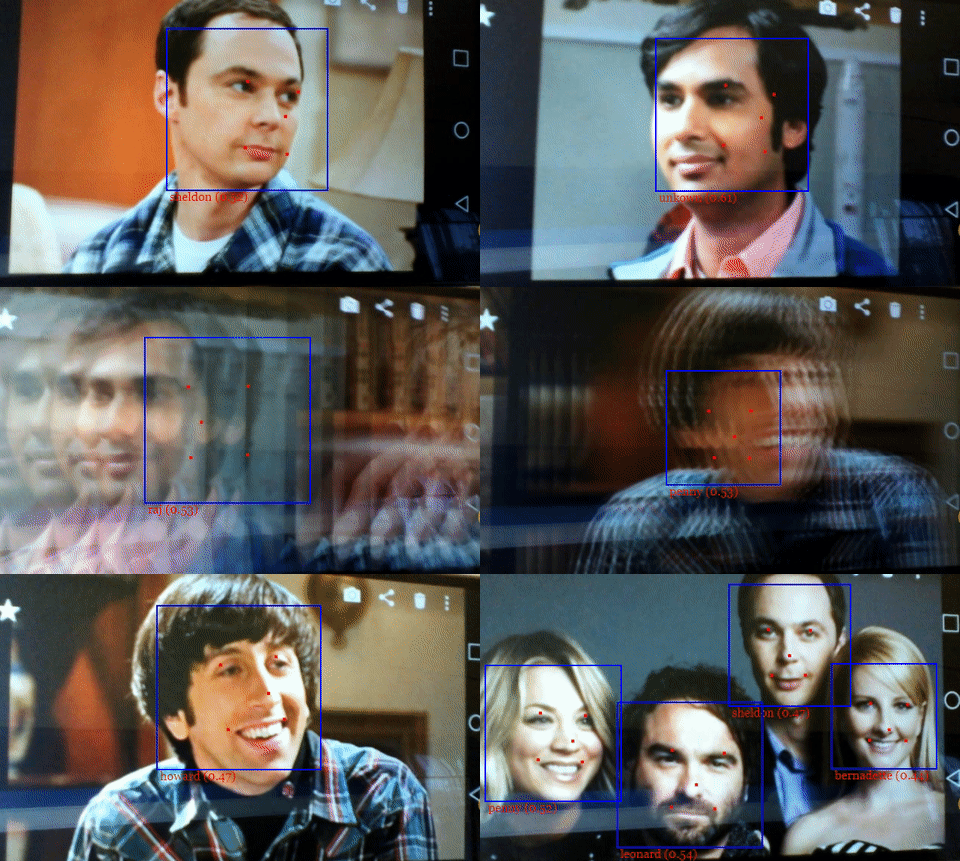
## MTCNN
## Running the Examples
Clone the repository:
``` bash
git clone https://github.com/justadudewhohacks/face-api.js.git
```
### Running the Browser Examples
``` bash
cd face-api.js/examples/examples-browser
npm i
npm start
```
Browse to http://localhost:3000/.
### Running the Nodejs Examples
``` bash
cd face-api.js/examples/examples-nodejs
npm i
```
Now run one of the examples using ts-node:
``` bash
ts-node faceDetection.ts
```
Or simply compile and run them with node:
``` bash
tsc faceDetection.ts
node faceDetection.js
```
# Available Models
## Face Detection Models
### SSD Mobilenet V1
For face detection, this project implements a SSD (Single Shot Multibox Detector) based on MobileNetV1. The neural net will compute the locations of each face in an image and will return the bounding boxes together with it's probability for each face. This face detector is aiming towards obtaining high accuracy in detecting face bounding boxes instead of low inference time. The size of the quantized model is about 5.4 MB (**ssd_mobilenetv1_model**).
The face detection model has been trained on the [WIDERFACE dataset](http://mmlab.ie.cuhk.edu.hk/projects/WIDERFace/) and the weights are provided by [yeephycho](https://github.com/yeephycho) in [this](https://github.com/yeephycho/tensorflow-face-detection) repo.
### Tiny Face Detector
The Tiny Face Detector is a very performant, realtime face detector, which is much faster, smaller and less resource consuming compared to the SSD Mobilenet V1 face detector, in return it performs slightly less well on detecting small faces. This model is extremely mobile and web friendly, thus it should be your GO-TO face detector on mobile devices and resource limited clients. The size of the quantized model is only 190 KB (**tiny_face_detector_model**).
The face detector has been trained on a custom dataset of ~14K images labeled with bounding boxes. Furthermore the model has been trained to predict bounding boxes, which entirely cover facial feature points, thus it in general produces better results in combination with subsequent face landmark detection than SSD Mobilenet V1.
This model is basically an even tinier version of Tiny Yolo V2, replacing the regular convolutions of Yolo with depthwise separable convolutions. Yolo is fully convolutional, thus can easily adapt to different input image sizes to trade off accuracy for performance (inference time).
### MTCNN
**Note, this model is mostly kept in this repo for experimental reasons. In general the other face detectors should perform better, but of course you are free to play around with MTCNN.**
MTCNN (Multi-task Cascaded Convolutional Neural Networks) represents an alternative face detector to SSD Mobilenet v1 and Tiny Yolo v2, which offers much more room for configuration. By tuning the input parameters, MTCNN should be able to detect a wide range of face bounding box sizes. MTCNN is a 3 stage cascaded CNN, which simultaneously returns 5 face landmark points along with the bounding boxes and scores for each face. Additionally the model size is only 2MB.
MTCNN has been presented in the paper [Joint Face Detection and Alignment using Multi-task Cascaded Convolutional Networks](https://kpzhang93.github.io/MTCNN_face_detection_alignment/paper/spl.pdf) by Zhang et al. and the model weights are provided in the official [repo](https://github.com/kpzhang93/MTCNN_face_detection_alignment) of the MTCNN implementation.
## 68 Point Face Landmark Detection Models
This package implements a very lightweight and fast, yet accurate 68 point face landmark detector. The default model has a size of only 350kb (**face_landmark_68_model**) and the tiny model is only 80kb (**face_landmark_68_tiny_model**). Both models employ the ideas of depthwise separable convolutions as well as densely connected blocks. The models have been trained on a dataset of ~35k face images labeled with 68 face landmark points.
## Face Recognition Model
For face recognition, a ResNet-34 like architecture is implemented to compute a face descriptor (a feature vector with 128 values) from any given face image, which is used to describe the characteristics of a persons face. The model is **not** limited to the set of faces used for training, meaning you can use it for face recognition of any person, for example yourself. You can determine the similarity of two arbitrary faces by comparing their face descriptors, for example by computing the euclidean distance or using any other classifier of your choice.
The neural net is equivalent to the **FaceRecognizerNet** used in [face-recognition.js](https://github.com/justadudewhohacks/face-recognition.js) and the net used in the [dlib](https://github.com/davisking/dlib/blob/master/examples/dnn_face_recognition_ex.cpp) face recognition example. The weights have been trained by [davisking](https://github.com/davisking) and the model achieves a prediction accuracy of 99.38% on the LFW (Labeled Faces in the Wild) benchmark for face recognition.
The size of the quantized model is roughly 6.2 MB (**face_recognition_model**).
## Face Expression Recognition Model
The face expression recognition model is lightweight, fast and provides reasonable accuracy. The model has a size of roughly 310kb and it employs depthwise separable convolutions and densely connected blocks. It has been trained on a variety of images from publicly available datasets as well as images scraped from the web. Note, that wearing glasses might decrease the accuracy of the prediction results.
# Getting Started
## face-api.js for the Browser
Simply include the latest script from [dist/face-api.js](https://github.com/justadudewhohacks/face-api.js/tree/master/dist).
Or install it via npm:
``` bash
npm i face-api.js
```
## face-api.js for Nodejs
We can use the equivalent API in a nodejs environment by polyfilling some browser specifics, such as HTMLImageElement, HTMLCanvasElement and ImageData. The easiest way to do so is by installing the node-canvas package.
Alternatively you can simply construct your own tensors from image data and pass tensors as inputs to the API.
Furthermore you want to install @tensorflow/tfjs-node (not required, but highly recommended), which speeds things up drastically by compiling and binding to the native Tensorflow C++ library:
``` bash
npm i face-api.js canvas @tensorflow/tfjs-node
```
Now we simply monkey patch the environment to use the polyfills:
``` javascript
// import nodejs bindings to native tensorflow,
// not required, but will speed up things drastically (python required)
import '@tensorflow/tfjs-node';
// implements nodejs wrappers for HTMLCanvasElement, HTMLImageElement, ImageData
import * as canvas from 'canvas';
import * as faceapi from 'face-api.js';
// patch nodejs environment, we need to provide an implementation of
// HTMLCanvasElement and HTMLImageElement, additionally an implementation
// of ImageData is required, in case you want to use the MTCNN
const { Canvas, Image, ImageData } = canvas
faceapi.env.monkeyPatch({ Canvas, Image, ImageData })
```
# Usage
## Loading the Models
To load a model, you have provide the corresponding manifest.json file as well as the model weight files (shards) as assets. Simply copy them to your public or assets folder. The manifest.json and shard files of a model have to be located in the same directory / accessible under the same route.
Assuming the models reside in **public/models**:
``` javascript
await faceapi.loadSsdMobilenetv1Model('/models')
// accordingly for the other models:
// await faceapi.loadTinyFaceDetectorModel('/models')
// await faceapi.loadMtcnnModel('/models')
// await faceapi.loadFaceLandmarkModel('/models')
// await faceapi.loadFaceLandmarkTinyModel('/models')
// await faceapi.loadFaceRecognitionModel('/models')
// await faceapi.loadFaceExpressionModel('/models')
```
All global neural network instances are exported via faceapi.nets:
``` javascript
console.log(faceapi.nets)
```
The following is equivalent to `await faceapi.loadSsdMobilenetv1Model('/models')`:
``` javascript
await faceapi.nets.ssdMobilenetv1.loadFromUri('/models')
```
In a nodejs environment you can furthermore load the models directly from disk:
``` javascript
await faceapi.nets.ssdMobilenetv1.loadFromDisk('./models')
```
You can also load the model from a tf.NamedTensorMap:
``` javascript
await faceapi.nets.ssdMobilenetv1.loadFromWeightMap(weightMap)
```
Alternatively, you can also create own instances of the neural nets:
``` javascript
const net = new faceapi.SsdMobilenetv1()
await net.load('/models')
```
You can also load the weights as a Float32Array (in case you want to use the uncompressed models):
``` javascript
// using fetch
net.load(await faceapi.fetchNetWeights('/models/face_detection_model.weights'))
// using axios
const res = await axios.get('/models/face_detection_model.weights', { responseType: 'arraybuffer' })
const weights = new Float32Array(res.data)
net.load(weights)
```
## High Level API
In the following **input** can be an HTML img, video or canvas element or the id of that element.
``` html
```
``` javascript
const input = document.getElementById('myImg')
// const input = document.getElementById('myVideo')
// const input = document.getElementById('myCanvas')
// or simply:
// const input = 'myImg'
```
### Detecting Faces
Detect all faces in an image. Returns **Array<[FaceDetection](#interface-face-detection)>**:
``` javascript
const detections = await faceapi.detectAllFaces(input)
```
Detect the face with the highest confidence score in an image. Returns **[FaceDetection](#interface-face-detection) | undefined**:
``` javascript
const detection = await faceapi.detectSingleFace(input)
```
By default **detectAllFaces** and **detectSingleFace** utilize the SSD Mobilenet V1 Face Detector. You can specify the face detector by passing the corresponding options object:
``` javascript
const detections1 = await faceapi.detectAllFaces(input, new faceapi.SsdMobilenetv1Options())
const detections2 = await faceapi.detectAllFaces(input, new faceapi.TinyFaceDetectorOptions())
const detections3 = await faceapi.detectAllFaces(input, new faceapi.MtcnnOptions())
```
You can tune the options of each face detector as shown [here](#usage-face-detection-options).
### Detecting 68 Face Landmark Points
**After face detection, we can furthermore predict the facial landmarks for each detected face as follows:**
Detect all faces in an image + computes 68 Point Face Landmarks for each detected face. Returns **Array<[WithFaceLandmarks>](#usage-utility-classes)>**:
``` javascript
const detectionsWithLandmarks = await faceapi.detectAllFaces(input).withFaceLandmarks()
```
Detect the face with the highest confidence score in an image + computes 68 Point Face Landmarks for that face. Returns **[WithFaceLandmarks>](#usage-utility-classes) | undefined**:
``` javascript
const detectionWithLandmarks = await faceapi.detectSingleFace(input).withFaceLandmarks()
```
You can also specify to use the tiny model instead of the default model:
``` javascript
const useTinyModel = true
const detectionsWithLandmarks = await faceapi.detectAllFaces(input).withFaceLandmarks(useTinyModel)
```
### Computing Face Descriptors
**After face detection and facial landmark prediction the face descriptors for each face can be computed as follows:**
Detect all faces in an image + computes 68 Point Face Landmarks for each detected face. Returns **Array<[WithFaceDescriptor>>](#usage-utility-classes)>**:
``` javascript
const results = await faceapi.detectAllFaces(input).withFaceLandmarks().withFaceDescriptors()
```
Detect the face with the highest confidence score in an image + computes 68 Point Face Landmarks and face descriptor for that face. Returns **[WithFaceDescriptor>>](#usage-utility-classes) | undefined**:
``` javascript
const result = await faceapi.detectSingleFace(input).withFaceLandmarks().withFaceDescriptor()
```
### Recognizing Face Expressions
**Face expression recognition can be performed for detected faces as follows:**
Detect all faces in an image + recognize face expressions. Returns **Array<[WithFaceExpressions>](#usage-utility-classes)>**:
``` javascript
const detectionsWithExpressions = await faceapi.detectAllFaces(input).withFaceExpressions()
```
Detect the face with the highest confidence score in an image + recognize the face expression for that face. Returns **[WithFaceExpressions>](#usage-utility-classes) | undefined**:
``` javascript
const detectionWithExpressions = await faceapi.detectSingleFace(input).withFaceExpressions()
```
### Composition of Tasks
**Tasks can be composed as follows:**
``` javascript
// all faces
await faceapi.detectAllFaces(input)
await faceapi.detectAllFaces(input).withFaceExpressions()
await faceapi.detectAllFaces(input).withFaceLandmarks()
await faceapi.detectAllFaces(input).withFaceExpressions().withFaceLandmarks()
await faceapi.detectAllFaces(input).withFaceExpressions().withFaceLandmarks().withFaceDescriptors()
// single face
await faceapi.detectSingleFace(input)
await faceapi.detectSingleFace(input).withFaceExpressions()
await faceapi.detectSingleFace(input).withFaceLandmarks()
await faceapi.detectSingleFace(input).withFaceExpressions().withFaceLandmarks()
await faceapi.detectSingleFace(input).withFaceExpressions().withFaceLandmarks().withFaceDescriptor()
```
### Face Recognition by Matching Descriptors
To perform face recognition, one can use faceapi.FaceMatcher to compare reference face descriptors to query face descriptors.
First, we initialize the FaceMatcher with the reference data, for example we can simply detect faces in a **referenceImage** and match the descriptors of the detected faces to faces of subsquent images:
``` javascript
const results = await faceapi
.detectAllFaces(referenceImage)
.withFaceLandmarks()
.withFaceDescriptors()
if (!results.length) {
return
}
// create FaceMatcher with automatically assigned labels
// from the detection results for the reference image
const faceMatcher = new faceapi.FaceMatcher(results)
```
Now we can recognize a persons face shown in **queryImage1**:
``` javascript
const singleResult = await faceapi
.detectSingleFace(queryImage1)
.withFaceLandmarks()
.withFaceDescriptor()
if (singleResult) {
const bestMatch = faceMatcher.findBestMatch(singleResult.descriptor)
console.log(bestMatch.toString())
}
```
Or we can recognize all faces shown in **queryImage2**:
``` javascript
const results = await faceapi
.detectAllFaces(queryImage2)
.withFaceLandmarks()
.withFaceDescriptors()
results.forEach(fd => {
const bestMatch = faceMatcher.findBestMatch(fd.descriptor)
console.log(bestMatch.toString())
})
```
You can also create labeled reference descriptors as follows:
``` javascript
const labeledDescriptors = [
new faceapi.LabeledFaceDescriptors(
'obama',
[descriptorObama1, descriptorObama2]
),
new faceapi.LabeledFaceDescriptors(
'trump',
[descriptorTrump]
)
]
const faceMatcher = new faceapi.FaceMatcher(labeledDescriptors)
```
## Displaying Detection Results
Drawing the detected faces into a canvas:
``` javascript
const detections = await faceapi.detectAllFaces(input)
// resize the detected boxes in case your displayed image has a different size then the original
const detectionsForSize = faceapi.resizeResults(detections, { width: input.width, height: input.height })
// draw them into a canvas
const canvas = document.getElementById('overlay')
canvas.width = input.width
canvas.height = input.height
faceapi.drawDetection(canvas, detectionsForSize, { withScore: true })
```
Drawing face landmarks into a canvas:
``` javascript
const detectionsWithLandmarks = await faceapi
.detectAllFaces(input)
.withFaceLandmarks()
// resize the detected boxes and landmarks in case your displayed image has a different size then the original
const detectionsWithLandmarksForSize = faceapi.resizeResults(detectionsWithLandmarks, { width: input.width, height: input.height })
// draw them into a canvas
const canvas = document.getElementById('overlay')
canvas.width = input.width
canvas.height = input.height
faceapi.drawLandmarks(canvas, detectionsWithLandmarks, { drawLines: true })
```
Finally you can also draw boxes with custom text:
``` javascript
const boxesWithText = [
new faceapi.BoxWithText(new faceapi.Rect(x, y, width, height), text))
new faceapi.BoxWithText(new faceapi.Rect(0, 0, 50, 50), 'some text'))
]
const canvas = document.getElementById('overlay')
faceapi.drawDetection(canvas, boxesWithText)
```
## Face Detection Options
### SsdMobilenetv1Options
``` javascript
export interface ISsdMobilenetv1Options {
// minimum confidence threshold
// default: 0.5
minConfidence?: number
// maximum number of faces to return
// default: 100
maxResults?: number
}
// example
const options = new faceapi.SsdMobilenetv1Options({ minConfidence: 0.8 })
```
### TinyFaceDetectorOptions
``` javascript
export interface ITinyFaceDetectorOptions {
// size at which image is processed, the smaller the faster,
// but less precise in detecting smaller faces, must be divisible
// by 32, common sizes are 128, 160, 224, 320, 416, 512, 608,
// for face tracking via webcam I would recommend using smaller sizes,
// e.g. 128, 160, for detecting smaller faces use larger sizes, e.g. 512, 608
// default: 416
inputSize?: number
// minimum confidence threshold
// default: 0.5
scoreThreshold?: number
}
// example
const options = new faceapi.TinyFaceDetectorOptions({ inputSize: 320 })
```
### MtcnnOptions
``` javascript
export interface IMtcnnOptions {
// minimum face size to expect, the higher the faster processing will be,
// but smaller faces won't be detected
// default: 20
minFaceSize?: number
// the score threshold values used to filter the bounding
// boxes of stage 1, 2 and 3
// default: [0.6, 0.7, 0.7]
scoreThresholds?: number[]
// scale factor used to calculate the scale steps of the image
// pyramid used in stage 1
// default: 0.709
scaleFactor?: number
// number of scaled versions of the input image passed through the CNN
// of the first stage, lower numbers will result in lower inference time,
// but will also be less accurate
// default: 10
maxNumScales?: number
// instead of specifying scaleFactor and maxNumScales you can also
// set the scaleSteps manually
scaleSteps?: number[]
}
// example
const options = new faceapi.MtcnnOptions({ minFaceSize: 100, scaleFactor: 0.8 })
```
## Utility Classes
### IBox
``` javascript
export interface IBox {
x: number
y: number
width: number
height: number
}
```
### IFaceDetection
``` javascript
export interface IFaceDetection {
score: number
box: Box
}
```
### IFaceLandmarks
``` javascript
export interface IFaceLandmarks {
positions: Point[]
shift: Point
}
```
### WithFaceDetection
``` javascript
export type WithFaceDetection TSource & {
detection: FaceDetection
}
```
### WithFaceLandmarks
``` javascript
export type WithFaceLandmarks TSource & {
unshiftedLandmarks: FaceLandmarks
landmarks: FaceLandmarks
alignedRect: FaceDetection
}
```
### WithFaceDescriptor
``` javascript
export type WithFaceDescriptor TSource & {
descriptor: Float32Array
}
```
### WithFaceExpressions
``` javascript
export type FaceExpression = 'neutral' | 'happy' | 'sad' | 'angry' | 'fearful' | 'disgusted' | 'surprised'
export type FaceExpressionPrediction = {
expression: FaceExpression,
probability: number
}
export type WithFaceExpressions TSource & {
expressions: FaceExpressionPrediction[]
}
```
## Other Useful Utility
### Using the Low Level API
Instead of using the high level API, you can directly use the forward methods of each neural network:
``` javascript
const detections1 = await faceapi.ssdMobilenetv1(input, options)
const detections2 = await faceapi.tinyFaceDetector(input, options)
const detections3 = await faceapi.mtcnn(input, options)
const landmarks1 = await faceapi.detectFaceLandmarks(faceImage)
const landmarks2 = await faceapi.detectFaceLandmarksTiny(faceImage)
const descriptor = await faceapi.computeFaceDescriptor(alignedFaceImage)
```
### Extracting a Canvas for an Image Region
``` javascript
const regionsToExtract = [
new faceapi.Rect(0, 0, 100, 100)
]
// actually extractFaces is meant to extract face regions from bounding boxes
// but you can also use it to extract any other region
const canvases = await faceapi.extractFaces(input, regionsToExtract)
```
### Euclidean Distance
``` javascript
// ment to be used for computing the euclidean distance between two face descriptors
const dist = faceapi.euclideanDistance([0, 0], [0, 10])
console.log(dist) // 10
```
### Retrieve the Face Landmark Points and Contours
``` javascript
const landmarkPositions = landmarks.positions
// or get the positions of individual contours,
// only available for 68 point face ladnamrks (FaceLandmarks68)
const jawOutline = landmarks.getJawOutline()
const nose = landmarks.getNose()
const mouth = landmarks.getMouth()
const leftEye = landmarks.getLeftEye()
const rightEye = landmarks.getRightEye()
const leftEyeBbrow = landmarks.getLeftEyeBrow()
const rightEyeBrow = landmarks.getRightEyeBrow()
```
### Fetch and Display Images from an URL
``` html
```
``` javascript
const image = await faceapi.fetchImage('/images/example.png')
console.log(image instanceof HTMLImageElement) // true
// displaying the fetched image content
const myImg = document.getElementById('myImg')
myImg.src = image.src
```
### Fetching JSON
``` javascript
const json = await faceapi.fetchJson('/files/example.json')
```
### Creating an Image Picker
``` html
```
``` javascript
async function uploadImage() {
const imgFile = document.getElementById('myFileUpload').files[0]
// create an HTMLImageElement from a Blob
const img = await faceapi.bufferToImage(imgFile)
document.getElementById('myImg').src = img.src
}
```
### Creating a Canvas Element from an Image or Video Element
``` html
```
``` javascript
const canvas1 = faceapi.createCanvasFromMedia(document.getElementById('myImg'))
const canvas2 = faceapi.createCanvasFromMedia(document.getElementById('myVideo'))
```
 ```
``` javascript
const canvas1 = faceapi.createCanvasFromMedia(document.getElementById('myImg'))
const canvas2 = faceapi.createCanvasFromMedia(document.getElementById('myVideo'))
```
```
``` javascript
const canvas1 = faceapi.createCanvasFromMedia(document.getElementById('myImg'))
const canvas2 = faceapi.createCanvasFromMedia(document.getElementById('myVideo'))
```