# SWXMLHash
**Repository Path**: insyangming/SWXMLHash
## Basic Information
- **Project Name**: SWXMLHash
- **Description**: No description available
- **Primary Language**: Swift
- **License**: MIT
- **Default Branch**: main
- **Homepage**: None
- **GVP Project**: No
## Statistics
- **Stars**: 0
- **Forks**: 0
- **Created**: 2021-08-24
- **Last Updated**: 2021-08-24
## Categories & Tags
**Categories**: Uncategorized
**Tags**: None
## README
# SWXMLHash
[]()
[](https://github.com/Carthage/Carthage)
[](https://cocoapods.org/pods/SWXMLHash)
[](https://gitter.im/drmohundro/SWXMLHash?utm_source=badge&utm_medium=badge&utm_campaign=pr-badge&utm_content=badge)
[](https://codebeat.co/projects/github-com-drmohundro-swxmlhash)
SWXMLHash is a relatively simple way to parse XML in Swift. If you're familiar
with `NSXMLParser`, this library is a simple wrapper around it. Conceptually, it
provides a translation from XML to a dictionary of arrays (aka hash).
The API takes a lot of inspiration from
[SwiftyJSON](https://github.com/SwiftyJSON/SwiftyJSON).
## Contents
- [Requirements](#requirements)
- [Installation](#installation)
- [Getting Started](#getting-started)
- [Configuration](#configuration)
- [Examples](#examples)
- [FAQ](#faq)
- [Changelog](#changelog)
- [Contributing](#contributing)
- [License](#license)
## Requirements
- iOS 8.0+ / Mac OS X 10.9+ / tvOS 9.0+ / watchOS 2.0+
- Xcode 8.0+
## Installation
SWXMLHash can be installed using [CocoaPods](http://cocoapods.org/),
[Carthage](https://github.com/Carthage/Carthage),
[Swift Package Manager](https://swift.org/package-manager/), or manually.
### CocoaPods
To install CocoaPods, run:
```bash
$ gem install cocoapods
```
Then create a `Podfile` with the following contents:
```ruby
platform :ios, '10.0'
use_frameworks!
target 'YOUR_TARGET_NAME' do
pod 'SWXMLHash', '~> 5.0.0'
end
```
Finally, run the following command to install it:
```bash
$ pod install
```
### Carthage
To install Carthage, run (using Homebrew):
```bash
$ brew update
$ brew install carthage
```
Then add the following line to your `Cartfile`:
```
github "drmohundro/SWXMLHash" ~> 5.0
```
### Swift Package Manager
Swift Package Manager requires Swift version 4.0 or higher. First, create a
`Package.swift` file. It should look like:
```swift
dependencies: [
.package(url: "https://github.com/drmohundro/SWXMLHash.git", from: "5.0.0")
]
```
`swift build` should then pull in and compile SWXMLHash for you to begin using.
### Manual Installation
To install manually, you'll need to clone the SWXMLHash repository. You can do
this in a separate directory or you can make use of git submodules - in this
case, git submodules are recommended so that your repository has details about
which commit of SWXMLHash you're using. Once this is done, you can just drop the
`SWXMLHash.swift` file into your project.
> NOTE: if you're targeting iOS 7, you'll have to install manually because
> embedded frameworks require a minimum deployment target of iOS 8 or OSX
> Mavericks.
## Getting Started
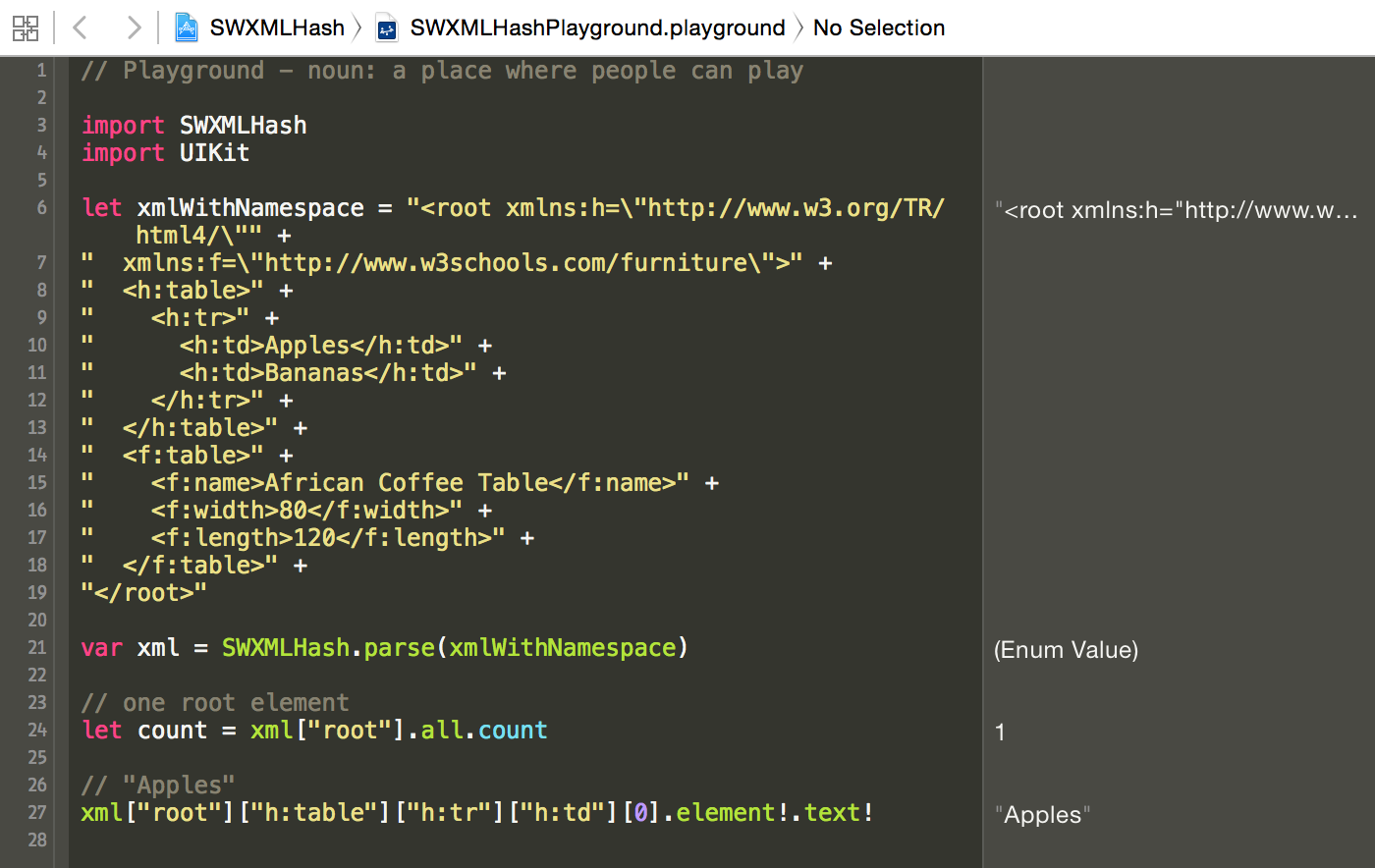
If you're just getting started with SWXMLHash, I'd recommend cloning the
repository down and opening the workspace. I've included a Swift playground in
the workspace which makes it easy to experiment with the API and the calls.
 ## Configuration
SWXMLHash allows for limited configuration in terms of its approach to parsing.
To set any of the configuration options, you use the `configure` method, like
so:
```swift
let xml = SWXMLHash.config {
config in
// set any config options here
}.parse(xmlToParse)
```
The available options at this time are:
- `shouldProcessLazily`
- This determines whether not to use lazy loading of the XML. It can
significantly increase the performance of parsing if your XML is large.
- Defaults to `false`
- `shouldProcessNamespaces`
- This setting is forwarded on to the internal `NSXMLParser` instance. It will
return any XML elements without their namespace parts (i.e. "\"
will be returned as "\")
- Defaults to `false`
- `caseInsensitive`
- This setting allows for key lookups to be case insensitive. Typically XML is
a case sensitive language, but this option lets you bypass this if
necessary.
- Defaults to `false`
- `encoding`
- This setting allows for explicitly specifying the character encoding when an
XML string is passed to `parse`.
- Defaults to `String.encoding.utf8`
- `userInfo`
- This setting mimics `Codable`'s `userInfo` property to allow the user to add
contextual information that will be used for deserialization.
- See
[Codable's userInfo docs](https://developer.apple.com/documentation/swift/encoder/2894907-userinfo)
- The default is [:]
- `detectParsingErrors`
- This setting attempts to detect XML parsing errors. `parse` will return an
`XMLIndexer.parsingError` if any parsing issues are found.
- Defaults to `false` (because of backwards compatibility and because many
users attempt to parse HTML with this library)
## Examples
All examples below can be found in the included
[specs](https://github.com/drmohundro/SWXMLHash/blob/main/Tests/).
### Initialization
```swift
let xml = SWXMLHash.parse(xmlToParse)
```
Alternatively, if you're parsing a large XML file and need the best performance,
you may wish to configure the parsing to be processed lazily. Lazy processing
avoids loading the entire XML document into memory, so it could be preferable
for performance reasons. See the error handling for one caveat regarding lazy
loading.
```swift
let xml = SWXMLHash.config {
config in
config.shouldProcessLazily = true
}.parse(xmlToParse)
```
The above approach uses the new config method, but there is also a `lazy` method
directly off of `SWXMLHash`.
```swift
let xml = SWXMLHash.lazy(xmlToParse)
```
### Single Element Lookup
Given:
```xml
...
```
Will return "Foo".
```swift
xml["root"]["header"]["title"].element?.text
```
### Multiple Elements Lookup
Given:
```xml
...
Bob
John
Mark
...
```
The below will return "John".
```swift
xml["root"]["catalog"]["book"][1]["author"].element?.text
```
### Attributes Usage
Given:
```xml
...
Bob
John
Mark
...
```
The below will return "123".
```swift
xml["root"]["catalog"]["book"][1].element?.attribute(by: "id")?.text
```
Alternatively, you can look up an element with specific attributes. The below
will return "John".
```swift
xml["root"]["catalog"]["book"].withAttribute("id", "123")["author"].element?.text
```
### Returning All Elements At Current Level
Given:
```xml
...
Fiction
Non-fiction
Technical
...
```
The `all` method will iterate over all nodes at the indexed level. The code
below will return "Fiction, Non-fiction, Technical".
```swift
", ".join(xml["root"]["catalog"]["book"].all.map { elem in
elem["genre"].element!.text!
})
```
You can also iterate over the `all` method:
```swift
for elem in xml["root"]["catalog"]["book"].all {
print(elem["genre"].element!.text!)
}
```
### Returning All Child Elements At Current Level
Given:
```xml
Fiction
Book
1/1/2015
```
The below will `print` "root", "catalog", "book", "genre", "title", and "date"
(note the `children` method).
```swift
func enumerate(indexer: XMLIndexer) {
for child in indexer.children {
print(child.element!.name)
enumerate(child)
}
}
enumerate(indexer: xml)
```
### Filtering elements
Given:
```xml
Gambardella, Matthew
XML Developer's Guide
Computer44.95
2000-10-01
Ralls, Kim
Midnight Rain
Fantasy
5.95
2000-12-16
Corets, Eva
Maeve Ascendant
Fantasy
5.95
2000-11-17
```
The following will return return "Midnight Rain". Filtering can be by any part
of the `XMLElement` class or by index as well.
```swift
let subIndexer = xml!["root"]["catalog"]["book"]
.filterAll { elem, _ in elem.attribute(by: "id")!.text == "bk102" }
.filterChildren { _, index in index >= 1 && index <= 3 }
print(subIndexer.children[0].element?.text)
```
### Error Handling
Using Swift 2.0's new error handling feature:
```swift
do {
try xml!.byKey("root").byKey("what").byKey("header").byKey("foo")
} catch let error as IndexingError {
// error is an IndexingError instance that you can deal with
}
```
**Or** using the existing indexing functionality:
```swift
switch xml["root"]["what"]["header"]["foo"] {
case .element(let elem):
// everything is good, code away!
case .xmlError(let error):
// error is an IndexingError instance that you can deal with
}
```
Note that error handling as shown above will not work with lazy loaded XML. The
lazy parsing doesn't actually occur until the `element` or `all` method are
called - as a result, there isn't any way to know prior to asking for an element
if it exists or not.
### Simple Type Conversion
Given:
```xml
Monday, 23 January 2016 12:01:12 111
```
With the following implementation for `Date` element and attribute
deserialization:
```swift
extension Date: XMLElementDeserializable, XMLAttributeDeserializable {
public static func deserialize(_ element: XMLElement) throws -> Date {
let date = stringToDate(element.text)
guard let validDate = date else {
throw XMLDeserializationError.typeConversionFailed(type: "Date", element: element)
}
return validDate
}
public static func deserialize(_ attribute: XMLAttribute) throws -> Date {
let date = stringToDate(attribute.text)
guard let validDate = date else {
throw XMLDeserializationError.attributeDeserializationFailed(type: "Date", attribute: attribute)
}
return validDate
}
private static func stringToDate(_ dateAsString: String) -> Date? {
let dateFormatter = DateFormatter()
dateFormatter.dateFormat = "EEE, dd MMM yyyy HH:mm:ss zzz"
return dateFormatter.date(from: dateAsString)
}
}
```
The below will return a date value:
```swift
let dt: Date = try xml["root"]["elem"].value()
```
### Complex Types Conversion
Given:
```xml
Book A
12.5
2015
C1
C2
Book B
10
1988
C2
C3
Book C
8.33
1990
10
C1
C3
```
with `Book` struct implementing `XMLIndexerDeserializable`:
```swift
struct Book: XMLIndexerDeserializable {
let title: String
let price: Double
let year: Int
let amount: Int?
let isbn: Int
let category: [String]
static func deserialize(_ node: XMLIndexer) throws -> Book {
return try Book(
title: node["title"].value(),
price: node["price"].value(),
year: node["year"].value(),
amount: node["amount"].value(),
isbn: node.value(ofAttribute: "isbn"),
category : node["categories"]["category"].value()
)
}
}
```
The below will return an array of `Book` structs:
```swift
let books: [Book] = try xml["root"]["books"]["book"].value()
```
## Configuration
SWXMLHash allows for limited configuration in terms of its approach to parsing.
To set any of the configuration options, you use the `configure` method, like
so:
```swift
let xml = SWXMLHash.config {
config in
// set any config options here
}.parse(xmlToParse)
```
The available options at this time are:
- `shouldProcessLazily`
- This determines whether not to use lazy loading of the XML. It can
significantly increase the performance of parsing if your XML is large.
- Defaults to `false`
- `shouldProcessNamespaces`
- This setting is forwarded on to the internal `NSXMLParser` instance. It will
return any XML elements without their namespace parts (i.e. "\"
will be returned as "\")
- Defaults to `false`
- `caseInsensitive`
- This setting allows for key lookups to be case insensitive. Typically XML is
a case sensitive language, but this option lets you bypass this if
necessary.
- Defaults to `false`
- `encoding`
- This setting allows for explicitly specifying the character encoding when an
XML string is passed to `parse`.
- Defaults to `String.encoding.utf8`
- `userInfo`
- This setting mimics `Codable`'s `userInfo` property to allow the user to add
contextual information that will be used for deserialization.
- See
[Codable's userInfo docs](https://developer.apple.com/documentation/swift/encoder/2894907-userinfo)
- The default is [:]
- `detectParsingErrors`
- This setting attempts to detect XML parsing errors. `parse` will return an
`XMLIndexer.parsingError` if any parsing issues are found.
- Defaults to `false` (because of backwards compatibility and because many
users attempt to parse HTML with this library)
## Examples
All examples below can be found in the included
[specs](https://github.com/drmohundro/SWXMLHash/blob/main/Tests/).
### Initialization
```swift
let xml = SWXMLHash.parse(xmlToParse)
```
Alternatively, if you're parsing a large XML file and need the best performance,
you may wish to configure the parsing to be processed lazily. Lazy processing
avoids loading the entire XML document into memory, so it could be preferable
for performance reasons. See the error handling for one caveat regarding lazy
loading.
```swift
let xml = SWXMLHash.config {
config in
config.shouldProcessLazily = true
}.parse(xmlToParse)
```
The above approach uses the new config method, but there is also a `lazy` method
directly off of `SWXMLHash`.
```swift
let xml = SWXMLHash.lazy(xmlToParse)
```
### Single Element Lookup
Given:
```xml
...
```
Will return "Foo".
```swift
xml["root"]["header"]["title"].element?.text
```
### Multiple Elements Lookup
Given:
```xml
...
Bob
John
Mark
...
```
The below will return "John".
```swift
xml["root"]["catalog"]["book"][1]["author"].element?.text
```
### Attributes Usage
Given:
```xml
...
Bob
John
Mark
...
```
The below will return "123".
```swift
xml["root"]["catalog"]["book"][1].element?.attribute(by: "id")?.text
```
Alternatively, you can look up an element with specific attributes. The below
will return "John".
```swift
xml["root"]["catalog"]["book"].withAttribute("id", "123")["author"].element?.text
```
### Returning All Elements At Current Level
Given:
```xml
...
Fiction
Non-fiction
Technical
...
```
The `all` method will iterate over all nodes at the indexed level. The code
below will return "Fiction, Non-fiction, Technical".
```swift
", ".join(xml["root"]["catalog"]["book"].all.map { elem in
elem["genre"].element!.text!
})
```
You can also iterate over the `all` method:
```swift
for elem in xml["root"]["catalog"]["book"].all {
print(elem["genre"].element!.text!)
}
```
### Returning All Child Elements At Current Level
Given:
```xml
Fiction
Book
1/1/2015
```
The below will `print` "root", "catalog", "book", "genre", "title", and "date"
(note the `children` method).
```swift
func enumerate(indexer: XMLIndexer) {
for child in indexer.children {
print(child.element!.name)
enumerate(child)
}
}
enumerate(indexer: xml)
```
### Filtering elements
Given:
```xml
Gambardella, Matthew
XML Developer's Guide
Computer44.95
2000-10-01
Ralls, Kim
Midnight Rain
Fantasy
5.95
2000-12-16
Corets, Eva
Maeve Ascendant
Fantasy
5.95
2000-11-17
```
The following will return return "Midnight Rain". Filtering can be by any part
of the `XMLElement` class or by index as well.
```swift
let subIndexer = xml!["root"]["catalog"]["book"]
.filterAll { elem, _ in elem.attribute(by: "id")!.text == "bk102" }
.filterChildren { _, index in index >= 1 && index <= 3 }
print(subIndexer.children[0].element?.text)
```
### Error Handling
Using Swift 2.0's new error handling feature:
```swift
do {
try xml!.byKey("root").byKey("what").byKey("header").byKey("foo")
} catch let error as IndexingError {
// error is an IndexingError instance that you can deal with
}
```
**Or** using the existing indexing functionality:
```swift
switch xml["root"]["what"]["header"]["foo"] {
case .element(let elem):
// everything is good, code away!
case .xmlError(let error):
// error is an IndexingError instance that you can deal with
}
```
Note that error handling as shown above will not work with lazy loaded XML. The
lazy parsing doesn't actually occur until the `element` or `all` method are
called - as a result, there isn't any way to know prior to asking for an element
if it exists or not.
### Simple Type Conversion
Given:
```xml
Monday, 23 January 2016 12:01:12 111
```
With the following implementation for `Date` element and attribute
deserialization:
```swift
extension Date: XMLElementDeserializable, XMLAttributeDeserializable {
public static func deserialize(_ element: XMLElement) throws -> Date {
let date = stringToDate(element.text)
guard let validDate = date else {
throw XMLDeserializationError.typeConversionFailed(type: "Date", element: element)
}
return validDate
}
public static func deserialize(_ attribute: XMLAttribute) throws -> Date {
let date = stringToDate(attribute.text)
guard let validDate = date else {
throw XMLDeserializationError.attributeDeserializationFailed(type: "Date", attribute: attribute)
}
return validDate
}
private static func stringToDate(_ dateAsString: String) -> Date? {
let dateFormatter = DateFormatter()
dateFormatter.dateFormat = "EEE, dd MMM yyyy HH:mm:ss zzz"
return dateFormatter.date(from: dateAsString)
}
}
```
The below will return a date value:
```swift
let dt: Date = try xml["root"]["elem"].value()
```
### Complex Types Conversion
Given:
```xml
Book A
12.5
2015
C1
C2
Book B
10
1988
C2
C3
Book C
8.33
1990
10
C1
C3
```
with `Book` struct implementing `XMLIndexerDeserializable`:
```swift
struct Book: XMLIndexerDeserializable {
let title: String
let price: Double
let year: Int
let amount: Int?
let isbn: Int
let category: [String]
static func deserialize(_ node: XMLIndexer) throws -> Book {
return try Book(
title: node["title"].value(),
price: node["price"].value(),
year: node["year"].value(),
amount: node["amount"].value(),
isbn: node.value(ofAttribute: "isbn"),
category : node["categories"]["category"].value()
)
}
}
```
The below will return an array of `Book` structs:
```swift
let books: [Book] = try xml["root"]["books"]["book"].value()
```
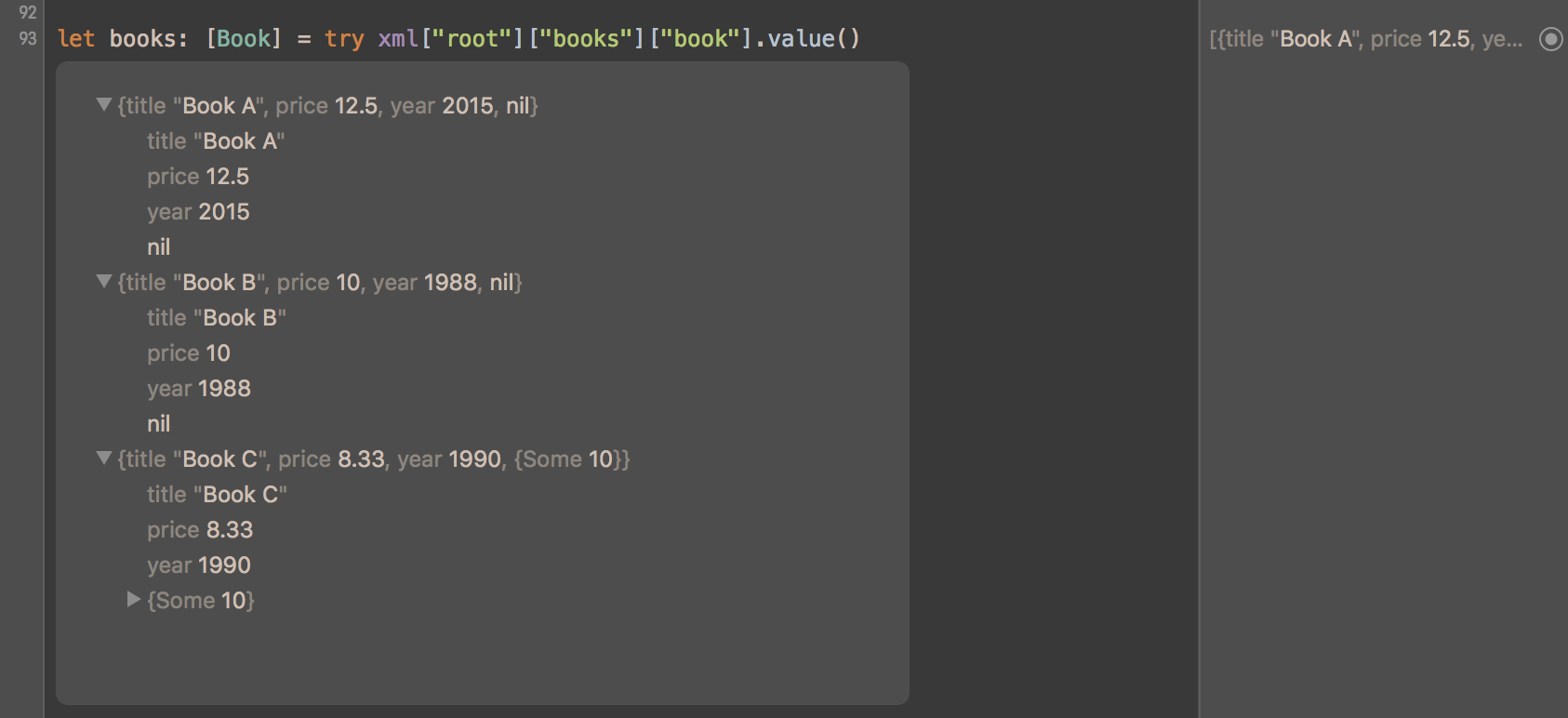 You can convert any XML to your custom type by implementing
`XMLIndexerDeserializable` for any non-leaf node (e.g. `` in the example
above).
For leaf nodes (e.g. `` in the example above), built-in converters
support `Int`, `Double`, `Float`, `Bool`, and `String` values (both non- and
-optional variants). Custom converters can be added by implementing
`XMLElementDeserializable`.
For attributes (e.g. `isbn=` in the example above), built-in converters support
the same types as above, and additional converters can be added by implementing
`XMLAttributeDeserializable`.
Types conversion supports error handling, optionals and arrays. For more
examples, look into `SWXMLHashTests.swift` or play with types conversion
directly in the Swift playground.
## FAQ
### Does SWXMLHash handle URLs for me?
No - SWXMLHash only handles parsing of XML. If you have a URL that has XML
content on it, I'd recommend using a library like
[AlamoFire](https://github.com/Alamofire/Alamofire) to download the content into
a string and then parsing it.
### Does SWXMLHash support writing XML content?
No, not at the moment - SWXMLHash only supports parsing XML (via indexing,
deserialization, etc.).
### I'm getting an "Ambiguous reference to member 'subscript'" when I call `.value()`.
`.value()` is used for deserialization - you have to have something that
implements `XMLIndexerDeserializable` (or `XMLElementDeserializable` if it is a
single element versus a group of elements) and that can handle deserialization
to the left-hand side of expression.
For example, given the following:
```swift
let dateValue: Date = try! xml["root"]["date"].value()
```
You'll get an error because there isn't any built-in deserializer for `Date`.
See the above documentation on adding your own deserialization support. In this
case, you would create your own `XMLElementDeserializable` implementation for
`Date`. See above for an example of how to add your own `Date` deserialization
support.
### I'm getting an `EXC_BAD_ACCESS (SIGSEGV)` when I call `parse()`
Chances are very good that your XML content has what is called a "byte order
mark" or BOM. SWXMLHash uses `NSXMLParser` for its parsing logic and there are
issues with it and handling BOM characters. See
[issue #65](https://github.com/drmohundro/SWXMLHash/issues/65) for more details.
Others who have run into this problem have just stripped the BOM out of their
content prior to parsing.
### How do I handle deserialization with a class versus a struct (such as with `NSDate`)?
Using extensions on classes instead of structs can result in some odd catches
that might give you a little trouble. For example, see
[this question on StackOverflow](http://stackoverflow.com/questions/38174669/how-to-deserialize-nsdate-with-swxmlhash)
where someone was trying to write their own `XMLElementDeserializable` for
`NSDate` which is a class and not a struct. The `XMLElementDeserializable`
protocol expects a method that returns `Self` - this is the part that gets a
little odd.
See below for the code snippet to get this to work and note in particular the
`private static func value<T>() -> T` line - that is the key.
```swift
extension NSDate: XMLElementDeserializable {
public static func deserialize(_ element: XMLElement) throws -> Self {
guard let dateAsString = element.text else {
throw XMLDeserializationError.nodeHasNoValue
}
let dateFormatter = NSDateFormatter()
dateFormatter.dateFormat = "EEE, dd MMM yyyy HH:mm:ss zzz"
let date = dateFormatter.dateFromString(dateAsString)
guard let validDate = date else {
throw XMLDeserializationError.typeConversionFailed(type: "Date", element: element)
}
// NOTE THIS
return value(validDate)
}
// AND THIS
private static func value<T>(date: NSDate) -> T {
return date as! T
}
}
```
### How do I handle deserialization with an enum?
Check out this great suggestion/example from @woolie up at https://github.com/drmohundro/SWXMLHash/discussions/245.
### Have a different question?
Feel free to shoot me an email, post a
[question on StackOverflow](http://stackoverflow.com/questions/tagged/swxmlhash),
or open an issue if you think you've found a bug. I'm happy to try to help!
Another alternative is to post a question in the [Discussions](https://github.com/drmohundro/SWXMLHash/discussions).
## Changelog
See [CHANGELOG](CHANGELOG.md) for a list of all changes and their corresponding
versions.
## Contributing
See [CONTRIBUTING](CONTRIBUTING.md) for guidelines to contribute back to
SWXMLHash.
## License
SWXMLHash is released under the MIT license. See [LICENSE](LICENSE) for details.
You can convert any XML to your custom type by implementing
`XMLIndexerDeserializable` for any non-leaf node (e.g. `` in the example
above).
For leaf nodes (e.g. `` in the example above), built-in converters
support `Int`, `Double`, `Float`, `Bool`, and `String` values (both non- and
-optional variants). Custom converters can be added by implementing
`XMLElementDeserializable`.
For attributes (e.g. `isbn=` in the example above), built-in converters support
the same types as above, and additional converters can be added by implementing
`XMLAttributeDeserializable`.
Types conversion supports error handling, optionals and arrays. For more
examples, look into `SWXMLHashTests.swift` or play with types conversion
directly in the Swift playground.
## FAQ
### Does SWXMLHash handle URLs for me?
No - SWXMLHash only handles parsing of XML. If you have a URL that has XML
content on it, I'd recommend using a library like
[AlamoFire](https://github.com/Alamofire/Alamofire) to download the content into
a string and then parsing it.
### Does SWXMLHash support writing XML content?
No, not at the moment - SWXMLHash only supports parsing XML (via indexing,
deserialization, etc.).
### I'm getting an "Ambiguous reference to member 'subscript'" when I call `.value()`.
`.value()` is used for deserialization - you have to have something that
implements `XMLIndexerDeserializable` (or `XMLElementDeserializable` if it is a
single element versus a group of elements) and that can handle deserialization
to the left-hand side of expression.
For example, given the following:
```swift
let dateValue: Date = try! xml["root"]["date"].value()
```
You'll get an error because there isn't any built-in deserializer for `Date`.
See the above documentation on adding your own deserialization support. In this
case, you would create your own `XMLElementDeserializable` implementation for
`Date`. See above for an example of how to add your own `Date` deserialization
support.
### I'm getting an `EXC_BAD_ACCESS (SIGSEGV)` when I call `parse()`
Chances are very good that your XML content has what is called a "byte order
mark" or BOM. SWXMLHash uses `NSXMLParser` for its parsing logic and there are
issues with it and handling BOM characters. See
[issue #65](https://github.com/drmohundro/SWXMLHash/issues/65) for more details.
Others who have run into this problem have just stripped the BOM out of their
content prior to parsing.
### How do I handle deserialization with a class versus a struct (such as with `NSDate`)?
Using extensions on classes instead of structs can result in some odd catches
that might give you a little trouble. For example, see
[this question on StackOverflow](http://stackoverflow.com/questions/38174669/how-to-deserialize-nsdate-with-swxmlhash)
where someone was trying to write their own `XMLElementDeserializable` for
`NSDate` which is a class and not a struct. The `XMLElementDeserializable`
protocol expects a method that returns `Self` - this is the part that gets a
little odd.
See below for the code snippet to get this to work and note in particular the
`private static func value<T>() -> T` line - that is the key.
```swift
extension NSDate: XMLElementDeserializable {
public static func deserialize(_ element: XMLElement) throws -> Self {
guard let dateAsString = element.text else {
throw XMLDeserializationError.nodeHasNoValue
}
let dateFormatter = NSDateFormatter()
dateFormatter.dateFormat = "EEE, dd MMM yyyy HH:mm:ss zzz"
let date = dateFormatter.dateFromString(dateAsString)
guard let validDate = date else {
throw XMLDeserializationError.typeConversionFailed(type: "Date", element: element)
}
// NOTE THIS
return value(validDate)
}
// AND THIS
private static func value<T>(date: NSDate) -> T {
return date as! T
}
}
```
### How do I handle deserialization with an enum?
Check out this great suggestion/example from @woolie up at https://github.com/drmohundro/SWXMLHash/discussions/245.
### Have a different question?
Feel free to shoot me an email, post a
[question on StackOverflow](http://stackoverflow.com/questions/tagged/swxmlhash),
or open an issue if you think you've found a bug. I'm happy to try to help!
Another alternative is to post a question in the [Discussions](https://github.com/drmohundro/SWXMLHash/discussions).
## Changelog
See [CHANGELOG](CHANGELOG.md) for a list of all changes and their corresponding
versions.
## Contributing
See [CONTRIBUTING](CONTRIBUTING.md) for guidelines to contribute back to
SWXMLHash.
## License
SWXMLHash is released under the MIT license. See [LICENSE](LICENSE) for details.