# qqtools
**Repository Path**: judaihyper/qqtools
## Basic Information
- **Project Name**: qqtools
- **Description**: QQ群工具,提供摩点监听,48系成员直播监听,48系成员信息监听,微博监听,群成员自动欢迎等功能。源文件编译方法请查看 use 分支。
- **Primary Language**: JavaScript
- **License**: GPL-3.0
- **Default Branch**: master
- **Homepage**: None
- **GVP Project**: No
## Statistics
- **Stars**: 0
- **Forks**: 0
- **Created**: 2020-11-10
- **Last Updated**: 2020-12-19
## Categories & Tags
**Categories**: Uncategorized
**Tags**: None
## README
# QQ群工具v2
V2版本的QQ登录基于[酷Q](https://cqp.cc/)。
## 软件下载链接
进入到[https://github.com/duan602728596/document/blob/master/48/README.md](https://github.com/duan602728596/document/blob/master/48/README.md)下载
## SmartQQ版本
SmartQQ版本请查看[https://github.com/duan602728596/qqtools/tree/smartQQ](https://github.com/duan602728596/qqtools/tree/smartQQ)
## 功能
* 摩点项目监听
* 口袋48直播监听
* 成员房间信息监听
* 微博监听([微博的lfid查找方法](#微博的lfid查找方法))
* 新成员自动欢迎
* 定时喊话
* 天气预报查询
* 图灵机器人
* 自定义命令
* 配置导入和导出
## 使用说明
[https://github.com/duan602728596/qqtools/blob/master/使用说明.txt](https://github.com/duan602728596/qqtools/blob/master/使用说明.txt)
## 许可证
本软件遵循**GNU General Public License v3.0**许可证。
## 技术栈
Pug + Sass + ECMAScript + React + AntD + Webpack + NW.js。
## 编译命令
* 输入命令 `$ npm start` 运行开发环境。
* 输入命令 `$ npm build` 编译到文件夹。
* 输入命令 `$ npm run devdll` 编译开发环境dll文件。
* 输入命令 `$ npm run prodll` 编译生产环境编译dll文件。
* 输入命令 `$ npm run npmi` 或 `$ yarn run yarni` 安装生产环境依赖。
## nwjs中文文档
[https://wizardforcel.gitbooks.io/nwjs-doc/content/wiki/index.html](https://wizardforcel.gitbooks.io/nwjs-doc/content/wiki/index.html)
## 谷歌扩展
* 教程参考:[http://www.ituring.com.cn/book/1421](http://www.ituring.com.cn/book/1421)
* api文档:[https://developer.chrome.com/extensions/api_index](https://developer.chrome.com/extensions/api_index)
## coolq-http-api
酷Q和nodejs的交互离不开[**https://github.com/richardchien/coolq-http-api**](https://github.com/richardchien/coolq-http-api),感谢插件的作者!!!
## 文件夹结构
* nwjs: nwjs SDK
* app: 源代码
## 关于dll
无论是开发环境还是生产环境,首先要编译dll文件,将公共模块提取出来。
## 关于node-sass
node-sass如果安装失败,可以先到[https://github.com/sass/node-sass/releases](https://github.com/sass/node-sass/releases)下载binding.node文件,然后将该文件添加到SASS_BINARY_PATH环境变量内。
## 打包方法
* 将文件夹内的文件打包成压缩文件,并重命名为*.nw
* 将*.nw复制到和nw.exe同级目录下,运行
```
$ copy /b nw.exe+*.nw *.exe
```
## 源代码托管地址
[https://github.com/duan602728596/qqtools](https://github.com/duan602728596/qqtools)
## 微博的lfid查找方法
1、移动端打开微博:找到要监听的微博
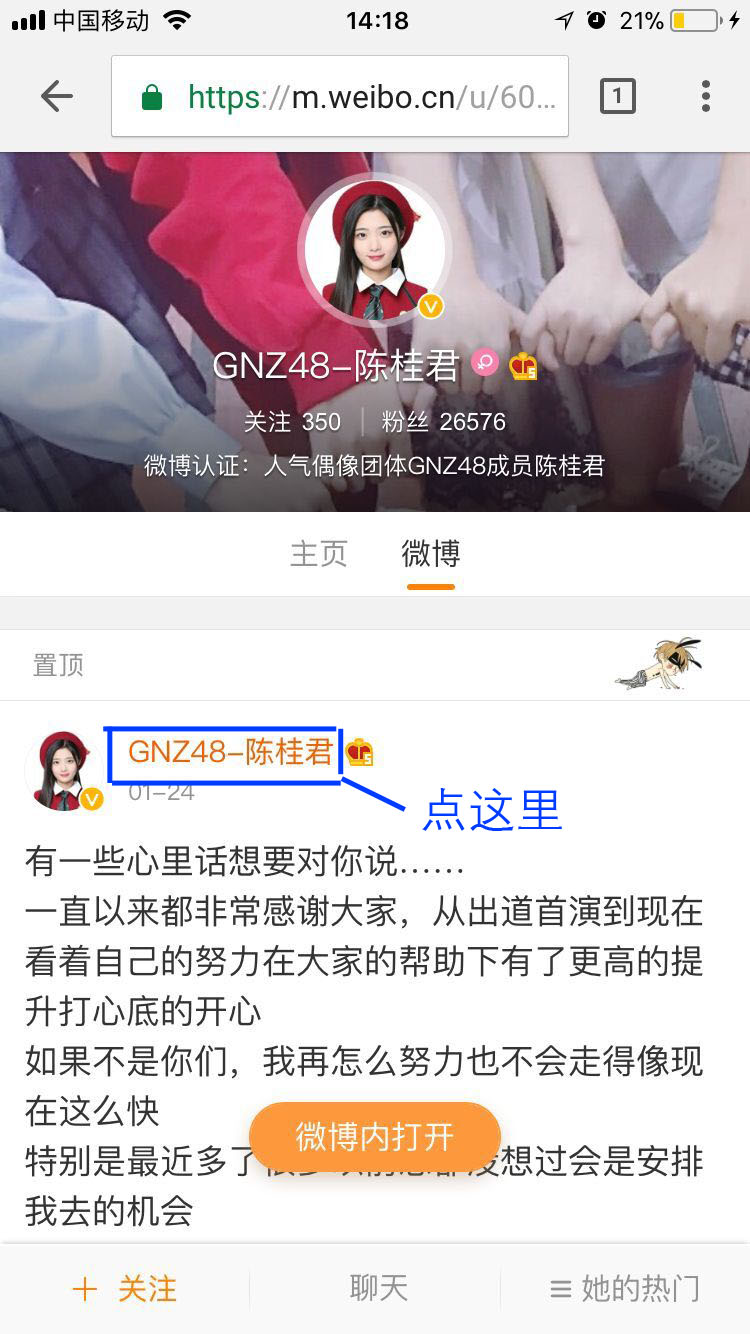
2、点击昵称,此时微博页面不变,但是地址变了,地址上就有lfid
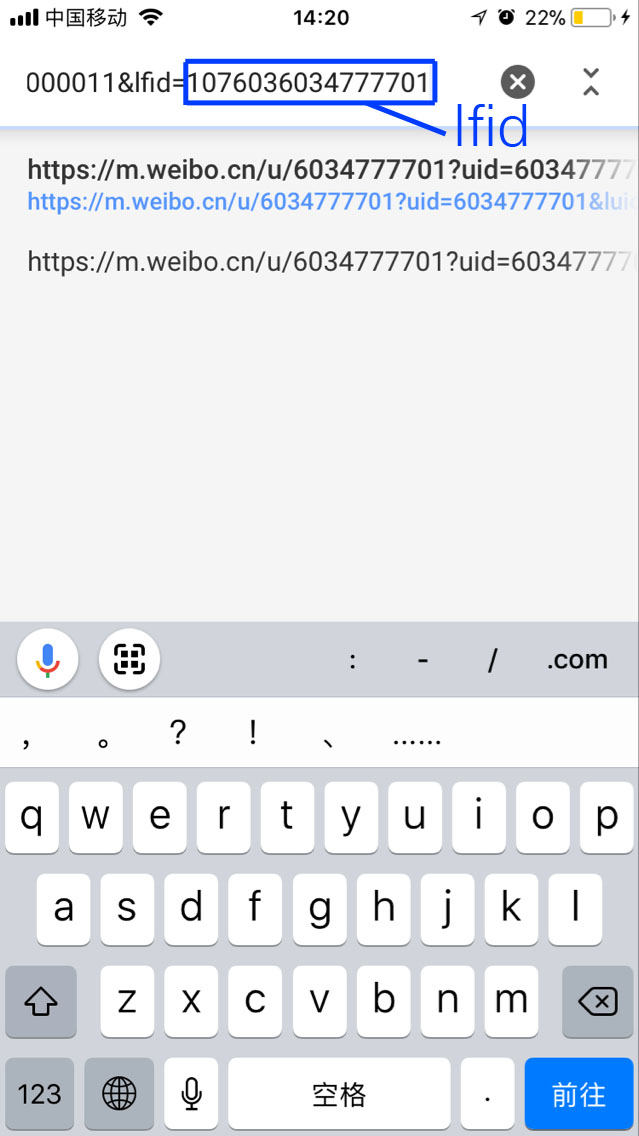
3、验证lfid是否正确
地址:`https://m.weibo.cn/api/container/getIndex?containerid={{ lfid }}`