# PyTorch-SRGAN
**Repository Path**: kongcong/PyTorch-SRGAN
## Basic Information
- **Project Name**: PyTorch-SRGAN
- **Description**: A modern PyTorch implementation of SRGAN
- **Primary Language**: Python
- **License**: GPL-3.0
- **Default Branch**: master
- **Homepage**: None
- **GVP Project**: No
## Statistics
- **Stars**: 0
- **Forks**: 0
- **Created**: 2019-07-25
- **Last Updated**: 2020-12-19
## Categories & Tags
**Categories**: Uncategorized
**Tags**: None
## README
# PyTorch-SRGAN
A modern PyTorch implementation of SRGAN
It is deeply based on __Photo-Realistic Single Image Super-Resolution Using a Generative Adversarial Network__ paper published by the Twitter team (https://arxiv.org/abs/1609.04802) but I replaced activations by Swish (https://arxiv.org/abs/1710.05941)
You can start training out-of-the-box with the CIFAR-10 or CIFAR-100 datasets, to emulate the paper results however, you will need to download and clean the ImageNet dataset yourself. Results and weights are provided for the ImageNet dataset.
Contributions are welcome!
## Requirements
* PyTorch
* torchvision
* tensorboard_logger (https://github.com/TeamHG-Memex/tensorboard_logger)
## Training
```
usage: train [-h] [--dataset DATASET] [--dataroot DATAROOT]
[--workers WORKERS] [--batchSize BATCHSIZE]
[--imageSize IMAGESIZE] [--upSampling UPSAMPLING]
[--nEpochs NEPOCHS] [--generatorLR GENERATORLR]
[--discriminatorLR DISCRIMINATORLR] [--cuda] [--nGPU NGPU]
[--generatorWeights GENERATORWEIGHTS]
[--discriminatorWeights DISCRIMINATORWEIGHTS] [--out OUT]
```
Example: ```./train --cuda```
This will start a training session in the GPU. First it will pre-train the generator using MSE error for 2 epochs, then it will train the full GAN (generator + discriminator) for 100 epochs, using content (mse + vgg) and adversarial loss. Although weights are already provided in the repository, this script will also generate them in the checkpoints file.
## Testing
```
usage: test [-h] [--dataset DATASET] [--dataroot DATAROOT] [--workers WORKERS]
[--batchSize BATCHSIZE] [--imageSize IMAGESIZE]
[--upSampling UPSAMPLING] [--cuda] [--nGPU NGPU]
[--generatorWeights GENERATORWEIGHTS]
[--discriminatorWeights DISCRIMINATORWEIGHTS]
```
Example: ```./test --cuda```
This will start a testing session in the GPU. It will display mean error values and save the generated images in the output directory, all three versions: low resolution, high resolution (original) and high resolution (generated).
## Results
### Training
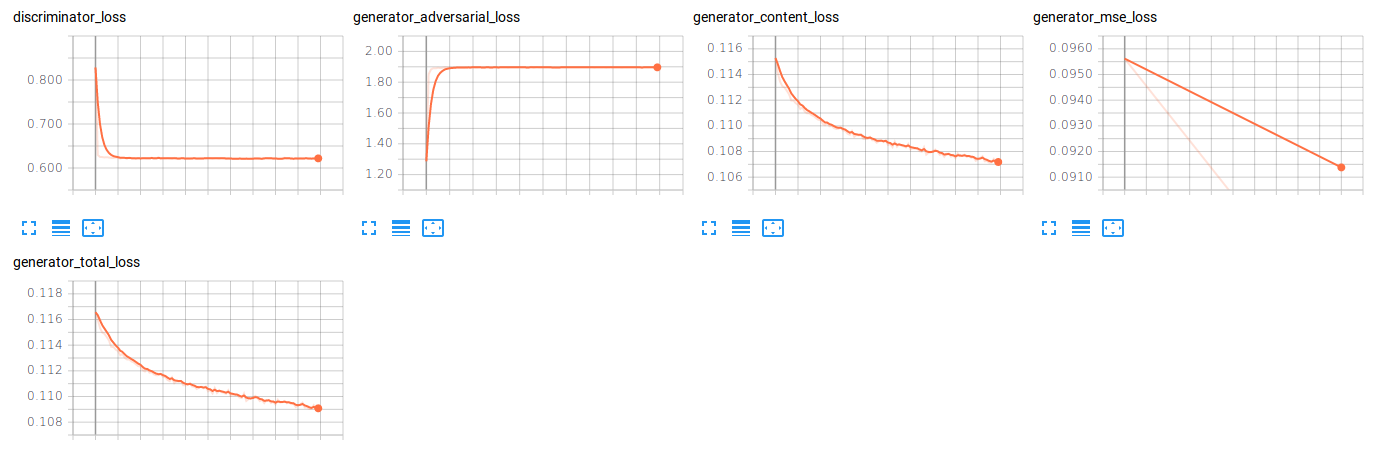
The following results have been obtained with the current training setup:
* Dataset: 350K randomly selected ImageNet samples
* Input image size: 24x24
* Output image size: 96x96 (16x)
Other training parameters are the default of _train_ script
### Testing
Testing has been executed on 128 randomly selected ImageNet samples (disjoint from training set)
```[7/8] Discriminator_Loss: 1.4123 Generator_Loss (Content/Advers/Total): 0.0901/0.6152/0.0908```
### Examples
See more under the _output_ directory
__High resolution / Low resolution / Recovered High Resolution__


