# ConfigManager
**Repository Path**: kyleljj/ConfigManager
## Basic Information
- **Project Name**: ConfigManager
- **Description**: 性能最高、最简单的配置管理工具
- **Primary Language**: C#
- **License**: Not specified
- **Default Branch**: master
- **Homepage**: None
- **GVP Project**: No
## Statistics
- **Stars**: 0
- **Forks**: 0
- **Created**: 2020-09-02
- **Last Updated**: 2020-12-19
## Categories & Tags
**Categories**: Uncategorized
**Tags**: None
## README
# Config Manager
Fast & Easy Config Manage Tool
*Read this in other languages: [简体中文](README.md) [English](README.en.md)*

# Features
1. **Fast Parse**: Parse in Editor
2. **Formats**: txt,csv,json,xml,xls,xlsx...
3. **No size**: all scripts in editor
4. **Intelligent**: Auto select type
5. **Reduce errors**: "."operation
# Quick Start
### Edit Configs:
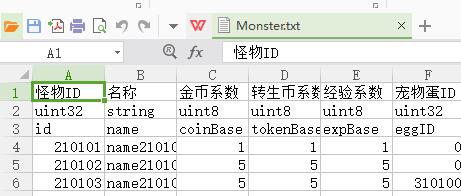
[Sheet](https://github.com/RickJiangShu/ConfigManager-Example/blob/master/Doc/Sheet.md "Sheet")
[Json](https://github.com/RickJiangShu/ConfigManager-Example/blob/master/Doc/Json.md "Json")
[Xml](https://github.com/RickJiangShu/ConfigManager-Example/blob/master/Doc/Xml.md "Xml")
### In Editor:
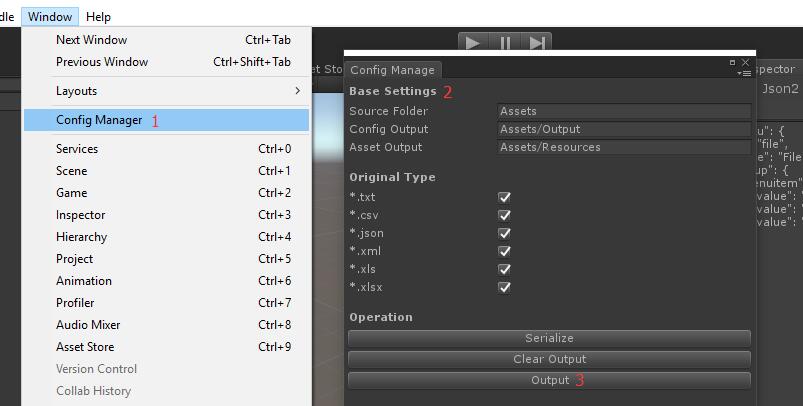
1. Press menu "Window/Config Manager";
2. Set paths;
3. Press "output"
### In Runtime:
1. Call Deserialize();
2. Call Get() use them.
```
SerializableSet set = Resources.Load("SerializableSet");
Deserializer.Deserialize(set);
/* 与加载解耦,不依赖加载方式
AssetBundle bundle = AssetBundle.LoadFromFile(Application.streamingAssetsPath + "/config.ab");
set = bundle.LoadAsset("SerializableSet");
Deserializer.Deserialize(set);
*/
MonsterSheet monsterSheet = MonsterSheet.Get(210102)
print(monsterSheet.name);
```

### Example:
https://github.com/RickJiangShu/ConfigManager-Example