# APK-Installer
**Repository Path**: mapleKirito/APK-Installer
## Basic Information
- **Project Name**: APK-Installer
- **Description**: An Android Application Installer for Windows
- **Primary Language**: Unknown
- **License**: GPL-3.0
- **Default Branch**: l10n_main
- **Homepage**: None
- **GVP Project**: No
## Statistics
- **Stars**: 0
- **Forks**: 0
- **Created**: 2021-11-07
- **Last Updated**: 2021-11-07
## Categories & Tags
**Categories**: Uncategorized
**Tags**: None
## README
 # APK Installer
An Android Application Installer for Windows
[](https://crowdin.com/project/APKInstaller)
# APK Installer
An Android Application Installer for Windows
[](https://crowdin.com/project/APKInstaller)




 ## 语言
- [中文](README.md)
- [English](README.en-US.md)
## 目录
- [APK Installer](#apk-installer)
- [语言](#语言)
- [目录](#目录)
- [如何安装应用](#如何安装应用)
- [最低需求](#最低需求)
- [使用应用安装脚本安装应用](#使用应用安装脚本安装应用)
- [使用应用安装程序安装应用](#使用应用安装程序安装应用)
- [更新应用](#更新应用)
- [屏幕截图](#屏幕截图)
- [使用到的模块](#使用到的模块)
- [鸣谢](#鸣谢)
- [Star 数量统计](#star-数量统计)
## 如何安装应用
### 最低需求
- Windows 10 Build 17763及以上
- 设备需支持ARM64/x86/x64
- 至少400MB的空余储存空间(用于储存安装包与安装应用)
### 使用应用安装脚本安装应用
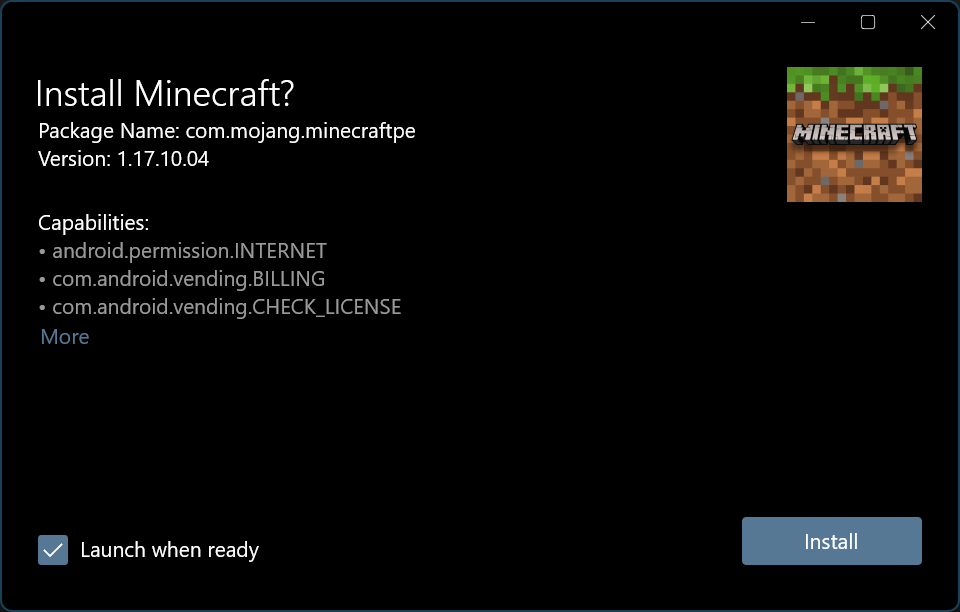
- 下载并解压最新的[安装包`(APKInstaller (Package)_x.x.x.0_Test.rar)`](https://github.com/Tangent-90/Coolapk-UWP/releases/latest "下载安装包")
- 如果没有应用安装脚本,下载[`Install.ps1`](Install.ps1)到目标目录

- 右击`Install.ps1`,选择“使用PowerShell运行”
- 应用安装脚本将会引导您完成此过程的剩余部分
### 使用应用安装程序安装应用
- 下载并解压最新的[安装包`(APKInstaller (Package)_x.x.x.0_Test.rar)`](https://github.com/Tangent-90/Coolapk-UWP/releases/latest "下载安装包")
- [开启旁加载模式](https://www.windowscentral.com/how-enable-windows-10-sideload-apps-outside-store)
- 如果您想开发UWP应用,您可以开启[开发人员模式](https://docs.microsoft.com/zh-cn/windows/uwp/get-started/enable-your-device-for-development),**对于大多数不需要做UWP开发的用户来说,开发人员模式是没有必要的**
- 安装`Dependencies`文件夹下的适用于您的设备的所有依赖包

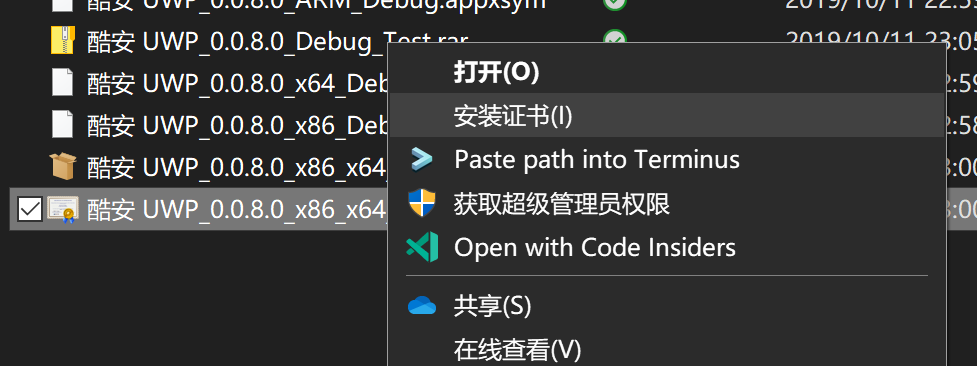
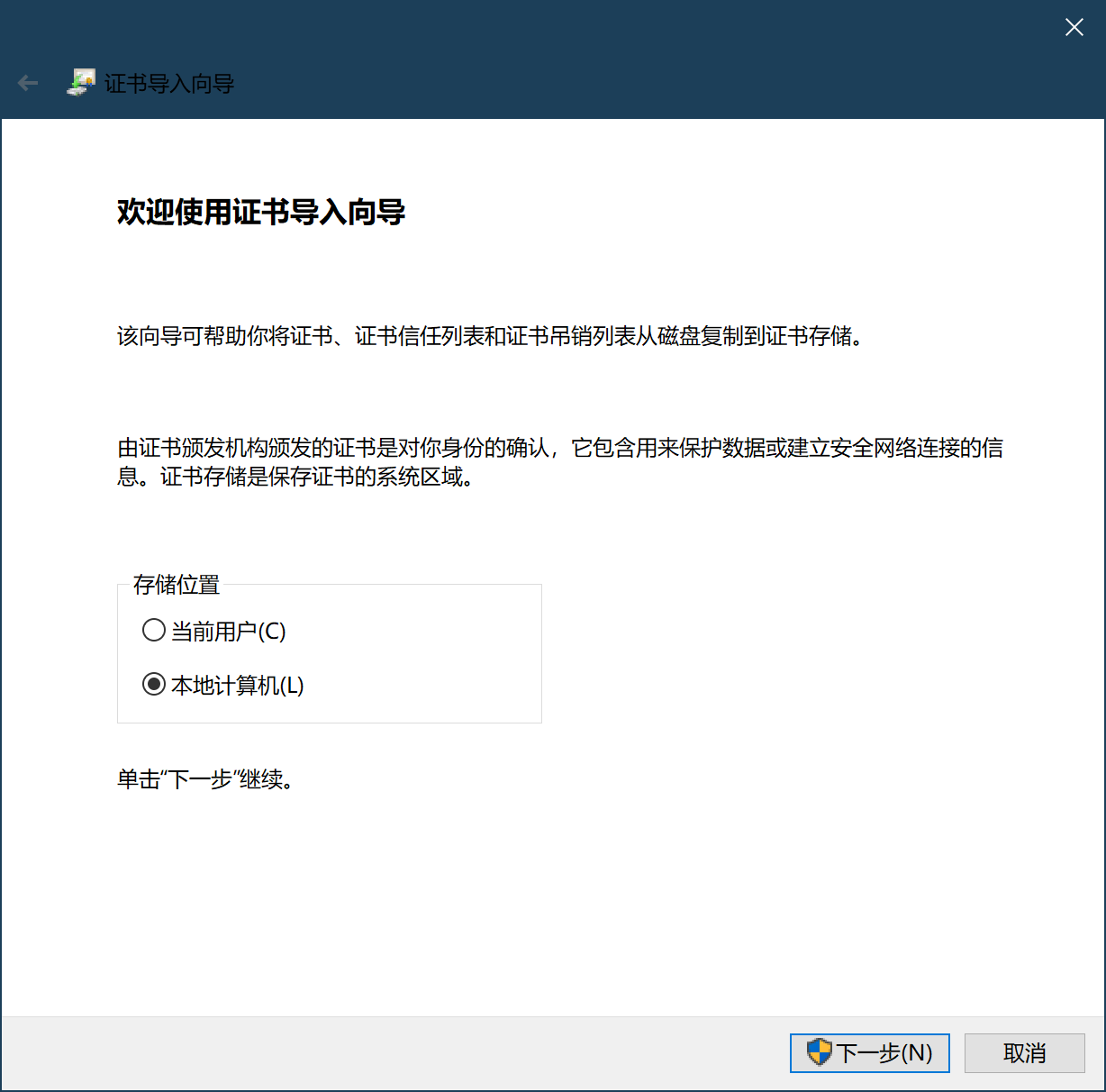
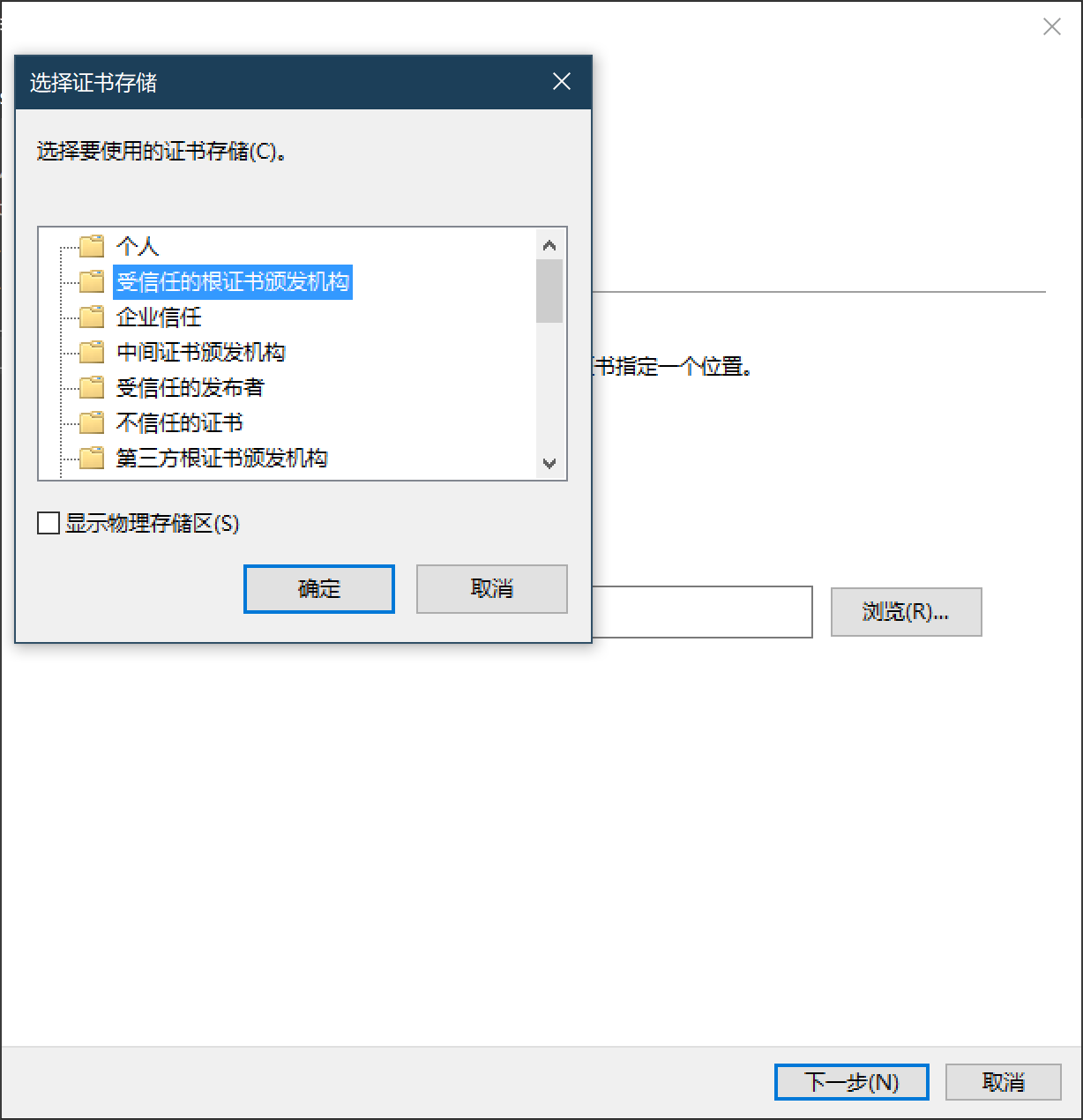
- 安装`*.cer`证书到`本地计算机`→`受信任的根证书颁发机构`
- 这项操作需要用到管理员权限,如果您安装证书时没有用到该权限,则可能是因为您将证书安装到了错误的位置或者您使用的是超级管理员账户
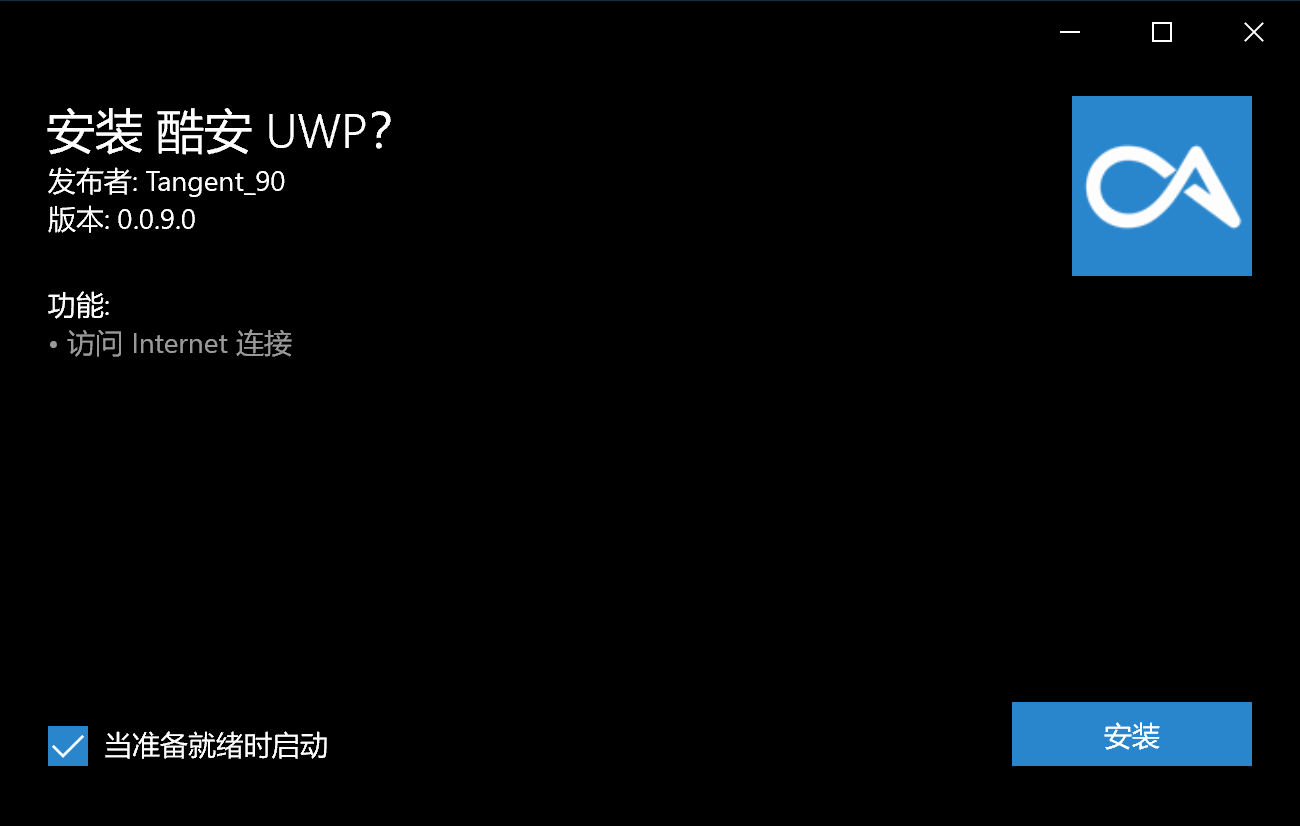
- 双击`*.appxbundle`,单击安装,坐和放宽
### 更新应用
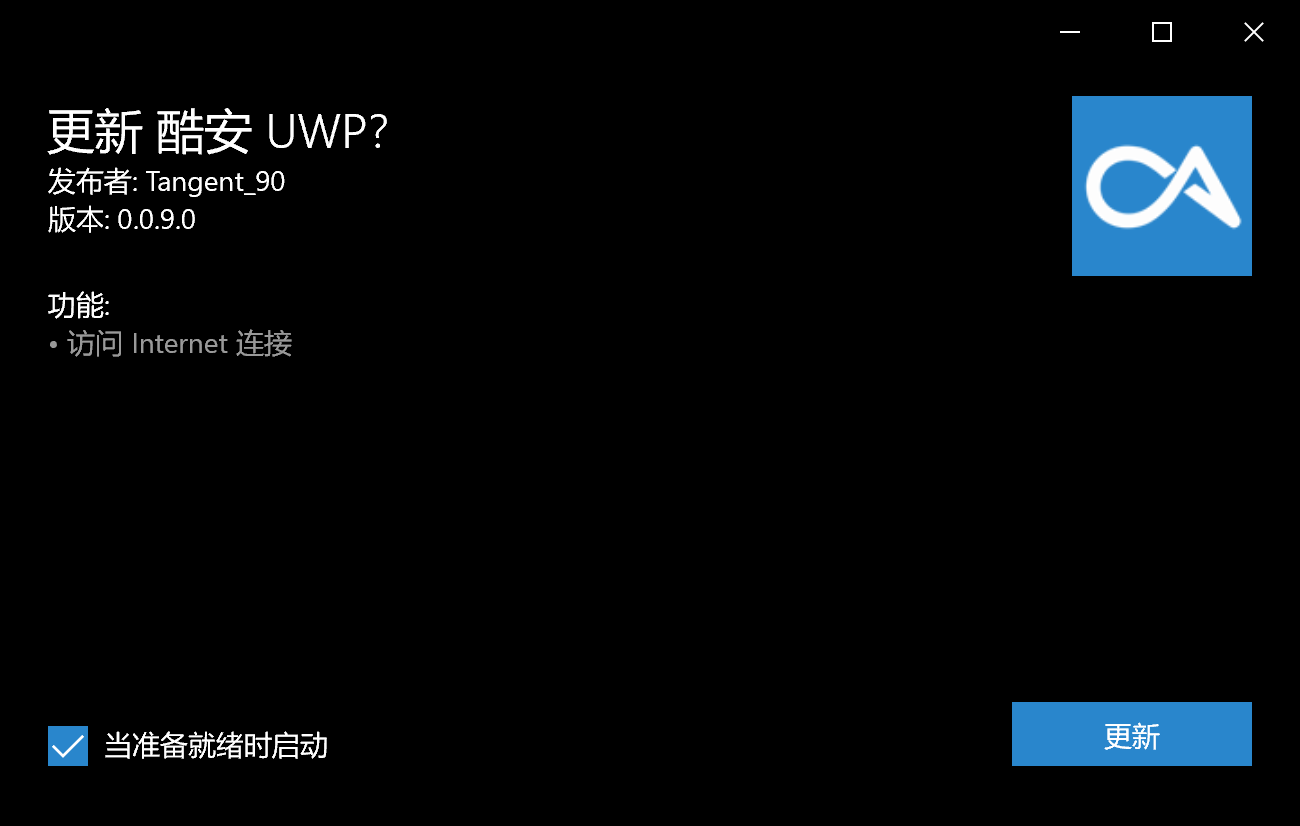
- 下载并解压最新的[安装包`(APKInstaller (Package)_x.x.x.0_x86_x64_arm_arm64.appxbundle)`](https://github.com/Tangent-90/Coolapk-UWP/releases/latest "下载安装包")
- 双击`*.appxbundle`,单击更新,坐和放宽
## 屏幕截图
- 安装
## 使用到的模块
- [WinUI](https://github.com/microsoft/microsoft-ui-xaml "WinUI")
- [AAPTForNet](https://github.com/canheo136/QuickLook.Plugin.ApkViewer "AAPTForNet")
- [Advanced Sharp Adb Client](https://github.com/yungd1plomat/AdvancedSharpAdbClient "Advanced Sharp Adb Client")
- [Windows Community Toolkit](https://github.com/CommunityToolkit/WindowsCommunityToolkit "Windows Community Toolkit")
## 鸣谢
- 所有为 APK Installer 做出贡献的同志们
- **铺路尚未成功,同志仍需努力!**
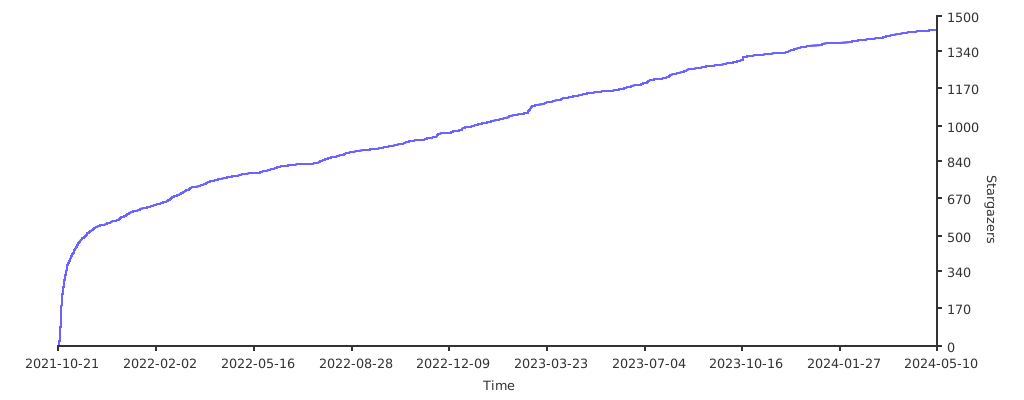
## Star 数量统计
[](https://starchart.cc/Paving-Base/APK-Installer "Star 数量统计")
## 语言
- [中文](README.md)
- [English](README.en-US.md)
## 目录
- [APK Installer](#apk-installer)
- [语言](#语言)
- [目录](#目录)
- [如何安装应用](#如何安装应用)
- [最低需求](#最低需求)
- [使用应用安装脚本安装应用](#使用应用安装脚本安装应用)
- [使用应用安装程序安装应用](#使用应用安装程序安装应用)
- [更新应用](#更新应用)
- [屏幕截图](#屏幕截图)
- [使用到的模块](#使用到的模块)
- [鸣谢](#鸣谢)
- [Star 数量统计](#star-数量统计)
## 如何安装应用
### 最低需求
- Windows 10 Build 17763及以上
- 设备需支持ARM64/x86/x64
- 至少400MB的空余储存空间(用于储存安装包与安装应用)
### 使用应用安装脚本安装应用
- 下载并解压最新的[安装包`(APKInstaller (Package)_x.x.x.0_Test.rar)`](https://github.com/Tangent-90/Coolapk-UWP/releases/latest "下载安装包")
- 如果没有应用安装脚本,下载[`Install.ps1`](Install.ps1)到目标目录

- 右击`Install.ps1`,选择“使用PowerShell运行”
- 应用安装脚本将会引导您完成此过程的剩余部分
### 使用应用安装程序安装应用
- 下载并解压最新的[安装包`(APKInstaller (Package)_x.x.x.0_Test.rar)`](https://github.com/Tangent-90/Coolapk-UWP/releases/latest "下载安装包")
- [开启旁加载模式](https://www.windowscentral.com/how-enable-windows-10-sideload-apps-outside-store)
- 如果您想开发UWP应用,您可以开启[开发人员模式](https://docs.microsoft.com/zh-cn/windows/uwp/get-started/enable-your-device-for-development),**对于大多数不需要做UWP开发的用户来说,开发人员模式是没有必要的**
- 安装`Dependencies`文件夹下的适用于您的设备的所有依赖包

- 安装`*.cer`证书到`本地计算机`→`受信任的根证书颁发机构`
- 这项操作需要用到管理员权限,如果您安装证书时没有用到该权限,则可能是因为您将证书安装到了错误的位置或者您使用的是超级管理员账户



- 双击`*.appxbundle`,单击安装,坐和放宽

### 更新应用
- 下载并解压最新的[安装包`(APKInstaller (Package)_x.x.x.0_x86_x64_arm_arm64.appxbundle)`](https://github.com/Tangent-90/Coolapk-UWP/releases/latest "下载安装包")
- 双击`*.appxbundle`,单击更新,坐和放宽

## 屏幕截图
- 安装

## 使用到的模块
- [WinUI](https://github.com/microsoft/microsoft-ui-xaml "WinUI")
- [AAPTForNet](https://github.com/canheo136/QuickLook.Plugin.ApkViewer "AAPTForNet")
- [Advanced Sharp Adb Client](https://github.com/yungd1plomat/AdvancedSharpAdbClient "Advanced Sharp Adb Client")
- [Windows Community Toolkit](https://github.com/CommunityToolkit/WindowsCommunityToolkit "Windows Community Toolkit")
## 鸣谢
- 所有为 APK Installer 做出贡献的同志们
- **铺路尚未成功,同志仍需努力!**
## Star 数量统计
[](https://starchart.cc/Paving-Base/APK-Installer "Star 数量统计")