# agentscope-runtime
**Repository Path**: mirrors/agentscope-runtime
## Basic Information
- **Project Name**: agentscope-runtime
- **Description**: AgentScope Runtime 解决了智能体开发中的两个关键挑战:安全的沙盒工具执行和可扩展的智能体服务化部署
- **Primary Language**: Python
- **License**: Apache-2.0
- **Default Branch**: main
- **Homepage**: https://www.oschina.net/p/agentscope-runtime
- **GVP Project**: No
## Statistics
- **Stars**: 2
- **Forks**: 1
- **Created**: 2025-09-05
- **Last Updated**: 2026-01-17
## Categories & Tags
**Categories**: Uncategorized
**Tags**: None
## README
# AgentScope Runtime:一个生产级的智能体应用运行时框架
[](https://github.com/agentscope-ai/agentscope-runtime)
[](http://webui.runtime.agentscope.io/)
[](https://pypi.org/project/agentscope-runtime/)
[](https://pepy.tech/project/agentscope-runtime)
[](https://python.org)
[](https://github.com/agentscope-ai/agentscope-runtime)
[](LICENSE)
[](https://github.com/psf/black)
[](https://github.com/agentscope-ai/agentscope-runtime/stargazers)
[](https://github.com/agentscope-ai/agentscope-runtime/network)
[](https://github.com/agentscope-ai/agentscope-runtime/actions)
[](https://runtime.agentscope.io)
[](https://deepwiki.com/agentscope-ai/agentscope-runtime)[](https://a2a-protocol.org/)
[](https://modelcontextprotocol.io/)
[](https://discord.gg/eYMpfnkG8h)
[](https://qr.dingtalk.com/action/joingroup?code=v1,k1,OmDlBXpjW+I2vWjKDsjvI9dhcXjGZi3bQiojOq3dlDw=&_dt_no_comment=1&origin=11)
[[使用教程]](https://runtime.agentscope.io/zh/intro.html)
[[体验WebUI]](http://webui.runtime.agentscope.io/)
[[English README]](README.md)
[[示例]](https://github.com/agentscope-ai/agentscope-samples)
> **核心能力:**
>
> **工具沙箱化(Tool Sandboxing)** —— 工具调用在**加固的沙箱**中运行
>
> **Agent 即服务(AaaS)API** —— 将智能体以**支持流式输出、可用于生产环境的 API** 形式对外提供
>
> **可扩展部署** —— 支持本地、Kubernetes 或无服务器(Serverless)部署,实现**弹性扩缩容**
>
>
> 此外
>
>
>
> **全栈可观测性**(日志 / 链路追踪)
>
> **框架兼容性** —— 兼容主流智能体框架
>
>
---
## 📋 目录
> [!NOTE]
>
> **推荐阅读顺序:**
>
> - **我只想 5 分钟跑起来Agent应用**:快速开始 (Agent App 示例) → curl 调用验证
> - **我关心安全工具执行/自动化环境**:快速开始 (沙箱示例) → 镜像配置 →(需要时)生产级 Serverless 沙箱部署
> - **我要做生产部署/对外提供 API**:快速开始 (Agent App 示例)→ 快速开始 (部署示例) → 指南
> - **我要参与共建**:贡献 → 联系我们
- [新闻](#-新闻)
- [关键特性](#-关键特性)
- [快速开始](#-快速开始):从安装到跑通一个最小 Agent API 服务,掌握 AgentApp 的 init/query/shutdown 三段式开发范式。
- [前提条件](#前提条件):运行环境与依赖要求
- [安装](#安装):PyPI/源码安装方式
- [Agent App 示例](#agent-app-示例):如何写一个可流式输出(SSE)的 Agent-as-a-Service API
- [沙箱示例](#沙箱示例):如何在隔离环境里安全执行 Python/Shell/GUI/Browser/Filesystem/Mobile 工具
- [部署示例](#部署示例) :学会用 DeployManager 本地/Serverless 部署,并了解兼容 A2A、Response API 与 OpenAI SDK 的访问方式。
- [指南](#-指南):进一步学习关于 AgentScope Runtime 的概念、架构、API 与示例项目的教程网站,从“能跑”走向“可扩展/可维护”。
- [联系我们](#-联系我们)
- [贡献](#-贡献)
- [许可证](#-许可证)
- [贡献者](#-贡献者)
---
## 🆕 新闻
* **[2026-01]** 新增 **异步沙箱** 实现(`BaseSandboxAsync`、`GuiSandboxAsync`、`BrowserSandboxAsync`、`FilesystemSandboxAsync`、`MobileSandboxAsync`),支持在异步编程中进行非阻塞的并发工具执行。
同时优化了 `run_ipython_cell` 和 `run_shell_command` 方法的 **并发与并行执行能力**,提升沙箱运行效率。
* **[2025-12]** 我们发布了 **AgentScope Runtime v1.0**,该版本引入统一的 “Agent 作为 API” 白盒化开发体验,并全面强化多智能体协作、状态持久化与跨框架组合能力,同时对抽象与模块进行了简化优化,确保开发与生产环境一致性。完整更新内容与迁移说明请参考 **[CHANGELOG](https://runtime.agentscope.io/zh/CHANGELOG.html)**。
---
## ✨ 关键特性
- **部署基础设施**:内置多种服务用于智能体状态管理、历史会话管理、长期记忆和沙盒环境生命周期控制等
- **框架无关**:不绑定任何特定智能体框架,与流行的开源智能体框架和自定义实现无缝集成
- **对开发者友好**:提供`AgentApp`方便部署并提供强大的自定义选项
- **可观察性**:对运行时操作进行全面跟踪和监控
- **沙盒工具执行**:隔离的沙盒确保安全工具执行,不会影响系统
- **开箱即用 & 一键适配**:提供种类丰富的开箱即用工具,适配器快速接入不同框架
> [!NOTE]
>
> **关于框架无关**:当前,AgentScope Runtime 支持 **AgentScope** 框架。未来我们计划扩展支持更多智能体开发框架。该表格展示了目前版本针对不同框架的适配器(adapter)支持情况,不同框架在各功能上的支持程度有所差异:
>
> | 框架 / 功能项 | 消息 / 事件 | 工具 | 服务 |
> | ------------------------------------------------------------ | ------------- | ---- | ------- |
> | [AgentScope](https://runtime.agentscope.io/zh/quickstart.html) | ✅ | ✅ | ✅ |
> | [LangGraph](https://runtime.agentscope.io/zh/langgraph_guidelines.html) | ✅ | 🚧 | 🚧 |
> | [Microsoft Agent Framework](https://runtime.agentscope.io/zh/ms_agent_framework_guidelines.html) | ✅ | ✅ | 🚧 |
> | [Agno](https://runtime.agentscope.io/zh/agno_guidelines.html) | ✅ | ✅ | 🚧 |
> | AutoGen | 🚧 | ✅ | 🚧 |
---
## 🚀 快速开始
### 前提条件
- Python 3.10 或更高版本
- pip 或 uv 包管理器
### 安装
从PyPI安装:
```bash
# 安装核心依赖
pip install agentscope-runtime
# 安装拓展
pip install "agentscope-runtime[ext]"
# 安装预览版本
pip install --pre agentscope-runtime
```
(可选)从源码安装:
```bash
# 从 GitHub 拉取源码
git clone -b main https://github.com/agentscope-ai/agentscope-runtime.git
cd agentscope-runtime
# 安装核心依赖
pip install -e .
```
### Agent App 示例
这个示例演示了如何使用 AgentScope 的 `ReActAgent` 和 `AgentApp` 创建一个代理 API 服务器。
要在 AgentScope Runtime 中运行一个最小化的 `AgentScope` Agent,通常需要实现以下内容:
1. **`@agent_app.init`** – 在启动时初始化服务或资源
2. **`@agent_app.query(framework="agentscope")`** – 处理请求的核心逻辑,**必须使用** `stream_printing_messages` 并 `yield msg, last` 来实现流式输出
3. **`@agent_app.shutdown`** – 在退出时清理服务或资源
```python
import os
from agentscope.agent import ReActAgent
from agentscope.model import DashScopeChatModel
from agentscope.formatter import DashScopeChatFormatter
from agentscope.tool import Toolkit, execute_python_code
from agentscope.pipeline import stream_printing_messages
from agentscope_runtime.engine import AgentApp
from agentscope_runtime.engine.schemas.agent_schemas import AgentRequest
from agentscope_runtime.adapters.agentscope.memory import (
AgentScopeSessionHistoryMemory,
)
from agentscope_runtime.engine.services.agent_state import (
InMemoryStateService,
)
from agentscope_runtime.engine.services.session_history import (
InMemorySessionHistoryService,
)
agent_app = AgentApp(
app_name="Friday",
app_description="A helpful assistant",
)
@agent_app.init
async def init_func(self):
self.state_service = InMemoryStateService()
self.session_service = InMemorySessionHistoryService()
await self.state_service.start()
await self.session_service.start()
@agent_app.shutdown
async def shutdown_func(self):
await self.state_service.stop()
await self.session_service.stop()
@agent_app.query(framework="agentscope")
async def query_func(
self,
msgs,
request: AgentRequest = None,
**kwargs,
):
session_id = request.session_id
user_id = request.user_id
state = await self.state_service.export_state(
session_id=session_id,
user_id=user_id,
)
toolkit = Toolkit()
toolkit.register_tool_function(execute_python_code)
agent = ReActAgent(
name="Friday",
model=DashScopeChatModel(
"qwen-turbo",
api_key=os.getenv("DASHSCOPE_API_KEY"),
stream=True,
),
sys_prompt="You're a helpful assistant named Friday.",
toolkit=toolkit,
memory=AgentScopeSessionHistoryMemory(
service=self.session_service,
session_id=session_id,
user_id=user_id,
),
formatter=DashScopeChatFormatter(),
)
agent.set_console_output_enabled(enabled=False)
if state:
agent.load_state_dict(state)
async for msg, last in stream_printing_messages(
agents=[agent],
coroutine_task=agent(msgs),
):
yield msg, last
state = agent.state_dict()
await self.state_service.save_state(
user_id=user_id,
session_id=session_id,
state=state,
)
agent_app.run(host="127.0.0.1", port=8090)
```
运行后,服务器会启动并监听:`http://localhost:8090/process`。你可以使用 `curl` 向 API 发送 JSON 输入:
```bash
curl -N \
-X POST "http://localhost:8090/process" \
-H "Content-Type: application/json" \
-d '{
"input": [
{
"role": "user",
"content": [
{ "type": "text", "text": "What is the capital of France?" }
]
}
]
}'
```
你将会看到以 **Server-Sent Events (SSE)** 格式流式输出的响应:
```bash
data: {"sequence_number":0,"object":"response","status":"created", ... }
data: {"sequence_number":1,"object":"response","status":"in_progress", ... }
data: {"sequence_number":2,"object":"message","status":"in_progress", ... }
data: {"sequence_number":3,"object":"content","status":"in_progress","text":"The" }
data: {"sequence_number":4,"object":"content","status":"in_progress","text":" capital of France is Paris." }
data: {"sequence_number":5,"object":"message","status":"completed","text":"The capital of France is Paris." }
data: {"sequence_number":6,"object":"response","status":"completed", ... }
```
### 沙箱示例
这些示例演示了如何创建沙箱环境并在其中执行工具,部分示例提供前端可交互页面(通过VNC,即Virtual Network Computing技术实现)
> [!NOTE]
>
> 如果你想在本地运行沙箱(sandbox),当前版本支持 **Docker(可选配 gVisor)** 或 **[BoxLite](https://github.com/boxlite-ai/boxlite)** 作为后端,并且可以通过设置环境变量 `CONTAINER_DEPLOYMENT` 来切换(可选值包括 `docker` / `gvisor` / `boxlite` 等,默认 `docker`)。
>
> 对于大规模远程/生产环境部署,我们推荐使用 **Kubernetes(K8s)**、**函数计算(Function Compute,FC)**,或 **[阿里云容器服务 Kubernetes 版(ACK)](https://computenest.console.aliyun.com/service/instance/create/default?ServiceName=AgentScope Runtime 沙箱环境)** 作为后端。更多细节请参考[本教程](https://runtime.agentscope.io/zh/sandbox/advanced.html)。
> [!TIP]
> AgentScope Runtime 为每种沙箱类型都提供了 **同步版本** 和 **异步版本**
| 同步类 | 异步类 |
| ------------------- | ------------------------ |
| `BaseSandbox` | `BaseSandboxAsync` |
| `GuiSandbox` | `GuiSandboxAsync` |
| `FilesystemSandbox` | `FilesystemSandboxAsync` |
| `BrowserSandbox` | `BrowserSandboxAsync` |
| `MobileSandbox` | `MobileSandboxAsync` |
| `TrainingSandbox` | \- (暂无异步版本) |
| `AgentbaySandbox` | \- (暂无异步版本) |
#### 基础沙箱(Base Sandbox)
用于在隔离环境中运行 **Python 代码** 或 **Shell 命令**。
```python
# --- 同步版本 ---
from agentscope_runtime.sandbox import BaseSandbox
with BaseSandbox() as box:
# 默认使用镜像 `agentscope/runtime-sandbox-base:latest` 从 DockerHub 拉取
print(box.list_tools()) # 列出所有可用工具
print(box.run_ipython_cell(code="print('你好')")) # 在沙箱中运行 Python 代码
print(box.run_shell_command(command="echo hello")) # 在沙箱中运行 Shell 命令
input("按 Enter 键继续...")
# --- 异步版本 ---
from agentscope_runtime.sandbox import BaseSandboxAsync
async with BaseSandboxAsync() as box:
# 默认使用镜像 `agentscope/runtime-sandbox-base:latest` 从 DockerHub 拉取
print(await box.list_tools()) # 列出所有可用工具
print(await box.run_ipython_cell(code="print('你好')")) # 在沙箱中运行 Python 代码
print(await box.run_shell_command(command="echo hello")) # 在沙箱中运行 Shell 命令
input("按 Enter 键继续...")
```
#### GUI 沙箱 (GUI Sandbox)
提供**可视化桌面环境**,可执行鼠标、键盘以及屏幕相关操作。
 ```python
# --- 同步版本 ---
from agentscope_runtime.sandbox import GuiSandbox
with GuiSandbox() as box:
# 默认使用镜像 `agentscope/runtime-sandbox-gui:latest` 从 DockerHub 拉取
print(box.list_tools()) # 列出所有可用工具
print(box.desktop_url) # Web 桌面访问地址
print(box.computer_use(action="get_cursor_position")) # 获取鼠标位置坐标
print(box.computer_use(action="get_screenshot")) # 截取桌面截图
input("按 Enter 键继续...")
# --- 异步版本 ---
from agentscope_runtime.sandbox import GuiSandboxAsync
async with GuiSandboxAsync() as box:
# 默认使用镜像 `agentscope/runtime-sandbox-gui:latest` 从 DockerHub 拉取
print(await box.list_tools()) # 列出所有可用工具
print(box.desktop_url) # Web 桌面访问地址
print(await box.computer_use(action="get_cursor_position")) # 获取鼠标位置坐标
print(await box.computer_use(action="get_screenshot")) # 截取桌面截图
input("按 Enter 键继续...")
```
#### 浏览器沙箱(Browser Sandbox)
基于 GUI 的沙箱,可进行浏览器操作。
```python
# --- 同步版本 ---
from agentscope_runtime.sandbox import GuiSandbox
with GuiSandbox() as box:
# 默认使用镜像 `agentscope/runtime-sandbox-gui:latest` 从 DockerHub 拉取
print(box.list_tools()) # 列出所有可用工具
print(box.desktop_url) # Web 桌面访问地址
print(box.computer_use(action="get_cursor_position")) # 获取鼠标位置坐标
print(box.computer_use(action="get_screenshot")) # 截取桌面截图
input("按 Enter 键继续...")
# --- 异步版本 ---
from agentscope_runtime.sandbox import GuiSandboxAsync
async with GuiSandboxAsync() as box:
# 默认使用镜像 `agentscope/runtime-sandbox-gui:latest` 从 DockerHub 拉取
print(await box.list_tools()) # 列出所有可用工具
print(box.desktop_url) # Web 桌面访问地址
print(await box.computer_use(action="get_cursor_position")) # 获取鼠标位置坐标
print(await box.computer_use(action="get_screenshot")) # 截取桌面截图
input("按 Enter 键继续...")
```
#### 浏览器沙箱(Browser Sandbox)
基于 GUI 的沙箱,可进行浏览器操作。
 ```python
# --- 同步版本 ---
from agentscope_runtime.sandbox import BrowserSandbox
with BrowserSandbox() as box:
# 默认使用镜像 `agentscope/runtime-sandbox-browser:latest` 从 DockerHub 拉取
print(box.list_tools()) # 列出所有可用工具
print(box.desktop_url) # Web 桌面访问地址
box.browser_navigate("https://www.google.com/") # 打开网页
input("按 Enter 键继续...")
# --- 异步版本 ---
from agentscope_runtime.sandbox import BrowserSandboxAsync
async with BrowserSandboxAsync() as box:
# 默认使用镜像 `agentscope/runtime-sandbox-browser:latest` 从 DockerHub 拉取
print(await box.list_tools()) # 列出所有可用工具
print(box.desktop_url) # Web 桌面访问地址
await box.browser_navigate("https://www.google.com/") # 打开网页
input("按 Enter 键继续...")
```
#### 文件系统沙箱 (Filesystem Sandbox)
基于 GUI 的隔离沙箱,可进行文件系统操作,如创建、读取和删除文件。
```python
# --- 同步版本 ---
from agentscope_runtime.sandbox import BrowserSandbox
with BrowserSandbox() as box:
# 默认使用镜像 `agentscope/runtime-sandbox-browser:latest` 从 DockerHub 拉取
print(box.list_tools()) # 列出所有可用工具
print(box.desktop_url) # Web 桌面访问地址
box.browser_navigate("https://www.google.com/") # 打开网页
input("按 Enter 键继续...")
# --- 异步版本 ---
from agentscope_runtime.sandbox import BrowserSandboxAsync
async with BrowserSandboxAsync() as box:
# 默认使用镜像 `agentscope/runtime-sandbox-browser:latest` 从 DockerHub 拉取
print(await box.list_tools()) # 列出所有可用工具
print(box.desktop_url) # Web 桌面访问地址
await box.browser_navigate("https://www.google.com/") # 打开网页
input("按 Enter 键继续...")
```
#### 文件系统沙箱 (Filesystem Sandbox)
基于 GUI 的隔离沙箱,可进行文件系统操作,如创建、读取和删除文件。
 ```python
# --- 同步版本 ---
from agentscope_runtime.sandbox import FilesystemSandbox
with FilesystemSandbox() as box:
# 默认使用镜像 `agentscope/runtime-sandbox-filesystem:latest` 从 DockerHub 拉取
print(box.list_tools()) # 列出所有可用工具
print(box.desktop_url) # Web 桌面访问地址
box.create_directory("test") # 创建一个目录
input("按 Enter 键继续...")
# --- 异步版本 ---
from agentscope_runtime.sandbox import FilesystemSandboxAsync
async with FilesystemSandboxAsync() as box:
# 默认使用镜像 `agentscope/runtime-sandbox-filesystem:latest` 从 DockerHub 拉取
print(await box.list_tools()) # 列出所有可用工具
print(box.desktop_url) # Web 桌面访问地址
await box.create_directory("test") # 创建一个目录
input("按 Enter 键继续...")
```
#### 移动端沙箱(Mobile Sandbox)
提供一个**沙箱化的 Android 模拟器环境**,允许执行各种移动端操作,如点击、滑动、输入文本和截屏等。
```python
# --- 同步版本 ---
from agentscope_runtime.sandbox import FilesystemSandbox
with FilesystemSandbox() as box:
# 默认使用镜像 `agentscope/runtime-sandbox-filesystem:latest` 从 DockerHub 拉取
print(box.list_tools()) # 列出所有可用工具
print(box.desktop_url) # Web 桌面访问地址
box.create_directory("test") # 创建一个目录
input("按 Enter 键继续...")
# --- 异步版本 ---
from agentscope_runtime.sandbox import FilesystemSandboxAsync
async with FilesystemSandboxAsync() as box:
# 默认使用镜像 `agentscope/runtime-sandbox-filesystem:latest` 从 DockerHub 拉取
print(await box.list_tools()) # 列出所有可用工具
print(box.desktop_url) # Web 桌面访问地址
await box.create_directory("test") # 创建一个目录
input("按 Enter 键继续...")
```
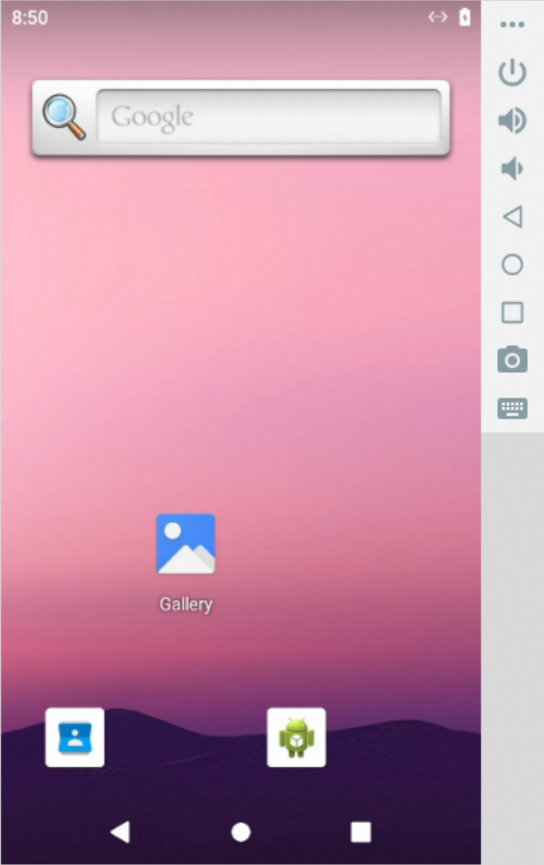
#### 移动端沙箱(Mobile Sandbox)
提供一个**沙箱化的 Android 模拟器环境**,允许执行各种移动端操作,如点击、滑动、输入文本和截屏等。
 ##### 运行环境要求
- **Linux 主机**:
该沙箱在 Linux 主机上运行时,需要内核加载 `binder` 和 `ashmem` 模块。如果缺失,请在主机上执行以下命令来安装和加载所需模块:
```bash
# 1. 安装额外的内核模块
sudo apt update && sudo apt install -y linux-modules-extra-`uname -r`
# 2. 加载模块并创建设备节点
sudo modprobe binder_linux devices="binder,hwbinder,vndbinder"
sudo modprobe ashmem_linux
```
- **架构兼容性**:
在 ARM64/aarch64 架构(如 Apple M 系列芯片)上运行时,可能会遇到兼容性或性能问题,建议在 x86_64 架构的主机上运行。
```python
# --- 同步版本 ---
from agentscope_runtime.sandbox import MobileSandbox
with MobileSandbox() as box:
# 默认使用镜像 'agentscope/runtime-sandbox-mobile:latest' 从 DockerHub 拉取
print(box.list_tools()) # 列出所有可用工具
print(box.mobile_get_screen_resolution()) # 获取屏幕分辨率
print(box.mobile_tap([500, 1000])) # 在坐标 (500, 1000) 点击
print(box.mobile_input_text("来自 AgentScope 的问候!")) # 输入文本
print(box.mobile_key_event(3)) # 发送 HOME 按键事件(KeyCode: 3)
screenshot_result = box.mobile_get_screenshot() # 截取屏幕
print(screenshot_result)
input("按 Enter 键继续...")
# --- 异步版本 ---
from agentscope_runtime.sandbox import MobileSandboxAsync
async with MobileSandboxAsync() as box:
# 默认使用镜像 'agentscope/runtime-sandbox-mobile:latest' 从 DockerHub 拉取
print(await box.list_tools()) # 列出所有可用工具
print(await box.mobile_get_screen_resolution()) # 获取屏幕分辨率
print(await box.mobile_tap([500, 1000])) # 在坐标 (500, 1000) 点击
print(await box.mobile_input_text("来自 AgentScope 的问候!")) # 输入文本
print(await box.mobile_key_event(3)) # 发送 HOME 按键事件(KeyCode: 3)
screenshot_result = await box.mobile_get_screenshot() # 截取屏幕
print(screenshot_result)
input("按 Enter 键继续...")
```
> [!NOTE]
>
> 要向 AgentScope 的 `Toolkit` 添加沙箱工具:
>
> 1. 使用 `sandbox_tool_adapter` 包装沙箱工具,以便 AgentScope 中的 agent 可以调用它:
>
> ```python
> from agentscope_runtime.adapters.agentscope.tool import sandbox_tool_adapter
>
> wrapped_tool = sandbox_tool_adapter(sandbox.browser_navigate)
> ```
>
> 2. 使用 `register_tool_function` 注册工具:
>
> ```python
> toolkit = Toolkit()
> Toolkit.register_tool_function(wrapped_tool)
> ```
#### 配置沙箱镜像的 Registry(镜像仓库)、Namespace(命名空间)和 Tag(标签)
##### 1. Registry(镜像仓库)
如果从 DockerHub 拉取镜像失败(例如由于网络限制),你可以将镜像源切换为阿里云容器镜像服务,以获得更快的访问速度:
```bash
export RUNTIME_SANDBOX_REGISTRY="agentscope-registry.ap-southeast-1.cr.aliyuncs.com"
```
##### 2. Namespace(命名空间)
命名空间用于区分不同的团队或项目镜像,你可以通过环境变量自定义 namespace:
```bash
export RUNTIME_SANDBOX_IMAGE_NAMESPACE="agentscope"
```
例如,这里会使用 `agentscope` 作为镜像路径的一部分。
##### 3. Tag(标签)
镜像标签用于指定镜像版本,例如:
```bash
export RUNTIME_SANDBOX_IMAGE_TAG="preview"
```
其中:
- 默认为`latest`,表示与PyPI发行版本适配的镜像版本
- `preview` 表示与 **GitHub main 分支** 同步构建的最新预览版本
- 你也可以使用指定版本号,如 `20250909`,可以在[DockerHub](https://hub.docker.com/repositories/agentscope)查看所有可用镜像版本
##### 4. 完整镜像路径
沙箱 SDK 会根据上述环境变量拼接拉取镜像的完整路径:
```bash
//runtime-sandbox-base:
```
示例:
```bash
agentscope-registry.ap-southeast-1.cr.aliyuncs.com/myteam/runtime-sandbox-base:preview
```
#### Serverless 沙箱部署
AgentScope Runtime 同样支持 serverless 部署,适用于在无服务器环境中运行沙箱,例如 [阿里云函数计算(FC)](https://help.aliyun.com/zh/functioncompute/fc/)。
首先,请参考[文档](https://runtime.agentscope.io/zh/sandbox/advanced.html#optional-function-compute-fc-settings)配置 serverless 环境变量。将 `CONTAINER_DEPLOYMENT` 设置为 `fc` 以启用 serverless 部署。
然后,启动沙箱服务器,使用 `--config` 选项指定 serverless 环境配置:
```bash
# 此命令将加载 `fc.env` 文件中定义的设置
runtime-sandbox-server --config fc.env
```
服务器启动后,您可以通过URL `http://localhost:8000` 访问沙箱服务器,并调用上述描述的沙箱工具。
### 部署示例
`AgentApp` 提供了一个 `deploy` 方法,该方法接收一个 `DeployManager` 实例并部署代理(agent)。
- 在创建 `LocalDeployManager` 时,通过参数 `port` 设置服务端口。
- 在部署代理时,通过参数 `endpoint_path` 设置服务的端点路径为`/process`。
- 部署器会自动添加常见的代理协议,例如 **A2A**、**Response API**。
部署后,可以通过 [http://localhost:8090/process](http://localhost:8090/process) 访问该服务:
```python
from agentscope_runtime.engine.deployers import LocalDeployManager
# 创建部署管理器
deployer = LocalDeployManager(
host="0.0.0.0",
port=8090,
)
# 部署应用
deploy_result = await app.deploy(
deployer=deployer,
endpoint_path="/process"
)
```
部署后用户也可以基于OpenAI SDK的Response API访问这个服务:
```python
from openai import OpenAI
client = OpenAI(base_url="http://0.0.0.0:8090/compatible-mode/v1")
response = client.responses.create(
model="any_name",
input="杭州天气如何?"
)
print(response)
```
此外,`DeployManager` 也支持 Serverless 部署,例如将您的 agent 应用部署到
[ModelStudio](https://bailian.console.aliyun.com/?admin=1&tab=doc#/doc/?type=app&url=2983030)。
```python
import os
from agentscope_runtime.engine.deployers.modelstudio_deployer import (
ModelstudioDeployManager,
OSSConfig,
ModelstudioConfig,
)
# 创建部署管理器
deployer = ModelstudioDeployManager(
oss_config=OSSConfig(
access_key_id=os.environ.get("ALIBABA_CLOUD_ACCESS_KEY_ID"),
access_key_secret=os.environ.get("ALIBABA_CLOUD_ACCESS_KEY_SECRET"),
),
modelstudio_config=ModelstudioConfig(
workspace_id=os.environ.get("MODELSTUDIO_WORKSPACE_ID"),
access_key_id=os.environ.get("ALIBABA_CLOUD_ACCESS_KEY_ID"),
access_key_secret=os.environ.get("ALIBABA_CLOUD_ACCESS_KEY_SECRET"),
dashscope_api_key=os.environ.get("DASHSCOPE_API_KEY"),
),
)
# 部署到 ModelStudio
result = await app.deploy(
deployer,
deploy_name="agent-app-example",
telemetry_enabled=True,
requirements=["agentscope", "fastapi", "uvicorn"],
environment={
"PYTHONPATH": "/app",
"DASHSCOPE_API_KEY": os.environ.get("DASHSCOPE_API_KEY"),
},
)
```
有关更高级的 serverless 部署指南,请参考[文档](https://runtime.agentscope.io/zh/advanced_deployment.html#method-4-modelstudio-deployment)。
---
## 📚 教程
更详细的教程请参考:[](https://runtime.agentscope.io)
---
## 💬 联系我们
欢迎加入我们的社区,获取最新的更新和支持!
| [Discord](https://discord.gg/eYMpfnkG8h) | 钉钉群 |
| ------------------------------------------------------------ | ------------------------------------------------------------ |
|
##### 运行环境要求
- **Linux 主机**:
该沙箱在 Linux 主机上运行时,需要内核加载 `binder` 和 `ashmem` 模块。如果缺失,请在主机上执行以下命令来安装和加载所需模块:
```bash
# 1. 安装额外的内核模块
sudo apt update && sudo apt install -y linux-modules-extra-`uname -r`
# 2. 加载模块并创建设备节点
sudo modprobe binder_linux devices="binder,hwbinder,vndbinder"
sudo modprobe ashmem_linux
```
- **架构兼容性**:
在 ARM64/aarch64 架构(如 Apple M 系列芯片)上运行时,可能会遇到兼容性或性能问题,建议在 x86_64 架构的主机上运行。
```python
# --- 同步版本 ---
from agentscope_runtime.sandbox import MobileSandbox
with MobileSandbox() as box:
# 默认使用镜像 'agentscope/runtime-sandbox-mobile:latest' 从 DockerHub 拉取
print(box.list_tools()) # 列出所有可用工具
print(box.mobile_get_screen_resolution()) # 获取屏幕分辨率
print(box.mobile_tap([500, 1000])) # 在坐标 (500, 1000) 点击
print(box.mobile_input_text("来自 AgentScope 的问候!")) # 输入文本
print(box.mobile_key_event(3)) # 发送 HOME 按键事件(KeyCode: 3)
screenshot_result = box.mobile_get_screenshot() # 截取屏幕
print(screenshot_result)
input("按 Enter 键继续...")
# --- 异步版本 ---
from agentscope_runtime.sandbox import MobileSandboxAsync
async with MobileSandboxAsync() as box:
# 默认使用镜像 'agentscope/runtime-sandbox-mobile:latest' 从 DockerHub 拉取
print(await box.list_tools()) # 列出所有可用工具
print(await box.mobile_get_screen_resolution()) # 获取屏幕分辨率
print(await box.mobile_tap([500, 1000])) # 在坐标 (500, 1000) 点击
print(await box.mobile_input_text("来自 AgentScope 的问候!")) # 输入文本
print(await box.mobile_key_event(3)) # 发送 HOME 按键事件(KeyCode: 3)
screenshot_result = await box.mobile_get_screenshot() # 截取屏幕
print(screenshot_result)
input("按 Enter 键继续...")
```
> [!NOTE]
>
> 要向 AgentScope 的 `Toolkit` 添加沙箱工具:
>
> 1. 使用 `sandbox_tool_adapter` 包装沙箱工具,以便 AgentScope 中的 agent 可以调用它:
>
> ```python
> from agentscope_runtime.adapters.agentscope.tool import sandbox_tool_adapter
>
> wrapped_tool = sandbox_tool_adapter(sandbox.browser_navigate)
> ```
>
> 2. 使用 `register_tool_function` 注册工具:
>
> ```python
> toolkit = Toolkit()
> Toolkit.register_tool_function(wrapped_tool)
> ```
#### 配置沙箱镜像的 Registry(镜像仓库)、Namespace(命名空间)和 Tag(标签)
##### 1. Registry(镜像仓库)
如果从 DockerHub 拉取镜像失败(例如由于网络限制),你可以将镜像源切换为阿里云容器镜像服务,以获得更快的访问速度:
```bash
export RUNTIME_SANDBOX_REGISTRY="agentscope-registry.ap-southeast-1.cr.aliyuncs.com"
```
##### 2. Namespace(命名空间)
命名空间用于区分不同的团队或项目镜像,你可以通过环境变量自定义 namespace:
```bash
export RUNTIME_SANDBOX_IMAGE_NAMESPACE="agentscope"
```
例如,这里会使用 `agentscope` 作为镜像路径的一部分。
##### 3. Tag(标签)
镜像标签用于指定镜像版本,例如:
```bash
export RUNTIME_SANDBOX_IMAGE_TAG="preview"
```
其中:
- 默认为`latest`,表示与PyPI发行版本适配的镜像版本
- `preview` 表示与 **GitHub main 分支** 同步构建的最新预览版本
- 你也可以使用指定版本号,如 `20250909`,可以在[DockerHub](https://hub.docker.com/repositories/agentscope)查看所有可用镜像版本
##### 4. 完整镜像路径
沙箱 SDK 会根据上述环境变量拼接拉取镜像的完整路径:
```bash
//runtime-sandbox-base:
```
示例:
```bash
agentscope-registry.ap-southeast-1.cr.aliyuncs.com/myteam/runtime-sandbox-base:preview
```
#### Serverless 沙箱部署
AgentScope Runtime 同样支持 serverless 部署,适用于在无服务器环境中运行沙箱,例如 [阿里云函数计算(FC)](https://help.aliyun.com/zh/functioncompute/fc/)。
首先,请参考[文档](https://runtime.agentscope.io/zh/sandbox/advanced.html#optional-function-compute-fc-settings)配置 serverless 环境变量。将 `CONTAINER_DEPLOYMENT` 设置为 `fc` 以启用 serverless 部署。
然后,启动沙箱服务器,使用 `--config` 选项指定 serverless 环境配置:
```bash
# 此命令将加载 `fc.env` 文件中定义的设置
runtime-sandbox-server --config fc.env
```
服务器启动后,您可以通过URL `http://localhost:8000` 访问沙箱服务器,并调用上述描述的沙箱工具。
### 部署示例
`AgentApp` 提供了一个 `deploy` 方法,该方法接收一个 `DeployManager` 实例并部署代理(agent)。
- 在创建 `LocalDeployManager` 时,通过参数 `port` 设置服务端口。
- 在部署代理时,通过参数 `endpoint_path` 设置服务的端点路径为`/process`。
- 部署器会自动添加常见的代理协议,例如 **A2A**、**Response API**。
部署后,可以通过 [http://localhost:8090/process](http://localhost:8090/process) 访问该服务:
```python
from agentscope_runtime.engine.deployers import LocalDeployManager
# 创建部署管理器
deployer = LocalDeployManager(
host="0.0.0.0",
port=8090,
)
# 部署应用
deploy_result = await app.deploy(
deployer=deployer,
endpoint_path="/process"
)
```
部署后用户也可以基于OpenAI SDK的Response API访问这个服务:
```python
from openai import OpenAI
client = OpenAI(base_url="http://0.0.0.0:8090/compatible-mode/v1")
response = client.responses.create(
model="any_name",
input="杭州天气如何?"
)
print(response)
```
此外,`DeployManager` 也支持 Serverless 部署,例如将您的 agent 应用部署到
[ModelStudio](https://bailian.console.aliyun.com/?admin=1&tab=doc#/doc/?type=app&url=2983030)。
```python
import os
from agentscope_runtime.engine.deployers.modelstudio_deployer import (
ModelstudioDeployManager,
OSSConfig,
ModelstudioConfig,
)
# 创建部署管理器
deployer = ModelstudioDeployManager(
oss_config=OSSConfig(
access_key_id=os.environ.get("ALIBABA_CLOUD_ACCESS_KEY_ID"),
access_key_secret=os.environ.get("ALIBABA_CLOUD_ACCESS_KEY_SECRET"),
),
modelstudio_config=ModelstudioConfig(
workspace_id=os.environ.get("MODELSTUDIO_WORKSPACE_ID"),
access_key_id=os.environ.get("ALIBABA_CLOUD_ACCESS_KEY_ID"),
access_key_secret=os.environ.get("ALIBABA_CLOUD_ACCESS_KEY_SECRET"),
dashscope_api_key=os.environ.get("DASHSCOPE_API_KEY"),
),
)
# 部署到 ModelStudio
result = await app.deploy(
deployer,
deploy_name="agent-app-example",
telemetry_enabled=True,
requirements=["agentscope", "fastapi", "uvicorn"],
environment={
"PYTHONPATH": "/app",
"DASHSCOPE_API_KEY": os.environ.get("DASHSCOPE_API_KEY"),
},
)
```
有关更高级的 serverless 部署指南,请参考[文档](https://runtime.agentscope.io/zh/advanced_deployment.html#method-4-modelstudio-deployment)。
---
## 📚 教程
更详细的教程请参考:[](https://runtime.agentscope.io)
---
## 💬 联系我们
欢迎加入我们的社区,获取最新的更新和支持!
| [Discord](https://discord.gg/eYMpfnkG8h) | 钉钉群 |
| ------------------------------------------------------------ | ------------------------------------------------------------ |
|  |
|  |
---
## 🤝 贡献
我们欢迎来自社区的贡献!您可以提供以下帮助:
### 🐛 错误报告
- 使用 GitHub Issues 报告错误
- 包含详细的重现步骤
- 提供系统信息和日志
### 💡 特性请求
- 在 GitHub Discussions 中讨论新想法
- 遵循特性请求模板
- 考虑实施的可行性
### 🔧 代码贡献
1. Fork 这个仓库
2. 创建一个功能分支 (git checkout -b feature/amazing-feature)
3. 提交更改 (git commit -m 'Add amazing feature')
4. 推送到分支 (git push origin feature/amazing-feature)
5. 打开一个 Pull Request
有关如何贡献的详细指南,请查看 [如何贡献](cookbook/zh/contribute.md).
---
## 📄 许可证
AgentScope Runtime 根据 [Apache License 2.0](LICENSE) 发布。
```
Copyright 2025 Tongyi Lab
Licensed under the Apache License, Version 2.0 (the "License");
you may not use this file except in compliance with the License.
You may obtain a copy of the License at
http://www.apache.org/licenses/LICENSE-2.0
Unless required by applicable law or agreed to in writing, software
distributed under the License is distributed on an "AS IS" BASIS,
WITHOUT WARRANTIES OR CONDITIONS OF ANY KIND, either express or implied.
See the License for the specific language governing permissions and
limitations under the License.
```
## ✨ 贡献者
[](#contributors-)
感谢这些优秀的贡献者们 ([表情符号说明](https://allcontributors.org/emoji-key/)):
本项目遵循 [all-contributors](https://github.com/all-contributors/all-contributors) 规范。欢迎任何形式的贡献!
|
---
## 🤝 贡献
我们欢迎来自社区的贡献!您可以提供以下帮助:
### 🐛 错误报告
- 使用 GitHub Issues 报告错误
- 包含详细的重现步骤
- 提供系统信息和日志
### 💡 特性请求
- 在 GitHub Discussions 中讨论新想法
- 遵循特性请求模板
- 考虑实施的可行性
### 🔧 代码贡献
1. Fork 这个仓库
2. 创建一个功能分支 (git checkout -b feature/amazing-feature)
3. 提交更改 (git commit -m 'Add amazing feature')
4. 推送到分支 (git push origin feature/amazing-feature)
5. 打开一个 Pull Request
有关如何贡献的详细指南,请查看 [如何贡献](cookbook/zh/contribute.md).
---
## 📄 许可证
AgentScope Runtime 根据 [Apache License 2.0](LICENSE) 发布。
```
Copyright 2025 Tongyi Lab
Licensed under the Apache License, Version 2.0 (the "License");
you may not use this file except in compliance with the License.
You may obtain a copy of the License at
http://www.apache.org/licenses/LICENSE-2.0
Unless required by applicable law or agreed to in writing, software
distributed under the License is distributed on an "AS IS" BASIS,
WITHOUT WARRANTIES OR CONDITIONS OF ANY KIND, either express or implied.
See the License for the specific language governing permissions and
limitations under the License.
```
## ✨ 贡献者
[](#contributors-)
感谢这些优秀的贡献者们 ([表情符号说明](https://allcontributors.org/emoji-key/)):
本项目遵循 [all-contributors](https://github.com/all-contributors/all-contributors) 规范。欢迎任何形式的贡献! 


