---
## Latest Updates
- [2025/05/29] 🔥 Jointly launched a free inference framework course with Huawei Ascend official [Ascend Official](https://www.hiascend.com/developer/courses/detail/1923211251905150977) | [Bilibili Video](https://space.bilibili.com/435543077?spm_id_from=333.788.0.0)! Based on nndeploy's internal inference sub-module, helping you quickly master core AI inference deployment technologies.
---
## Introduction
nndeploy is an easy-to-use and high-performance AI deployment framework. Based on visual workflows and multi-end inference, developers can quickly develop SDKs for specified platforms and hardware from algorithm repositories, significantly saving development time. In addition, the framework has deployed numerous AI models including LLM, AIGC generation, face swapping, object detection, image segmentation, etc., which are ready to use out of the box.
### **Easy to Use**
- **Visual Workflow**: Deploy AI algorithms by dragging nodes, with real-time adjustable parameters and intuitive effects.
- **Custom Nodes**: Support Python/C++ custom nodes. Whether implementing preprocessing in Python or writing high-performance nodes in C++/CUDA, they can be seamlessly integrated into the visual workflow.
- **One-Click Deployment**: Workflows can be exported as JSON and called through C++/Python APIs, applicable to platforms such as Linux, Windows, macOS, Android, and iOS.
### **High Performance**
- **Parallel Optimization**: Support execution modes such as serial, pipeline parallelism, and task parallelism.
- **Memory Optimization**: Zero-copy, memory pool, memory reuse and other optimization strategies.
- **High-Performance Optimization**: Built-in nodes optimized with C++/CUDA/Ascend C/SIMD implementations.
- **Multi-End Inference**: One workflow for multi-end inference, integrating 13 mainstream inference frameworks, covering full-platform deployment scenarios such as cloud, desktop, mobile, and edge.
> If there is a custom inference framework, it can be used completely independently without relying on any third-party frameworks.
### **Out-of-the-Box Algorithms**
A list of deployed models with over 100+ visual nodes.
| Application Scenario | Available Models | Remarks |
| ------------------------- | ------------------------------------------------------------------------------- | ------------------------------------------------------------------------------- |
| **Large Language Models** | **QWen-2.5**, **QWen-3** | Support small B models |
| **Image Generation** | Stable Diffusion 1.5, Stable Diffusion XL, Stable Diffusion 3, HunyuanDiT, etc. | Support text-to-image, image-to-image, image inpainting, based on **diffusers** |
| **Face Swapping** | **deep-live-cam** | |
| **OCR** | **Paddle OCR** | |
| **Object Detection** | **YOLOv5, YOLOv6, YOLOv7, YOLOv8, YOLOv11, YOLOx** | |
| **Object Tracking** | FairMot | |
| **Image Segmentation** | RBMGv1.4, PPMatting, **Segment Anything** | |
| **Classification** | ResNet, MobileNet, EfficientNet, PPLcNet, GhostNet, ShuffleNet, SqueezeNet | |
| **API Services** | OPENAI, DeepSeek, Moonshot | Support LLM and AIGC services |
> For more, see [Detailed List of Deployed Models](docs/zh_cn/quick_start/model_list.md)
## Quick Start
- **Step 1: Installation**
```bash
pip install --upgrade nndeploy
```
- **Step 2: Launch the Visual Interface**
```bash
# Method 1: Command line
nndeploy-app --port 8000
# Method 2: Code startup
cd path/to/nndeploy
python app.py --port 8000
```
After successful launch, open http://localhost:8000 to access the workflow editor. Here, you can drag nodes, adjust parameters, and preview effects in real-time, with a what-you-see-is-what-you-get experience.
- **Step 3: Save and Load for Execution**
After building and debugging in the visual interface, click save, and the workflow will be exported as a JSON file, which encapsulates all processing procedures. You can run it in the **production environment** in the following two ways:
- Method 1: Command-line execution
For debugging
```bash
# Python CLI
nndeploy-run-json --json_file path/to/workflow.json
# C++ CLI
nndeploy_demo_run_json --json_file path/to/workflow.json
```
- Method 2: Load and run in Python/C++ code
You can integrate the JSON file into your existing Python or C++ project. Here is an example code for loading and running an LLM workflow:
- Python API to load and run LLM workflow
```Python
graph = nndeploy.dag.Graph("")
graph.remove_in_out_node()
graph.load_file("path/to/llm_workflow.json")
graph.init()
input = graph.get_input(0)
text = nndeploy.tokenizer.TokenizerText()
text.texts_ = [ "<|im_start|>user\nPlease introduce NBA superstar Michael Jordan<|im_end|>\n<|im_start|>assistant\n" ]
input.set(text)
status = graph.run()
output = graph.get_output(0)
result = output.get_graph_output()
graph.deinit()
```
- C++ API to load and run LLM workflow
```C++
std::shared_ptr graph = std::make_shared("");
base::Status status = graph->loadFile("path/to/llm_workflow.json");
graph->removeInOutNode();
status = graph->init();
dag::Edge* input = graph->getInput(0);
tokenizer::TokenizerText* text = new tokenizer::TokenizerText();
text->texts_ = {
"<|im_start|>user\nPlease introduce NBA superstar Michael Jordan<|im_end|>\n<|im_start|>assistant\n"};
input->set(text, false);
status = graph->run();
dag::Edge* output = graph->getOutput(0);
tokenizer::TokenizerText* result =
output->getGraphOutput();
status = graph->deinit();
```
> Requires Python 3.10+. By default, it includes ONNXRuntime, and MNN. For more inference backends, please use developer mode.
## Documentation
- [How to Build](docs/zh_cn/quick_start/build.md)
- [How to Obtain Models](docs/zh_cn/quick_start/model.md)
- [Visual Workflow](docs/zh_cn/quick_start/workflow.md)
- [Production Environment Deployment](docs/zh_cn/quick_start/deploy.md)
- [Python API](https://nndeploy-zh.readthedocs.io/en/latest/python_api/index.html)
- [Python Custom Node Development Guide](docs/zh_cn/quick_start/plugin_python.md)
- [C++ API](https://nndeploy-zh.readthedocs.io/en/latest/cpp_api/doxygen.html)
- [C++ Custom Node Development Guide](docs/zh_cn/quick_start/plugin.md)
- [Deploy New Algorithms](docs/zh_cn/quick_start/ai_deploy.md)
- [Integrate New Inference Frameworks](docs/zh_cn/developer_guide/how_to_support_new_inference.md)
## Performance Testing
Test environment: Ubuntu 22.04, i7-12700, RTX3060
- **Pipeline parallel acceleration**. End-to-end workflow total time for YOLOv11s, serial vs pipeline parallel
| Execution Mode \ Inference Engine | ONNXRuntime | OpenVINO | TensorRT |
| --------------------------------- | ----------- | --------- | --------- |
| Serial | 54.803 ms | 34.139 ms | 13.213 ms |
| Pipeline Parallel | 47.283 ms | 29.666 ms | 5.681 ms |
| Performance Improvement | 13.7% | 13.1% | 57% |
- **Task parallel acceleration**. End-to-end total time for combined tasks (segmentation RMBGv1.4 + detection YOLOv11s + classification ResNet50), serial vs task parallel
| Execution Mode \ Inference Engine | ONNXRuntime | OpenVINO | TensorRT |
| --------------------------------- | ----------- | ---------- | --------- |
| Serial | 654.315 ms | 489.934 ms | 59.140 ms |
| Task Parallel | 602.104 ms | 435.181 ms | 51.883 ms |
| Performance Improvement | 7.98% | 11.2% | 12.2% |
## Roadmap
- [Workflow Ecosystem](https://github.com/nndeploy/nndeploy/issues/191)
- [Edge Large Model Inference](https://github.com/nndeploy/nndeploy/issues/161)
- [Architecture Optimization](https://github.com/nndeploy/nndeploy/issues/189)
- [AI Box](https://github.com/nndeploy/nndeploy/issues/190)
## Contact Us
- If you love open source and enjoy tinkering, whether for learning purposes or to share better ideas, you are welcome to join us.
- WeChat: Always031856 (Feel free to add as a friend to join the group discussion. Please note: nndeploy_name)
## Acknowledgements
- Thanks to the following projects: [TNN](https://github.com/Tencent/TNN), [FastDeploy](https://github.com/PaddlePaddle/FastDeploy), [opencv](https://github.com/opencv/opencv), [CGraph](https://github.com/ChunelFeng/CGraph), [tvm](https://github.com/apache/tvm), [mmdeploy](https://github.com/open-mmlab/mmdeploy), [FlyCV](https://github.com/PaddlePaddle/FlyCV), [oneflow](https://github.com/Oneflow-Inc/oneflow), [flowgram.ai](https://github.com/bytedance/flowgram.ai), [deep-live-cam](https://github.com/hacksider/Deep-Live-Cam).
- Thanks to [HelloGithub](https://hellogithub.com/repository/nndeploy/nndeploy) for recommendation
## Contributors
[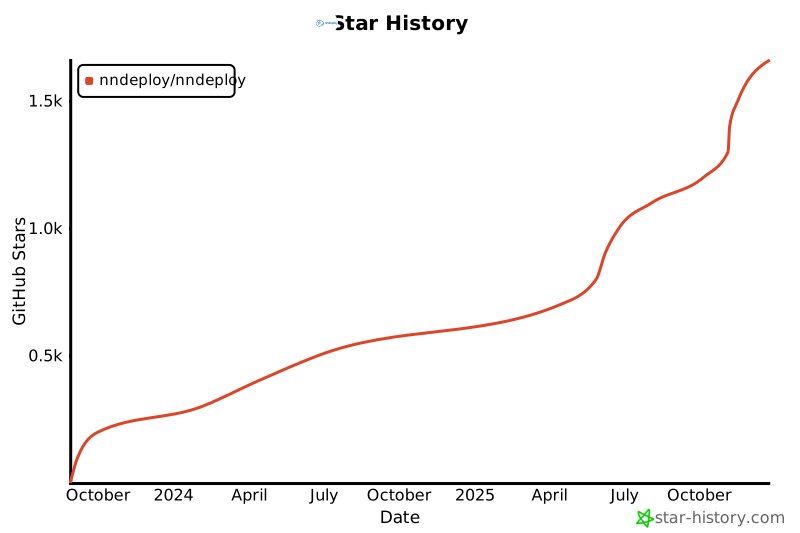](https://star-history.com/#nndeploy/nndeploy)


 | Execution Mode \ Inference Engine | ONNXRuntime | OpenVINO | TensorRT |
| --------------------------------- | ----------- | --------- | --------- |
| Serial | 54.803 ms | 34.139 ms | 13.213 ms |
| Pipeline Parallel | 47.283 ms | 29.666 ms | 5.681 ms |
| Performance Improvement | 13.7% | 13.1% | 57% |
- **Task parallel acceleration**. End-to-end total time for combined tasks (segmentation RMBGv1.4 + detection YOLOv11s + classification ResNet50), serial vs task parallel
| Execution Mode \ Inference Engine | ONNXRuntime | OpenVINO | TensorRT |
| --------------------------------- | ----------- | --------- | --------- |
| Serial | 54.803 ms | 34.139 ms | 13.213 ms |
| Pipeline Parallel | 47.283 ms | 29.666 ms | 5.681 ms |
| Performance Improvement | 13.7% | 13.1% | 57% |
- **Task parallel acceleration**. End-to-end total time for combined tasks (segmentation RMBGv1.4 + detection YOLOv11s + classification ResNet50), serial vs task parallel
 | Execution Mode \ Inference Engine | ONNXRuntime | OpenVINO | TensorRT |
| --------------------------------- | ----------- | ---------- | --------- |
| Serial | 654.315 ms | 489.934 ms | 59.140 ms |
| Task Parallel | 602.104 ms | 435.181 ms | 51.883 ms |
| Performance Improvement | 7.98% | 11.2% | 12.2% |
## Roadmap
- [Workflow Ecosystem](https://github.com/nndeploy/nndeploy/issues/191)
- [Edge Large Model Inference](https://github.com/nndeploy/nndeploy/issues/161)
- [Architecture Optimization](https://github.com/nndeploy/nndeploy/issues/189)
- [AI Box](https://github.com/nndeploy/nndeploy/issues/190)
## Contact Us
- If you love open source and enjoy tinkering, whether for learning purposes or to share better ideas, you are welcome to join us.
- WeChat: Always031856 (Feel free to add as a friend to join the group discussion. Please note: nndeploy_name)
## Acknowledgements
- Thanks to the following projects: [TNN](https://github.com/Tencent/TNN), [FastDeploy](https://github.com/PaddlePaddle/FastDeploy), [opencv](https://github.com/opencv/opencv), [CGraph](https://github.com/ChunelFeng/CGraph), [tvm](https://github.com/apache/tvm), [mmdeploy](https://github.com/open-mmlab/mmdeploy), [FlyCV](https://github.com/PaddlePaddle/FlyCV), [oneflow](https://github.com/Oneflow-Inc/oneflow), [flowgram.ai](https://github.com/bytedance/flowgram.ai), [deep-live-cam](https://github.com/hacksider/Deep-Live-Cam).
- Thanks to [HelloGithub](https://hellogithub.com/repository/nndeploy/nndeploy) for recommendation
| Execution Mode \ Inference Engine | ONNXRuntime | OpenVINO | TensorRT |
| --------------------------------- | ----------- | ---------- | --------- |
| Serial | 654.315 ms | 489.934 ms | 59.140 ms |
| Task Parallel | 602.104 ms | 435.181 ms | 51.883 ms |
| Performance Improvement | 7.98% | 11.2% | 12.2% |
## Roadmap
- [Workflow Ecosystem](https://github.com/nndeploy/nndeploy/issues/191)
- [Edge Large Model Inference](https://github.com/nndeploy/nndeploy/issues/161)
- [Architecture Optimization](https://github.com/nndeploy/nndeploy/issues/189)
- [AI Box](https://github.com/nndeploy/nndeploy/issues/190)
## Contact Us
- If you love open source and enjoy tinkering, whether for learning purposes or to share better ideas, you are welcome to join us.
- WeChat: Always031856 (Feel free to add as a friend to join the group discussion. Please note: nndeploy_name)
## Acknowledgements
- Thanks to the following projects: [TNN](https://github.com/Tencent/TNN), [FastDeploy](https://github.com/PaddlePaddle/FastDeploy), [opencv](https://github.com/opencv/opencv), [CGraph](https://github.com/ChunelFeng/CGraph), [tvm](https://github.com/apache/tvm), [mmdeploy](https://github.com/open-mmlab/mmdeploy), [FlyCV](https://github.com/PaddlePaddle/FlyCV), [oneflow](https://github.com/Oneflow-Inc/oneflow), [flowgram.ai](https://github.com/bytedance/flowgram.ai), [deep-live-cam](https://github.com/hacksider/Deep-Live-Cam).
- Thanks to [HelloGithub](https://hellogithub.com/repository/nndeploy/nndeploy) for recommendation
 ## Contributors