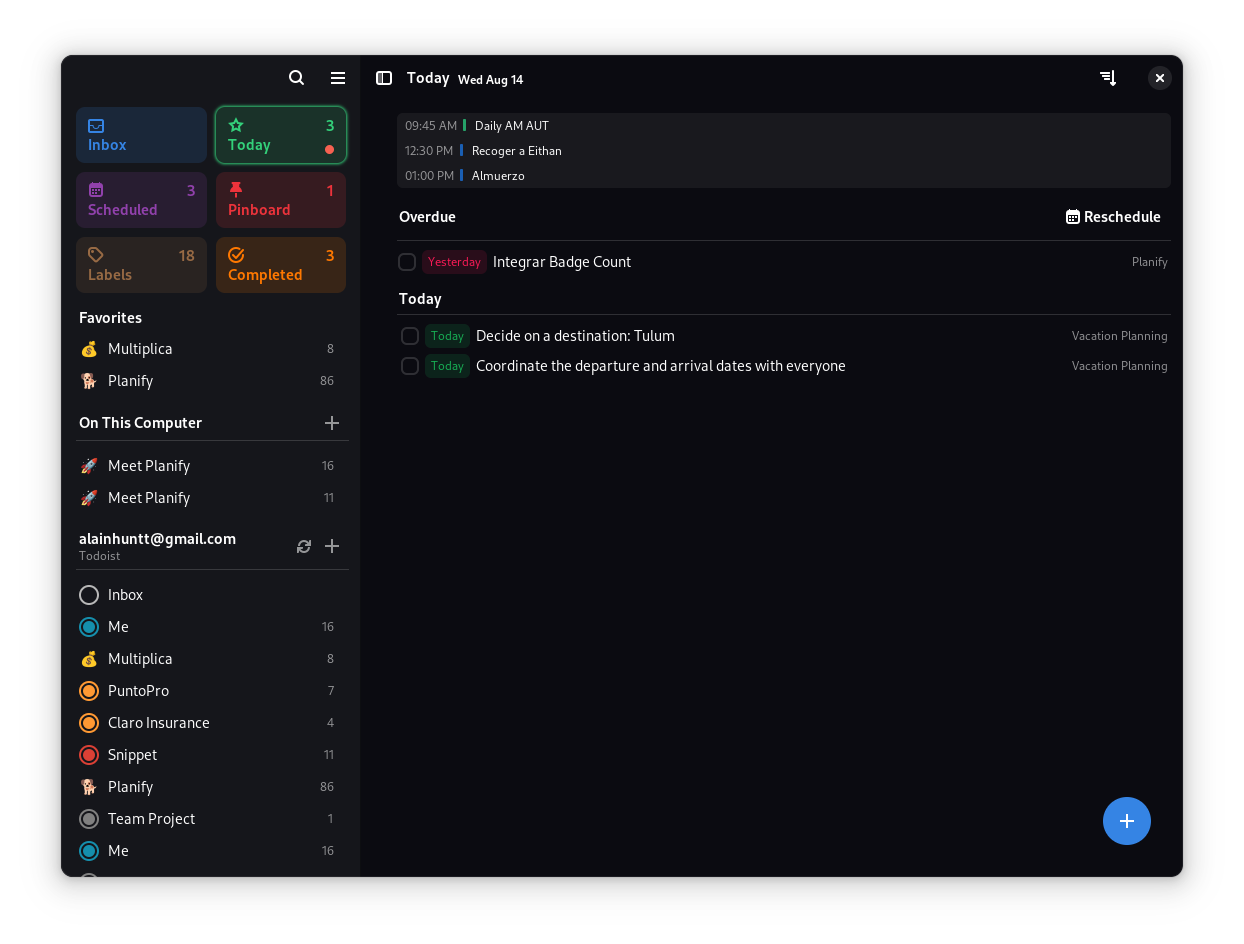
## ✨ Features
### 🎯 Core Functionality
- **🚀 Modern Interface**: Clean, intuitive design that gets out of your way
- **🤚 Drag & Drop**: Effortlessly organize tasks and projects with natural gestures
- **💯 Progress Tracking**: Visual indicators show completion status at a glance
- **📂 Smart Organization**: Group tasks into sections for better workflow management
- **📅 Calendar Integration**: Visualize your schedule and plan your day effectively
- **⏰ Flexible Reminders**: Set multiple reminders per task - never miss a deadline
- **🌙 Dark Mode**: Seamless integration with system themes
- **🔍 Quick Search**: Find anything instantly with powerful search capabilities
### ☁️ Cloud Synchronization
- **Todoist Integration**: Full sync with your existing Todoist account
- **Nextcloud Support**: Keep your data private with self-hosted solutions
- **Offline Mode**: Work without internet - sync when you're back online
- **Cross-Platform**: Access your tasks from anywhere
*Note: Planify is not created by, affiliated with, or supported by Doist*
### 💎 Advanced Features
- **🔔 Smart Notifications**: Never miss important tasks
- **🔁 Recurring Tasks**: Set up repeating schedules with flexible patterns
- **📊 Analytics**: Track your productivity over time
- **🏷️ Labels & Filters**: Organize and find tasks with custom labels
- **📎 Attachments**: Add files and links to your tasks
- **🎨 Customization**: Personalize colors and themes
## 📥 Installation
### 🏪 Official Distribution
### 🛠 Build from Source
System Requirements & Dependencies
**Minimum Requirements:**
- Linux distribution with GTK4 support
- 2GB RAM
- 500MB disk space
**Build Dependencies:**
| Package | Version |
|---------|---------|
| meson | ≥ 0.56 |
| valac | ≥ 0.48 |
| gio-2.0 | ≥ 2.80.3 |
| glib-2.0 | ≥ 2.80.3 |
| gee-0.8 | ≥ 0.20.6 |
| gtk4 | ≥ 4.14.4 |
| libsoup-3.0 | ≥ 3.4.4 |
| sqlite3 | ≥ 3.45.1 |
| libadwaita-1 | ≥ 1.5.3 |
| webkitgtk-6.0 | ≥ 2.44.3 |
| json-glib-1.0 | ≥ 1.8.0 |
| libecal-2.0 | ≥ 3.52.4 |
| libedataserver-1.2 | ≥ 3.52.4 |
| libportal | ≥ 0.7.1 |
| libportal-gtk4 | ≥ 0.7.1 |
| gxml-0.20 | ≥ 0.21.0 |
| libsecret-1 | ≥ 0.21.4 |
| libspelling-dev | latest |
| gtksourceview-5 | 5.12.1 |
**Install Dependencies:**
**Fedora/RHEL:**
```bash
sudo dnf install vala meson ninja-build gtk4-devel libadwaita-devel libgee-devel libsoup3-devel webkitgtk6.0-devel libportal-devel libportal-gtk4-devel evolution-devel libspelling-devel gtksourceview5-devel
```
**Ubuntu/Debian:**
```bash
sudo apt install valac meson ninja-build libgtk-4-dev libadwaita-1-dev libgee-0.8-dev libjson-glib-dev libecal2.0-dev libsoup-3.0-dev libwebkitgtk-6.0-dev libportal-dev libportal-gtk4-dev libspelling-1-dev libgtksourceview-5-dev
```
**Build Instructions:**
```bash
# Clone the repository
git clone https://github.com/alainm23/planify.git
cd planify
# Configure build
meson build --prefix=/usr
# Compile
cd build
ninja
# Install
sudo ninja install
# Run
io.github.alainm23.planify
```
### 🏗️ Development Setup
**Using GNOME Builder:**
1. Install [GNOME Builder](https://apps.gnome.org/Builder/)
2. Clone this repository
3. Open the project in GNOME Builder
4. Click "Run" to build and test
## 🤝 Contributing
We welcome contributions! Here's how you can help:
### 🐛 Bug Reports & Feature Requests
- Check [existing issues](https://github.com/alainm23/planify/issues) first
- Use our issue templates for better communication
- Include system information and steps to reproduce
### 💻 Code Contributions
- Read our [Architecture Guide](ARCHITECTURE.md)
- Fork the repository and create a feature branch
- Follow our coding standards and commit message format
- Submit a pull request with a clear description
### 🌍 Translations
Help make Planify available in your language:
- **Weblate (Recommended)**: [Join our translation project](https://hosted.weblate.org/engage/planner/)
- **Manual**: Check our [Translation Guide](po/README.md)
## 📋 Code of Conduct
Planify follows the [GNOME Code of Conduct](https://conduct.gnome.org/). We are committed to providing a welcoming and inclusive environment for all contributors.
**Our Principles:**
- **Be friendly** - Use welcoming and inclusive language
- **Be empathetic** - Respect differing viewpoints and experiences
- **Be respectful** - Disagree politely and constructively
- **Be considerate** - Remember that decisions often involve competing priorities
- **Be patient** - Help others learn and grow
- **Be concise** - Read discussions before commenting
## 💝 Support the Project
If you find Planify useful, consider supporting its development:


 ### 🛠 Build from Source

