# CNNDetection
**Repository Path**: nancy_cheng/CNNDetection
## Basic Information
- **Project Name**: CNNDetection
- **Description**: No description available
- **Primary Language**: Python
- **License**: Not specified
- **Default Branch**: master
- **Homepage**: None
- **GVP Project**: No
## Statistics
- **Stars**: 0
- **Forks**: 0
- **Created**: 2024-04-10
- **Last Updated**: 2024-10-18
## Categories & Tags
**Categories**: Uncategorized
**Tags**: None
## README
## Detecting CNN-Generated Images [[Project Page]](https://peterwang512.github.io/CNNDetection/)
**CNN-generated images are surprisingly easy to spot...for now**
[Sheng-Yu Wang](https://peterwang512.github.io/), [Oliver Wang](http://www.oliverwang.info/), [Richard Zhang](https://richzhang.github.io/), [Andrew Owens](http://andrewowens.com/), [Alexei A. Efros](https://people.eecs.berkeley.edu/~efros/).
In [CVPR](https://arxiv.org/abs/1912.11035), 2020.
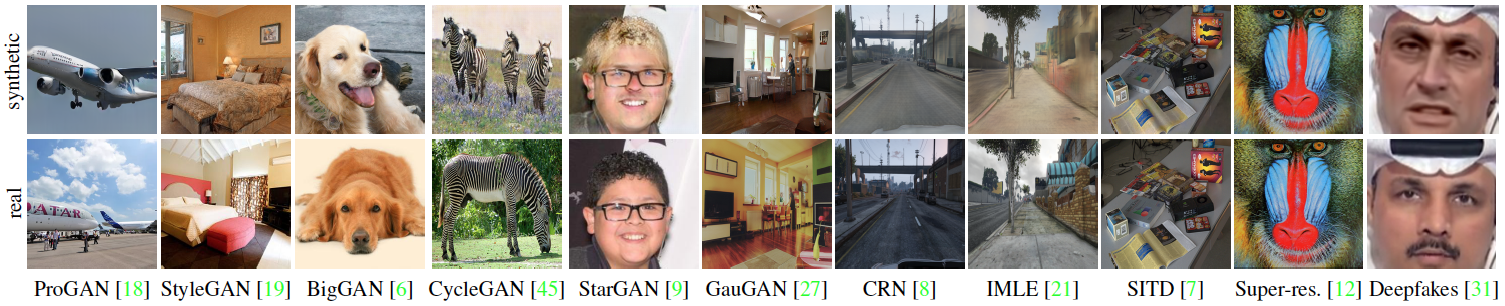 This repository contains models, evaluation code, and training code on datasets from our paper. **If you would like to run our pretrained model on your image/dataset see [(2) Quick start](https://github.com/PeterWang512/CNNDetection#2-quick-start).**
**Jun 20th 2020 Update** Training code and dataset released; test results on uncropped images added (recommended for best performance).
**Oct 26th 2020 Update** Some reported the download link for training data does not work. If this happens, please try the updated alternative links: [1](https://drive.google.com/drive/u/2/folders/14E_R19lqIE9JgotGz09fLPQ4NVqlYbVc) and [2](https://cmu.app.box.com/folder/124997172518?s=4syr4womrggfin0tsfhxohaec5dh6n48)
**Oct 18th 2021 Update** Our method gets 92% AUC on the recently released StyleGAN3 model! For more details, please visit this [link](https://github.com/NVlabs/stylegan3-detector).
## (1) Setup
### Install packages
- Install PyTorch ([pytorch.org](http://pytorch.org))
- `pip install -r requirements.txt`
### Download model weights
- Run `bash weights/download_weights.sh`
## (2) Quick start
### Run on a single image
This command runs the model on a single image, and outputs the uncalibrated prediction.
```
# Model weights need to be downloaded.
python demo.py -f examples/real.png -m weights/blur_jpg_prob0.5.pth
python demo.py -f examples/fake.png -m weights/blur_jpg_prob0.5.pth
```
### Run on a dataset
This command computes AP and accuracy on a dataset. See the [provided directory](examples/realfakedir) for an example. Put your real/fake images into the appropriate subfolders to test.
```
python demo_dir.py -d examples/realfakedir -m weights/blur_jpg_prob0.5.pth
```
## (3) Dataset
### Testset
The testset evaluated in the paper can be downloaded [here](https://drive.google.com/file/d/1z_fD3UKgWQyOTZIBbYSaQ-hz4AzUrLC1/view?usp=sharing).
The zip file contains images from 13 CNN-based synthesis algorithms, including the 12 testsets from the paper and images downloaded from whichfaceisreal.com. Images from each algorithm are stored in a separate folder. In each category, real images are in the `0_real` folder, and synthetic images are in the `1_fake` folder.
Note: ProGAN, StyleGAN, StyleGAN2, CycleGAN testset contains multiple classes, which are stored in separate subdirectories.
### Training set
The training set used in the paper can be downloaded [here](https://drive.google.com/file/d/1iVNBV0glknyTYGA9bCxT_d0CVTOgGcKh/view?usp=sharing) (Try alternative links [1](https://drive.google.com/drive/u/2/folders/14E_R19lqIE9JgotGz09fLPQ4NVqlYbVc),[2](https://cmu.app.box.com/folder/124997172518?s=4syr4womrggfin0tsfhxohaec5dh6n48) if the previous link does not work). All images are from LSUN or generated by ProGAN, and they are separated in 20 object categories. Similarly, in each category, real images are in the `0_real` folder, and synthetic images are in the `1_fake` folder.
### Validation set
The validation set consists of held-out ProGAN real and fake images, and can be downloaded [here](https://drive.google.com/file/d/1FU7xF8Wl_F8b0tgL0529qg2nZ_RpdVNL/view?usp=sharing). The directory structure is identical to that of the training set.
### Download the dataset
A script for downloading the dataset is as follows:
```
# Download the testset
cd dataset/test
bash download_testset.sh
cd ../..
# Download the training set
cd dataset/train
bash download_trainset.sh
cd ../..
# Download the validation set
cd dataset/val
bash download_valset.sh
cd ../..
```
**If the script doesn't work, an alternative will be to download the zip files manually from the above google drive links. One can place the testset, training, and validation set zip files in `dataset/test`, `dataset/train`, and `dataset/val` folders, respectively, and then unzip the zip files to set everything up.**
## (4) Train your models
We provide two example scripts to train our `Blur+JPEG(0.5)` and `Blur+JPEG(0.1)` models. We use `checkpoints/[model_name]/model_epoch_best.pth` as our final model.
```
# Train Blur+JPEG(0.5)
python train.py --name blur_jpg_prob0.5 --blur_prob 0.5 --blur_sig 0.0,3.0 --jpg_prob 0.5 --jpg_method cv2,pil --jpg_qual 30,100 --dataroot ./dataset/ --classes airplane,bird,bicycle,boat,bottle,bus,car,cat,cow,chair,diningtable,dog,person,pottedplant,motorbike,tvmonitor,train,sheep,sofa,horse
# Train Blur+JPEG(0.1)
python train.py --name blur_jpg_prob0.1 --blur_prob 0.1 --blur_sig 0.0,3.0 --jpg_prob 0.1 --jpg_method cv2,pil --jpg_qual 30,100 --dataroot ./dataset/ --classes airplane,bird,bicycle,boat,bottle,bus,car,cat,cow,chair,diningtable,dog,person,pottedplant,motorbike,tvmonitor,train,sheep,sofa,horse
```
## (5) Evaluation
After the testset and the model weights are downloaded, one can evaluate the models by running:
```
# Run evaluation script. Model weights need to be downloaded. See eval_config.py for flags
python eval.py
```
Besides print-outs, the results will also be stored in a csv file in the `results` folder. Configurations such as the path of the dataset, model weight are in `eval_config.py`, and one can modify the evaluation by changing the configurations.
**6/13/2020 Update** Additionally, we tested on uncropped images, and observed better performances on most categories. To evaluate without center-cropping:
```
# Run evaluation script without cropping. Model weights need to be downloaded.
python eval.py --no_crop --batch_size 1
```
The following are the models' performances on the released set, with cropping to 224x224 (as in the paper), and without cropping.
[Blur+JPEG(0.5)]
|Testset |Acc (224)| AP (224) |Acc (No crop)| AP (No crop)|
|:--------:|:------:|:----:|:------:|:----:|
|ProGAN | 100.0% |100.0%| 100.0% |100.0%|
|StyleGAN | 73.4% |98.5% | 77.5% |99.3% |
|BigGAN | 59.0% |88.2% | 59.5% |90.4% |
|CycleGAN | 80.8% |96.8% | 84.6% |97.9% |
|StarGAN | 81.0% |95.4% | 84.7% |97.5% |
|GauGAN | 79.3% |98.1% | 82.9% |98.8% |
|CRN | 87.6% |98.9% | 97.8% |100.0% |
|IMLE | 94.1% |99.5% | 98.8% |100.0% |
|SITD | 78.3% |92.7% | 93.9% |99.6% |
|SAN | 50.0% |63.9% | 50.0% |62.8% |
|Deepfake | 51.1% |66.3% | 50.4% |63.1% |
|StyleGAN2 | 68.4% |98.0% | 72.4% |99.1% |
|Whichfaceisreal| 63.9% |88.8% | 75.2% |100.0% |
[Blur+JPEG(0.1)]
|Testset |Acc (224)| AP (224) |Acc (No crop)| AP (No crop)|
|:--------:|:------:|:----:|:------:|:----:|
|ProGAN |100.0% |100.0%| 100.0% |100.0%|
|StyleGAN |87.1% |99.6%| 90.2% |99.8% |
|BigGAN |70.2% |84.5%| 71.2% |86.0% |
|CycleGAN |85.2% |93.5%| 87.6% |94.9% |
|StarGAN |91.7% |98.2%| 94.6% |99.0% |
|GauGAN |78.9% |89.5%| 81.4% |90.8% |
|CRN |86.3% |98.2%| 86.3% |99.8% |
|IMLE |86.2% |98.4%| 86.3% |99.8% |
|SITD |90.3% |97.2%| 98.1% |99.8% |
|SAN |50.5% |70.5%| 50.0% |68.6% |
|Deepfake |53.5% |89.0%| 50.7% |84.5% |
|StyleGAN2 |84.4% |99.1%| 86.9% |99.5% |
|Whichfaceisreal|83.6% |93.2%| 91.6% |99.8%|
## (A) Acknowledgments
This repository borrows partially from the [pytorch-CycleGAN-and-pix2pix](https://github.com/junyanz/pytorch-CycleGAN-and-pix2pix), and the PyTorch [torchvision models](https://github.com/pytorch/vision/tree/master/torchvision/models) repositories.
## (B) Citation, Contact
If you find this useful for your research, please consider citing this [bibtex](https://peterwang512.github.io/CNNDetection/bibtex.txt). Please contact Sheng-Yu Wang \ with any comments or feedback.
This repository contains models, evaluation code, and training code on datasets from our paper. **If you would like to run our pretrained model on your image/dataset see [(2) Quick start](https://github.com/PeterWang512/CNNDetection#2-quick-start).**
**Jun 20th 2020 Update** Training code and dataset released; test results on uncropped images added (recommended for best performance).
**Oct 26th 2020 Update** Some reported the download link for training data does not work. If this happens, please try the updated alternative links: [1](https://drive.google.com/drive/u/2/folders/14E_R19lqIE9JgotGz09fLPQ4NVqlYbVc) and [2](https://cmu.app.box.com/folder/124997172518?s=4syr4womrggfin0tsfhxohaec5dh6n48)
**Oct 18th 2021 Update** Our method gets 92% AUC on the recently released StyleGAN3 model! For more details, please visit this [link](https://github.com/NVlabs/stylegan3-detector).
## (1) Setup
### Install packages
- Install PyTorch ([pytorch.org](http://pytorch.org))
- `pip install -r requirements.txt`
### Download model weights
- Run `bash weights/download_weights.sh`
## (2) Quick start
### Run on a single image
This command runs the model on a single image, and outputs the uncalibrated prediction.
```
# Model weights need to be downloaded.
python demo.py -f examples/real.png -m weights/blur_jpg_prob0.5.pth
python demo.py -f examples/fake.png -m weights/blur_jpg_prob0.5.pth
```
### Run on a dataset
This command computes AP and accuracy on a dataset. See the [provided directory](examples/realfakedir) for an example. Put your real/fake images into the appropriate subfolders to test.
```
python demo_dir.py -d examples/realfakedir -m weights/blur_jpg_prob0.5.pth
```
## (3) Dataset
### Testset
The testset evaluated in the paper can be downloaded [here](https://drive.google.com/file/d/1z_fD3UKgWQyOTZIBbYSaQ-hz4AzUrLC1/view?usp=sharing).
The zip file contains images from 13 CNN-based synthesis algorithms, including the 12 testsets from the paper and images downloaded from whichfaceisreal.com. Images from each algorithm are stored in a separate folder. In each category, real images are in the `0_real` folder, and synthetic images are in the `1_fake` folder.
Note: ProGAN, StyleGAN, StyleGAN2, CycleGAN testset contains multiple classes, which are stored in separate subdirectories.
### Training set
The training set used in the paper can be downloaded [here](https://drive.google.com/file/d/1iVNBV0glknyTYGA9bCxT_d0CVTOgGcKh/view?usp=sharing) (Try alternative links [1](https://drive.google.com/drive/u/2/folders/14E_R19lqIE9JgotGz09fLPQ4NVqlYbVc),[2](https://cmu.app.box.com/folder/124997172518?s=4syr4womrggfin0tsfhxohaec5dh6n48) if the previous link does not work). All images are from LSUN or generated by ProGAN, and they are separated in 20 object categories. Similarly, in each category, real images are in the `0_real` folder, and synthetic images are in the `1_fake` folder.
### Validation set
The validation set consists of held-out ProGAN real and fake images, and can be downloaded [here](https://drive.google.com/file/d/1FU7xF8Wl_F8b0tgL0529qg2nZ_RpdVNL/view?usp=sharing). The directory structure is identical to that of the training set.
### Download the dataset
A script for downloading the dataset is as follows:
```
# Download the testset
cd dataset/test
bash download_testset.sh
cd ../..
# Download the training set
cd dataset/train
bash download_trainset.sh
cd ../..
# Download the validation set
cd dataset/val
bash download_valset.sh
cd ../..
```
**If the script doesn't work, an alternative will be to download the zip files manually from the above google drive links. One can place the testset, training, and validation set zip files in `dataset/test`, `dataset/train`, and `dataset/val` folders, respectively, and then unzip the zip files to set everything up.**
## (4) Train your models
We provide two example scripts to train our `Blur+JPEG(0.5)` and `Blur+JPEG(0.1)` models. We use `checkpoints/[model_name]/model_epoch_best.pth` as our final model.
```
# Train Blur+JPEG(0.5)
python train.py --name blur_jpg_prob0.5 --blur_prob 0.5 --blur_sig 0.0,3.0 --jpg_prob 0.5 --jpg_method cv2,pil --jpg_qual 30,100 --dataroot ./dataset/ --classes airplane,bird,bicycle,boat,bottle,bus,car,cat,cow,chair,diningtable,dog,person,pottedplant,motorbike,tvmonitor,train,sheep,sofa,horse
# Train Blur+JPEG(0.1)
python train.py --name blur_jpg_prob0.1 --blur_prob 0.1 --blur_sig 0.0,3.0 --jpg_prob 0.1 --jpg_method cv2,pil --jpg_qual 30,100 --dataroot ./dataset/ --classes airplane,bird,bicycle,boat,bottle,bus,car,cat,cow,chair,diningtable,dog,person,pottedplant,motorbike,tvmonitor,train,sheep,sofa,horse
```
## (5) Evaluation
After the testset and the model weights are downloaded, one can evaluate the models by running:
```
# Run evaluation script. Model weights need to be downloaded. See eval_config.py for flags
python eval.py
```
Besides print-outs, the results will also be stored in a csv file in the `results` folder. Configurations such as the path of the dataset, model weight are in `eval_config.py`, and one can modify the evaluation by changing the configurations.
**6/13/2020 Update** Additionally, we tested on uncropped images, and observed better performances on most categories. To evaluate without center-cropping:
```
# Run evaluation script without cropping. Model weights need to be downloaded.
python eval.py --no_crop --batch_size 1
```
The following are the models' performances on the released set, with cropping to 224x224 (as in the paper), and without cropping.
[Blur+JPEG(0.5)]
|Testset |Acc (224)| AP (224) |Acc (No crop)| AP (No crop)|
|:--------:|:------:|:----:|:------:|:----:|
|ProGAN | 100.0% |100.0%| 100.0% |100.0%|
|StyleGAN | 73.4% |98.5% | 77.5% |99.3% |
|BigGAN | 59.0% |88.2% | 59.5% |90.4% |
|CycleGAN | 80.8% |96.8% | 84.6% |97.9% |
|StarGAN | 81.0% |95.4% | 84.7% |97.5% |
|GauGAN | 79.3% |98.1% | 82.9% |98.8% |
|CRN | 87.6% |98.9% | 97.8% |100.0% |
|IMLE | 94.1% |99.5% | 98.8% |100.0% |
|SITD | 78.3% |92.7% | 93.9% |99.6% |
|SAN | 50.0% |63.9% | 50.0% |62.8% |
|Deepfake | 51.1% |66.3% | 50.4% |63.1% |
|StyleGAN2 | 68.4% |98.0% | 72.4% |99.1% |
|Whichfaceisreal| 63.9% |88.8% | 75.2% |100.0% |
[Blur+JPEG(0.1)]
|Testset |Acc (224)| AP (224) |Acc (No crop)| AP (No crop)|
|:--------:|:------:|:----:|:------:|:----:|
|ProGAN |100.0% |100.0%| 100.0% |100.0%|
|StyleGAN |87.1% |99.6%| 90.2% |99.8% |
|BigGAN |70.2% |84.5%| 71.2% |86.0% |
|CycleGAN |85.2% |93.5%| 87.6% |94.9% |
|StarGAN |91.7% |98.2%| 94.6% |99.0% |
|GauGAN |78.9% |89.5%| 81.4% |90.8% |
|CRN |86.3% |98.2%| 86.3% |99.8% |
|IMLE |86.2% |98.4%| 86.3% |99.8% |
|SITD |90.3% |97.2%| 98.1% |99.8% |
|SAN |50.5% |70.5%| 50.0% |68.6% |
|Deepfake |53.5% |89.0%| 50.7% |84.5% |
|StyleGAN2 |84.4% |99.1%| 86.9% |99.5% |
|Whichfaceisreal|83.6% |93.2%| 91.6% |99.8%|
## (A) Acknowledgments
This repository borrows partially from the [pytorch-CycleGAN-and-pix2pix](https://github.com/junyanz/pytorch-CycleGAN-and-pix2pix), and the PyTorch [torchvision models](https://github.com/pytorch/vision/tree/master/torchvision/models) repositories.
## (B) Citation, Contact
If you find this useful for your research, please consider citing this [bibtex](https://peterwang512.github.io/CNNDetection/bibtex.txt). Please contact Sheng-Yu Wang \ with any comments or feedback.