# extended_image
**Repository Path**: one_dev/extended_image
## Basic Information
- **Project Name**: extended_image
- **Description**: extended_image
- **Primary Language**: Dart
- **License**: MIT
- **Default Branch**: master
- **Homepage**: None
- **GVP Project**: No
## Statistics
- **Stars**: 0
- **Forks**: 0
- **Created**: 2020-01-19
- **Last Updated**: 2020-12-19
## Categories & Tags
**Categories**: Uncategorized
**Tags**: None
## README
# extended_image
[](https://pub.dartlang.org/packages/extended_image) [](https://github.com/fluttercandies/extended_image/stargazers) [](https://github.com/fluttercandies/extended_image/network) [](https://github.com/fluttercandies/extended_image/blob/master/LICENSE) [](https://github.com/fluttercandies/extended_image/issues)  文档语言: [English](README.md) | [中文简体](README-ZH.md)
强大的官方Image扩展组件, 支持加载以及失败显示,缓存网络图片,缩放拖拽图片,图片浏览(微信掘金效果),滑动退出页面(微信掘金效果),编辑图片(裁剪旋转翻转),保存,绘制自定义效果等功能
- [Flutter 什么功能都有的 Image](https://juejin.im/post/5c867112f265da2dd427a340)
- [Flutter 可以缩放拖拽的图片](https://juejin.im/post/5ca758916fb9a05e1c4d01bb)
- [Flutter 仿掘金微信图片滑动退出页面效果](https://juejin.im/post/5cf62ab0e51d45776031afb2)
- [Flutter 图片裁剪旋转翻转编辑器](https://juejin.im/post/5d77dfbb6fb9a06b160f55fc)
## 目录
- [extended_image](#extendedimage)
- [目录](#%e7%9b%ae%e5%bd%95)
- [缓存网络图片](#%e7%bc%93%e5%ad%98%e7%bd%91%e7%bb%9c%e5%9b%be%e7%89%87)
- [简单使用](#%e7%ae%80%e5%8d%95%e4%bd%bf%e7%94%a8)
- [使用 Extendednetworkimageprovider](#%e4%bd%bf%e7%94%a8-extendednetworkimageprovider)
- [加载状态](#%e5%8a%a0%e8%bd%bd%e7%8a%b6%e6%80%81)
- [例子](#%e4%be%8b%e5%ad%90)
- [缩放拖拽](#%e7%bc%a9%e6%94%be%e6%8b%96%e6%8b%bd)
- [双击图片动画](#%e5%8f%8c%e5%87%bb%e5%9b%be%e7%89%87%e5%8a%a8%e7%94%bb)
- [图片编辑](#%e5%9b%be%e7%89%87%e7%bc%96%e8%be%91)
- [裁剪框的宽高比](#%e8%a3%81%e5%89%aa%e6%a1%86%e7%9a%84%e5%ae%bd%e9%ab%98%e6%af%94)
- [旋转,翻转,重置](#%e6%97%8b%e8%bd%ac%e7%bf%bb%e8%bd%ac%e9%87%8d%e7%bd%ae)
- [裁剪数据](#%e8%a3%81%e5%89%aa%e6%95%b0%e6%8d%ae)
- [使用dart库(稳定)](#%e4%bd%bf%e7%94%a8dart%e5%ba%93%e7%a8%b3%e5%ae%9a)
- [使用原生库(快速)](#%e4%bd%bf%e7%94%a8%e5%8e%9f%e7%94%9f%e5%ba%93%e5%bf%ab%e9%80%9f)
- [图片浏览](#%e5%9b%be%e7%89%87%e6%b5%8f%e8%a7%88)
- [滑动退出页面](#%e6%bb%91%e5%8a%a8%e9%80%80%e5%87%ba%e9%a1%b5%e9%9d%a2)
- [首先开启滑动退出页面效果](#%e9%a6%96%e5%85%88%e5%bc%80%e5%90%af%e6%bb%91%e5%8a%a8%e9%80%80%e5%87%ba%e9%a1%b5%e9%9d%a2%e6%95%88%e6%9e%9c)
- [把你的页面用ExtendedImageSlidePage包一下](#%e6%8a%8a%e4%bd%a0%e7%9a%84%e9%a1%b5%e9%9d%a2%e7%94%a8extendedimageslidepage%e5%8c%85%e4%b8%80%e4%b8%8b)
- [确保你的页面是透明背景的](#%e7%a1%ae%e4%bf%9d%e4%bd%a0%e7%9a%84%e9%a1%b5%e9%9d%a2%e6%98%af%e9%80%8f%e6%98%8e%e8%83%8c%e6%99%af%e7%9a%84)
- [Push一个透明的页面](#push%e4%b8%80%e4%b8%aa%e9%80%8f%e6%98%8e%e7%9a%84%e9%a1%b5%e9%9d%a2)
- [Border BorderRadius Shape](#border-borderradius-shape)
- [清除缓存和保存](#%e6%b8%85%e9%99%a4%e7%bc%93%e5%ad%98%e5%92%8c%e4%bf%9d%e5%ad%98)
- [清除缓存](#%e6%b8%85%e9%99%a4%e7%bc%93%e5%ad%98)
- [保存网络图片](#%e4%bf%9d%e5%ad%98%e7%bd%91%e7%bb%9c%e5%9b%be%e7%89%87)
- [显示裁剪图片](#%e6%98%be%e7%a4%ba%e8%a3%81%e5%89%aa%e5%9b%be%e7%89%87)
- [绘制](#%e7%bb%98%e5%88%b6)
- [瀑布流](#%e7%80%91%e5%b8%83%e6%b5%81)
- [内存回收/可视区域追踪](#%e5%86%85%e5%ad%98%e5%9b%9e%e6%94%b6%e5%8f%af%e8%a7%86%e5%8c%ba%e5%9f%9f%e8%bf%bd%e8%b8%aa)
- [其他 APIs](#%e5%85%b6%e4%bb%96-apis)
## 缓存网络图片
### 简单使用
你可以直接使用 ExtendedImage.network,这跟官方是一样。
```dart
ExtendedImage.network(
url,
width: ScreenUtil.instance.setWidth(400),
height: ScreenUtil.instance.setWidth(400),
fit: BoxFit.fill,
cache: true,
border: Border.all(color: Colors.red, width: 1.0),
shape: boxShape,
borderRadius: BorderRadius.all(Radius.circular(30.0)),
//cancelToken: cancellationToken,
)
```
### 使用 Extendednetworkimageprovider
你也可以通过[ExtendedNetworkImageProvider](https://github.com/fluttercandies/extended_image_library/blob/master/lib/src/extended_network_image_provider.dart),设置更多的网络请求的参数
```dart
ExtendedNetworkImageProvider(
this.url, {
this.scale = 1.0,
this.headers,
this.cache: false,
this.retries = 3,
this.timeLimit,
this.timeRetry = const Duration(milliseconds: 100),
CancellationToken cancelToken,
}) : assert(url != null),
assert(scale != null),
cancelToken = cancelToken ?? CancellationToken();
```
| 参数 | 描述 | 默认 |
| ----------- | --------------------- | ------------------- |
| url | 网络请求地址 | required |
| scale | ImageInfo 中的 scale | 1.0 |
| headers | HttpClient 的 headers | - |
| cache | 是否缓存到本地 | false |
| retries | 请求尝试次数 | 3 |
| timeLimit | 请求超时 | - |
| timeRetry | 请求重试间隔 | milliseconds: 100 |
| cancelToken | 用于取消请求的 Token | CancellationToken() |
当然你也可以继承任何的ExtendedProvider,并且覆写instantiateImageCodec方法,这样你可以统一处理图片的元数据,比如进行压缩图片。
## 加载状态
Extended Image一共有3种状态,分别是正在加载,完成,失败(loading,completed,failed),你可以通过实现loadStateChanged回调来定义显示的效果
loadStateChanged 不仅仅只在网络图片中可以使用, 如果你的图片很大,需要长时间加载,
你可以把enableLoadState设置为了true,这样也会有状态回调了,(默认只有网络图片,enableLoadState为true)

注意:
* 如果你不想重写某个状态,那么请返回null
* 如果你想重写完成图片的 size 或者 sourceRect, 你可以通过使用 ExtendedRawImage 来完成
* 如果你想增加一些新效果 (比如动画), 你可以重写并且使用ExtendedImageState.completedWidget
* ExtendedImageState.completedWidget 包含手势或者裁剪, 这样你不会丢失它们
```dart
/// custom load state widget if you want
final LoadStateChanged loadStateChanged;
enum LoadState {
//loading
loading,
//completed
completed,
//failed
failed
}
///whether has loading or failed state
///default is false
///but network image is true
///better to set it's true when your image is big and take some time to ready
final bool enableLoadState;
```
ExtendedImageState 状态回调
| 参数/方法 | 描述 | 默认 |
| ---------------------------- | -------------------------------------------------------------------------------------------------- | ---- |
| extendedImageInfo | 图片的信息,包括底层image和image的大小 | - |
| extendedImageLoadState | 状态(loading,completed,failed) | - |
| returnLoadStateChangedWidget | 如果这个为true的话,状态回调返回的widget将不会对(width/height/gesture/border/shape)等效果进行包装 | - |
| imageProvider | 图片的Provider | - |
| invertColors | 是否反转颜色 | - |
| imageStreamKey | 图片流的唯一键 | - |
| reLoadImage() | 如果图片加载失败,你可以通过调用这个方法来重新加载图片 | - |
| completedWidget | 返回图片完成的Widget,它包含手势以及裁剪 | - |
```dart
abstract class ExtendedImageState {
void reLoadImage();
ImageInfo get extendedImageInfo;
LoadState get extendedImageLoadState;
///return widget which from LoadStateChanged fucntion immediately
bool returnLoadStateChangedWidget;
ImageProvider get imageProvider;
bool get invertColors;
Object get imageStreamKey;
Widget get completedWidget;
}
```
### 例子
```dart
ExtendedImage.network(
url,
width: ScreenUtil.instance.setWidth(600),
height: ScreenUtil.instance.setWidth(400),
fit: BoxFit.fill,
cache: true,
loadStateChanged: (ExtendedImageState state) {
switch (state.extendedImageLoadState) {
case LoadState.loading:
_controller.reset();
return Image.asset(
"assets/loading.gif",
fit: BoxFit.fill,
);
break;
///if you don't want override completed widget
///please return null or state.completedWidget
//return null;
//return state.completedWidget;
case LoadState.completed:
_controller.forward();
return FadeTransition(
opacity: _controller,
child: ExtendedRawImage(
image: state.extendedImageInfo?.image,
width: ScreenUtil.instance.setWidth(600),
height: ScreenUtil.instance.setWidth(400),
),
);
break;
case LoadState.failed:
_controller.reset();
return GestureDetector(
child: Stack(
fit: StackFit.expand,
children: [
Image.asset(
"assets/failed.jpg",
fit: BoxFit.fill,
),
Positioned(
bottom: 0.0,
left: 0.0,
right: 0.0,
child: Text(
"load image failed, click to reload",
textAlign: TextAlign.center,
),
)
],
),
onTap: () {
state.reLoadImage();
},
);
break;
}
},
)
```
## 缩放拖拽

ExtendedImage
| 参数 | 描述 | 默认 |
| ------------------------ | --------------------------------------------------------------------- | ---- |
| mode | 图片模式,默认/手势/编辑 (none,gestrue,editor) | none |
| initGestureConfigHandler | 手势配置的回调(图片加载完成时).你可以根据图片的信息比如宽高,来初始化 | - |
| onDoubleTap | 支持手势的时候,双击回调 | - |
GestureConfig
| 参数 | 描述 | 默认值 |
| ----------------- | ---------------------------------------------------------------------------------------------------- | ----------------------- |
| minScale | 缩放最小值 | 0.8 |
| animationMinScale | 缩放动画最小值,当缩放结束时回到minScale值 | minScale * 0.8 |
| maxScale | 缩放最大值 | 5.0 |
| animationMaxScale | 缩放动画最大值,当缩放结束时回到maxScale值 | maxScale * 1.2 |
| speed | 缩放拖拽速度,与用户操作成正比 | 1.0 |
| inertialSpeed | 拖拽惯性速度,与惯性速度成正比 | 100 |
| cacheGesture | 是否缓存手势状态,可用于ExtendedImageGesturePageView中保留状态,使用clearGestureDetailsCache方法清除 | false |
| inPageView | 是否使用ExtendedImageGesturePageView展示图片 | false |
| initialAlignment | 当图片的初始化缩放大于1.0的时候,根据相对位置初始化图片 | InitialAlignment.center |
```dart
ExtendedImage.network(
imageTestUrl,
fit: BoxFit.contain,
//enableLoadState: false,
mode: ExtendedImageMode.Gesture,
initGestureConfigHandler: (state) {
return GestureConfig(
minScale: 0.9,
animationMinScale: 0.7,
maxScale: 3.0,
animationMaxScale: 3.5,
speed: 1.0,
inertialSpeed: 100.0,
initialScale: 1.0,
inPageView: false,
initialAlignment: InitialAlignment.center,
);
},
)
```
### 双击图片动画
支持双击动画,具体双击图片什么样子的效果,可以自定义
```dart
onDoubleTap: (ExtendedImageGestureState state) {
///you can use define pointerDownPosition as you can,
///default value is double tap pointer down postion.
var pointerDownPosition = state.pointerDownPosition;
double begin = state.gestureDetails.totalScale;
double end;
//remove old
_animation?.removeListener(animationListener);
//stop pre
_animationController.stop();
//reset to use
_animationController.reset();
if (begin == doubleTapScales[0]) {
end = doubleTapScales[1];
} else {
end = doubleTapScales[0];
}
animationListener = () {
//print(_animation.value);
state.handleDoubleTap(
scale: _animation.value,
doubleTapPosition: pointerDownPosition);
};
_animation = _animationController
.drive(Tween(begin: begin, end: end));
_animation.addListener(animationListener);
_animationController.forward();
},
```
## 图片编辑

``` dart
ExtendedImage.network(
imageTestUrl,
fit: BoxFit.contain,
mode: ExtendedImageMode.editor,
extendedImageEditorKey: editorKey,
initEditorConfigHandler: (state) {
return EditorConfig(
maxScale: 8.0,
cropRectPadding: EdgeInsets.all(20.0),
hitTestSize: 20.0,
cropAspectRatio: _aspectRatio.aspectRatio);
},
);
```
ExtendedImage
| 参数 | 描述 | 默认 |
| ------------------------ | ----------------------------------------------------------------------- | ---- |
| mode | 图片模式,默认/手势/编辑 (none,gestrue,editor) | none |
| initGestureConfigHandler | 编辑器配置的回调(图片加载完成时).你可以根据图片的信息比如宽高,来初始化 | - |
| extendedImageEditorKey | key of ExtendedImageEditorState 用于裁剪旋转翻转 | - |
EditorConfig
| 参数 | 描述 | 默认 |
| ---------------------- | -------------------------------------------------------------------------------- | ------------------------------------------------------------ |
| maxScale | 最大的缩放倍数 | 5.0 |
| cropRectPadding | 裁剪框跟图片layout区域之间的距离。最好是保持一定距离,不然裁剪框边界很难进行拖拽 | EdgeInsets.all(20.0) |
| cornerSize | 裁剪框四角图形的大小 | Size(30.0, 5.0) |
| cornerColor | 裁剪框四角图形的颜色 | primaryColor |
| lineColor | 裁剪框线的颜色 | scaffoldBackgroundColor.withOpacity(0.7) |
| lineHeight | 裁剪框线的高度 | 0.6 |
| eidtorMaskColorHandler | 蒙层的颜色回调,你可以根据是否手指按下来设置不同的蒙层颜色 | scaffoldBackgroundColor.withOpacity(pointerdown ? 0.4 : 0.8) |
| hitTestSize | 裁剪框四角以及边线能够拖拽的区域的大小 | 20.0 |
| animationDuration | 当裁剪框拖拽变化结束之后,自动适应到中间的动画的时长 | Duration(milliseconds: 200) |
| tickerDuration | 当裁剪框拖拽变化结束之后,多少时间才触发自动适应到中间的动画 | Duration(milliseconds: 400) |
| cropAspectRatio | 裁剪框的宽高比 | null(无宽高比) |
| initCropRectType | 剪切框的初始化类型(根据图片初始化区域或者图片的layout区域) | imageRect |
### 裁剪框的宽高比
这是一个double类型,你可以自定义裁剪框的宽高比。
如果为null,那就没有宽高比限制。
如果小于等于0,宽高比等于图片的宽高比。
下面是一些定义好了的宽高比
``` dart
class CropAspectRatios {
/// no aspect ratio for crop
static const double custom = null;
/// the same as aspect ratio of image
/// [cropAspectRatio] is not more than 0.0, it's original
static const double original = 0.0;
/// ratio of width and height is 1 : 1
static const double ratio1_1 = 1.0;
/// ratio of width and height is 3 : 4
static const double ratio3_4 = 3.0 / 4.0;
/// ratio of width and height is 4 : 3
static const double ratio4_3 = 4.0 / 3.0;
/// ratio of width and height is 9 : 16
static const double ratio9_16 = 9.0 / 16.0;
/// ratio of width and height is 16 : 9
static const double ratio16_9 = 16.0 / 9.0;
}
```
### 旋转,翻转,重置
- 定义key,以方便操作ExtendedImageEditorState
`final GlobalKey editorKey =GlobalKey();`
- 顺时针旋转90°
`editorKey.currentState.rotate(right: true);`
- 逆时针旋转90°
`editorKey.currentState.rotate(right: false);`
- 翻转(镜像)
`editorKey.currentState.flip();`
- 重置
`editorKey.currentState.reset();`
### 裁剪数据
#### 使用dart库(稳定)
- 添加 [Image](https://github.com/brendan-duncan/image) 库到 pubspec.yaml, 它是用来裁剪/旋转/翻转图片数据的
``` yaml
dependencies:
image: any
```
- 从ExtendedImageEditorState中获取裁剪区域以及图片数据
``` dart
///crop rect base on raw image
final Rect cropRect = state.getCropRect();
var data = state.rawImageData;
```
- 将flutter的图片数据转换为image库的数据
``` dart
/// it costs much time and blocks ui.
//Image src = decodeImage(data);
/// it will not block ui with using isolate.
//Image src = await compute(decodeImage, data);
//Image src = await isolateDecodeImage(data);
final lb = await loadBalancer;
Image src = await lb.run>(decodeImage, data);
```
- 翻转,旋转,裁剪数据
``` dart
//相机拍照的图片带有旋转,处理之前需要去掉
src = bakeOrientation(src);
if (editAction.needCrop)
src = copyCrop(src, cropRect.left.toInt(), cropRect.top.toInt(),
cropRect.width.toInt(), cropRect.height.toInt());
if (editAction.needFlip) {
Flip mode;
if (editAction.flipY && editAction.flipX) {
mode = Flip.both;
} else if (editAction.flipY) {
mode = Flip.horizontal;
} else if (editAction.flipX) {
mode = Flip.vertical;
}
src = flip(src, mode);
}
if (editAction.hasRotateAngle) src = copyRotate(src, editAction.rotateAngle);
```
- 将数据转为为图片的元数据
获取到的将是图片的元数据,你可以使用它来保存或者其他的一些用途
``` dart
/// you can encode your image
///
/// it costs much time and blocks ui.
//var fileData = encodeJpg(src);
/// it will not block ui with using isolate.
//var fileData = await compute(encodeJpg, src);
//var fileData = await isolateEncodeImage(src);
var fileData = await lb.run, Image>(encodeJpg, src);
```
#### 使用原生库(快速)
- 添加 [ImageEditor](https://github.com/fluttercandies/flutter_image_editor) 库到 pubspec.yaml, 它是用来裁剪/旋转/翻转图片数据的。
``` yaml
dependencies:
image_editor: any
```
- 从ExtendedImageEditorState中获取裁剪区域以及图片数据
``` dart
///crop rect base on raw image
final Rect cropRect = state.getCropRect();
final img = state.rawImageData;
```
- 准备裁剪选项
``` dart
final rotateAngle = action.rotateAngle.toInt();
final flipHorizontal = action.flipY;
final flipVertical = action.flipX;
ImageEditorOption option = ImageEditorOption();
if (action.needCrop) option.addOption(ClipOption.fromRect(cropRect));
if (action.needFlip)
option.addOption(
FlipOption(horizontal: flipHorizontal, vertical: flipVertical));
if (action.hasRotateAngle) option.addOption(RotateOption(rotateAngle));
```
- 使用editImage方法进行裁剪
获取到的将是图片的元数据,你可以使用它来保存或者其他的一些用途
``` dart
final result = await ImageEditor.editImage(
image: img,
imageEditorOption: option,
);
```
[more detail](https://github.com/fluttercandies/extended_image/blob/master/example/lib/common/crop_editor_helper.dart)
## 图片浏览
支持跟微信/掘金一样的图片查看效果
ExtendedImageGesturePageView跟官方PageView一样的使用,不同的是,它避免了跟缩放拖拽手势冲突
支持缓存手势的状态,就是说你缩放了图片,然后下一个,再回到之前的图片,图片的缩放状态可以保存,
如果你缓存了手势,记住在合适的时候使用clearGestureDetailsCache()清除掉,比如页面销毁的时候

ExtendedImageGesturePageView
| parameter | description | default |
| ----------- | -------------------------------------------------------------------- | ------- |
| canMovePage | 是否滑动页面.有些场景如果Scale大于1.0,并不想滑动页面,可以返回false | true |
GestureConfig
| 参数 | 描述 | 默认 |
| ------------ | ---------------------------------------------------------------------------------------------------- | ----- |
| cacheGesture | 是否缓存手势状态,可用于ExtendedImageGesturePageView中保留状态,使用clearGestureDetailsCache方法清除 | false |
| inPageView | 是否使用ExtendedImageGesturePageView展示图片 | false |
```dart
ExtendedImageGesturePageView.builder(
itemBuilder: (BuildContext context, int index) {
var item = widget.pics[index].picUrl;
Widget image = ExtendedImage.network(
item,
fit: BoxFit.contain,
mode: ExtendedImageMode.Gesture,
gestureConfig: GestureConfig(
inPageView: true, initialScale: 1.0,
//you can cache gesture state even though page view page change.
//remember call clearGestureDetailsCache() method at the right time.(for example,this page dispose)
cacheGesture: false
),
);
image = Container(
child: image,
padding: EdgeInsets.all(5.0),
);
if (index == currentIndex) {
return Hero(
tag: item + index.toString(),
child: image,
);
} else {
return image;
}
},
itemCount: widget.pics.length,
onPageChanged: (int index) {
currentIndex = index;
rebuild.add(index);
},
controller: PageController(
initialPage: currentIndex,
),
scrollDirection: Axis.horizontal,
),
```
## 滑动退出页面
支持微信掘金滑动退出页面的效果

### 首先开启滑动退出页面效果
ExtendedImage
| parameter | description | default |
| ------------------------- | ----------------------------------------------------------------------------------- | ------- |
| enableSlideOutPage | 是否开启滑动退出页面效果 | false |
| heroBuilderForSlidingPage | 滑动退出页面的transform必须作用在Hero上面,这样在退出页面的时候,Hero动画才不会奇怪 | null |
### 把你的页面用ExtendedImageSlidePage包一下
注意:onSlidingPage回调,你可以使用它来设置滑动页面的时候,页面上其他元素的状态。但是注意别直接使用setState来刷新,因为这样会导致ExtendedImage的状态重置掉,你应该只通知需要刷新的Widgets进行刷新
```dart
return ExtendedImageSlidePage(
child: result,
slideAxis: SlideAxis.both,
slideType: SlideType.onlyImage,
onSlidingPage: (state) {
///you can change other widgets' state on page as you want
///base on offset/isSliding etc
//var offset= state.offset;
var showSwiper = !state.isSliding;
if (showSwiper != _showSwiper) {
// do not setState directly here, the image state will change,
// you should only notify the widgets which are needed to change
// setState(() {
// _showSwiper = showSwiper;
// });
_showSwiper = showSwiper;
rebuildSwiper.add(_showSwiper);
}
},
);
```
ExtendedImageGesturePage的参数
| parameter | description | default |
| -------------------------- | --------------------------------------------------------------------- | --------------------------------- |
| child | 需要包裹的页面 | - |
| slidePageBackgroundHandler | 在滑动页面的时候根据Offset自定义整个页面的背景色 | defaultSlidePageBackgroundHandler |
| slideScaleHandler | 在滑动页面的时候根据Offset自定义整个页面的缩放值 | defaultSlideScaleHandler |
| slideEndHandler | 滑动页面结束的时候计算是否需要pop页面 | defaultSlideEndHandler |
| slideAxis | 滑动页面的方向(both,horizontal,vertical),掘金是vertical,微信是Both | both |
| resetPageDuration | 滑动结束,如果不pop页面,整个页面回弹动画的时间 | milliseconds: 500 |
| slideType | 滑动整个页面还是只是图片(wholePage/onlyImage) | SlideType.onlyImage |
| onSlidingPage | 滑动页面的回调,你可以在这里改变页面上其他元素的状态 | - |
| slideOffsetHandler | 在滑动页面的时候自定义Offset | - |
下面是默认实现,你也可以根据你的喜好,来定义属于自己方式
```dart
Color defaultSlidePageBackgroundHandler(
{Offset offset, Size pageSize, Color color, SlideAxis pageGestureAxis}) {
double opacity = 0.0;
if (pageGestureAxis == SlideAxis.both) {
opacity = offset.distance /
(Offset(pageSize.width, pageSize.height).distance / 2.0);
} else if (pageGestureAxis == SlideAxis.horizontal) {
opacity = offset.dx.abs() / (pageSize.width / 2.0);
} else if (pageGestureAxis == SlideAxis.vertical) {
opacity = offset.dy.abs() / (pageSize.height / 2.0);
}
return color.withOpacity(min(1.0, max(1.0 - opacity, 0.0)));
}
bool defaultSlideEndHandler(
{Offset offset, Size pageSize, SlideAxis pageGestureAxis}) {
if (pageGestureAxis == SlideAxis.both) {
return offset.distance >
Offset(pageSize.width, pageSize.height).distance / 3.5;
} else if (pageGestureAxis == SlideAxis.horizontal) {
return offset.dx.abs() > pageSize.width / 3.5;
} else if (pageGestureAxis == SlideAxis.vertical) {
return offset.dy.abs() > pageSize.height / 3.5;
}
return true;
}
double defaultSlideScaleHandler(
{Offset offset, Size pageSize, SlideAxis pageGestureAxis}) {
double scale = 0.0;
if (pageGestureAxis == SlideAxis.both) {
scale = offset.distance / Offset(pageSize.width, pageSize.height).distance;
} else if (pageGestureAxis == SlideAxis.horizontal) {
scale = offset.dx.abs() / (pageSize.width / 2.0);
} else if (pageGestureAxis == SlideAxis.vertical) {
scale = offset.dy.abs() / (pageSize.height / 2.0);
}
return max(1.0 - scale, 0.8);
}
```
### 确保你的页面是透明背景的
如果你设置 slideType =SlideType.onlyImage, 请确保的你页面是透明的,毕竟没法操控你页面上的颜色
### Push一个透明的页面
这里我把官方的MaterialPageRoute 和CupertinoPageRoute拷贝出来了,
改为TransparentMaterialPageRoute/TransparentCupertinoPageRoute,因为它们的opaque不能设置为false
```dart
Navigator.push(
context,
Platform.isAndroid
? TransparentMaterialPageRoute(builder: (_) => page)
: TransparentCupertinoPageRoute(builder: (_) => page),
);
```
[滑动退出页面相关代码演示 1](https://github.com/fluttercandies/extended_image/blob/master/example/lib/common/crop_image.dart)
[滑动退出页面相关代码演示 2](https://github.com/fluttercandies/extended_image/blob/master/example/lib/common/pic_swiper.dart)
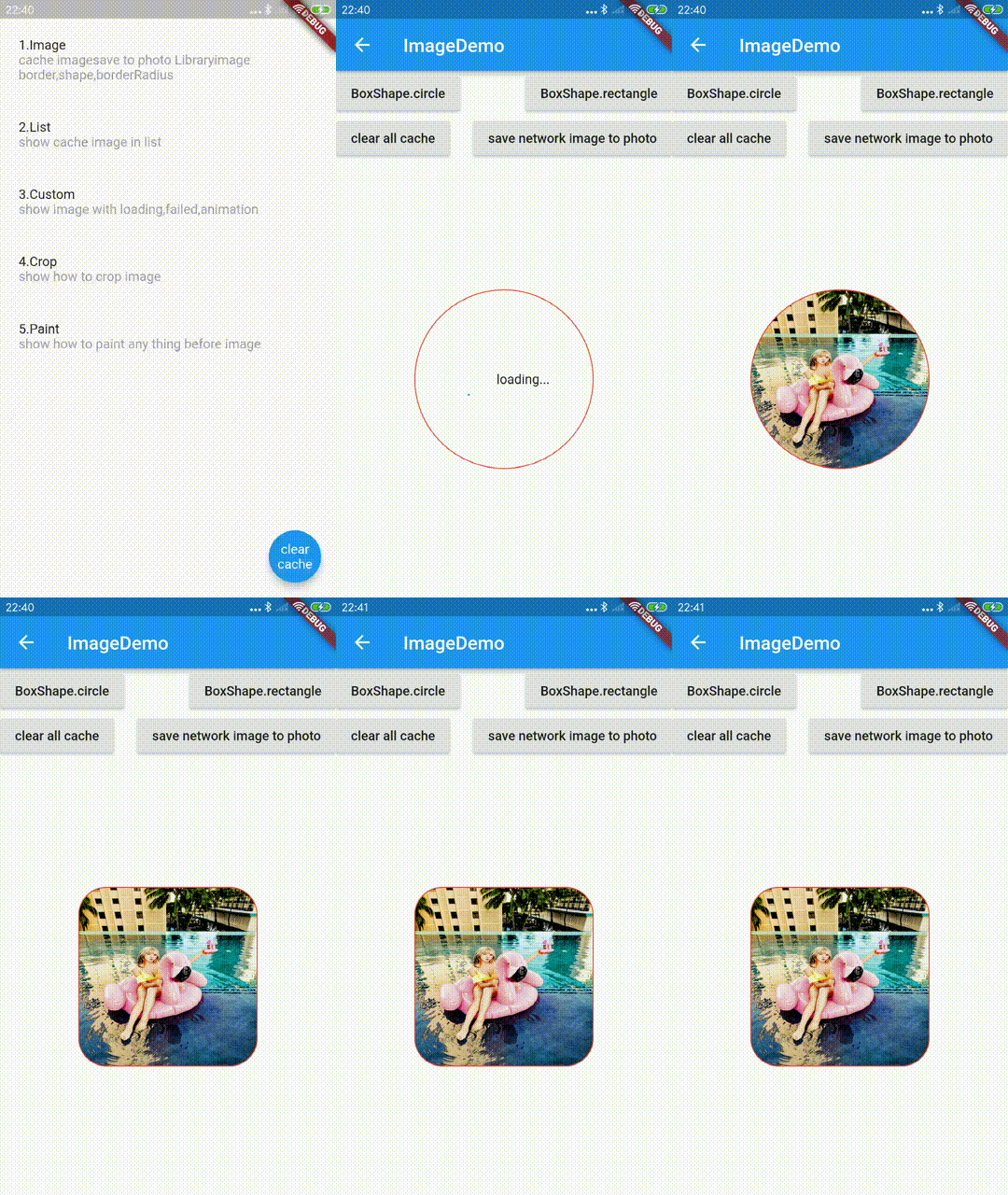
## Border BorderRadius Shape
ExtendedImage
| 参数 | 描述 | 默认 |
| ------------ | -------------------------------------------------- | ---- |
| border | 跟官方的含义一样,你可以通过它设置边框 | - |
| borderRadius | 跟官方的含义一样,你可以通过它设置圆角 |
| shape | 跟官方的含义一样,你可以通过它设置裁剪(矩形和圆) | - |
```dart
ExtendedImage.network(
url,
width: ScreenUtil.instance.setWidth(400),
height: ScreenUtil.instance.setWidth(400),
fit: BoxFit.fill,
cache: true,
border: Border.all(color: Colors.red, width: 1.0),
shape: boxShape,
borderRadius: BorderRadius.all(Radius.circular(30.0)),
),
```
## 清除缓存和保存
### 清除缓存
清除本地缓存,可以调用clearDiskCachedImages方法
```dart
// Clear the disk cache directory then return if it succeed.
/// timespan to compute whether file has expired or not
Future clearDiskCachedImages({Duration duration})
```
根据某一个url清除缓存, 可以调用clearDiskCachedImage方法.
```dart
/// clear the disk cache image then return if it succeed.
/// clear specific one
Future clearDiskCachedImage(String url) async {
```
根据url获取缓存图片文件
```dart
Future getCachedImageFile(String url) async {
```
清除内存缓存,可以调用clearMemoryImageCache方法
```dart
///clear all of image in memory
clearMemoryImageCache();
/// get ImageCache
getMemoryImageCache() ;
```
### 保存网络图片
这是一个例子,使用到[image_picker_saver](https://github.com/cnhefang/image_picker_saver)
插件,ExtendedImage做的只是提供网络图片的数据源
```dart
///save netwrok image to photo
Future saveNetworkImageToPhoto(String url, {bool useCache: true}) async {
var data = await getNetworkImageData(url, useCache: useCache);
var filePath = await ImagePickerSaver.saveFile(fileData: data);
return filePath != null && filePath != "";
}
```
## 显示裁剪图片
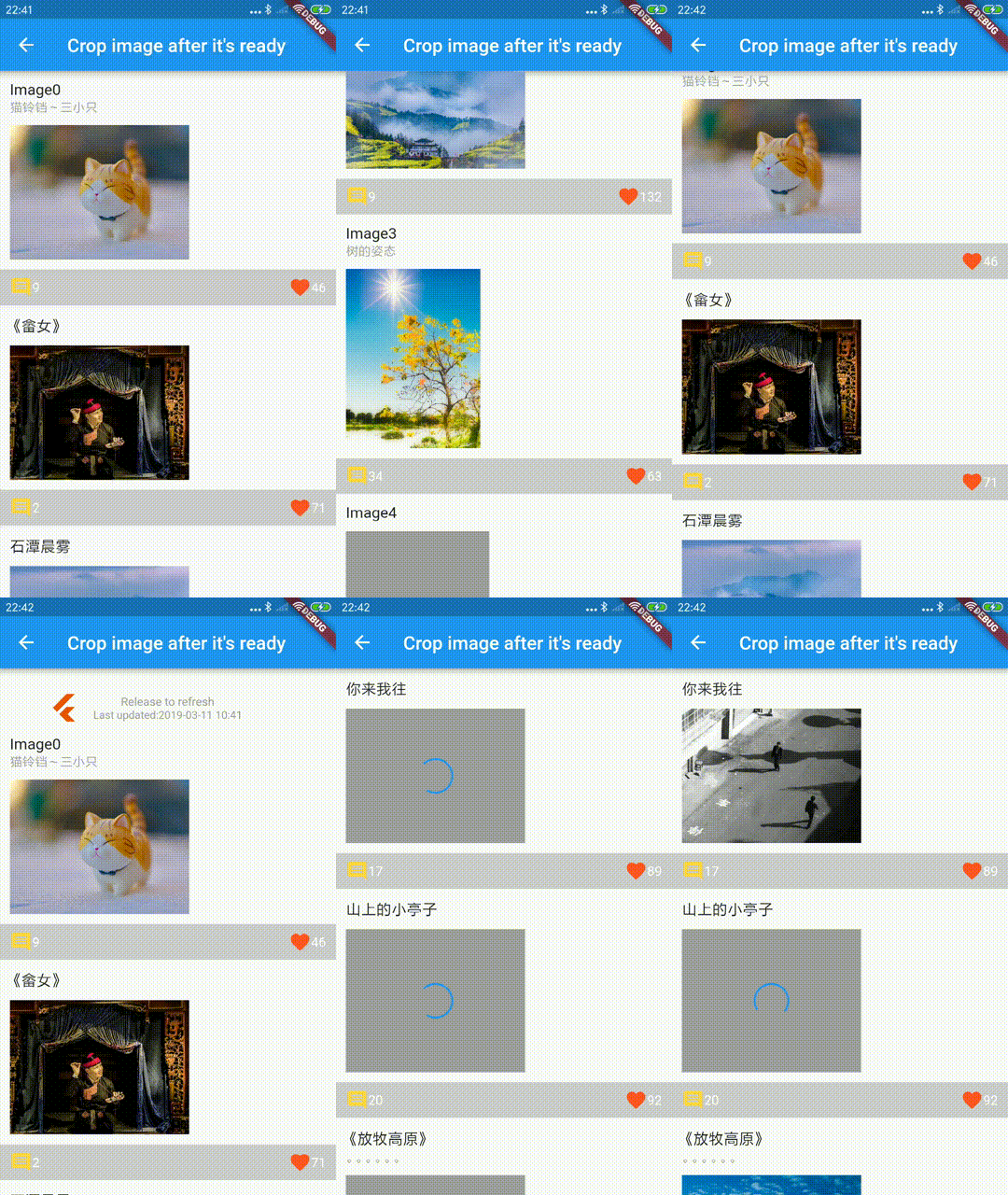
你可以通过
[ExtendedRawImage](https://github.com/fluttercandies/extended_image/blob/master/lib/src/image/extended_raw_image.dart)(可以在状态回调的时候使用),sourceRect 是你想要显示图片的哪一部分,这个在各个app里面应该是比较常见的操作
```dart
ExtendedRawImage(
image: image,
width: num400,
height: num300,
fit: BoxFit.fill,
sourceRect: Rect.fromLTWH(
(image.width - width) / 2.0, 0.0, width, image.height.toDouble()),
)
```
## 绘制
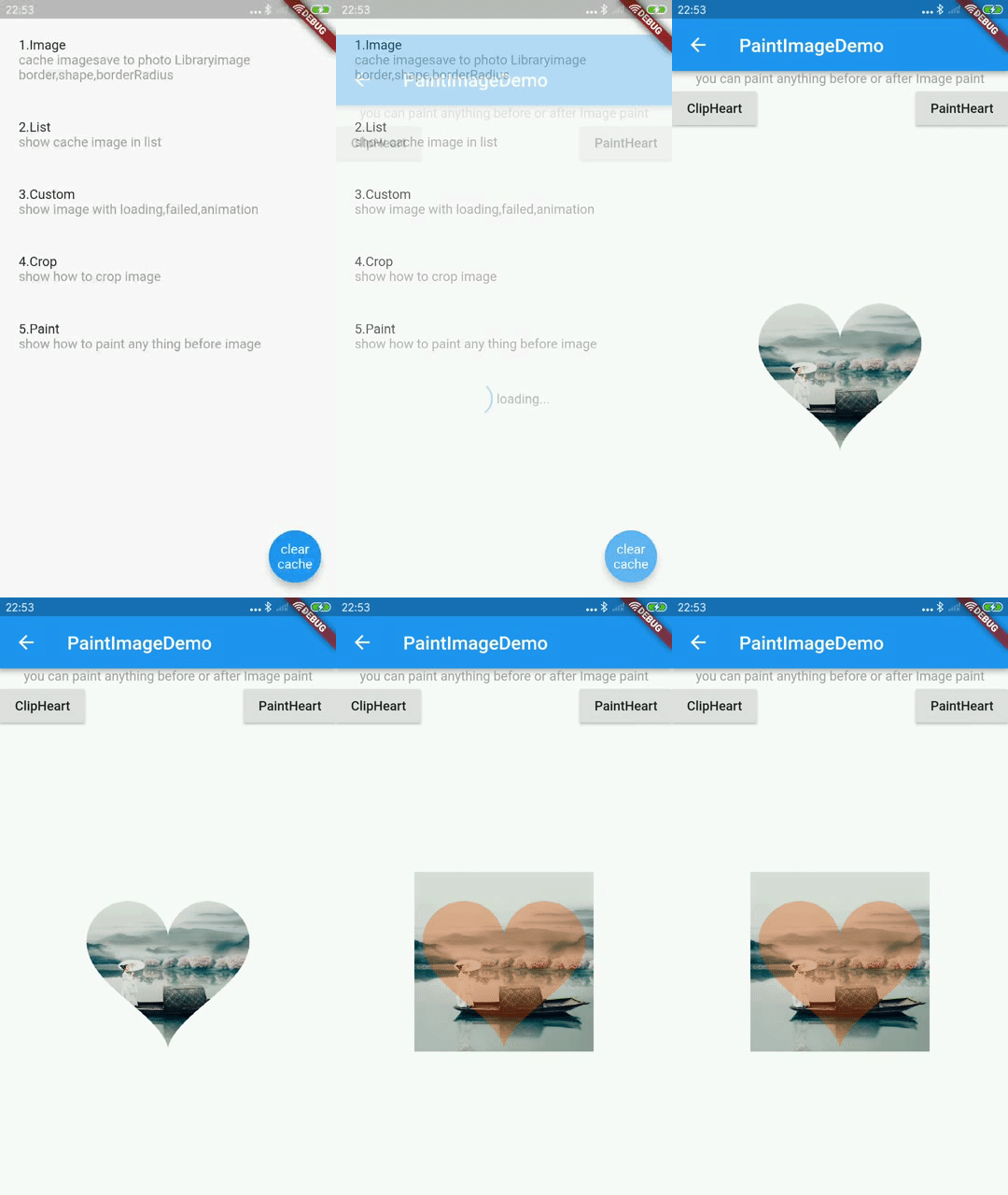
提供了 BeforePaintImage and AfterPaintImage 两个回调, 这样你就能绘制你想要的东西或者进图片进行Clip。
ExtendedImage
| parameter | description | default |
| ---------------- | -------------- | ------- |
| beforePaintImage | 在绘制图片之前 | - |
| afterPaintImage | 在绘制图片之后 | - |
```dart
ExtendedImage.network(
url,
width: ScreenUtil.instance.setWidth(400),
height: ScreenUtil.instance.setWidth(400),
fit: BoxFit.fill,
cache: true,
beforePaintImage: (Canvas canvas, Rect rect, ui.Image image) {
if (paintType == PaintType.ClipHeart) {
if (!rect.isEmpty) {
canvas.save();
canvas.clipPath(clipheart(rect, canvas));
}
}
return false;
},
afterPaintImage: (Canvas canvas, Rect rect, ui.Image image) {
if (paintType == PaintType.ClipHeart) {
if (!rect.isEmpty) canvas.restore();
} else if (paintType == PaintType.PaintHeart) {
canvas.drawPath(
clipheart(rect, canvas),
Paint()
..colorFilter =
ColorFilter.mode(Color(0x55ea5504), BlendMode.srcIn)
..isAntiAlias = false
..filterQuality = FilterQuality.low);
}
},
);
```
在例子中可以看到把图片Clip成了一个桃心,你也可以根据你的要求,做出不同的Clip
[绘制例子](https://github.com/fluttercandies/extended_image/blob/master/example/lib/pages/paint_image_demo.dart)
[下拉刷新头当中,也使用了这个技巧](https://github.com/fluttercandies/extended_image/tree/master/example/lib/common/push_to_refresh_header.dart)
## 瀑布流
使用 [LoadingMoreList](https://github.com/fluttercandies/loading_more_list) 或者 [WaterfallFlow](https://github.com/fluttercandies/waterfall_flow) 以及ExtendedImage创建瀑布流布局.

```dart
LoadingMoreList(
ListConfig(
waterfallFlowDelegate: WaterfallFlowDelegate(
crossAxisCount: 2,
crossAxisSpacing: 5,
mainAxisSpacing: 5,
),
itemBuilder: buildWaterfallFlowItem,
sourceList: listSourceRepository,
padding: EdgeInsets.all(5.0),
lastChildLayoutType: LastChildLayoutType.foot,
),
),
```
## 内存回收/可视区域追踪
当列表元素回收的时候你可以回收掉图片的内存缓存以减少内存压力。你也可以监听到viewport中indexes的变化。
更多详情请查看[LoadingMoreList](https://github.com/fluttercandies/loading_more_list), [WaterfallFlow](https://github.com/fluttercandies/waterfall_flow) 和 [ExtendedList](https://github.com/fluttercandies/extended_list)
```dart
LoadingMoreList(
ListConfig(
waterfallFlowDelegate: WaterfallFlowDelegate(
crossAxisCount: 2,
crossAxisSpacing: 5,
mainAxisSpacing: 5,
),
itemBuilder: buildWaterfallFlowItem,
sourceList: listSourceRepository,
padding: EdgeInsets.all(5.0),
lastChildLayoutType: LastChildLayoutType.foot,
collectGarbage: (List garbages) {
///collectGarbage
garbages.forEach((index) {
final provider = ExtendedNetworkImageProvider(
listSourceRepository[index].imageUrl,
);
provider.evict();
});
//print("collect garbage : $garbages");
},
viewportBuilder: (int firstIndex, int lastIndex) {
print("viewport : [$firstIndex,$lastIndex]");
},
),
),
```
## 其他 APIs
ExtendedImage
| 参数 | 描述 | 默认 |
| ------------------------ | ---------------------------------- | ---- |
| enableMemoryCache | 是否缓存到内存 | true |
| clearMemoryCacheIfFailed | 如果图片加载失败,是否清掉内存缓存 | true |
文档语言: [English](README.md) | [中文简体](README-ZH.md)
强大的官方Image扩展组件, 支持加载以及失败显示,缓存网络图片,缩放拖拽图片,图片浏览(微信掘金效果),滑动退出页面(微信掘金效果),编辑图片(裁剪旋转翻转),保存,绘制自定义效果等功能
- [Flutter 什么功能都有的 Image](https://juejin.im/post/5c867112f265da2dd427a340)
- [Flutter 可以缩放拖拽的图片](https://juejin.im/post/5ca758916fb9a05e1c4d01bb)
- [Flutter 仿掘金微信图片滑动退出页面效果](https://juejin.im/post/5cf62ab0e51d45776031afb2)
- [Flutter 图片裁剪旋转翻转编辑器](https://juejin.im/post/5d77dfbb6fb9a06b160f55fc)
## 目录
- [extended_image](#extendedimage)
- [目录](#%e7%9b%ae%e5%bd%95)
- [缓存网络图片](#%e7%bc%93%e5%ad%98%e7%bd%91%e7%bb%9c%e5%9b%be%e7%89%87)
- [简单使用](#%e7%ae%80%e5%8d%95%e4%bd%bf%e7%94%a8)
- [使用 Extendednetworkimageprovider](#%e4%bd%bf%e7%94%a8-extendednetworkimageprovider)
- [加载状态](#%e5%8a%a0%e8%bd%bd%e7%8a%b6%e6%80%81)
- [例子](#%e4%be%8b%e5%ad%90)
- [缩放拖拽](#%e7%bc%a9%e6%94%be%e6%8b%96%e6%8b%bd)
- [双击图片动画](#%e5%8f%8c%e5%87%bb%e5%9b%be%e7%89%87%e5%8a%a8%e7%94%bb)
- [图片编辑](#%e5%9b%be%e7%89%87%e7%bc%96%e8%be%91)
- [裁剪框的宽高比](#%e8%a3%81%e5%89%aa%e6%a1%86%e7%9a%84%e5%ae%bd%e9%ab%98%e6%af%94)
- [旋转,翻转,重置](#%e6%97%8b%e8%bd%ac%e7%bf%bb%e8%bd%ac%e9%87%8d%e7%bd%ae)
- [裁剪数据](#%e8%a3%81%e5%89%aa%e6%95%b0%e6%8d%ae)
- [使用dart库(稳定)](#%e4%bd%bf%e7%94%a8dart%e5%ba%93%e7%a8%b3%e5%ae%9a)
- [使用原生库(快速)](#%e4%bd%bf%e7%94%a8%e5%8e%9f%e7%94%9f%e5%ba%93%e5%bf%ab%e9%80%9f)
- [图片浏览](#%e5%9b%be%e7%89%87%e6%b5%8f%e8%a7%88)
- [滑动退出页面](#%e6%bb%91%e5%8a%a8%e9%80%80%e5%87%ba%e9%a1%b5%e9%9d%a2)
- [首先开启滑动退出页面效果](#%e9%a6%96%e5%85%88%e5%bc%80%e5%90%af%e6%bb%91%e5%8a%a8%e9%80%80%e5%87%ba%e9%a1%b5%e9%9d%a2%e6%95%88%e6%9e%9c)
- [把你的页面用ExtendedImageSlidePage包一下](#%e6%8a%8a%e4%bd%a0%e7%9a%84%e9%a1%b5%e9%9d%a2%e7%94%a8extendedimageslidepage%e5%8c%85%e4%b8%80%e4%b8%8b)
- [确保你的页面是透明背景的](#%e7%a1%ae%e4%bf%9d%e4%bd%a0%e7%9a%84%e9%a1%b5%e9%9d%a2%e6%98%af%e9%80%8f%e6%98%8e%e8%83%8c%e6%99%af%e7%9a%84)
- [Push一个透明的页面](#push%e4%b8%80%e4%b8%aa%e9%80%8f%e6%98%8e%e7%9a%84%e9%a1%b5%e9%9d%a2)
- [Border BorderRadius Shape](#border-borderradius-shape)
- [清除缓存和保存](#%e6%b8%85%e9%99%a4%e7%bc%93%e5%ad%98%e5%92%8c%e4%bf%9d%e5%ad%98)
- [清除缓存](#%e6%b8%85%e9%99%a4%e7%bc%93%e5%ad%98)
- [保存网络图片](#%e4%bf%9d%e5%ad%98%e7%bd%91%e7%bb%9c%e5%9b%be%e7%89%87)
- [显示裁剪图片](#%e6%98%be%e7%a4%ba%e8%a3%81%e5%89%aa%e5%9b%be%e7%89%87)
- [绘制](#%e7%bb%98%e5%88%b6)
- [瀑布流](#%e7%80%91%e5%b8%83%e6%b5%81)
- [内存回收/可视区域追踪](#%e5%86%85%e5%ad%98%e5%9b%9e%e6%94%b6%e5%8f%af%e8%a7%86%e5%8c%ba%e5%9f%9f%e8%bf%bd%e8%b8%aa)
- [其他 APIs](#%e5%85%b6%e4%bb%96-apis)
## 缓存网络图片
### 简单使用
你可以直接使用 ExtendedImage.network,这跟官方是一样。
```dart
ExtendedImage.network(
url,
width: ScreenUtil.instance.setWidth(400),
height: ScreenUtil.instance.setWidth(400),
fit: BoxFit.fill,
cache: true,
border: Border.all(color: Colors.red, width: 1.0),
shape: boxShape,
borderRadius: BorderRadius.all(Radius.circular(30.0)),
//cancelToken: cancellationToken,
)
```
### 使用 Extendednetworkimageprovider
你也可以通过[ExtendedNetworkImageProvider](https://github.com/fluttercandies/extended_image_library/blob/master/lib/src/extended_network_image_provider.dart),设置更多的网络请求的参数
```dart
ExtendedNetworkImageProvider(
this.url, {
this.scale = 1.0,
this.headers,
this.cache: false,
this.retries = 3,
this.timeLimit,
this.timeRetry = const Duration(milliseconds: 100),
CancellationToken cancelToken,
}) : assert(url != null),
assert(scale != null),
cancelToken = cancelToken ?? CancellationToken();
```
| 参数 | 描述 | 默认 |
| ----------- | --------------------- | ------------------- |
| url | 网络请求地址 | required |
| scale | ImageInfo 中的 scale | 1.0 |
| headers | HttpClient 的 headers | - |
| cache | 是否缓存到本地 | false |
| retries | 请求尝试次数 | 3 |
| timeLimit | 请求超时 | - |
| timeRetry | 请求重试间隔 | milliseconds: 100 |
| cancelToken | 用于取消请求的 Token | CancellationToken() |
当然你也可以继承任何的ExtendedProvider,并且覆写instantiateImageCodec方法,这样你可以统一处理图片的元数据,比如进行压缩图片。
## 加载状态
Extended Image一共有3种状态,分别是正在加载,完成,失败(loading,completed,failed),你可以通过实现loadStateChanged回调来定义显示的效果
loadStateChanged 不仅仅只在网络图片中可以使用, 如果你的图片很大,需要长时间加载,
你可以把enableLoadState设置为了true,这样也会有状态回调了,(默认只有网络图片,enableLoadState为true)

注意:
* 如果你不想重写某个状态,那么请返回null
* 如果你想重写完成图片的 size 或者 sourceRect, 你可以通过使用 ExtendedRawImage 来完成
* 如果你想增加一些新效果 (比如动画), 你可以重写并且使用ExtendedImageState.completedWidget
* ExtendedImageState.completedWidget 包含手势或者裁剪, 这样你不会丢失它们
```dart
/// custom load state widget if you want
final LoadStateChanged loadStateChanged;
enum LoadState {
//loading
loading,
//completed
completed,
//failed
failed
}
///whether has loading or failed state
///default is false
///but network image is true
///better to set it's true when your image is big and take some time to ready
final bool enableLoadState;
```
ExtendedImageState 状态回调
| 参数/方法 | 描述 | 默认 |
| ---------------------------- | -------------------------------------------------------------------------------------------------- | ---- |
| extendedImageInfo | 图片的信息,包括底层image和image的大小 | - |
| extendedImageLoadState | 状态(loading,completed,failed) | - |
| returnLoadStateChangedWidget | 如果这个为true的话,状态回调返回的widget将不会对(width/height/gesture/border/shape)等效果进行包装 | - |
| imageProvider | 图片的Provider | - |
| invertColors | 是否反转颜色 | - |
| imageStreamKey | 图片流的唯一键 | - |
| reLoadImage() | 如果图片加载失败,你可以通过调用这个方法来重新加载图片 | - |
| completedWidget | 返回图片完成的Widget,它包含手势以及裁剪 | - |
```dart
abstract class ExtendedImageState {
void reLoadImage();
ImageInfo get extendedImageInfo;
LoadState get extendedImageLoadState;
///return widget which from LoadStateChanged fucntion immediately
bool returnLoadStateChangedWidget;
ImageProvider get imageProvider;
bool get invertColors;
Object get imageStreamKey;
Widget get completedWidget;
}
```
### 例子
```dart
ExtendedImage.network(
url,
width: ScreenUtil.instance.setWidth(600),
height: ScreenUtil.instance.setWidth(400),
fit: BoxFit.fill,
cache: true,
loadStateChanged: (ExtendedImageState state) {
switch (state.extendedImageLoadState) {
case LoadState.loading:
_controller.reset();
return Image.asset(
"assets/loading.gif",
fit: BoxFit.fill,
);
break;
///if you don't want override completed widget
///please return null or state.completedWidget
//return null;
//return state.completedWidget;
case LoadState.completed:
_controller.forward();
return FadeTransition(
opacity: _controller,
child: ExtendedRawImage(
image: state.extendedImageInfo?.image,
width: ScreenUtil.instance.setWidth(600),
height: ScreenUtil.instance.setWidth(400),
),
);
break;
case LoadState.failed:
_controller.reset();
return GestureDetector(
child: Stack(
fit: StackFit.expand,
children: [
Image.asset(
"assets/failed.jpg",
fit: BoxFit.fill,
),
Positioned(
bottom: 0.0,
left: 0.0,
right: 0.0,
child: Text(
"load image failed, click to reload",
textAlign: TextAlign.center,
),
)
],
),
onTap: () {
state.reLoadImage();
},
);
break;
}
},
)
```
## 缩放拖拽

ExtendedImage
| 参数 | 描述 | 默认 |
| ------------------------ | --------------------------------------------------------------------- | ---- |
| mode | 图片模式,默认/手势/编辑 (none,gestrue,editor) | none |
| initGestureConfigHandler | 手势配置的回调(图片加载完成时).你可以根据图片的信息比如宽高,来初始化 | - |
| onDoubleTap | 支持手势的时候,双击回调 | - |
GestureConfig
| 参数 | 描述 | 默认值 |
| ----------------- | ---------------------------------------------------------------------------------------------------- | ----------------------- |
| minScale | 缩放最小值 | 0.8 |
| animationMinScale | 缩放动画最小值,当缩放结束时回到minScale值 | minScale * 0.8 |
| maxScale | 缩放最大值 | 5.0 |
| animationMaxScale | 缩放动画最大值,当缩放结束时回到maxScale值 | maxScale * 1.2 |
| speed | 缩放拖拽速度,与用户操作成正比 | 1.0 |
| inertialSpeed | 拖拽惯性速度,与惯性速度成正比 | 100 |
| cacheGesture | 是否缓存手势状态,可用于ExtendedImageGesturePageView中保留状态,使用clearGestureDetailsCache方法清除 | false |
| inPageView | 是否使用ExtendedImageGesturePageView展示图片 | false |
| initialAlignment | 当图片的初始化缩放大于1.0的时候,根据相对位置初始化图片 | InitialAlignment.center |
```dart
ExtendedImage.network(
imageTestUrl,
fit: BoxFit.contain,
//enableLoadState: false,
mode: ExtendedImageMode.Gesture,
initGestureConfigHandler: (state) {
return GestureConfig(
minScale: 0.9,
animationMinScale: 0.7,
maxScale: 3.0,
animationMaxScale: 3.5,
speed: 1.0,
inertialSpeed: 100.0,
initialScale: 1.0,
inPageView: false,
initialAlignment: InitialAlignment.center,
);
},
)
```
### 双击图片动画
支持双击动画,具体双击图片什么样子的效果,可以自定义
```dart
onDoubleTap: (ExtendedImageGestureState state) {
///you can use define pointerDownPosition as you can,
///default value is double tap pointer down postion.
var pointerDownPosition = state.pointerDownPosition;
double begin = state.gestureDetails.totalScale;
double end;
//remove old
_animation?.removeListener(animationListener);
//stop pre
_animationController.stop();
//reset to use
_animationController.reset();
if (begin == doubleTapScales[0]) {
end = doubleTapScales[1];
} else {
end = doubleTapScales[0];
}
animationListener = () {
//print(_animation.value);
state.handleDoubleTap(
scale: _animation.value,
doubleTapPosition: pointerDownPosition);
};
_animation = _animationController
.drive(Tween(begin: begin, end: end));
_animation.addListener(animationListener);
_animationController.forward();
},
```
## 图片编辑

``` dart
ExtendedImage.network(
imageTestUrl,
fit: BoxFit.contain,
mode: ExtendedImageMode.editor,
extendedImageEditorKey: editorKey,
initEditorConfigHandler: (state) {
return EditorConfig(
maxScale: 8.0,
cropRectPadding: EdgeInsets.all(20.0),
hitTestSize: 20.0,
cropAspectRatio: _aspectRatio.aspectRatio);
},
);
```
ExtendedImage
| 参数 | 描述 | 默认 |
| ------------------------ | ----------------------------------------------------------------------- | ---- |
| mode | 图片模式,默认/手势/编辑 (none,gestrue,editor) | none |
| initGestureConfigHandler | 编辑器配置的回调(图片加载完成时).你可以根据图片的信息比如宽高,来初始化 | - |
| extendedImageEditorKey | key of ExtendedImageEditorState 用于裁剪旋转翻转 | - |
EditorConfig
| 参数 | 描述 | 默认 |
| ---------------------- | -------------------------------------------------------------------------------- | ------------------------------------------------------------ |
| maxScale | 最大的缩放倍数 | 5.0 |
| cropRectPadding | 裁剪框跟图片layout区域之间的距离。最好是保持一定距离,不然裁剪框边界很难进行拖拽 | EdgeInsets.all(20.0) |
| cornerSize | 裁剪框四角图形的大小 | Size(30.0, 5.0) |
| cornerColor | 裁剪框四角图形的颜色 | primaryColor |
| lineColor | 裁剪框线的颜色 | scaffoldBackgroundColor.withOpacity(0.7) |
| lineHeight | 裁剪框线的高度 | 0.6 |
| eidtorMaskColorHandler | 蒙层的颜色回调,你可以根据是否手指按下来设置不同的蒙层颜色 | scaffoldBackgroundColor.withOpacity(pointerdown ? 0.4 : 0.8) |
| hitTestSize | 裁剪框四角以及边线能够拖拽的区域的大小 | 20.0 |
| animationDuration | 当裁剪框拖拽变化结束之后,自动适应到中间的动画的时长 | Duration(milliseconds: 200) |
| tickerDuration | 当裁剪框拖拽变化结束之后,多少时间才触发自动适应到中间的动画 | Duration(milliseconds: 400) |
| cropAspectRatio | 裁剪框的宽高比 | null(无宽高比) |
| initCropRectType | 剪切框的初始化类型(根据图片初始化区域或者图片的layout区域) | imageRect |
### 裁剪框的宽高比
这是一个double类型,你可以自定义裁剪框的宽高比。
如果为null,那就没有宽高比限制。
如果小于等于0,宽高比等于图片的宽高比。
下面是一些定义好了的宽高比
``` dart
class CropAspectRatios {
/// no aspect ratio for crop
static const double custom = null;
/// the same as aspect ratio of image
/// [cropAspectRatio] is not more than 0.0, it's original
static const double original = 0.0;
/// ratio of width and height is 1 : 1
static const double ratio1_1 = 1.0;
/// ratio of width and height is 3 : 4
static const double ratio3_4 = 3.0 / 4.0;
/// ratio of width and height is 4 : 3
static const double ratio4_3 = 4.0 / 3.0;
/// ratio of width and height is 9 : 16
static const double ratio9_16 = 9.0 / 16.0;
/// ratio of width and height is 16 : 9
static const double ratio16_9 = 16.0 / 9.0;
}
```
### 旋转,翻转,重置
- 定义key,以方便操作ExtendedImageEditorState
`final GlobalKey editorKey =GlobalKey();`
- 顺时针旋转90°
`editorKey.currentState.rotate(right: true);`
- 逆时针旋转90°
`editorKey.currentState.rotate(right: false);`
- 翻转(镜像)
`editorKey.currentState.flip();`
- 重置
`editorKey.currentState.reset();`
### 裁剪数据
#### 使用dart库(稳定)
- 添加 [Image](https://github.com/brendan-duncan/image) 库到 pubspec.yaml, 它是用来裁剪/旋转/翻转图片数据的
``` yaml
dependencies:
image: any
```
- 从ExtendedImageEditorState中获取裁剪区域以及图片数据
``` dart
///crop rect base on raw image
final Rect cropRect = state.getCropRect();
var data = state.rawImageData;
```
- 将flutter的图片数据转换为image库的数据
``` dart
/// it costs much time and blocks ui.
//Image src = decodeImage(data);
/// it will not block ui with using isolate.
//Image src = await compute(decodeImage, data);
//Image src = await isolateDecodeImage(data);
final lb = await loadBalancer;
Image src = await lb.run>(decodeImage, data);
```
- 翻转,旋转,裁剪数据
``` dart
//相机拍照的图片带有旋转,处理之前需要去掉
src = bakeOrientation(src);
if (editAction.needCrop)
src = copyCrop(src, cropRect.left.toInt(), cropRect.top.toInt(),
cropRect.width.toInt(), cropRect.height.toInt());
if (editAction.needFlip) {
Flip mode;
if (editAction.flipY && editAction.flipX) {
mode = Flip.both;
} else if (editAction.flipY) {
mode = Flip.horizontal;
} else if (editAction.flipX) {
mode = Flip.vertical;
}
src = flip(src, mode);
}
if (editAction.hasRotateAngle) src = copyRotate(src, editAction.rotateAngle);
```
- 将数据转为为图片的元数据
获取到的将是图片的元数据,你可以使用它来保存或者其他的一些用途
``` dart
/// you can encode your image
///
/// it costs much time and blocks ui.
//var fileData = encodeJpg(src);
/// it will not block ui with using isolate.
//var fileData = await compute(encodeJpg, src);
//var fileData = await isolateEncodeImage(src);
var fileData = await lb.run, Image>(encodeJpg, src);
```
#### 使用原生库(快速)
- 添加 [ImageEditor](https://github.com/fluttercandies/flutter_image_editor) 库到 pubspec.yaml, 它是用来裁剪/旋转/翻转图片数据的。
``` yaml
dependencies:
image_editor: any
```
- 从ExtendedImageEditorState中获取裁剪区域以及图片数据
``` dart
///crop rect base on raw image
final Rect cropRect = state.getCropRect();
final img = state.rawImageData;
```
- 准备裁剪选项
``` dart
final rotateAngle = action.rotateAngle.toInt();
final flipHorizontal = action.flipY;
final flipVertical = action.flipX;
ImageEditorOption option = ImageEditorOption();
if (action.needCrop) option.addOption(ClipOption.fromRect(cropRect));
if (action.needFlip)
option.addOption(
FlipOption(horizontal: flipHorizontal, vertical: flipVertical));
if (action.hasRotateAngle) option.addOption(RotateOption(rotateAngle));
```
- 使用editImage方法进行裁剪
获取到的将是图片的元数据,你可以使用它来保存或者其他的一些用途
``` dart
final result = await ImageEditor.editImage(
image: img,
imageEditorOption: option,
);
```
[more detail](https://github.com/fluttercandies/extended_image/blob/master/example/lib/common/crop_editor_helper.dart)
## 图片浏览
支持跟微信/掘金一样的图片查看效果
ExtendedImageGesturePageView跟官方PageView一样的使用,不同的是,它避免了跟缩放拖拽手势冲突
支持缓存手势的状态,就是说你缩放了图片,然后下一个,再回到之前的图片,图片的缩放状态可以保存,
如果你缓存了手势,记住在合适的时候使用clearGestureDetailsCache()清除掉,比如页面销毁的时候

ExtendedImageGesturePageView
| parameter | description | default |
| ----------- | -------------------------------------------------------------------- | ------- |
| canMovePage | 是否滑动页面.有些场景如果Scale大于1.0,并不想滑动页面,可以返回false | true |
GestureConfig
| 参数 | 描述 | 默认 |
| ------------ | ---------------------------------------------------------------------------------------------------- | ----- |
| cacheGesture | 是否缓存手势状态,可用于ExtendedImageGesturePageView中保留状态,使用clearGestureDetailsCache方法清除 | false |
| inPageView | 是否使用ExtendedImageGesturePageView展示图片 | false |
```dart
ExtendedImageGesturePageView.builder(
itemBuilder: (BuildContext context, int index) {
var item = widget.pics[index].picUrl;
Widget image = ExtendedImage.network(
item,
fit: BoxFit.contain,
mode: ExtendedImageMode.Gesture,
gestureConfig: GestureConfig(
inPageView: true, initialScale: 1.0,
//you can cache gesture state even though page view page change.
//remember call clearGestureDetailsCache() method at the right time.(for example,this page dispose)
cacheGesture: false
),
);
image = Container(
child: image,
padding: EdgeInsets.all(5.0),
);
if (index == currentIndex) {
return Hero(
tag: item + index.toString(),
child: image,
);
} else {
return image;
}
},
itemCount: widget.pics.length,
onPageChanged: (int index) {
currentIndex = index;
rebuild.add(index);
},
controller: PageController(
initialPage: currentIndex,
),
scrollDirection: Axis.horizontal,
),
```
## 滑动退出页面
支持微信掘金滑动退出页面的效果

### 首先开启滑动退出页面效果
ExtendedImage
| parameter | description | default |
| ------------------------- | ----------------------------------------------------------------------------------- | ------- |
| enableSlideOutPage | 是否开启滑动退出页面效果 | false |
| heroBuilderForSlidingPage | 滑动退出页面的transform必须作用在Hero上面,这样在退出页面的时候,Hero动画才不会奇怪 | null |
### 把你的页面用ExtendedImageSlidePage包一下
注意:onSlidingPage回调,你可以使用它来设置滑动页面的时候,页面上其他元素的状态。但是注意别直接使用setState来刷新,因为这样会导致ExtendedImage的状态重置掉,你应该只通知需要刷新的Widgets进行刷新
```dart
return ExtendedImageSlidePage(
child: result,
slideAxis: SlideAxis.both,
slideType: SlideType.onlyImage,
onSlidingPage: (state) {
///you can change other widgets' state on page as you want
///base on offset/isSliding etc
//var offset= state.offset;
var showSwiper = !state.isSliding;
if (showSwiper != _showSwiper) {
// do not setState directly here, the image state will change,
// you should only notify the widgets which are needed to change
// setState(() {
// _showSwiper = showSwiper;
// });
_showSwiper = showSwiper;
rebuildSwiper.add(_showSwiper);
}
},
);
```
ExtendedImageGesturePage的参数
| parameter | description | default |
| -------------------------- | --------------------------------------------------------------------- | --------------------------------- |
| child | 需要包裹的页面 | - |
| slidePageBackgroundHandler | 在滑动页面的时候根据Offset自定义整个页面的背景色 | defaultSlidePageBackgroundHandler |
| slideScaleHandler | 在滑动页面的时候根据Offset自定义整个页面的缩放值 | defaultSlideScaleHandler |
| slideEndHandler | 滑动页面结束的时候计算是否需要pop页面 | defaultSlideEndHandler |
| slideAxis | 滑动页面的方向(both,horizontal,vertical),掘金是vertical,微信是Both | both |
| resetPageDuration | 滑动结束,如果不pop页面,整个页面回弹动画的时间 | milliseconds: 500 |
| slideType | 滑动整个页面还是只是图片(wholePage/onlyImage) | SlideType.onlyImage |
| onSlidingPage | 滑动页面的回调,你可以在这里改变页面上其他元素的状态 | - |
| slideOffsetHandler | 在滑动页面的时候自定义Offset | - |
下面是默认实现,你也可以根据你的喜好,来定义属于自己方式
```dart
Color defaultSlidePageBackgroundHandler(
{Offset offset, Size pageSize, Color color, SlideAxis pageGestureAxis}) {
double opacity = 0.0;
if (pageGestureAxis == SlideAxis.both) {
opacity = offset.distance /
(Offset(pageSize.width, pageSize.height).distance / 2.0);
} else if (pageGestureAxis == SlideAxis.horizontal) {
opacity = offset.dx.abs() / (pageSize.width / 2.0);
} else if (pageGestureAxis == SlideAxis.vertical) {
opacity = offset.dy.abs() / (pageSize.height / 2.0);
}
return color.withOpacity(min(1.0, max(1.0 - opacity, 0.0)));
}
bool defaultSlideEndHandler(
{Offset offset, Size pageSize, SlideAxis pageGestureAxis}) {
if (pageGestureAxis == SlideAxis.both) {
return offset.distance >
Offset(pageSize.width, pageSize.height).distance / 3.5;
} else if (pageGestureAxis == SlideAxis.horizontal) {
return offset.dx.abs() > pageSize.width / 3.5;
} else if (pageGestureAxis == SlideAxis.vertical) {
return offset.dy.abs() > pageSize.height / 3.5;
}
return true;
}
double defaultSlideScaleHandler(
{Offset offset, Size pageSize, SlideAxis pageGestureAxis}) {
double scale = 0.0;
if (pageGestureAxis == SlideAxis.both) {
scale = offset.distance / Offset(pageSize.width, pageSize.height).distance;
} else if (pageGestureAxis == SlideAxis.horizontal) {
scale = offset.dx.abs() / (pageSize.width / 2.0);
} else if (pageGestureAxis == SlideAxis.vertical) {
scale = offset.dy.abs() / (pageSize.height / 2.0);
}
return max(1.0 - scale, 0.8);
}
```
### 确保你的页面是透明背景的
如果你设置 slideType =SlideType.onlyImage, 请确保的你页面是透明的,毕竟没法操控你页面上的颜色
### Push一个透明的页面
这里我把官方的MaterialPageRoute 和CupertinoPageRoute拷贝出来了,
改为TransparentMaterialPageRoute/TransparentCupertinoPageRoute,因为它们的opaque不能设置为false
```dart
Navigator.push(
context,
Platform.isAndroid
? TransparentMaterialPageRoute(builder: (_) => page)
: TransparentCupertinoPageRoute(builder: (_) => page),
);
```
[滑动退出页面相关代码演示 1](https://github.com/fluttercandies/extended_image/blob/master/example/lib/common/crop_image.dart)
[滑动退出页面相关代码演示 2](https://github.com/fluttercandies/extended_image/blob/master/example/lib/common/pic_swiper.dart)
## Border BorderRadius Shape
ExtendedImage
| 参数 | 描述 | 默认 |
| ------------ | -------------------------------------------------- | ---- |
| border | 跟官方的含义一样,你可以通过它设置边框 | - |
| borderRadius | 跟官方的含义一样,你可以通过它设置圆角 |
| shape | 跟官方的含义一样,你可以通过它设置裁剪(矩形和圆) | - |
```dart
ExtendedImage.network(
url,
width: ScreenUtil.instance.setWidth(400),
height: ScreenUtil.instance.setWidth(400),
fit: BoxFit.fill,
cache: true,
border: Border.all(color: Colors.red, width: 1.0),
shape: boxShape,
borderRadius: BorderRadius.all(Radius.circular(30.0)),
),
```

## 清除缓存和保存
### 清除缓存
清除本地缓存,可以调用clearDiskCachedImages方法
```dart
// Clear the disk cache directory then return if it succeed.
/// timespan to compute whether file has expired or not
Future clearDiskCachedImages({Duration duration})
```
根据某一个url清除缓存, 可以调用clearDiskCachedImage方法.
```dart
/// clear the disk cache image then return if it succeed.
/// clear specific one
Future clearDiskCachedImage(String url) async {
```
根据url获取缓存图片文件
```dart
Future getCachedImageFile(String url) async {
```
清除内存缓存,可以调用clearMemoryImageCache方法
```dart
///clear all of image in memory
clearMemoryImageCache();
/// get ImageCache
getMemoryImageCache() ;
```
### 保存网络图片
这是一个例子,使用到[image_picker_saver](https://github.com/cnhefang/image_picker_saver)
插件,ExtendedImage做的只是提供网络图片的数据源
```dart
///save netwrok image to photo
Future saveNetworkImageToPhoto(String url, {bool useCache: true}) async {
var data = await getNetworkImageData(url, useCache: useCache);
var filePath = await ImagePickerSaver.saveFile(fileData: data);
return filePath != null && filePath != "";
}
```
## 显示裁剪图片

你可以通过
[ExtendedRawImage](https://github.com/fluttercandies/extended_image/blob/master/lib/src/image/extended_raw_image.dart)(可以在状态回调的时候使用),sourceRect 是你想要显示图片的哪一部分,这个在各个app里面应该是比较常见的操作
```dart
ExtendedRawImage(
image: image,
width: num400,
height: num300,
fit: BoxFit.fill,
sourceRect: Rect.fromLTWH(
(image.width - width) / 2.0, 0.0, width, image.height.toDouble()),
)
```
## 绘制

提供了 BeforePaintImage and AfterPaintImage 两个回调, 这样你就能绘制你想要的东西或者进图片进行Clip。
ExtendedImage
| parameter | description | default |
| ---------------- | -------------- | ------- |
| beforePaintImage | 在绘制图片之前 | - |
| afterPaintImage | 在绘制图片之后 | - |
```dart
ExtendedImage.network(
url,
width: ScreenUtil.instance.setWidth(400),
height: ScreenUtil.instance.setWidth(400),
fit: BoxFit.fill,
cache: true,
beforePaintImage: (Canvas canvas, Rect rect, ui.Image image) {
if (paintType == PaintType.ClipHeart) {
if (!rect.isEmpty) {
canvas.save();
canvas.clipPath(clipheart(rect, canvas));
}
}
return false;
},
afterPaintImage: (Canvas canvas, Rect rect, ui.Image image) {
if (paintType == PaintType.ClipHeart) {
if (!rect.isEmpty) canvas.restore();
} else if (paintType == PaintType.PaintHeart) {
canvas.drawPath(
clipheart(rect, canvas),
Paint()
..colorFilter =
ColorFilter.mode(Color(0x55ea5504), BlendMode.srcIn)
..isAntiAlias = false
..filterQuality = FilterQuality.low);
}
},
);
```
在例子中可以看到把图片Clip成了一个桃心,你也可以根据你的要求,做出不同的Clip
[绘制例子](https://github.com/fluttercandies/extended_image/blob/master/example/lib/pages/paint_image_demo.dart)
[下拉刷新头当中,也使用了这个技巧](https://github.com/fluttercandies/extended_image/tree/master/example/lib/common/push_to_refresh_header.dart)
## 瀑布流
使用 [LoadingMoreList](https://github.com/fluttercandies/loading_more_list) 或者 [WaterfallFlow](https://github.com/fluttercandies/waterfall_flow) 以及ExtendedImage创建瀑布流布局.

```dart
LoadingMoreList(
ListConfig(
waterfallFlowDelegate: WaterfallFlowDelegate(
crossAxisCount: 2,
crossAxisSpacing: 5,
mainAxisSpacing: 5,
),
itemBuilder: buildWaterfallFlowItem,
sourceList: listSourceRepository,
padding: EdgeInsets.all(5.0),
lastChildLayoutType: LastChildLayoutType.foot,
),
),
```
## 内存回收/可视区域追踪
当列表元素回收的时候你可以回收掉图片的内存缓存以减少内存压力。你也可以监听到viewport中indexes的变化。
更多详情请查看[LoadingMoreList](https://github.com/fluttercandies/loading_more_list), [WaterfallFlow](https://github.com/fluttercandies/waterfall_flow) 和 [ExtendedList](https://github.com/fluttercandies/extended_list)
```dart
LoadingMoreList(
ListConfig(
waterfallFlowDelegate: WaterfallFlowDelegate(
crossAxisCount: 2,
crossAxisSpacing: 5,
mainAxisSpacing: 5,
),
itemBuilder: buildWaterfallFlowItem,
sourceList: listSourceRepository,
padding: EdgeInsets.all(5.0),
lastChildLayoutType: LastChildLayoutType.foot,
collectGarbage: (List garbages) {
///collectGarbage
garbages.forEach((index) {
final provider = ExtendedNetworkImageProvider(
listSourceRepository[index].imageUrl,
);
provider.evict();
});
//print("collect garbage : $garbages");
},
viewportBuilder: (int firstIndex, int lastIndex) {
print("viewport : [$firstIndex,$lastIndex]");
},
),
),
```
## 其他 APIs
ExtendedImage
| 参数 | 描述 | 默认 |
| ------------------------ | ---------------------------------- | ---- |
| enableMemoryCache | 是否缓存到内存 | true |
| clearMemoryCacheIfFailed | 如果图片加载失败,是否清掉内存缓存 | true |