
关注项目作者微信订阅号,接收项目最新动态
## 预览 点击 https://ci.khs1994.com/github/khs1994-docker/lnmp 查看 PCIT 功能界面。 ## 参与开发 本项目适用于对 CI/CD 感兴趣的开发者(特别是 PHP 开发者),欢迎开发者 [参与 PCIT 开发](https://github.com/pcit-ce/pcit/blob/master/CONTRIBUTING.md)。 ## 愿景 你尽管 `push`,其他的 PCIT 搞定。 push by you, test and deploy by us. ## 掌上 PCIT

掌上 PCIT
## 什么是持续集成 Continuous Integration (CI)? * https://www.mindtheproduct.com/2016/02/what-the-hell-are-ci-cd-and-devops-a-cheatsheet-for-the-rest-of-us/ 持续集成 (CI) 是一种 **软件开发实践**,即团队开发成员经常集成他们的工作,而不是在开发周期结束时进行集成,通过每个成员每天至少集成一次,这意味着每天可能会发生多次集成。每次集成都通过自动化的构建(包括编译,发布,自动化测试)来验证,从而尽早地发现集成错误。 持续集成 (CI) 的 **目标** 是通过以较小的增量进行 **开发** 和 **测试** 来构建更健康的软件。 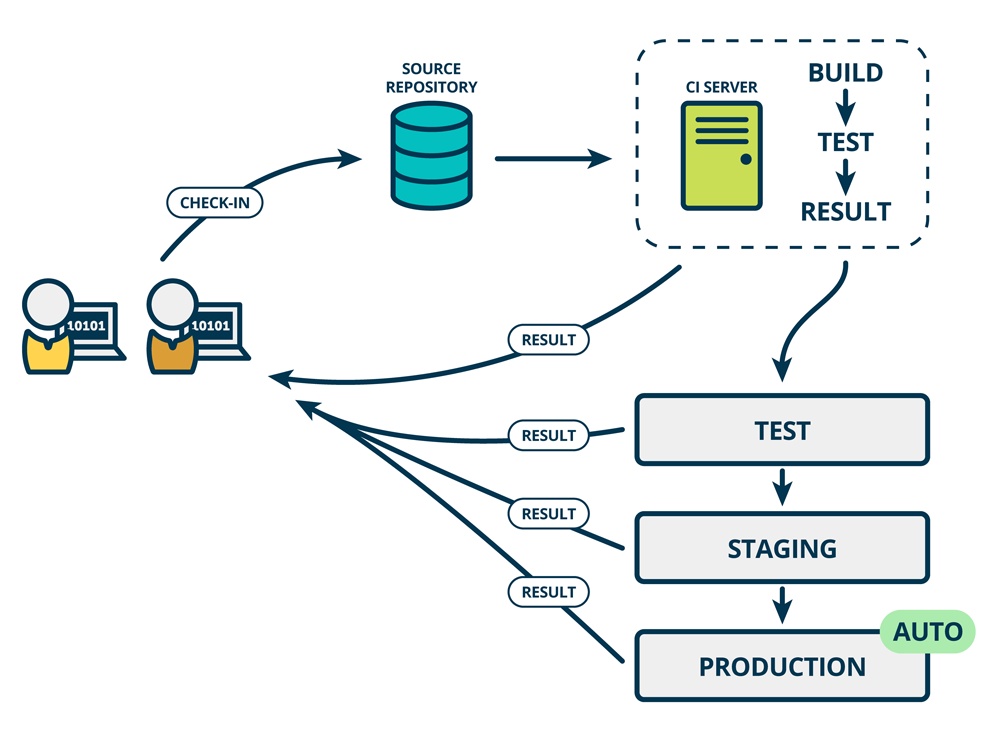 作为一个持续集成系统,**PCIT** 可以自动的在代码变更时进行 **构建** 和 **测试**,同时为代码变更的构建状态提供即时的反馈。**PCIT** 还可以通过管理 **部署** 和 **通知** 来自动化软件开发过程中的其他流程。 当开发者提交代码到 Git(即代码发生变更), **PCIT** 会把 Git 仓库克隆到一个容器环境中,并执行一系列 **构建** 和 **测试** 代码的任务。如果其中一项或多项任务失败,则认为构建失败。如果没有任何任务失败,构建被认为通过。同时 **PCIT** 可以将代码部署到 Web 服务器、应用程序主机或容器集群中。 ## PCIT 架构 **PCIT** 由 **PHP 分布式后端(1+N)**(`Webhooks Server` + `Daemon CLI` + `Runner(N)`) + **GitHub App** + **CLI** + **开放平台**(`插件`、`API`)四部分组成 * **Webhooks Server** 接收 Git 事件 * **Daemon CLI** 后端常驻 (守护) 程序,解析 Git 事件生成一个 **build** 并将其分解为多个 **job** (Server 节点),之后在 Docker 单机或集群(Kubernetes)中执行构建、测试、容器化部署的自动化过程(Runner)。 * **CLI** 提供各种实用的功能,例如命令行查看构建状态 * **开放平台** 包含用于功能扩展的 **插件** 和 **RESTFul API**,与开发者一道构建 PCIT 生态系统 ### 开放(合作共赢) * [GPI (Git Provider Interface)](https://github.com/pcit-ce/git-gpi) * [Providers](https://github.com/pcit-ce/kernel-provider) * [Runners](https://github.com/pcit-ce/kernel-runner) * [Plugins](https://github.com/pcit-plugins) * [Notifications](https://github.com/pcit-ce/kernel-notification) * OpenAPI ## 使用方法(使用之前需要私有部署 PCIT EE) > 这里只是介绍部署 PCIT 之后如何使用 PCIT 进行 CI/CD 实践,如何部署 PCIT 请查看下一小节 **1.** 点击 [PCIT-CE GitHub App](https://github.com/apps/pcit-ce) 进行安装 **2.** Git 仓库根目录包含 [`.pcit.yml`](https://github.com/pcit-ce/pcit/tree/master/pcit_examples) 来配置 CI 规则 ```yaml language: php steps: before_install: ['echo exec init script'] install: composer install script: - composer test after_success: image: bash if: status: success run: - echo "build is success" services: redis: mysql: ``` > 为了智能补全、错误提示等功能,推荐使用 vsCode 编辑 `.pcit.yml` 文件。安装 `redhat.vscode-yaml` 扩展并在项目的 `.vscode/settings.json` 文件中增加以下内容。 ```diff { + "yaml.schemas": { + "https://github.com/pcit-ce/pcit/raw/master/config/config.schema.json": [ + ".pcit.yaml", + ".pcit.yml", + ".pcit/**.yaml", + ".pcit/**.yml" + ] + } } ``` **3.** 推送 git 仓库到 GitHub,PCIT 开始进行 **构建** **测试** **部署** 等一系列工作。 > 查看构建的聚合页面,请登录 https://ci.khs1994.com/login ## PCIT CE vs PCIT EE 在未来 PCIT 可能会提供 **公有云服务** 让开发者无需私有部署即可方便快捷的使用 PCIT。我们将这个有待实现的版本称为 PCIT CE。 所以 **CE** 和 **EE** 的区别为是否需要开发者自行部署。 ## 部署 PCIT EE > 依托于 khs1994-docker/lnmp LNMP 容器化解决方案,私有部署 PCIT 也很方便。 * ~~PHP~~ * ~~MySQL~~ * ~~Redis~~ * **仅仅** 需要 [安装 Docker](https://github.com/yeasy/docker_practice/tree/master/install) 和 [khs1994-docker/lnmp](https://github.com/khs1994-docker/lnmp) 和 [网站的 SSL/TLS 证书](https://github.com/Neilpang/acme.sh) ```bash # 安装 Docker 这里不再赘述 # 安装 khs1994-docker/lnmp $ git clone --depth=1 https://github.com/khs1994-docker/lnmp.git ~/lnmp # 中国镜像 # $ git clone --depth=1 https://gitee.com/khs1994-docker/lnmp.git ~/lnmp $ cd ~/lnmp ``` **1.** 在 GitHub [Settings > Developer settings > GitHub Apps](https://github.com/settings/apps) 注册一个 **GitHub App** **2.** 启用 GitHub App 的 OAuth。 **3.** 准备证书文件,包括网站证书以及 GitHub App 的私钥证书 **4.** 编辑 `~/lnmp/pcit/.env.development` 文件中的变量,之后启动 PCIT ```bash $ ./lnmp-docker pcit-up ``` **5.** 点击刚才注册好的 **GitHub App** 地址 https://github.com/apps/YOUR_APP_NAME ,进行安装。 **6.** Git 仓库根目录包含 `.pcit.yml` 文件 **7.** 推送项目到 GitHub,在 **Commit** 详情处查看构建。 详细的步骤请查看 https://github.com/pcit-ce/pcit/blob/master/docs/install/ee.md ## 示例项目 目前 PCIT 官方维护以下语言的示例项目。 | 语言 | 地址 | 构建页面| | -- | -- | -- | | **PHP** | https://github.com/khs1994-php/tencent-ai | [](https://ci.khs1994.com/github/khs1994-php/tencent-ai) | | **Node.js** | https://github.com/khs1994/tencent-ai-js | [](https://ci.khs1994.com/github/khs1994/tencent-ai-js) | | **微信小程序 (Node.js)** | https://github.com/docker-practice/miniprogram | | | **Hexo (Node.js)** | https://github.com/khs1994/khs1994.github.io | [](https://ci.khs1994.com/github/khs1994/khs1994.github.io) | | **Bash Shell**| https://github.com/khs1994-docker/lnmp | [](https://ci.khs1994.com/github/khs1994-docker/lnmp) | ## 生态系统 ## Why PCIT * https://github.com/pcit-ce/pcit/blob/master/docs/why.md ## PCIT 子项目 * [Docker PHP SDK](https://github.com/khs1994-docker/libdocker) * [Docker Registry PHP SDK](https://github.com/khs1994-docker/libregistry) * [Tencent AI CLI]() * [WeChat PHP SDK](https://github.com/khs1994-php/libwechat) ## 项目拆分 ### 待拆分 * [日志处理组件](https://github.com/pcit-ce/kernel-log) * [任务执行组件 Runner](https://github.com/pcit-ce/kernel-runner) ### 已拆分 * [前端 UI](https://github.com/pcit-ce/ui) * [微信小程序](https://github.com/pcit-ce/miniprogram) ## Docker Image * pcit/pcit * pcit/frontend ## 致谢 * [PHP](https://www.php.net) * [Docker](https://www.docker.com) * [Kubernetes](https://kubernetes.io/) * [Travis CI](https://travis-ci.com) * [Drone CI](https://drone.io) * [Minio](https://github.com/minio/minio) ## 国内友商 * [PHP 实现 piplin.com](https://github.com/Piplin/Piplin) * [JAVA 实现 flow.ci](https://flow.ci) ## GitHub 上的其他 CI/CD 项目 * https://github.com/topics/continuous-integration?l=php&o=desc&s=stars * https://github.com/topics/continuous-integration?o=desc&s=stars ## 什么是云原生 Cloud Native? Cloud native computing uses an open source software stack to be: 1. **Containerized.** Each part (applications, processes, etc) is packaged in its own container. This facilitates reproducibility, transparency, and resource isolation. 2. **Dynamically orchestrated.** Containers are actively scheduled and managed to optimize resource utilization. 3. **Microservices oriented.** Applications are segmented into microservices. This significantly increases the overall agility and maintainability of applications.