# FAST_LIO_SAM
**Repository Path**: primer007/FAST_LIO_SAM
## Basic Information
- **Project Name**: FAST_LIO_SAM
- **Description**: No description available
- **Primary Language**: Unknown
- **License**: Not specified
- **Default Branch**: master
- **Homepage**: None
- **GVP Project**: No
## Statistics
- **Stars**: 0
- **Forks**: 0
- **Created**: 2025-02-14
- **Last Updated**: 2025-02-14
## Categories & Tags
**Categories**: Uncategorized
**Tags**: None
## README
# FAST_LIO_SAM
## Front_end : fastlio2 Back_end : lio_sam


## Videos : FAST-LIO-SAM [Bilibili_link](https://www.bilibili.com/video/BV12Y4y1g7xN/?vd_source=ed6bf57ee5a8e930b7a857e261dac86d)
## Related worked
1.[FAST-LIO2](https://github.com/hku-mars/FAST_LIO)为紧耦合的lio slam系统,因其缺乏前端,所以缺少全局一致性,参考lio_sam的后端部分,接入GTSAM进行后端优化。
2.[FAST_LIO_SLAM](https://github.com/gisbi-kim/FAST_LIO_SLAM)的作者kim在FAST-LIO2的基础上,添加SC-PGO模块,通过加入ScanContext全局描述子,进行回环修正,SC-PGO模块与FAST-LIO2解耦,非常方便,很优秀的工作。
3.[FAST_LIO_LC](https://github.com/yanliang-wang/FAST_LIO_LC)的作者yanliang-wang,在FAST_LIO_SLAM的基础上添加了:1.基于Radius Search 基于欧式距离的回环检测搜索,增加回环搜索的鲁棒性;2.回环检测的优化结果,更新到FAST-LIO2的当前帧位姿中,幷进行ikdtree的重构,进而更新submap。
## Contributions
[FAST_LIO_SAM](https://github.com/kahowang/FAST_LIO_SAM)的主要贡献:
1.对比[FAST_LIO_SLAM](https://github.com/gisbi-kim/FAST_LIO_SLAM/tree/bf975560741c425f71811c864af5d35aa880c797) 与 [FAST_LIO_LC](https://github.com/yanliang-wang/FAST_LIO_LC) 使用外部接入的PGO回环检测模块进行后端优化 ,FAST_LIO_SAM 将LIO-SAM的后端GTSAM优化部分移植到FAST-LIO2的代码中,数据传输处理环节更加清晰。
2.增加关键帧的保存,可通过rosservice的指令对地图和轨迹进行保存。
3.FAST_LIO_SLAM中的后端优化,只使用了GPS的高层进行约束,GPS的高层一般噪声比较大,所以添加GPS的XYZ三维的postion进行GPS先验因子约束。
## Prerequisites
- Ubuntu 18.04 and ROS Melodic
- PCL >= 1.8 (default for Ubuntu 18.04)
- Eigen >= 3.3.4 (default for Ubuntu 18.04)
- GTSAM >= 4.0.0(tested on 4.0.0-alpha2)
## Build
```shell
cd YOUR_WORKSPACE/src
git clone https://github.com/kahowang/FAST_LIO_SAM.git
cd ..
catkin_make
```
## Quick test
### Loop clousre:
#### 1 .For indoor dataset
Videos : [FAST-LIO-SAM' videos](https://www.bilibili.com/video/BV12Y4y1g7xN?spm_id_from=444.41.list.card_archive.click&vd_source=ed6bf57ee5a8e930b7a857e261dac86d)
dataset is from yanliang-wang 's [FAST_LIO_LC](https://github.com/yanliang-wang/FAST_LIO_LC) ,[dataset](https://drive.google.com/file/d/1NGTN3aULoTMp3raF75LwMu-OUtzUx-zX/view?usp=sharing) which includes `/velodyne_points`(10Hz) and `/imu/data`(400Hz).
```shell
roslaunch fast_lio_sam mapping_velodyne16.launch
rosbag play T3F2-2021-08-02-15-00-12.bag
```

#### 2 .For outdoor dataset
dataset is from [LIO-SAM](https://github.com/TixiaoShan/LIO-SAM) **Walking dataset:** [[Google Drive](https://drive.google.com/drive/folders/1gJHwfdHCRdjP7vuT556pv8atqrCJPbUq?usp=sharing)]
Videos : [FAST-LIO-SAM' videos](https://www.bilibili.com/video/BV12Y4y1g7xN?spm_id_from=444.41.list.card_archive.click&vd_source=ed6bf57ee5a8e930b7a857e261dac86d)
```shell
roslaunch fast_lio_sam mapping_velodyne16_lio_sam_dataset.launch
rosbag play walking_dataset.bag
```
#### 3.save_map
输入如下指令到terminal中,地图文件将会保存在应文件夹中
```shell
rosservice call /save_map "resolution: 0.0
destination: ''"
success: True
```
#### 4.save_poes
输入如下指令到terminal中,poes文件将会保存在相应文件夹中
```shell
rosservice call /save_pose "resolution: 0.0
destination: ''"
success: False
```
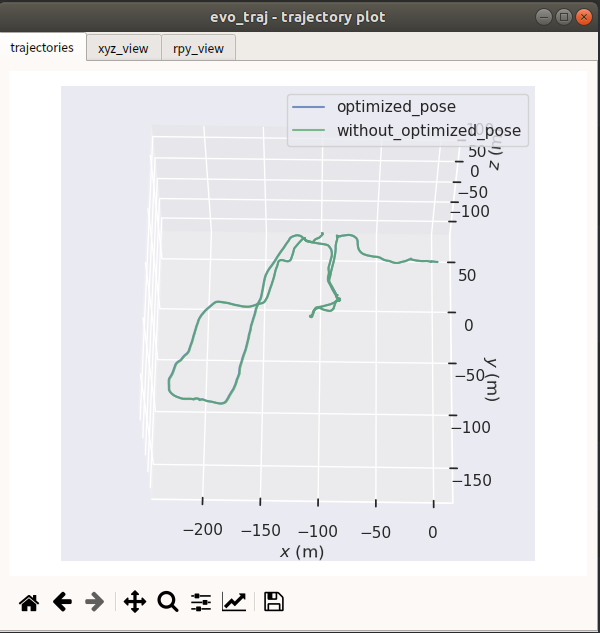
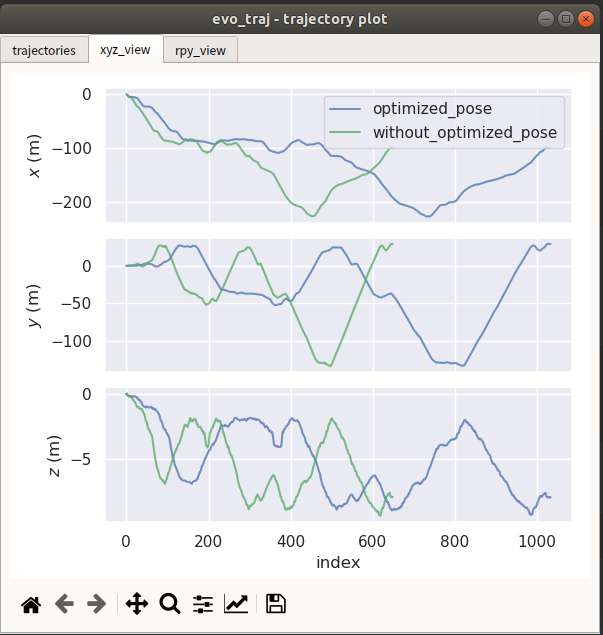
evo 绘制轨迹
```shell
evo_traj kitti optimized_pose.txt without_optimized_pose.txt -p
```
|  |  |
| ------------------------------------------------------------ | ------------------------------------------------------------ |
#### 5.some config
```shell
# Loop closure
loopClosureEnableFlag: true # use loopclousre or not
loopClosureFrequency: 4.0 # Hz, regulate loop closure constraint add frequency
surroundingKeyframeSize: 50 # submap size (when loop closure enabled)
historyKeyframeSearchRadius: 1.5 # meters, key frame that is within n meters from current pose will be considerd for loop closure
historyKeyframeSearchTimeDiff: 30.0 # seconds, key frame that is n seconds older will be considered for loop closure
historyKeyframeSearchNum: 20 # number of hostory key frames will be fused into a submap for loop closure
historyKeyframeFitnessScore: 0.3 # icp threshold, the smaller the better alignment
# visual iktree_map
visulize_IkdtreeMap: true
# visual iktree_map
recontructKdTree: true
savePCDDirectory: "/fast_lio_sam_ws/src/FAST_LIO_SAM/PCD/" # in your home folder, starts and ends with "/". Warning: the code deletes "LOAM" folder then recreates it. See "mapOptimization" for implementation
```
### Use GPS:
#### 1.dataset
dataset is from [LIO-SAM](https://github.com/TixiaoShan/LIO-SAM) **Park dataset:** [[Google Drive](https://drive.google.com/drive/folders/1gJHwfdHCRdjP7vuT556pv8atqrCJPbUq?usp=sharing)]
Videos : [FAST-LIO-SAM' videos](https://www.bilibili.com/video/BV12Y4y1g7xN?spm_id_from=444.41.list.card_archive.click&vd_source=ed6bf57ee5a8e930b7a857e261dac86d)
```shell
roslaunch fast_lio_sam mapping_velodyne16_lio_sam_parking_dataset.launch
rosbag play parking_dataset.bag
```
Line Color define: path_no_optimized(blue)、path_updated(red)、path_gnss(green)
#### 2.save_map
输入如下指令到terminal中,地图文件将会保存在应文件夹中
```shell
rosservice call /save_map "resolution: 0.0
destination: ''"
success: True
```
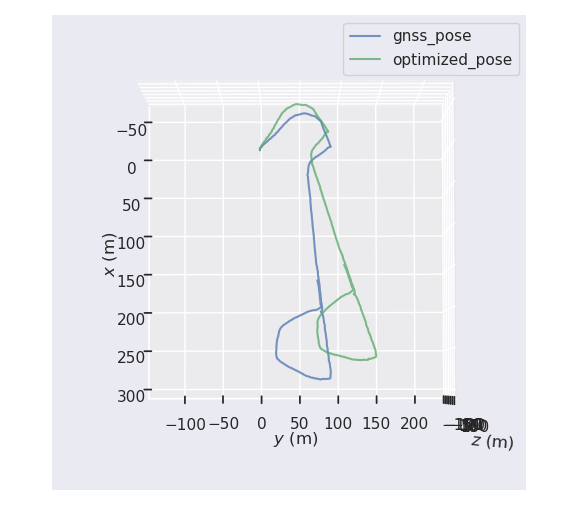
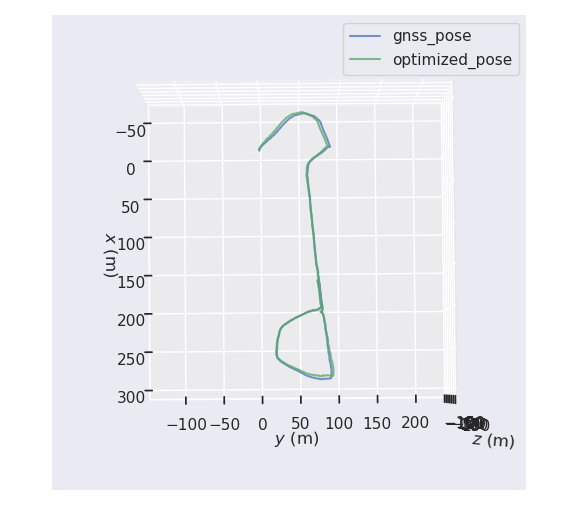
FAST-LIO Map (no gnss prior factor) Red ; FAST-LIO-SAM (with gnss prior factor) Blue

#### 3.save_poes
输入如下指令到terminal中,poes文件将会保存在相应文件夹中
```
rosservice call /save_pose "resolution: 0.0
destination: ''"
success: False
```
evo 绘制轨迹
```
evo_traj kitti gnss_pose.txt optimized_pose.txt -p
```
| FAST-LIO (no gnss prior factor) | FAST-LIO-SAM (with gnss prior factor) |
| ------------------------------------------------------------ | ------------------------------------------------------------ |
|  |  |
#### 4.some config
```shell
# GPS Settings
useImuHeadingInitialization: false # if using GPS data, set to "true"
useGpsElevation: false # if GPS elevation is bad, set to "false"
gpsCovThreshold: 2.0 # m^2, threshold for using GPS data
poseCovThreshold: 0 #25.0 # m^2, threshold for using GPS data 位姿协方差阈值 from isam2
```
#### 5.some fun
when you want to see the path in the Map [satellite map](http://dict.youdao.com/w/satellite map/#keyfrom=E2Ctranslation),you can also use [Mapviz](http://wiki.ros.org/mapviz)p plugin . You can refer to my [blog](https://blog.csdn.net/weixin_41281151/article/details/120630786?ops_request_misc=%257B%2522request%255Fid%2522%253A%2522165569598716782246421813%2522%252C%2522scm%2522%253A%252220140713.130102334..%2522%257D&request_id=165569598716782246421813&biz_id=0&utm_medium=distribute.pc_search_result.none-task-blog-2~all~sobaiduend~default-2-120630786-null-null.142^v17^pc_search_result_control_group,157^v15^new_3&utm_term=MAPVIZ&spm=1018.2226.3001.4187) on CSDN.
## Attention:
1.FAST-LIO2中对pose姿态是使用so3表示,而gtsam中,输入的relative_pose姿态是Euler RPY形式表示,需要使用罗德里格斯的公式进行转换更新。
2.参考yanliang-wang [FAST-LIO-LC](https://github.com/yanliang-wang/FAST_LIO_LC)中的iktree reconstruct
3.在walking数据集中,因为有个别数据是在同一个地方不断手持旋转激光雷达,旋转激光雷达的角度达到了保存关键帧的阈值,在短时间内,保存了多帧相似的关键帧,导致ISAM2出现特征退化,进而里程计跑飞,可以根据数据集的情况适当调整关键帧选取的阈值参数。
4.添加GPS prior 先验因子的部分diamante,参考lio_sam的先验因子部分,对比于kim的FAST-LIO-SLAM,FAST-LIO-SLAM中只是用了GPS的高层约束,并没有使用xy方向的约束,而GPS在高层(Z轴)的误差比较大,优化过程中容易引入误差。
5.GPS先验因子中,**"useGpsElevation"**是否选择GPS的高层约束,默认不使用,因为GPS的高层噪声比较大。
6.LIO-SAM 中使用**ekf_localization_node**这个ROS Package 把GPS的WGS84 坐标系 转到 World系下,FAST-LIO-SAM考虑到尽量与外部的ROS package 解耦,调用 **GeographicLib**进行坐标转换。
## some problems:
1.GNSS的经纬高噪声协方差没有转换到World系下,暂时使用latitude longtitude 的cov noise 作为x y 向的cov nosie
2.应该使用的是ENU坐标系,但是使用**GeographicLib**转换后的结果得到的坐标系是NED坐标系下的,原因暂时没捋清楚,待解决。(X: E Y: N Z: -D )
## UpdateLogs:
根据网友的运行和提示,进行了代码的一些bug更新与修改,更新日志如下,欢迎大家多提issues,感谢大家~
https://github.com/kahowang/FAST_LIO_SAM/blob/master/%E6%9B%B4%E6%96%B0%E6%97%A5%E5%BF%97.md
## Cite the Work
If you use this repository in your academic research, a BibTeX citation is appreciated:
```
@misc{wang2022fast_lio_sam,
title={FAST-LIO-SAM: FAST-LIO with Smoothing and Mapping.},
author={Wang, Jiahao},
howpublished={\url{https://github.com/kahowang/FAST_LIO_SAM}},
year={2022}
}
```
or, you can add a footnote link of this repository:
`https://github.com/kahowang/FAST_LIO_SAM`
## Acknowledgements
In this project, the LIO module refers to [FAST-LIO](https://github.com/hku-mars/FAST_LIO) and the pose graph optimization refers to [FAST_LIO_SLAM](https://github.com/gisbi-kim/FAST_LIO_SLAM) and [LIO_SAM](https://github.com/TixiaoShan/LIO-SAM).The mainly idea is for [FAST_LIO_LC](https://github.com/yanliang-wang/FAST_LIO_LC).Thanks there great work .
Also thanks yanliang-wang、minzhao-zhu、peili-ma 's great help .
edited by kaho 2022.6.20


