# Windows-Use
**Repository Path**: psugoo010/Windows-Use
## Basic Information
- **Project Name**: Windows-Use
- **Description**: 🖥️Open-source Computer-USE for Windows
- **Primary Language**: Unknown
- **License**: MIT
- **Default Branch**: main
- **Homepage**: None
- **GVP Project**: No
## Statistics
- **Stars**: 0
- **Forks**: 0
- **Created**: 2025-11-07
- **Last Updated**: 2025-11-07
## Categories & Tags
**Categories**: Uncategorized
**Tags**: None
## README
**Windows-Use** is a powerful automation agent that interact directly with the Windows at GUI layer. It bridges the gap between AI Agents and the Windows OS to perform tasks such as opening apps, clicking buttons, typing, executing shell commands, and capturing UI state all without relying on traditional computer vision models. Enabling any LLM to perform computer automation instead of relying on specific models for it.
## Updates
- Migrated from langchain, langgraph.
## 🛠️Installation Guide
### **Prerequisites**
- Python 3.12 or higher
- [UV](https://github.com/astral-sh/uv) (or `pip`)
- Windows 7 or 8 or 10 or 11
### **Installation Steps**
**Install using `uv`:**
```bash
uv add windows-use
````
Or with pip:
```bash
pip install windows-use
```
## ⚙️Basic Usage
### Ollama
```python
# main.py
from windows_use.llms.ollama import ChatOllama
from windows_use.agent import Agent, Browser
from dotenv import load_dotenv
import os
load_dotenv()
def main():
llm=ChatOllama(model='qwen3-vl:235b-cloud')
agent = Agent(llm=llm, browser=Browser.EDGE, use_vision=False, auto_minimize=False)
agent.print_response(query=input("Enter a query: "))
if __name__ == "__main__":
main()
```
### Google Gemini
```python
# main.py
from windows_use.llms.google import ChatGoogle
from windows_use.agent import Agent, Browser
from dotenv import load_dotenv
import os
load_dotenv()
def main():
#For Gemini API (not VertexAI)
api_key = os.getenv("GOOGLE_API_KEY")
llm=ChatGoogle(model="gemini-2.5-flash", api_key=api_key, temperature=0.7)
agent = Agent(llm=llm, browser=Browser.EDGE, use_vision=False, auto_minimize=True)
agent.print_response(query=input("Enter a query: "))
if __name__ == "__main__":
main()
```
## 🤖 Run Agent
You can use the following to run from a script:
```bash
uv run main.py
```
---
## 🎥 Demos
**PROMPT:** Write a short note about LLMs and save to the desktop
**PROMPT:** Change from Dark mode to Light mode
## 📈 Grounding


## Vision
Talk to your computer. Watch it get things done.
## Star History
[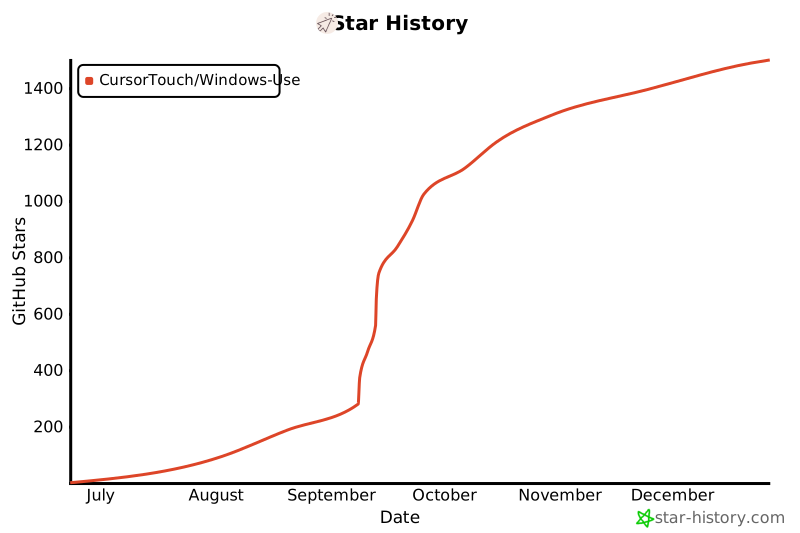](https://www.star-history.com/#CursorTouch/Windows-Use&Date)
## ⚠️ Caution
Agent interacts directly with your Windows OS at GUI layer to perform actions. While the agent is designed to act intelligently and safely, it can make mistakes that might bring undesired system behaviour or cause unintended changes. Try to run the agent in a sandbox envirnoment.
## 🪪 License
This project is licensed under the MIT License - see the [LICENSE](LICENSE) file for details.
## 🙏 Acknowledgements
Windows-Use makes use of several excellent open-source projects that power its Windows automation features:
- [UIAutomation](https://github.com/yinkaisheng/Python-UIAutomation-for-Windows)
- [PyAutoGUI](https://github.com/asweigart/pyautogui)
Huge thanks to the maintainers and contributors of these libraries for their outstanding work and open-source spirit.
## 🤝 Contributing
Contributions are welcome! Please check the [CONTRIBUTING](CONTRIBUTING) file for setup and development workflow.
Made with ❤️ by [Jeomon George](https://github.com/Jeomon)
---
## Citation
```bibtex
@software{
author = {George, Jeomon},
title = {Windows-Use: Enable AI to control Windows OS},
year = {2025},
publisher = {GitHub},
url={https://github.com/CursorTouch/Windows-Use}
}
```