# wechat_kit
**Repository Path**: randomhao/wechat_kit
## Basic Information
- **Project Name**: wechat_kit
- **Description**: wechat_kit
- **Primary Language**: Unknown
- **License**: Apache-2.0
- **Default Branch**: master
- **Homepage**: None
- **GVP Project**: No
## Statistics
- **Stars**: 0
- **Forks**: 0
- **Created**: 2020-10-27
- **Last Updated**: 2020-12-19
## Categories & Tags
**Categories**: Uncategorized
**Tags**: None
## README
# wechat_kit
[](https://pub.dev/packages/wechat_kit)
[](https://github.com/RxReader/wechat_kit/blob/master/LICENSE)
Flutter 版微信登录/分享/支付 SDK。
若需使用 API 接口方法,请使用 [wechat_kit_extension](https://pub.flutter-io.cn/packages/wechat_kit_extension) 。
## 相关工具
* [Flutter版微信SDK](https://github.com/RxReader/wechat_kit)
* [Flutter版腾讯(QQ)SDK](https://github.com/RxReader/tencent_kit)
* [Flutter版新浪微博SDK](https://github.com/RxReader/weibo_kit)
* [Flutter版支付宝SDK](https://github.com/RxReader/alipay_kit)
* [Flutter版深度链接](https://github.com/RxReader/link_kit)
* [Flutter版walle渠道打包工具](https://github.com/RxReader/walle_kit)
## Dart/Flutter Pub 私服
* [simple_pub_server](https://github.com/rxreader/simple_pub_server)
## 相关文档
* [微信开放平台](https://open.weixin.qq.com/)
* [微信登录](https://open.weixin.qq.com/cgi-bin/showdocument?action=dir_list&t=resource/res_list&verify=1&id=open1419317851&token=&lang=zh_CN)
* [扫码登录](https://open.weixin.qq.com/cgi-bin/showdocument?action=dir_list&t=resource/res_list&verify=1&id=215238808828h4XN&token=&lang=zh_CN)
* [微信支付](https://open.weixin.qq.com/cgi-bin/showdocument?action=dir_list&t=resource/res_list&verify=1&id=open1419317780&token=&lang=zh_CN)
* [Universal Links](https://developer.apple.com/documentation/uikit/inter-process_communication/allowing_apps_and_websites_to_link_to_your_content)
## FEATURE
* 5.x.y 通过配置 pubspec.yaml 和 cli 抹平 Android/iOS 平台的复杂配置
## 开始使用
### Android
```
# 不需要做任何额外接入工作
# 混淆已打入 Library,随 Library 引用,自动添加到 apk 打包混淆
```
* 获取 Android 签名信息
> 集成后,运行即可获取
```groovy
// android/app/build.gradle
apply from: "${project(":wechat_kit").projectDir}/key-store.gradle"
```
```
--- KeyStore ---
Alias name: dev
Creation date: Fri May 24 17:26:21 CST 2019
Owner: CN=lin
Issuer: CN=lin
Serial number: 77dcb7d8
Valid from: Fri May 24 17:26:21 CST 2019 until: Sun Apr 30 17:26:21 CST 2119
Certificate fingerprints:
MD5: 28:42:41:30:A4:41:6D:51:9E:00:94:66:51:D5:3A:46
SHA1: C9:A9:3A:28:6D:1A:8A:0A:F1:5A:DB:76:45:97:6F:C6:30:8A:FA:B9
SHA256: EA:3A:9B:EE:3C:8B:6C:96:31:5F:B9:09:52:58:52:05:75:E2:2A:6D:5A:C2:C0:7F:07:4F:EA:90:31:DB:58:D8
Certificate digest:
MD5: 28424130a4416d519e00946651d53a46
SHA1: c9a93a286d1a8a0af15adb7645976fc6308afab9
SHA256: ea3a9bee3c8b6c96315fb9095258520575e22a6d5ac2c07f074fea9031db58d8
Certificate Third-part:
Wechat/Weibo/Alipay MD5 HEX: 28424130a4416d519e00946651d53a46
Firebase SHA1 HEX: C9:A9:3A:28:6D:1A:8A:0A:F1:5A:DB:76:45:97:6F:C6:30:8A:FA:B9
Facebook SHA1 BASE64: yak6KG0aigrxWtt2RZdvxjCK+rk=
--- KeyStore ---
```
### iOS
> 暂不支持 SceneDelegate,详见文档 [微信-iOS接入指南](https://developers.weixin.qq.com/doc/oplatform/Mobile_App/Access_Guide/iOS.html)
在Xcode中,选择你的工程设置项,选中「TARGETS」一栏,在「info」标签栏的「URL type」添加「URL scheme」为你所注册的应用程序 id。
```
URL Types
weixin: identifier=weixin schemes=${appId}
```
iOS 9系统策略更新,限制了http协议的访问,此外应用需要在“Info.plist”中将要使用的URL Schemes列为白名单,才可正常检查其他应用是否安装。
```plist
LSApplicationQueriesSchemes
weixin
weixinULAPI
NSAppTransportSecurity
NSAllowsArbitraryLoads
```
Universal Links
```
Capabilities -> Associated Domain -> Domain -> applinks:${your applinks}
```
### Flutter
* 已发布的 pub 版本
```
dependencies:
wechat_kit: ^${latestTag}
```
若需要不包含支付的 iOS SDK
* wechat_kit: ^4.0.2 请修改项目下的 `pubspec.yaml`
```diff
+wechat_kit:
+ ios: no_pay # 默认 pay
```
* wechat_kit: ^3.2.0/^4.0.0 请修改项目下的 `ios/Podfile`:
```diff
# 5.x.y 版本将删除
+ $WechatKitSubspec = 'no_pay'
```
* snapshot
```
dependencies:
wechat_kit:
git:
url: https://github.com/rxreader/wechat_kit.git
```
## 示例
[示例](./example/lib/main.dart)
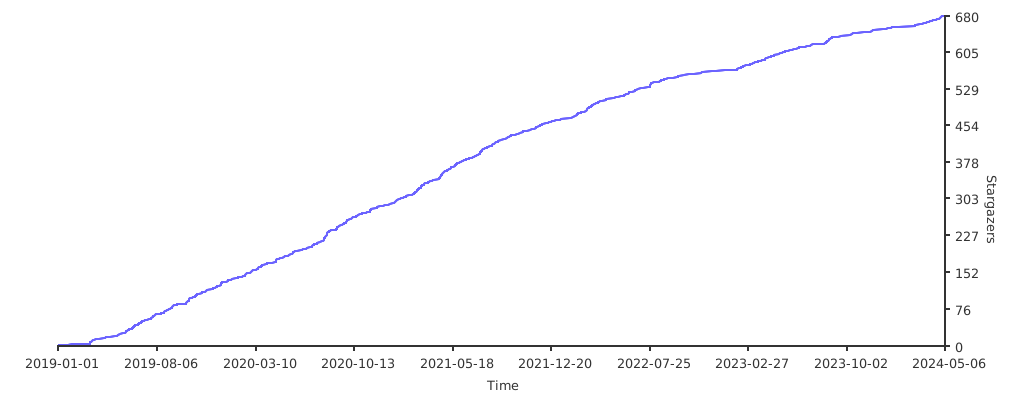
## Star History