# ABTestingGateway **Repository Path**: ravior/ABTestingGateway ## Basic Information - **Project Name**: ABTestingGateway - **Description**: No description available - **Primary Language**: Lua - **License**: MIT - **Default Branch**: master - **Homepage**: None - **GVP Project**: No ## Statistics - **Stars**: 0 - **Forks**: 0 - **Created**: 2019-10-07 - **Last Updated**: 2020-12-19 ## Categories & Tags **Categories**: Uncategorized **Tags**: None ## README 基于动态策略的灰度发布系统 ========================= * ABTestingGateway 是一个可以动态设置分流策略的灰度发布系统,工作在7层,基于nginx和ngx-lua开发,使用 redis 作为分流策略数据库,可以实现动态调度功能。 * nginx是目前使用较多的7层服务器,可以实现高性能的转发和响应;ABTestingGateway 是在 nginx 转发的框架内,在转向 upstream 前,根据 用户请求特征 和 系统的分流策略 ,查找出目标upstream,进而实现分流。 * ABTestingGateway 是新浪微博内部的动态路由系统 dygateway 的一部分,因此本文档中的 dygateway 主要是指其子功能 ABTestingGateway。动态路由系统dygateway目前应用于手机微博7层、微博头条等产品线。 在以往的基于 nginx 实现的灰度系统中,分流逻辑往往通过 rewrite 阶段的 if 和 rewrite 指令等实现,优点是`性能较高`,缺点是`功能受限`、`容易出错`,以及`转发规则固定,只能静态分流`。针对这些缺点,我们设计实现了ABTestingGateway,采用 ngx-lua 实现系统功能,通过启用[lua-shared-dict](http://wiki.nginx.org/HttpLuaModule#ngx.shared.DICT)和[lua-resty-lock](https://github.com/openresty/lua-resty-lock)作为系统缓存和缓存锁,系统获得了较为接近原生nginx转发的性能。
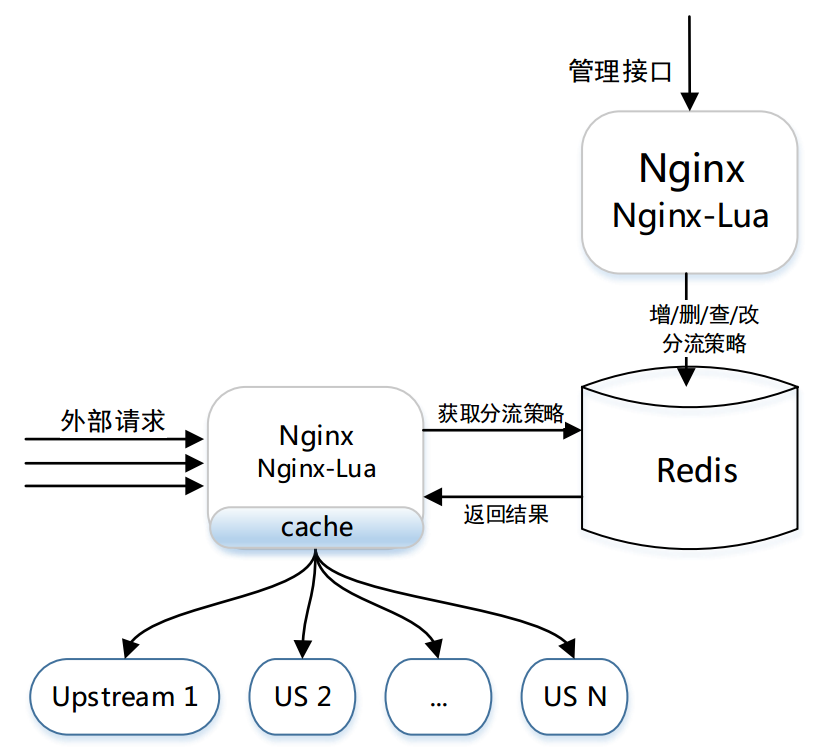
ABTestingGateway 的架构简图
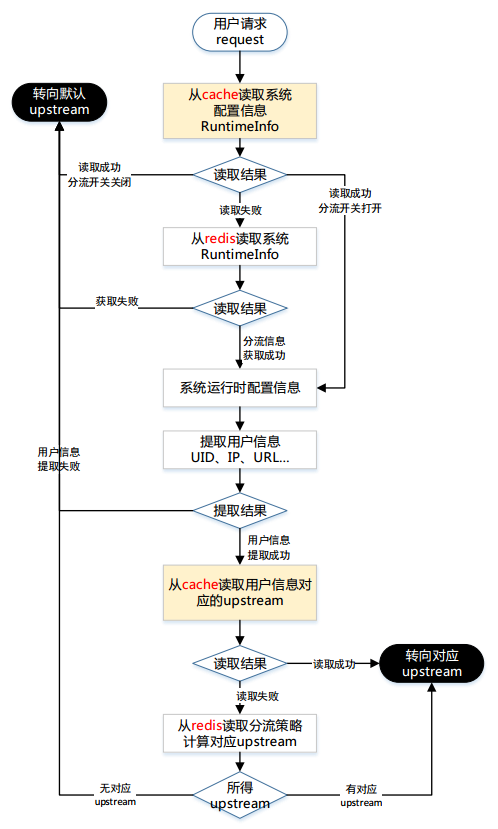
如果在使用过程中有任何问题,欢迎大家来吐槽,一起完善、一起提高、一起使用! email: bg2bkk@gmail.com open.hfc@gmail.com 压测数据:[压测报告](https://github.com/WEIBOMSRE/ABTestingGateway/blob/master/doc/%E7%81%B0%E5%BA%A6%E5%8F%91%E5%B8%83%E7%B3%BB%E7%BB%9F%E5%8E%8B%E6%B5%8B%E6%8A%A5%E5%91%8A.pdf) 项目演讲:[演讲文档](https://github.com/WEIBOMSRE/ABTestingGateway/blob/master/doc/%E5%9F%BA%E4%BA%8E%E5%8A%A8%E6%80%81%E7%AD%96%E7%95%A5%E7%9A%84%E7%81%B0%E5%BA%A6%E5%8F%91%E5%B8%83%E7%B3%BB%E7%BB%9F.pdf) Features: ---------- - 支持多种分流方式,目前包括iprange、uidrange、uid尾数和指定uid分流 - 动态设置分流策略,即时生效,无需重启 - 可扩展性,提供了开发框架,开发者可以灵活添加新的分流方式,实现二次开发 - 高性能,压测数据接近原生nginx转发 - 灰度系统配置写在nginx配置文件中,方便管理员配置 - 适用于多种场景:灰度发布、AB测试和负载均衡等 - new feature: ***支持多级分流*** 灰度发布系统功能简介 ------------------- 对于ab管理功能而言,步骤是以下三步: 1. 向系统添加策略,将策略写入策略数据库中 1. 为具体的server设置运行时信息,将某个分流策略设置为运行时策略 1. 之后可以进行分流操作 详细解释参见: [ab分流功能须知](doc/ab功能须知.md) 对于ab分流功能而言,分流流程图如图所示

分流过程流程图

系统部署 ========================= 软件依赖 ------------------ * openresty * ngx_lua * LuaJIT * lua-cjson * redis > > 注意:建议选用openresty最新版,但是从openresty-1.9.15.1开始,lua-resty-core有些api变更,因此建议先使用openresty-1.9.7.5,原因是:[必读](https://github.com/CNSRE/ABTestingGateway/issues/27#issuecomment-236149255) > > 注意:tengine用户仍然可以使用本项目,只需要从openresty软件包中获取最新的ngx_lua、LuaJIT以及lua-cjson等,并注意:[必读](https://github.com/CNSRE/ABTestingGateway/issues/27#issuecomment-236149255) how to start ----------------------- repo中的`utils/conf`文件夹中有灰度系统部署所需的最小示例 > 目前repo的master分支是支持多级分流的版本,如果只想体验单级分流,可以fork single_diversion_release分支,具体文档都在相关分支的readme中。 ```bash 1. git clone https://github.com/SinaMSRE/ABTestingGateway 2. cd /path/to/ABTestingGateway/utils && mkdir logs # 启动redis数据库 3. redis-server conf/redis.conf # 启动upstream server,其中stable为默认upstream 4. /usr/local/nginx/sbin/nginx -p `pwd` -c conf/stable.conf 5. /usr/local/nginx/sbin/nginx -p `pwd` -c conf/beta1.conf 6. /usr/local/nginx/sbin/nginx -p `pwd` -c conf/beta2.conf 7. /usr/local/nginx/sbin/nginx -p `pwd` -c conf/beta3.conf 8. /usr/local/nginx/sbin/nginx -p `pwd` -c conf/beta4.conf # 启动灰度系统,proxy server,灰度系统的配置也写在conf/nginx.conf中 9. /usr/local/nginx/sbin/nginx -p `pwd` -c conf/nginx.conf # 简单验证:添加分流策略组 $ curl 127.0.0.1:8080/ab_admin?action=policygroup_set -d '{"1":{"divtype":"uidsuffix","divdata":[{"suffix":"1","upstream":"beta1"},{"suffix":"3","upstream":"beta2"},{"suffix":"5","upstream":"beta1"},{"suffix":"0","upstream":"beta3"}]},"2":{"divtype":"arg_city","divdata":[{"city":"BJ","upstream":"beta1"},{"city":"SH","upstream":"beta2"},{"city":"XA","upstream":"beta1"},{"city":"HZ","upstream":"beta3"}]},"3":{"divtype":"iprange","divdata":[{"range":{"start":1111,"end":2222},"upstream":"beta1"},{"range":{"start":3333,"end":4444},"upstream":"beta2"},{"range":{"start":7777,"end":2130706433},"upstream":"beta2"}]}}' {"desc":"success ","code":200,"data":{"groupid":0,"group":[0,1,2]}} # 简单验证:设置运行时策略 $ curl "127.0.0.1:8080/ab_admin?action=runtime_set&hostname=api.weibo.cn&policygroupid=0" # 分流 $ curl 127.0.0.1:8030 -H 'X-Uid:39' -H 'X-Real-IP:192.168.1.1' this is stable server $ curl 127.0.0.1:8030 -H 'X-Uid:30' -H 'X-Real-IP:192.168.1.1' this is beta3 server $ curl 127.0.0.1:8030/?city=BJ -H 'X-Uid:39' -H 'X-Real-IP:192.168.1.1' this is beta1 server ``` 配置过程 ------------------------ * 由于内部部署时以dygateway项目名部署,因此下文中的所有配置,都应将ABTestingGateway文件夹重命名为dygateway [nginx.conf配置过程](doc/nginx_conf_配置过程.md) [redis.conf配置过程](doc/redis_conf_配置过程.md) 系统使用 ========================= ab分流策略 ----------------- * ab功能目前支持的分流策略有 * iprange: ip段分流 * uidrange: 用户uid段分流 * uidsuffix: uid尾数分流 * uidappoint: uid白名单分流 * 可以灵活添加新的分流方式 [ab分流策略格式和样例](doc/ab分流策略.md) ab功能接口 ------------------ * [ab功能接口说明文档](doc/ab功能接口使用介绍.md) ```bash * 策略管理:增删改查 /ab_admin?action=policy_check /ab_admin?action=policy_set /ab_admin?action=policy_get /ab_admin?action=policy_del * 策略组管理(用于多级分流) /ab_admin?action=policygroup_check /ab_admin?action=policygroup_set /ab_admin?action=policygroup_get /ab_admin?action=policygroup_del * 运行时信息管理 * 其中runtime_set接受policyid和policygroupid参数,分别用于单级分流和多级分流 /ab_admin?action=runtime_get /ab_admin?action=runtime_set /ab_admin?action=runtime_del ``` 压测结果: -----------

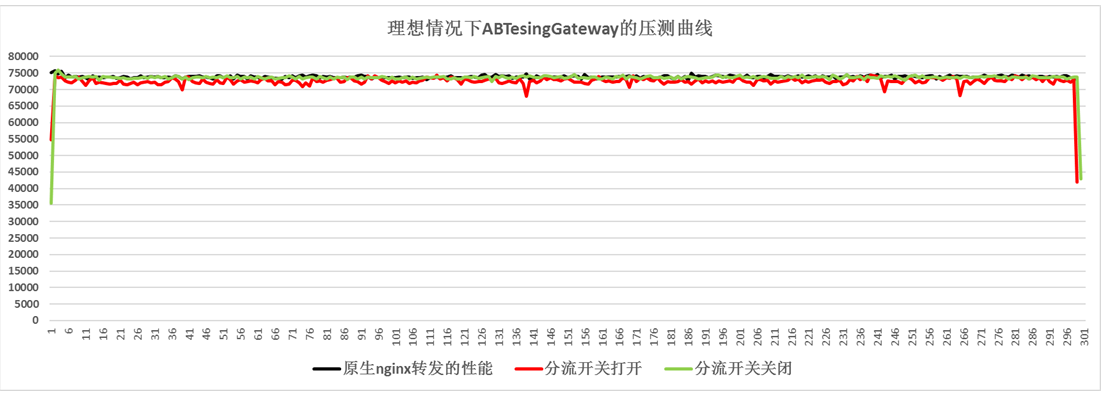
压测环境下灰度系统与原生nginx转发的对比图

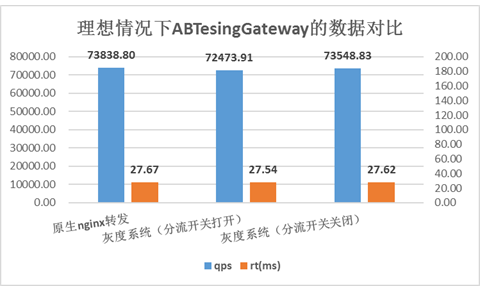
压测环境下灰度系统与原生nginx转发的数据对比

如图所示,用户请求完全命中cache是理想中的情况,灰度系统在理想情况下可以达到十分接近原生nginx转发的性能。 产生图中压测结果的场景是:用户请求经过proxy server转向upstream server,访问1KB大小的静态文件。 proxy server的硬件配置: - CPU:E5620 2.4GHz 16核 - Mem:24GB - Nic:千兆网卡,多队列,理论流量峰值为125MB/s * 注:压测结果是单级分流模式的压力测试结果,多级压测与单级压测的数据像差不多,因为ngx_lua的执行时间仅占ab功能的小部分,瓶颈不在于此 线上部署简图: -----------
FAQ ------------------------------- * 启动时报错,[提示ngx_http_lua_ffi_semaphore_new未定义](https://github.com/CNSRE/ABTestingGateway/issues/27) * 这个是ngx_lua比较新的版本中带有的 resty.semaphore模块,请确定ngx_lua版本包含该模块 * LuaJIT也请采用openresty软件包中提供的版本 * 其实直接采用openresty最好,使用最新版本的openresty不会用软件依赖问题,只是我所在的项目组有tengine的需求,所以用tengine * 为什么都root用户了还会提示Permission denied, [solution](https://github.com/CNSRE/ABTestingGateway/issues/28) TODO LIST ---------------------------- * 开发nginx shm storage模块,扩展 ngx-shared-dict 的功能 * 目前 ngx-shared-dict 提供高效快速的 kv 式简单存储 * 简单高效的存储,不足之处最直接的体现在不支持缓存 lua table。[lua-resty-lrucache提供LuaVM级别的缓存,不能跨worker共享] * 目前团队同学基于红黑树实现了类似于ngx-shared-dict的存储功能,可以存储任意类型,查找方式由用户自定义。项目地址:[ngx-shared-rbtree](https://github.com/helloyi/ngx-lua-shrbtree-module) * ngx-shared-rbtree的不足之处在于“模块只能存储一颗红黑树”,不能实现复杂用法,因此需要被进一步扩展。类似于如下所示的使用方法: ```bash local dict = ngx.shared.ngxdb ----------------------------------- local db_tab = "db_tab" local k_tab = {["a"]=1, ["b"]=2} local v_tab = {1, 2, 3} dict:set(db_tab, k_tab, v_tab) local v_tab = dict:get(db_tab, k_tab) ----------------------------------- local db_kv = "db_kv" local k = "foo" local v = "bar" dict:set(db_kv, k, v) local getv = dict:get(db_kv, v) ----------------------------------- ``` * 扩展ABTestingGateway的功能 * 由于该项目最初是为手机微博7层开发的,所以只关注了分流功能。 * 而项目在公司内部使用过程中发现,不同业务对于ab项目这层转发工作的期许不太一样 * 有的业务需要将用户分流到不同的服务器上 * 有的业务需要在这步处理中根据策略增减用户请求的uri参数或者header头 * 所以扩展ab项目的这层转发很有必要,目前随着在公司内部的推广,也在不停的收集需求,探索新的玩法 * 其实整个AB项目并没有太高的技术含量,大家关于ab和分流的玩法都大同小异,所不同的是,我们在这种范式下,能发出多少有趣的花样,期待大家多多交流 * 逐步开源dygateway的所有功能