# TedPermission
**Repository Path**: sco.jun/TedPermission
## Basic Information
- **Project Name**: TedPermission
- **Description**: No description available
- **Primary Language**: Unknown
- **License**: Not specified
- **Default Branch**: master
- **Homepage**: None
- **GVP Project**: No
## Statistics
- **Stars**: 0
- **Forks**: 0
- **Created**: 2023-10-31
- **Last Updated**: 2024-11-23
## Categories & Tags
**Categories**: Uncategorized
**Tags**: None
## README
[](https://jitpack.io/ParkSangGwon/TedPermission)
[](https://android-arsenal.com/details/1/3238)
#What is TedPermission?
After Android Marshmallow, you have to not only decalare permisions in `AndroidManifest.xml` but also request permissions at runtime.
Furthermore anytime user can on/off permissions at application setting.
When you use dangerous permissons(ex. CAMERA, READ_CONTACTS, READ_PHONE_STATE), you have to check and request permissions runtime.
([See dangerous permissions](http://developer.android.com/intl/ko/guide/topics/security/permissions.html#normal-dangerous))
You can make check function yourself.
([How to Requesting Permissions at RunTime](http://developer.android.com/intl/ko/training/permissions/requesting.html))
But original check function is so complex and hard..
(`checkSelfPermission()`, `requestPermissions()`, `onRequestPermissionsResult()`, `onActivityResult()` ...)
TedPermission is simple permission check helper.
##Demo
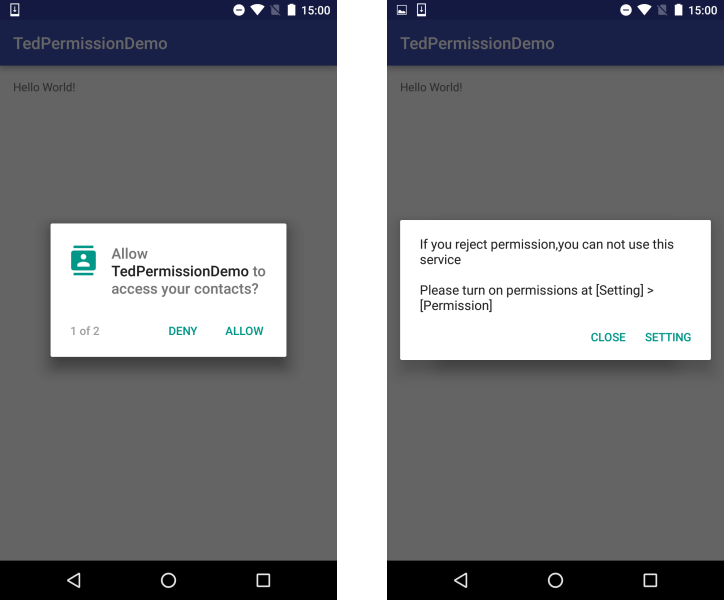
1. Request Permissions.
2. If user denied permissions, we will show message dialog with Setting button.
##Setup
###Gradle
```javascript
dependencies {
compile 'gun0912.ted:tedpermission:1.0.0'
}
```
##How to use
###1. Make PermissionListener
We will use PermissionListener for Permission Result.
You will get result to `onPermissionGranted()`, `onPermissionDenied()`
```javascript
PermissionListener permissionlistener = new PermissionListener() {
@Override
public void onPermissionGranted() {
Toast.makeText(MainActivity.this, "Permission Granted", Toast.LENGTH_SHORT).show();
}
@Override
public void onPermissionDenied(ArrayList deniedPermissions) {
Toast.makeText(MainActivity.this, "Permission Denied\n" + deniedPermissions.toString(), Toast.LENGTH_SHORT).show();
}
};
```
###2. Start TedPermission
TedPermission class need `setPermissionListener()`, `setPermissions()`.
and `check()` will start check permissions
`setRationaleMessage()`,`setDeniedMessage()` is optional method.
```javascript
new TedPermission(this)
.setPermissionListener(permissionlistener)
.setDeniedMessage("If you reject permission,you can not use this service\n\nPlease turn on permissions at [Setting] > [Permission]")
.setPermissions(Manifest.permission.READ_CONTACTS, Manifest.permission.ACCESS_FINE_LOCATION)
.check();
```
##Proguard
If you use proguard, you have to add this code.
```javascript
-keepattributes *Annotation*
-keepclassmembers class ** {
@com.squareup.otto.Subscribe public *;
@com.squareup.otto.Produce public *;
}
````
##Customize
You can customize something ...
* `setGotoSettingButton(boolean) (default: true)`
* `setRationaleMessage(R.string.xxx or String)`
* `setRationaleConfirmText(R.string.xxx or String) (default: confirm / 확인)`
* `setDeniedMessage(R.string.xxx or String)`
* `setDeniedCloseButtonText(R.string.xxx or String) (default: close / 닫기)`
* `setGotoSettingButtonText(R.string.xxx or String) (default: setting / 설정)`
##Number of Cases
1. Check permissions -> have permissions
: `onPermissionGranted()` called
2. Check permissions -> don't have permissions
: show request dialog

3. show request dialog -> granted permissions
: `onPermissionGranted()` called
4. show request dialog -> denied permissions
: show denied dialog
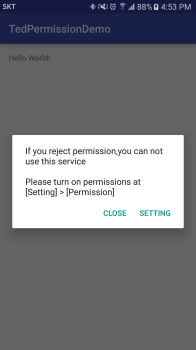
5. show denied dialog -> close
: `onPermissionDenied()` called
6. show denied dialog -> setting
: `startActivityForResult()` to `setting` activity

7. setting activity -> `onActivityResult()`
: check permission
8. check permission -> granted permissions
: `onPermissionGranted()` called
9. check permission -> denied permissions
: `onPermissionDenied()` called

##Thanks
* [Otto](https://github.com/square/otto) - An enhanced Guava-based event bus with emphasis on Android support
##License
```code
Copyright 2016 Ted Park
Licensed under the Apache License, Version 2.0 (the "License");
you may not use this file except in compliance with the License.
You may obtain a copy of the License at
http://www.apache.org/licenses/LICENSE-2.0
Unless required by applicable law or agreed to in writing, software
distributed under the License is distributed on an "AS IS" BASIS,
WITHOUT WARRANTIES OR CONDITIONS OF ANY KIND, either express or implied.
See the License for the specific language governing permissions and
limitations under the License.```