# Ki-nTree
**Repository Path**: shareceo/Ki-nTree
## Basic Information
- **Project Name**: Ki-nTree
- **Description**: No description available
- **Primary Language**: Unknown
- **License**: GPL-3.0
- **Default Branch**: main
- **Homepage**: None
- **GVP Project**: No
## Statistics
- **Stars**: 0
- **Forks**: 0
- **Created**: 2026-02-24
- **Last Updated**: 2026-02-24
## Categories & Tags
**Categories**: Uncategorized
**Tags**: None
## README
#  Ki-nTree
### Fast part creation for [KiCad](https://kicad.org/) and [InvenTree](https://inventree.org/)
[](https://www.gnu.org/licenses/gpl-3.0)
[](https://www.python.org/)
[](https://pypi.org/project/kintree/)
[](https://github.com/sparkmicro/Ki-nTree/actions)
[](https://coveralls.io/github/sparkmicro/Ki-nTree?branch=main)
## :warning: InvenTree Compatibility
InvenTree `0.12` introduced a new parameter template system which was not supported until version `0.12.6` came out, see https://github.com/sparkmicro/Ki-nTree/issues/165 for more details. In short, Ki-nTree currently supports InvenTree `0.11` or older versions, and `0.12.6` and future versions. From `0.13.0` onwards a InvenTree setting needs to be modified for Ki-nTree to work: `InvenTree Settings` -> `Part Parameters` -> `Enforce Parameter Units` -> **OFF** (requires administrator rights)
## :fast_forward: [Demo Video](https://youtu.be/YeWBqOCb4pw)
Ki-nTree
### Fast part creation for [KiCad](https://kicad.org/) and [InvenTree](https://inventree.org/)
[](https://www.gnu.org/licenses/gpl-3.0)
[](https://www.python.org/)
[](https://pypi.org/project/kintree/)
[](https://github.com/sparkmicro/Ki-nTree/actions)
[](https://coveralls.io/github/sparkmicro/Ki-nTree?branch=main)
## :warning: InvenTree Compatibility
InvenTree `0.12` introduced a new parameter template system which was not supported until version `0.12.6` came out, see https://github.com/sparkmicro/Ki-nTree/issues/165 for more details. In short, Ki-nTree currently supports InvenTree `0.11` or older versions, and `0.12.6` and future versions. From `0.13.0` onwards a InvenTree setting needs to be modified for Ki-nTree to work: `InvenTree Settings` -> `Part Parameters` -> `Enforce Parameter Units` -> **OFF** (requires administrator rights)
## :fast_forward: [Demo Video](https://youtu.be/YeWBqOCb4pw)
 ## Introduction
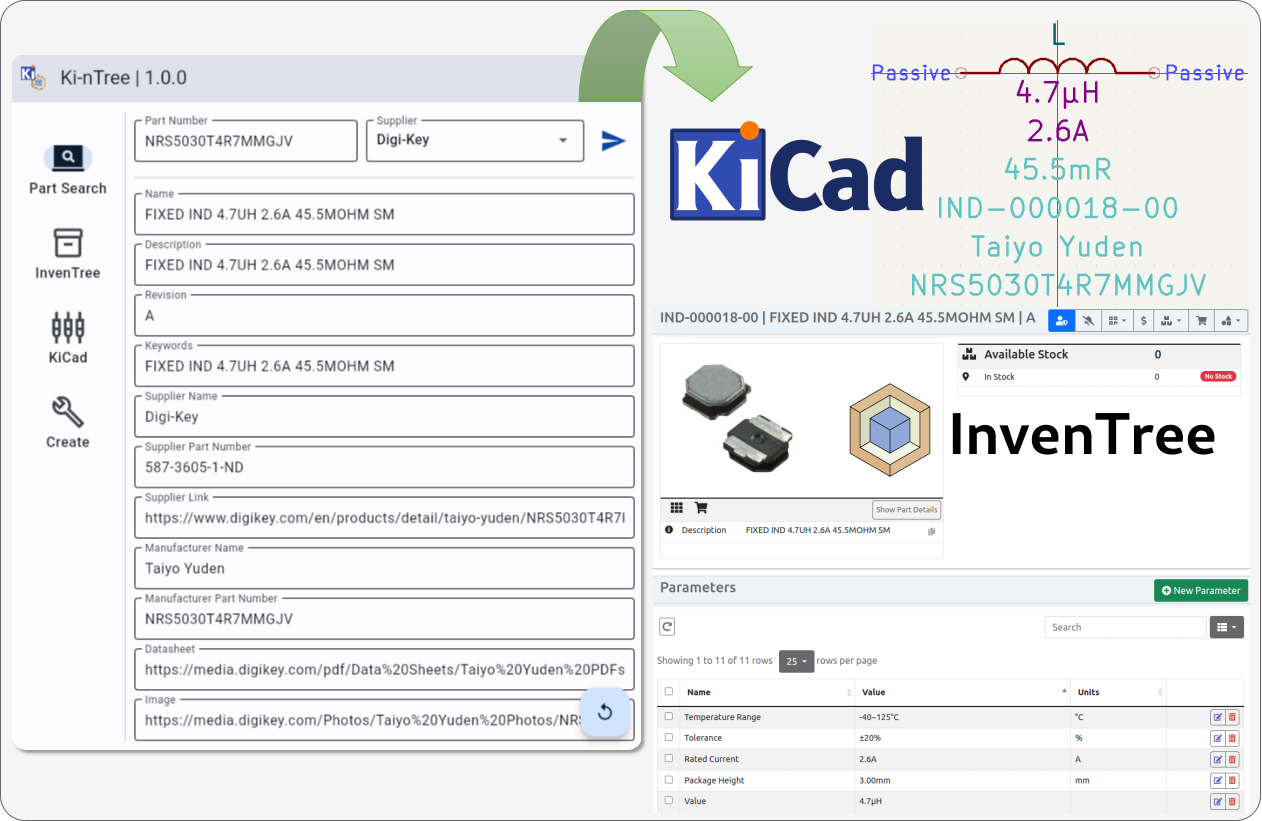
Ki-nTree (pronounced "Key Entry" or "Key 'n' Tree") aims to:
* automate part creation of KiCad library parts
* automate part creation of InvenTree parts
* synchronize parts data between KiCad and InvenTree
Ki-nTree works with:
- [Digi-Key](https://developer.digikey.com/), [Mouser](https://www.mouser.com/api-hub/), [Element14](https://partner.element14.com/docs) and [LCSC](https://lcsc.com/) **enormous** part databases and free APIs
- the awesome open-source [InvenTree Inventory Management System](https://github.com/inventree/inventree) built and maintained by [@SchrodingersGat](https://github.com/SchrodingersGat) and [@matmair](https://github.com/matmair)
- the reliable and SCM-friendly KiCad file parser [KiUtils](https://github.com/mvnmgrx/kiutils) built and maintained by [@mvnmgrx](https://github.com/mvnmgrx)
- the amazing [Digi-Key API python library](https://github.com/peeter123/digikey-api) built and maintained by [@peeter123](https://github.com/peeter123)
- the [Mouser Python API](https://github.com/sparkmicro/mouser-api/) built and maintained by [@eeintech](https://github.com/eeintech)
> :warning: **Important Note**
>
> Ki-nTree version `1.2.x` and forward support Digi-Key API version **4 only**.
>
> Ki-nTree version `1.0.x` and forward support KiCad versions **6 and up**.
>
> Ki-nTree versions `0.5.x` and `0.6.x` only support KiCad version **6** (`pip install kintree==0.6.6`).
>
> To use with KiCad version **5**, use older Ki-nTree `0.4.x` versions (`pip install kintree==0.4.8`).
Ki-nTree was developed by [@eeintech](https://github.com/eeintech) for [SPARK Microsystems](https://www.sparkmicro.com/), who generously accepted to make it open-source!
## Get Started
### Requirements
* Ki-nTree is currently tested for Python 3.9 to 3.12 versions.
* Ki-nTree requires a Digi-Key **production** API instance. To create one, go to https://developer.digikey.com/. Create an account, an organization and add a **production** API to your organization. Save both Client ID and Secret keys.
> [Here is a video](https://youtu.be/OI1EGEc0Ju0) to help with the different steps
* Ki-nTree requires a Mouser Search API key. To request one, head over to https://www.mouser.ca/api-search/ and click on "Sign Up for Search API"
* Ki-nTree requires an Element14 Product Search API key to fetch part information for the following suppliers: Farnell (Europe), Newark (North America) and Element14 (Asia-Pacific). To request one, head over to https://partner.element14.com/ and click on "Register"
* on rolling release distributions like Arch Linux some Flet dependencies need to be repaired manually:
```
sudo pacman -S mpv
sudo ln -s /usr/lib/libmpv.so /usr/lib/libmpv.so.1
```
### Installation (system wide)
1. Install using Pip
``` bash
pip install -U kintree
```
2. Run Ki-nTree
``` bash
kintree
```
### Run in virtual environment (contained)
##### Linux / MacOS
Create a virtual environment and activate it with:
``` bash
$ python3 -m venv env-kintree
$ source env-kintree/bin/activate
```
Then follow the steps from the [installation section](#installation-system-wide).
##### Windows
In Git Bash, use the following commands to create and activate a virtual environment:
``` bash
$ python3 -m venv env-kintree
$ source env-kintree/Scripts/activate
```
For any other Windows terminal, refer to the [official documentation](https://docs.python.org/library/venv.html#creating-virtual-environments)
### Packages
#### Arch Linux
Ki-nTree is [available on Arch Linux's AUR](https://aur.archlinux.org/packages/python-kintree/) as `python-kintree`.
### Usage Instructions
#### Before Starting
If you intend to use Ki-nTree with InvenTree, this tool offers to setup the InvenTree category tree with a simple script that you can run as follow:
> :warning: Warning: Before running it, make sure you have setup your category tree in your `categories.yaml` configuration file according to your own preferences, else it will use the [default setup](https://github.com/sparkmicro/Ki-nTree/blob/main/kintree/config/inventree/categories.yaml).
``` bash
python3 -m kintree.setup_inventree
```
If the InvenTree category tree is **not setup** before starting to use Ki-nTree, you **won't be able to add parts** to InvenTree.
#### Advanced Configuration
Configuration files are stored in the folder pointed by the `Configuration Files Folder` path in the "User Settings" window:
## Introduction
Ki-nTree (pronounced "Key Entry" or "Key 'n' Tree") aims to:
* automate part creation of KiCad library parts
* automate part creation of InvenTree parts
* synchronize parts data between KiCad and InvenTree
Ki-nTree works with:
- [Digi-Key](https://developer.digikey.com/), [Mouser](https://www.mouser.com/api-hub/), [Element14](https://partner.element14.com/docs) and [LCSC](https://lcsc.com/) **enormous** part databases and free APIs
- the awesome open-source [InvenTree Inventory Management System](https://github.com/inventree/inventree) built and maintained by [@SchrodingersGat](https://github.com/SchrodingersGat) and [@matmair](https://github.com/matmair)
- the reliable and SCM-friendly KiCad file parser [KiUtils](https://github.com/mvnmgrx/kiutils) built and maintained by [@mvnmgrx](https://github.com/mvnmgrx)
- the amazing [Digi-Key API python library](https://github.com/peeter123/digikey-api) built and maintained by [@peeter123](https://github.com/peeter123)
- the [Mouser Python API](https://github.com/sparkmicro/mouser-api/) built and maintained by [@eeintech](https://github.com/eeintech)
> :warning: **Important Note**
>
> Ki-nTree version `1.2.x` and forward support Digi-Key API version **4 only**.
>
> Ki-nTree version `1.0.x` and forward support KiCad versions **6 and up**.
>
> Ki-nTree versions `0.5.x` and `0.6.x` only support KiCad version **6** (`pip install kintree==0.6.6`).
>
> To use with KiCad version **5**, use older Ki-nTree `0.4.x` versions (`pip install kintree==0.4.8`).
Ki-nTree was developed by [@eeintech](https://github.com/eeintech) for [SPARK Microsystems](https://www.sparkmicro.com/), who generously accepted to make it open-source!
## Get Started
### Requirements
* Ki-nTree is currently tested for Python 3.9 to 3.12 versions.
* Ki-nTree requires a Digi-Key **production** API instance. To create one, go to https://developer.digikey.com/. Create an account, an organization and add a **production** API to your organization. Save both Client ID and Secret keys.
> [Here is a video](https://youtu.be/OI1EGEc0Ju0) to help with the different steps
* Ki-nTree requires a Mouser Search API key. To request one, head over to https://www.mouser.ca/api-search/ and click on "Sign Up for Search API"
* Ki-nTree requires an Element14 Product Search API key to fetch part information for the following suppliers: Farnell (Europe), Newark (North America) and Element14 (Asia-Pacific). To request one, head over to https://partner.element14.com/ and click on "Register"
* on rolling release distributions like Arch Linux some Flet dependencies need to be repaired manually:
```
sudo pacman -S mpv
sudo ln -s /usr/lib/libmpv.so /usr/lib/libmpv.so.1
```
### Installation (system wide)
1. Install using Pip
``` bash
pip install -U kintree
```
2. Run Ki-nTree
``` bash
kintree
```
### Run in virtual environment (contained)
##### Linux / MacOS
Create a virtual environment and activate it with:
``` bash
$ python3 -m venv env-kintree
$ source env-kintree/bin/activate
```
Then follow the steps from the [installation section](#installation-system-wide).
##### Windows
In Git Bash, use the following commands to create and activate a virtual environment:
``` bash
$ python3 -m venv env-kintree
$ source env-kintree/Scripts/activate
```
For any other Windows terminal, refer to the [official documentation](https://docs.python.org/library/venv.html#creating-virtual-environments)
### Packages
#### Arch Linux
Ki-nTree is [available on Arch Linux's AUR](https://aur.archlinux.org/packages/python-kintree/) as `python-kintree`.
### Usage Instructions
#### Before Starting
If you intend to use Ki-nTree with InvenTree, this tool offers to setup the InvenTree category tree with a simple script that you can run as follow:
> :warning: Warning: Before running it, make sure you have setup your category tree in your `categories.yaml` configuration file according to your own preferences, else it will use the [default setup](https://github.com/sparkmicro/Ki-nTree/blob/main/kintree/config/inventree/categories.yaml).
``` bash
python3 -m kintree.setup_inventree
```
If the InvenTree category tree is **not setup** before starting to use Ki-nTree, you **won't be able to add parts** to InvenTree.
#### Advanced Configuration
Configuration files are stored in the folder pointed by the `Configuration Files Folder` path in the "User Settings" window:
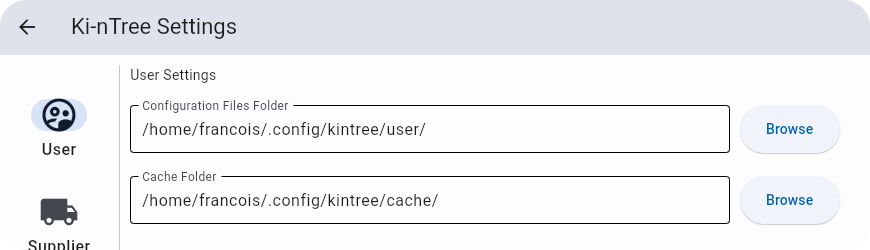
Click here to read about configuration files
Ki-nTree uses a number of YAML configuration files to function. New users shouldn't need to worry about them to try out Ki-nTree (except for `categories.yaml` as mentioned in the previous section), however they can be modified to customize behavior and workflow.
Below is a summary table of the different configuration files, their function and if they are updated by the GUI:
| Filename | Function | GUI Update? |
| --- | --- | --- |
| `categories.yaml` | InvenTree categories hierarchy tree and category codes for IPN generation (see [Before Starting section](#before-starting)) | :x: |
| `general.yaml` | General user settings | :heavy_check_mark: |
| `internal_part_number.yaml` | Controls for IPN generation | :heavy_check_mark: |
| `inventree_.yaml` | InvenTree login credentials, per environment (`=['dev', 'prod']`) | :heavy_check_mark: |
| `kicad.yaml` | KiCad symbol, footprint and library paths | :heavy_check_mark: |
| `kicad_map.yaml` | Mapping between InvenTree parent categories and KiCad symbol/footprint libraries and templates | :x: |
| `parameters.yaml` | List of InvenTree parameters templates (see [InvenTree Part Parameters documentation](https://docs.inventree.org/en/latest/part/parameter/)) | :x: |
| `parameters_filters.yaml` | Mapping between InvenTree parent categories and InvenTree parameters templates | :x: |
| `search_api.yaml` | Generic controls for Supplier search APIs like cache validity | :heavy_check_mark: |
| `supplier_parameters.yaml` | Mapping between InvenTree parameters templates and suppliers parameters/attributes, sorted by InvenTree parent categories (see [Part Parameters section](#part-parameters)) | :x: |
| `_config.yaml` | Mapping for supplier name and search results fields, to overwrite defaults (`=['digikey', 'element14', 'lcsc', 'mouser']`) | :x: |
| `_api.yaml` | Required supplier API fields, custom to each supplier (`=['digikey', 'element14', 'lcsc', 'mouser']`) | :heavy_check_mark: |
| `digikey_categories.yaml` | Mapping between InvenTree categories and Digi-Key categories | :x: |
| `digikey_parameters.yaml` | Mapping between InvenTree parameters and Digi-Key parameters/attributes | :x: |
> Ki-nTree only supports matching between InvenTree and Digi-Key categories and parameters/attributes (help wanted!)
#### InvenTree Permissions
Each InvenTree user has a set of permissions associated to them.
Please refer to the [InvenTree documentation](https://inventree.readthedocs.io/en/latest/settings/permissions/) to understand how to setup user permissions.
The minimum set of user/group permission required to add parts to InvenTree is:
- "Part - Add" to add InvenTree parts
- "Purchase Orders - Add" to add manufacturers, suppliers and their associated parts
If you wish to automatically add subcategories while creating InvenTree parts, you will need to enable the "Part Categories - Add" permission.
Note that each time you enable the "Add" permission to an object, InvenTree automatically enables the "Change" permission to that object too.
#### Settings
1. With Ki-nTree GUI open, click on "Settings > Supplier > Digi-Key" and fill in both Digi-Key API Client ID and Secret keys (optional: click on "Test" to [get an API token](#get-digi-key-api-token))
2. Click on "Settings > Supplier > Mouser" and fill in the Mouser part search API key
3. Click on "Settings > Supplier > Element14" and fill in the Element14 product search API key (key is shared with Farnell and Newark)
4. Click on "Settings > KiCad", browse to the location where KiCad symbol, template and footprint libraries are stored on your computer then click "Save"
5. If you intend to use InvenTree with this tool, click on "Settings > InvenTree" and fill in your InvenTree server address and credentials then click "Save" (optional: click on "Test" to check communication with server)
a. It is possible to define a Proxy Server over which all interactions with InvenTree will be routed. To set a proxy server use the "Enable Proxy Support" switch in "Settings > InvenTree" and define the proxy address in the new input field.
b. Instead of user credential authentication token authentication is also supported. To use a token add it it to the "Password or Token" field and leave the "Username" empty. You can retrieve your personal access token from your InvenTree server by sending an get-request to its api url `api/user/token/`.
c. If needed this tool can try to download the parts datasheet from the suppliers and upload it it to the attachment section of each part. For this just activate "Upload Datasheets to InvenTree" in the InvenTree settings
d. It is also possible to sync the prices in InvenTree with the latest supplier prices. For this enable "Upload Pricing Data to InvenTree"
6. If your InvenTree server requires a IPN in a specific pattern make sure to adjust "Settings > InvenTree > Internal Part Number" to match it or adjust the servers pattern to the one yo set in Ki-nTree
> Note: All URLs should start with "http://" if they do not have a valid SSL certificate.
#### Get Digi-Key API token
Show steps (click to expand)
Enter your Digi-Key developer account credentials then login. The following page will appear (`user@email.com` will show your email address):
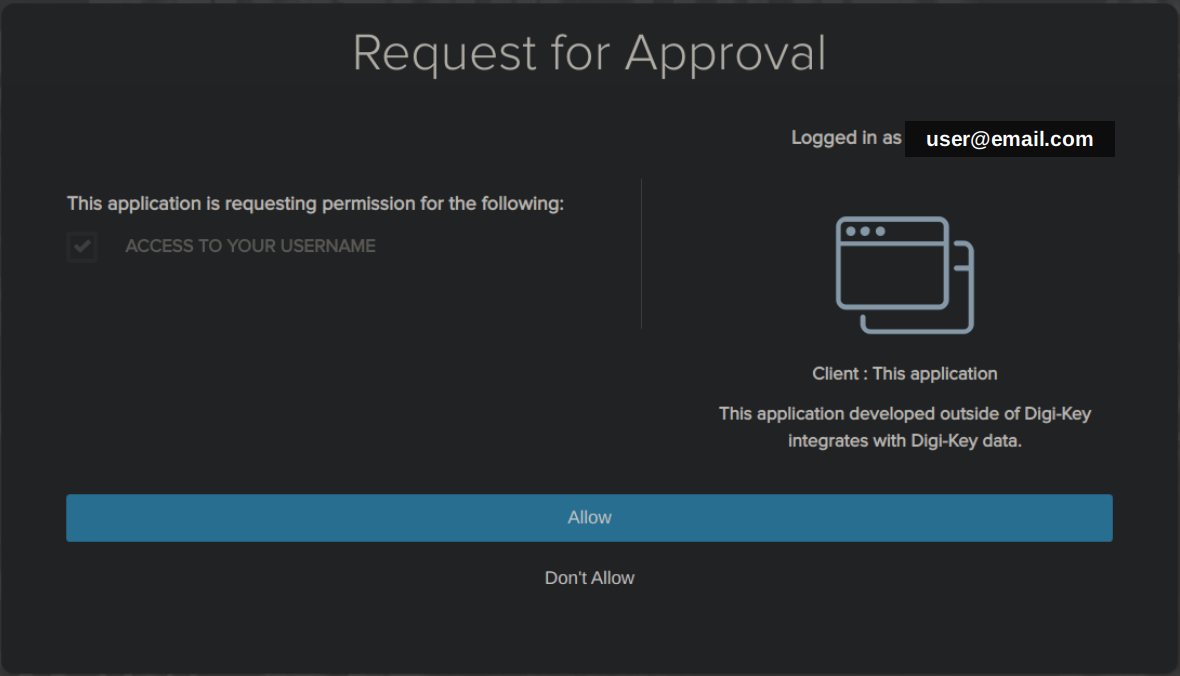 Click on "Allow", another page will open.
Click on the "Advanced" button, then click on "Proceed to localhost (unsafe)" at the bottom of the page:
Click on "Allow", another page will open.
Click on the "Advanced" button, then click on "Proceed to localhost (unsafe)" at the bottom of the page:
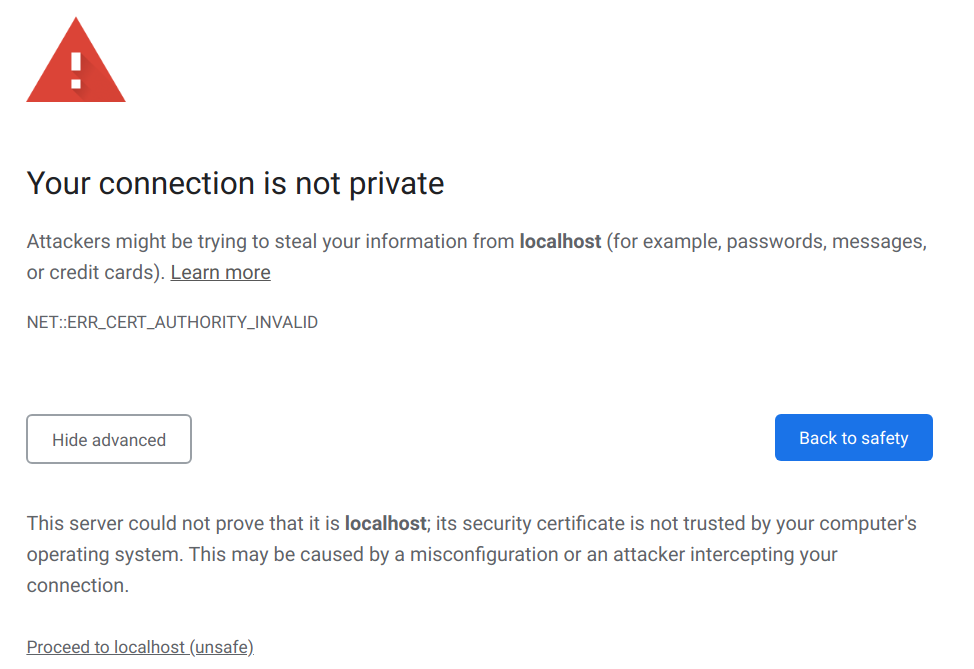 > On Chrome, if the "Proceed to localhost (unsafe)" link does not appear, enable the following flag: [chrome://flags/#allow-insecure-localhost](chrome://flags/#allow-insecure-localhost)
Lastly, a new page will open with a "You may now close this window." message, proceed to get the token.
> On Chrome, if the "Proceed to localhost (unsafe)" link does not appear, enable the following flag: [chrome://flags/#allow-insecure-localhost](chrome://flags/#allow-insecure-localhost)
Lastly, a new page will open with a "You may now close this window." message, proceed to get the token.
#### Part Parameters
Ki-nTree uses **supplier** parameters to populate **InvenTree** parameters. In order to match between supplier and InvenTree, users need to setup the configuration file `supplier_parameters.yaml` with the following mapping for each category:
``` yaml
CATEGORY_NAME:
INVENTREE_PARAMETER_NAME:
- SUPPLIER_1_PARAMETER_NAME_1
- SUPPLIER_1_PARAMETER_NAME_2
- SUPPLIER_2_PARAMETER_NAME_1
```
It is also possible to cross reference the mappings of different categories. To define one or multiple parent categories a parameter named `parent` can be added where the items then are the desired parent categories. If a parameter name is present in both parent and child, the childs definition will override the parent.
A template image for an category can be set by using the `image` parameter. The sole item in this parameter must the filename of an already existing part image on the the InvenTree server.
Refer to [this file](https://github.com/sparkmicro/Ki-nTree/blob/main/kintree/config/inventree/supplier_parameters.yaml) as a starting point / example.
#### Part Number Search
Ki-nTree currently supports APIs for the following electronics suppliers: Digi-Key, Mouser, Element14, TME and LCSC.
1. In the main window, enter the part number and select the supplier in drop-down list, then click the "Submit" button (arrow). It will start by fetching part data using the supplier's API
2. In the case Digi-Key has been selected and the API token is not found or expired, a browser window will pop-up. To get a new token: [follow those steps](#get-digi-key-api-token)
3. Once the part data has been successfully fetched from the supplier's API, you can review the part information in the different fields and edit them, if needed.
4. Then, go to the Inventree tabl to pick the `Category` and `Subcategory` to use for this part
5. If you desire to add this part to KiCad, click the KiCad tab and select the KiCad symbol library, the template and the footprint library to use for this part
6. Finally, go to the Create tab and launch the part creation. It will take some time to complete the process in InvenTree and/or KiCad, once it finishes you'll be notified of the result
If the part was created or found in InvenTree, and if you have selected this option in the settings, your browser will automatically open and navigate to the new Inventree part page.
#### Kicad Templates
The automatic part generation in KiCad is controlled via templates:
* Template examples are shipped together with Ki-nTree, these can be adjusted to your liking or you also can create completely new ones.
* Each template has its own library file where the file name defines the templates name.
* The templates can use the parameters and attributes of the InvenTree part on a wildcard base. So you can add for example `Resistance@Tolerance` into a field and the resulting part will then have the resistance and the tolerance value inside this text field.
* Using the templates and wildcards without the InvenTree functions enabled is also possible. In this case the library parameter wildcards need to be configured in the `supplier_parameters.yaml` for each library individually.
Enjoy!
*For any problem/bug you find, please [report an issue](https://github.com/sparkmicro/Ki-nTree/issues).*
## Development
### Requirements
You need `python>=3.9` and `poetry`.
You can install poetry by following the instructions [on its official website](https://python-poetry.org/docs/master/#installation), by using `pip install poetry` or by installing a package on your Linux distro.
### Setup and run
1. Clone this repository
``` bash
git clone https://github.com/sparkmicro/Ki-nTree
```
2. Install the requirements into a `poetry`-managed virtual environment
``` bash
poetry install
Installing dependencies from lock file
...
Installing the current project: kintree (1.1.99)
```
> Note: the version is not accurate (placeholder only)
3. Run Ki-nTree in the virtual environment
```bash
poetry run python -m kintree_gui
```
or
```bash
$ poetry shell
$ python -m kintree_gui
```
#### Build
1. Make sure you followed the previous installation steps, then run:
``` bash
$ poetry build
Building kintree (1.1.99)
- Building sdist
- Built kintree-1.1.99.tar.gz
- Building wheel
- Built kintree-1.1.99-py3-none-any.whl
```
2. Exit the virtual environment (`Ctrl + D` on Linux; you can also close the
terminal and reopen it in the same folder).
Run `pip install dist/.whl` with the file name from the previous
step. For example:
```bash
pip install dist/kintree-1.1.99-py3-none-any.whl
```
3. You can now start Ki-nTree by typing `kintree` in the terminal, provided
that your python dist path is a part of your `$PATH`.
## License
The Ki-nTree source code is licensed under the [GPL3.0 license](https://github.com/sparkmicro/Ki-nTree/blob/main/LICENSE) as it uses source code under that license:
* https://github.com/mvnmgrx/kiutils
* https://github.com/peeter123/digikey-api
The [KiCad templates](https://github.com/sparkmicro/Ki-nTree/tree/main/kintree/kicad/templates) are licensed under the [Creative Commons CC0 1.0 license](https://github.com/sparkmicro/Ki-nTree/blob/main/kintree/kicad/templates/LICENSE) which means that "you can copy, modify, distribute and perform the work, even for commercial purposes, all without asking permission" ([reference](https://creativecommons.org/publicdomain/zero/1.0/)).