# cells
**Repository Path**: sycr/cells
## Basic Information
- **Project Name**: cells
- **Description**: No description available
- **Primary Language**: Go
- **License**: AGPL-3.0
- **Default Branch**: main
- **Homepage**: None
- **GVP Project**: No
## Statistics
- **Stars**: 0
- **Forks**: 0
- **Created**: 2024-07-12
- **Last Updated**: 2025-07-03
## Categories & Tags
**Categories**: Uncategorized
**Tags**: None
## README
 [Homepage](https://pydio.com/) | [Dev Guide](https://pydio.com/en/docs/developer-guide) | [GitHub-Repository](https://github.com/pydio/cells) |
[Issue-Tracker](https://github.com/pydio/cells/issues)
[](LICENSE)
[](https://godoc.org/github.com/pydio/cells/v4)
[](https://goreportcard.com/report/github.com/pydio/cells/v4)
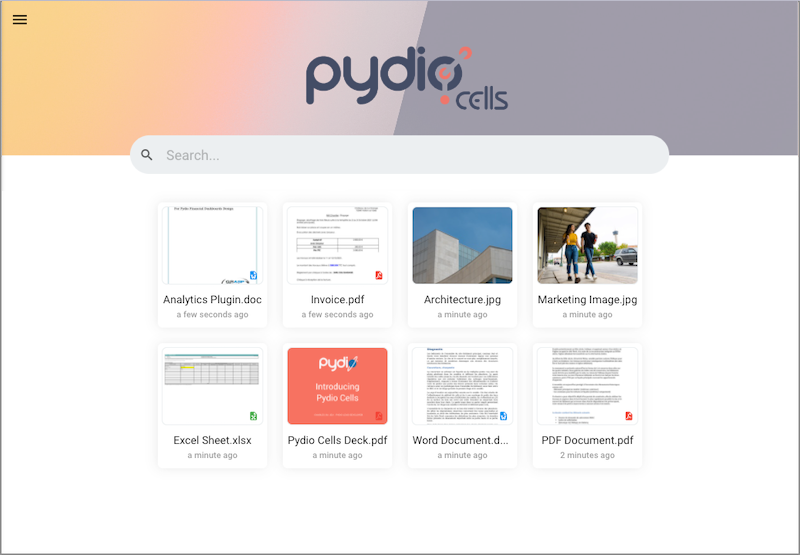
Pydio Cells is the nextgen file sharing platform for organizations. It is a full rewrite of the Pydio project using the Go language following a micro-service architecture.
[Homepage](https://pydio.com/) | [Dev Guide](https://pydio.com/en/docs/developer-guide) | [GitHub-Repository](https://github.com/pydio/cells) |
[Issue-Tracker](https://github.com/pydio/cells/issues)
[](LICENSE)
[](https://godoc.org/github.com/pydio/cells/v4)
[](https://goreportcard.com/report/github.com/pydio/cells/v4)
Pydio Cells is the nextgen file sharing platform for organizations. It is a full rewrite of the Pydio project using the Go language following a micro-service architecture.
## Getting Started
These instructions will get you a copy of the project up and running on your local machine for **development** and testing purposes. See the [Deployment section below](#pre-built-binaries) for notes on how to deploy the project on a live system.
### A - Prerequisites
The following elements are required to compile and run Pydio Cells on your machine:
- Go language **v1.21** or higher and a [correctly configured](https://golang.org/doc/install#testing) Go toolchain,
- MySQL database 5.6 or higher (or MariaDB equivalent).
_Note: We have developed and tested Pydio Cells on macOS, Ubuntu, Debian and CentOS. Windows version might still have unknown glitches and is not yet supported._
### B - Build From Sources
Assuming that your system meets the above prerequisites, building the **Pydio Cells** backend from the source code is quite straightforward:
```sh
# Retrieve the code
git clone https://github.com/pydio/cells
# Enter cells directory
cd cells
# Build your binary
make dev
```
### C - Configure Environment
To have the environment running, you must also:
- Create a database in your chosen DB server,
- Run the Pydio Cells installer that will guide you through the necessary steps: you might refer to the [official documentation](https://pydio.com/en/docs/cells/v4/cells-installation) for additional information.
```sh
./cells configure
```
### D - Start Server
```sh
./cells start
```
Access the default site https://localhost:8080/ and you are good to go. Learn more about Cells features
and advanced configuration in the [Documentation](https://pydio.com/en/docs).
## Running the tests
To run the tests, simply do
```sh
go test -v ./...
```
Please read the [CONTRIBUTING.md](CONTRIBUTING.md) document if you wish to add more tests or contribute to the code.
## Pre-built Binaries
Binaries are currently provided for [Linux, macOS and Windows distributions](https://pydio.com/en/download). To deploy them on a live system, please see the [Installation Guide](https://pydio.com/en/docs/cells/v4/cells-installation) instructions.
## Contributing
Please read [CONTRIBUTING.md](CONTRIBUTING.md) for details on our code of conduct, and the process for submitting pull requests to us. You can find a comprehensive [Developer Guide](https://pydio.com/en/docs/developer-guide) on our website. Our online docs are open-source as well, feel free to improve them by contributing!
We are also looking for help to translate the Cells interface in various languages.
It is really easy to participate: just navigate to [our page in the Crowdin translation tool](https://crowdin.com/project/pydio-cells), create an account and get started.
Pydio Cells uses many open-source libraries. The most important ones are listed below, please see [DEPENDENCIES](DEPENDENCIES) for an exhaustive list of other libs and their licenses.
## Versioning & Branches
Please note that git main branch moved from `master` for Cells v1 to v3 (vendoring, no modules) to `main` for Cells v4 (go modules).
We use [Semantic Versioning](http://semver.org/). For all available versions, see the [release list](https://github.com/pydio/cells/releases).
## Authors
See the list of [contributors](https://github.com/pydio/cells/graphs/contributors) who participated in this project. Pydio Cells is also a continuation of the Pydio project and many contributions were ported from [pydio-core](https://github.com/pydio/pydio-core) to the code that can be found under `frontend/front-srv/assets`.
## License
This project is licensed under the AGPLv3 License - see the [LICENSE](LICENSE) file for more details.