# TinyPiXOS
**Repository Path**: tinypixos/TinyPiXOS
## Basic Information
- **Project Name**: TinyPiXOS
- **Description**: TinyPiXOS 完全自主研发的轻量级移动设备操作系统!基于开源Linux深度定制内核,彻底摒弃X11/Wayland传统图形方案,以纯C/C++重构轻量级嵌入式GUI框架,自研TpWM窗口管理器,实现完整桌面级功能与多应用并行处理,为工业触控屏、医疗设备HMI提供开源解决方案。以硬核技术重塑嵌入式交互体验!
- **Primary Language**: C++
- **License**: Apache-2.0
- **Default Branch**: master
- **Homepage**: https://www.tinypixos.com/
- **GVP Project**: No
## Statistics
- **Stars**: 78
- **Forks**: 7
- **Created**: 2025-07-07
- **Last Updated**: 2026-06-24
## Categories & Tags
**Categories**: os
**Tags**: 国产操作系统, 嵌入式gui, Linux, GUI, Cpp
## README
# TinyPiXOS 🚀
  
[📖 TinyPiXOS官网](https://www.tinypixos.com/)
TinyPiXOS 包括窗口管理器(TpWM)、核心库(TpCore)、GUI库(TpGUI)、工具库(TpUtil)四大部分。
---
# 一、项目简介 📚
**TinyPiXOS** 以开源Linux为基础,通过创新的内核级轻量化改造与精简设计,摒弃了X11/Wayland等传统图形方案,运用纯C/C++从底层重构出超轻量级的整体图形技术栈——包含高效窗口管理、精简GUI框架及深度优化的内核机制。
TinyPiXOS的诞生标志着我们从零起步,完成了基础技术栈的完整构建与自主掌控。其核心定位在于提供一个**独立可控、架构轻量且高度定制化**的嵌入式桌面操作系统开发平台。
**核心目标:** 在最小化硬件资源配置的前提下,确保流畅的多应用并行处理能力,提供完备的桌面级核心功能体验(资源管理、外设驱动、图形渲染等)。
## TpWM
TpWM是 TinyPiXOS 的窗口管理引擎,是 TinyPiXOS 的核心支撑要件。整个引擎设计以精简接口为切入点,摒弃复杂冗余的接口设计理念,结合类似RISC精简指令集的设计思想,为窗口设计人员提供任意组装和拼接的高效途径,可以打造出千变万化的自定义产品。
## TpService
TpService 是 TiniPiXOS 框架的后台服务模块,基于 nanomsg 实现高效通信,目前主要提供 进程间通信(IPC) 和 局域网设备间通信 功能,并计划逐步扩展为更强大的系统服务节点。
## TpCore
TpCore 库为 TinyPiXOS 应用程序的核心库,提供了信号槽、核心数据结构、文件操作、JSON 处理、泛类型等。
---
- 统一数据抽象:提供 TpString、TpList、TpHash、TpVector 等作为框架中所有数据操作的通用容器基类,建立统一的数据结构管理体系,确保类型安全与内存效率。
- 高效序列化机制:统一处理二进制与 JSON 格式的数据转换,支持结构体与内存缓冲区的快速互转,适用于高性能数据存储与传输。
- 事件驱动调度:内建信号槽系统,基于观察者模式实现松耦合的组件间通信,支持异步事件传播与回调处理。
---
## TpGUI
TpGUI 库为 TinyPiXOS 应用程序提供了核心 GUI 框架,实现了一个全面的基于小部件的用户界面系统,具有 CSS 样式、事件处理和动画功能。该库是在 TinyPiXOS 平台上构建图形应用程序的基础。
---
- 统一对象管理:提供TpObject作为框架中所有模块组件的公共基类,建立统一的对象生命周期管理体系,确保资源管理的严谨性。
- 高效事件分发:统一处理和传播用户输入、系统事件。
- 智能内存管理:自动或半自动处理控件内存,降低资源泄漏风险。
- 渲染调度系统:优化绘制流程,协调组件间的渲染顺序与更新,保障界面流畅性。
- 声明式样式定制:内建强大的样式表系统,允许开发者通过声明式配置快速、便捷地定制控件外观和整体界面风格,避免硬编码。
---
## TpUtils
TpUtils 库为 TinyPiXOS 应用程序提供全面的系统级集成功能。该库充当高级应用程序逻辑和低级系统资源之间的桥梁,为媒体处理、网络通信、蓝牙连接、应用程序生命周期管理、硬件监控和设备管理提供标准化接口。
---
- 统一媒体处理:提供 TpAudioOutput、TpVideoOutput 作为音视频处理的统一抽象层,集成 FFmpeg 编解码能力,支持多格式媒体文件的高效播放与录制。
- 设备管理:通过 TpDiskManage、TpUsbManager 实现热插拔设备的自动检测与挂载,提供设备状态变化的信号驱动通知机制,降低外设管理复杂度。
- 高效网络通信:内建完整的 TCP/UDP Socket 框架,提供 TpTcpSocket、TpUdpSocket、TpTcpServer 等标准化网络接口,支持异步事件驱动的连接管理与数据传输。
- 蓝牙协议栈:基于 BlueZ 实现完整的蓝牙设备配对、音频传输与文件交换能力,通过 TpBluetoothLocal、TpBluetoothAudioManager 提供声明式设备管理接口。
- 应用生命周期管理:提供 TpAppInstall、TpAppDopack 实现沙箱化应用安装,支持权限控制、依赖注入与加密签名验证,确保系统安全性。
- 系统资源监控:通过 TpCpuManage、TpMemory、TpDiskManage 实时采集CPU/内存/磁盘 I/O 等系统指标,为性能优化提供数据支撑。
- 显示系统集成:TpDisplay 提供 DPI 缩放计算与 TpWM 窗口管理器的分辨率适配,支持多显示器配置与运行时分辨率切换。
---
# 二、系统优势 🌟
- **自主可控:** 自主研发窗口管理器TpWM与GUI框架,不依赖X11/Wayland。
- **轻量灵活:** 模块化架构按需裁剪,内存与进程调度优化,资源极致利用,从微型嵌入式设备到高性能移动终端均可灵活部署。
- **异构兼容:** 统一C/C++开发接口,ARM/x86/RISC-V多平台无缝迁移。
- **开箱即用:** 预置UI组件库,方便用户快速上手开发应用。
- **长期维护:** 技术团队长期维护,不用担心遇到问题导致项目无法推动。
- **中文支持:** 系统内文字中文支持友好。
- **免费商用:** 免费商用(需保留版权标识),企业可低成本构建定制化系统,支撑产品快速落地。
---
# 三、技术架构 💻
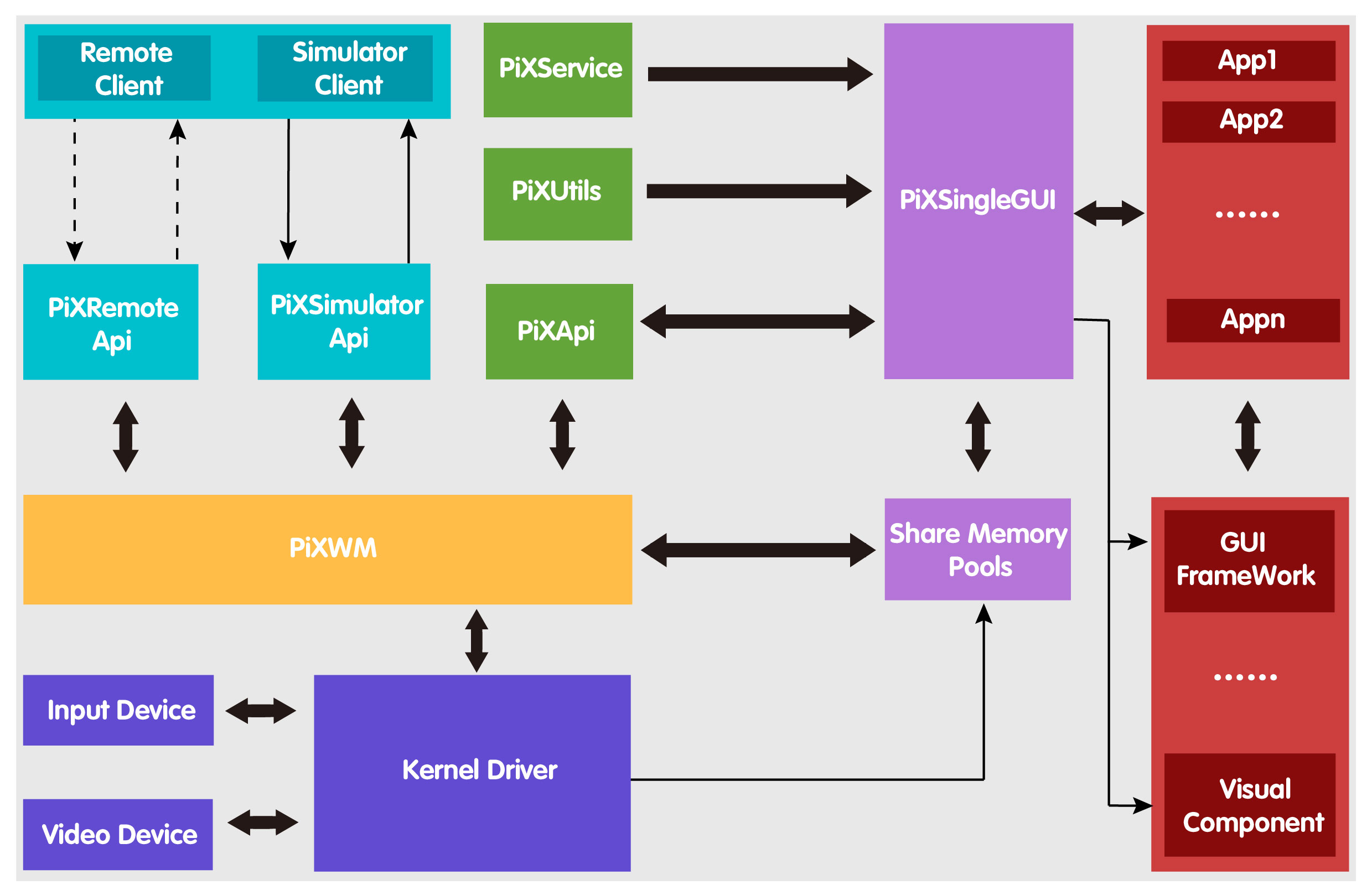
TinyPiXOS整体架构图
---
# 四、开源协议 📜
**TinyPiXOS** 采用 **Apache License 2.0** 开源协议。您可以自由使用、修改和分发代码,但需遵守协议条款。Apache License 是一种宽松的开源协议,允许您在商业项目中使用本项目代码,同时保留原作者的版权声明。
---
# 五、开源目标 🎯
**TinyPiXOS** 作为一款面向轻量化硬件平台的桌面操作系统,其架构设计复杂、功能模块众多。目前现有版本虽已实现基础能力,仍需要开发者社区的力量共同完善。我们选择将核心框架开源,旨在汇聚开发者智慧,共同打造国产嵌入式操作系统生态基座。
- 🛠️共建国产基座:以TpGUI等三大模块为基座,联合打造自主可控的嵌入式开发生态
- 🤝包容共创:现有版本难免存在不足,请以开发者视角包容反馈,共同优化
- 🚀创造无限可能:鼓励基于开源框架构建创新应用,优秀项目将获官方技术支持
- 🔄持续承诺:核心团队将长期维护系统桌面与应用生态,定期发布关键更新
---
# 六、如何参与 🤝
## 项目构建
### 系统环境
- **操作系统**: Ubuntu 22.04.4 LTS
- **编译器**: gcc g++ 11.4.0
- **构建工具**: >=CMake 3.5.0
- **语言标准**: C++11
理论上对操作系统无限制;目前只在 Ubuntu 22.04.4 LTS 进行了验证。编译器版本和构建工具必须相同或高于要求版本。
### 源码下载
拉取代码,可以使用Gitee地址直接下拉,或者使用同步仓库Github拉取
```bash
# git clone https://github.com/TinyPiXOS/TinyPiXOS.git
git clone https://gitee.com/tinypixos/TinyPiXOS.git
```
### 依赖库清单
| 依赖库 | 依赖库文件名 | 推荐版本(项目中已有) | 已支持的版本 |
|:------:|:------:|:------:|:------:|
| libasound2-dev | libasound.so | 1.2.6.1 | 1.2.6.1 |
| libavcodec-dev | libavcodec.so | 7:4.4.2 | 7:4.4.2, 7:3.4.11 |
| libavformat-dev | libavformat.so | 7:4.4.2 | 7:4.4.2, 7:3.4.11 |
| libavutil-dev | libavutil.so | 7:4.4.2 | 7:4.4.2, 7:3.4.11 |
| libswscale-dev | libswscale.so | 7:4.4.2 | 7:4.4.2, 7:3.4.11 |
| libswresample-dev | libswresample.so | 7:4.4.2 | 7:4.4.2, 7:3.4.11 |
| libavfilter-dev | libavfilter.so | 7:4.4.2 | 7:4.4.2, 7:3.4.11 |
| libavdevice-dev | libavdevice.so | 7:4.4.2 | 7:4.4.2, 7:3.4.11 |
| libssl-dev | libssl.so | 3.0.2 | 3.0.2 |
| librsvg2-dev | librsvg-2.so | 2.52.5 | 2.52.5 |
| libbluetooth | libbluetooth.so | 5.64 | 5.64 |
| libdbus | libdbus-1.so | 1.12.20 | 1.12.20 |
| bluez-alsa-utils | | | 3.0.0-2 |
| libasound2-plugin-bluez| | | 3.0.0-2 |
| bluez-obexd | | | 5.64-0 |
| libusb-1.0 | | | 1.0.25 |
### 构建安装
- **安装 依赖环境**
```bash
sudo apt install \
libsdl2-dev libglib2.0-dev \
libgbm-dev libgles2 libegl-dev \
libasound2-dev libssl-dev libavcodec-dev libavformat-dev \
libavutil-dev libswscale-dev libswresample-dev \
libavfilter-dev libavdevice-dev librsvg2-dev bluez libbluetooth-dev \
libdbus-1-dev bluez-alsa-utils libasound2-plugin-bluez bluez-obexd libusb-1.0-0-dev \
libleveldb-dev libmarisa-dev libopencc-dev libyaml-cpp-dev libexpat1-dev libbz2-dev
# libgl1-mesa-dev libgles2-mesa-dev libglu1-mesa-dev
```
- **构建 TinyPiXOS 依赖子模块(可跳过)**
```bash
# 更新子模块
git submodule update --init --recursive
# 构建并安装所有子模块依赖库
make -f deps.mk
```
- **构建 TinyPiXOS Debug版本**
```bash
cmake .
make
make install
```
或者显示指定构建版本
```bash
cmake --preset=debug
make
make install
```
- **构建 TinyPiXOS Release版本**
```bash
cmake --preset=release
make
make install
```
- **交叉编译构建 TinyPiXOS Arm64-Debug版本(32位版本将64修改为32即可)**
```bash
cmake --preset=arm64-debug \
-DCMAKE_C_COMPILER=/your/custom/path/arm-linux-gnueabihf-gcc \
-DCMAKE_CXX_COMPILER=/your/custom/path/arm-linux-gnueabihf-g++ \
-DARM_SDK_PATH=/your/sdk/path
make
make install
```
- **交叉编译构建 TinyPiXOS Arm64-Release版本(32位版本将64修改为32即可)**
```bash
cmake --preset=arm64-release \
-DCMAKE_C_COMPILER=/your/custom/path/arm-linux-gnueabihf-gcc \
-DCMAKE_CXX_COMPILER=/your/custom/path/arm-linux-gnueabihf-g++ \
-DARM_SDK_PATH=/your/sdk/path
make
make install
```
### 环境变量
将生成库目录添加至系统环境变量
```bash
gedit ~/.bashrc
export LD_LIBRARY_PATH="/usr/lib/TinyPiX:$LD_LIBRARY_PATH"
```
### 卸载
```bash
make uninstall
```
### 使用说明
#### 目录结构
- **可执行程序安装路径**
`/usr/bin/TinyPiX`
- **头文件安装路径**
`/usr/include/TinyPiX`
- **动态库安装路径**
`/usr/lib/TinyPiX`
- **资源文件安装路径**
`/usr/res/TinyPiX`
- **数据文件安装路径**
`/usr/data/TinyPiX`
- **系统支持文件安装路径**
`/System`
#### 应用程序库引入
```bash
export LD_LIBRARY_PATH="/usr/lib/TinyPiX:$LD_LIBRARY_PATH"
```
```cmake
# TpCore引入
include_directories(/usr/include/TinyPiX/TpCore)
link_directories("/usr/lib/TinyPiX")
link_directories("/usr/lib/TpWM")
target_link_libraries(你的应用程序名称 TpCore)
# TpGUI引入:
include_directories(/usr/include/TinyPiX/TpGUI)
link_directories("/usr/lib/TinyPiX")
target_link_libraries(你的应用程序名称 TpGUI)
# TpUtils引入:
include_directories(/usr/include/TinyPiX/TpUtils)
link_directories("/usr/lib/TinyPiX")
target_link_libraries(你的应用程序名称 TpUtils)
```
#### 配置文件解析
### 2. 配置文件解析
配置文件路径:`/System/conf/tinyPiX.conf`
示例配置,请勿复制注释至tinyPiX.conf:
```ini
[display-setting]
width = 1080 # 屏幕宽度(建议保持默认)
height = 720 # 屏幕高度(建议保持默认)
format = 32 # 颜色深度(不建议修改)
[attribute-setting]
daemon = 0 # 0=前台运行,1=后台运行
acclerate = 1 # 0=禁用硬件加速,1=启用
brightness = 255 # 屏幕亮度(0-255)
sharemem = 0 # 0=硬盘空间;1=内存空间
shareone = 1 # 0=多应用不使用共享内存;1=使用共享内存
[system-setting]
simulator = 1
quitwait = 15
[mode-setting]
startdir = /opt/project-main/tinyPiXApp/Application/deskTop/bin/
startapp = TpDesktop
```
## 贡献代码
- **提交问题**:在开源仓库的 Issues 页面提交问题或改进建议。
- **贡献代码**:按照贡献指南提交 Pull Request,帮助完善项目。
- **参与讨论**:加入知识星球社区,与其他开发者交流经验。
## 反馈与建议
### 📝 提交前自查
> [!TIP]
✅ 已在 [TinyPiXOS Issues](https://github.com/TinyPiXOS/TinyPiXOS/issues)搜索过同类问题。
✅ 使用最新版本进行验证后,问题仍然存在。
✅ 在[知识星球](https://t.zsxq.com/JzbkN)当中检索,但是未找到同类问题。
### 问题反馈渠道
#### 开源仓库Issues
在开源仓库的 Issues 页面提交问题或改进建议。
#### 知识星球反馈
> [!TIP]
如果您对项目很感兴趣,还未加入知识星球,我们建议您加入[知识星球](https://t.zsxq.com/JzbkN)深度了解和学习TinyPiXOS开源项目,与星球众多伙伴共同交流进步。
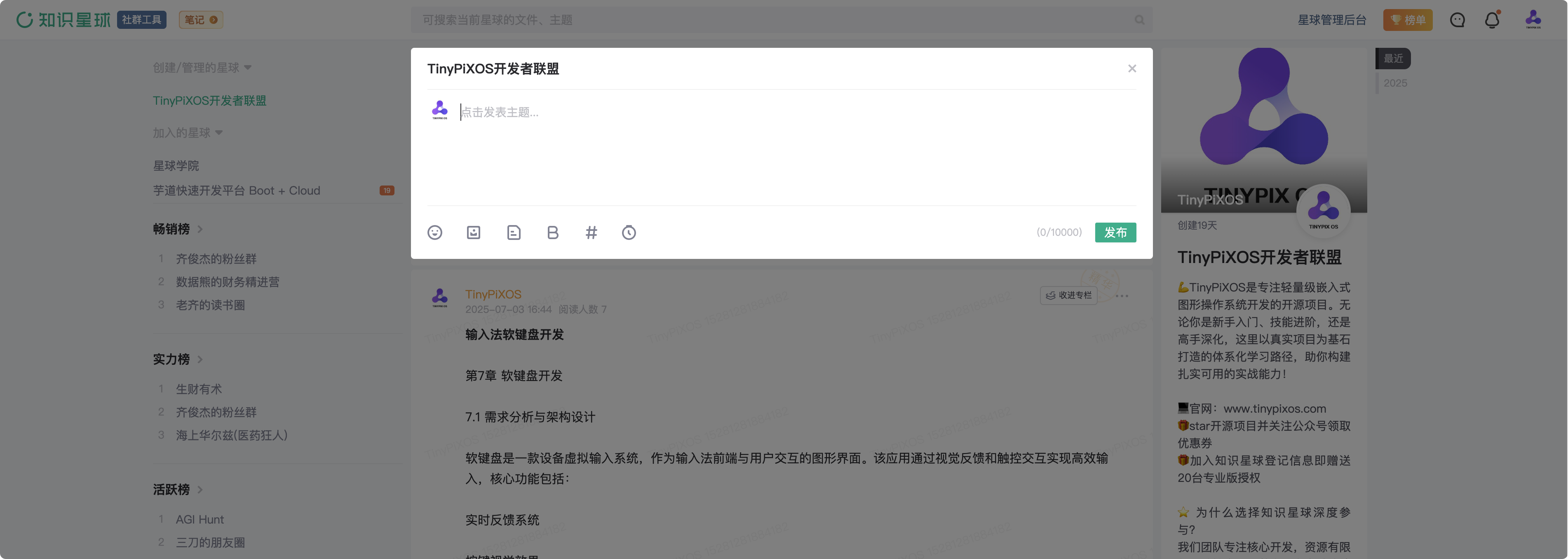
🎁加入[“TinyPiXOS开发者联盟”知识星球](https://t.zsxq.com/JzbkN)
- 通过星球查询历史问题回复和进行新问题反馈
#### 问卷表单反馈
[提交问题反馈问卷](https://wj.qq.com/s2/22794485/2341/)
#### 邮箱反馈
TinyPiXOS开发者服务邮箱
📧
## 关注我们
## 如何系统学习TinyPiXOS
- 我们围绕 TinyPiXOS 项目技术栈,搭建了“从零构建桌面操作系统”课程,包括“TinyPiXOS系统学习”. “TinyPiXApp应用开发实战”和“TpWM高级用法实战”三大板块和若干个子专栏,**通过阶梯式能力进阶,赋能开发者体系化掌握嵌入式OS全栈开发能力**。
- 为使开发者深度掌握TinyPiXOS技术栈的同时突破领域局限,我们特邀**嵌入式软件开发、硬件开发、人工智能、国产化**等跨领域专家驻场指导,助你构建多维度能力矩阵,实现**领域纵深+技能广度的双重提升**。
## 核心团队
## 支持作者