# iNotify
**Repository Path**: webtj/iNotify
## Basic Information
- **Project Name**: iNotify
- **Description**: JS 实现浏览器的 title 闪烁、滚动、声音提示、通知,没有依赖。https://github.com/jaywcjlove/iNotify
- **Primary Language**: JavaScript
- **License**: MIT
- **Default Branch**: master
- **Homepage**: https://git.io/iNotify
- **GVP Project**: No
## Statistics
- **Stars**: 0
- **Forks**: 183
- **Created**: 2022-11-09
- **Last Updated**: 2024-06-12
## Categories & Tags
**Categories**: Uncategorized
**Tags**: None
## README
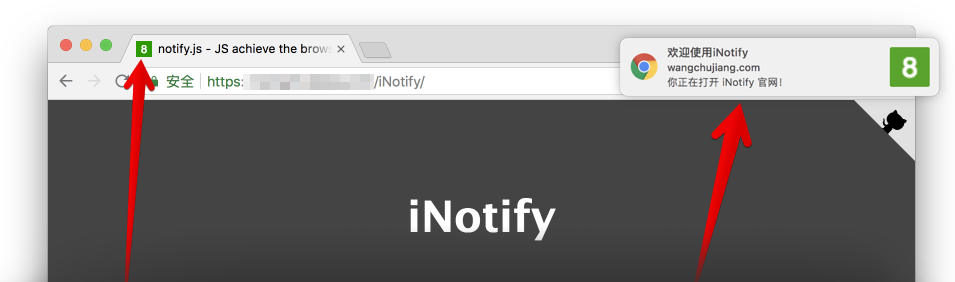


JS achieve the browser title flashing, scrolling, voice prompts, Chrome/Safari/FireFox/IE notice. has no dependencies. It not interfere with any JavaScript libraries or frameworks. has a reasonable footprint 5.05kb (gzipped: 1.75kb),Official document [demo preview](https://jaywcjlove.github.io/iNotify)。
## Installation
You will need Node.js installed on your system.
```bash
# v2.x
$ npm install @wcjiang/notify --save
# v1.x
$ npm install title-notify --save
```
> ⚠️: open in server. You can use [ssr](https://github.com/jaywcjlove/ssr) to quickly create a service..
## Using
```js
import Notify from "@wcjiang/notify";
const notify = new Notify({
message: "There is message.", // page title.
effect: "flash", // flash | scroll, Flashing or scrolling
openurl: "https://github.com/jaywcjlove/iNotify", // Click on the pop-up window to open the connection address
onclick: () => {
// Click on the pop-up window trip event
// Programmatically closes a notification.
notify.close();
console.log("---");
},
// Optional playback sound
audio: {
// You can use arrays to pass sound files in multiple formats.
file: ["msg.mp4", "msg.mp3", "msg.wav"],
// The following is also work.
// file: 'msg.mp4'
},
// Title flashing, or scrolling speed
interval: 1000,
disableFavicon: false, // Optional, default false, if true, No longer overwrites the original favicon
// Optional, default green background white text. Favicon
updateFavicon: {
// favicon font color
textColor: "#fff",
// Background color, set the background color to be transparent, set the value to "transparent"
backgroundColor: "#2F9A00",
},
// Optional chrome browser notifications,
// The default is not to fill in the following content
notification: {
title: "Notification!", // Set notification title
icon: "", // Set notification icon, The default is Favicon
body: "You have a new message!", // Set message content
},
});
notify.player();
```
Or manually download and link **notify.js** in your HTML, It can also be downloaded via [UNPKG](https://unpkg.com/@wcjiang/notify/dist/):
```html
```
## option
- **message**: String, page title
- **effect**: String, flash | scroll | favicon, Flashing or scrolling
- **audio**: Optional playback sound
- **file**: String/Array, You can use arrays to pass sound files in multiple formats.
- **interval**: Number, Title flashing, or scrolling speed.
- **openurl**: String, Click on the pop-up window to open the connection address
- **onclick**: Function, Click on the pop-up window trip event
- **updateFavicon**: Optional, default green background white text. Favicon
- **textColor**: String, favicon font color.
- **backgroundColor**: Background color, set the background color to be transparent, set the value to "transparent"
- **notification**: Optional chrome browser notifications, The default is not to fill in the following content
- **title**: Set notification title `iNotify`
- **icon**: Set notification icon, The default is Favicon
- **body**: Set message content
## isPermission
Determine if the browser bulletin notification is blocked.
```js
notify.isPermission();
```
## Sound Settings
### player
Play sound.
```js
notify.player();
```
### loopPlay
Loop the sound.
```js
notify.loopPlay();
```
### stopPlay
Stop playing sound.
```js
notify.stopPlay();
```
### setURL
Set the playback sound URL.
```js
notify.setURL("msg.mp3"); // Set one
notify.setURL(["msg.mp3", "msg.ogg", "msg.mp4"]); // Set multiple
```
## title
The latest version does not play the title blinking animation by default. After initialization, you need to call the `setTitle(true)` method to play the title animation.
### setTitle
Set the title.
```js
notify.setTitle(true); // Play animation
notify.setTitle("New title"); // Flashing new title
notify.setTitle(); // Clear Blinking Show original title
```
### setInterval
Set time interval.
```js
notify.setInterval(2000);
```
### close
Programmatically closes a notification.
```js
notify.close();
```
### addTimer
Add counter
```js
notify.addTimer();
```
### clearTimer
Clear counter.
```js
notify.clearTimer();
```
## Favicon Notice
### setFavicon
Set `icon` to display numbers or text
```js
notify.setFavicon(10);
```
### setFaviconColor
Set `icon` display text color
```js
notify.setFaviconColor("#0043ff");
```
### setFaviconBackgroundColor
Set `icon` to display text color
```js
notify.setFaviconBackgroundColor("#0043ff");
// Set font and background color
notify.setFaviconColor("#f5ff00").setFaviconBackgroundColor("red");
```
### faviconClear
Clear digital display original `icon`.
```js
notify.faviconClear();
```
## Chrome Notice
### notify
The chrome notification pops up, and the parameters are not passed as default values...
```js
notify.notify();
notify.notify({
title: "New notice",
body: "Thunder, it’s raining...",
openurl: "https://jaywcjlove.github.io",
onclick: function () {
console.log("on click");
},
onshow: function () {
console.log("on show");
},
});
```
- `title` The notification title that will be displayed.
- `dir` The direction of the text; its value can be auto (auto), ltr (left to right), or rtl (right to left).
- `icon` The URL of a picture that will be used to display the icon for the notification.
- `body` A string that is additionally displayed in the notification.
- `openurl` Click to open the specified URL.
- `onclick` Triggered whenever the user clicks on the notification.
- `onshow` Triggered when the notification is displayed.
- `onerror` Triggered whenever a notification encounters an error.
- `onclose` Triggered when the user closes the notification.
## Other
`notify.init().title;` Get the title.
## Example
### Example 1
```js
function iconNotify(num) {
if (!notify) {
var notify = new Notify({
effect: "flash",
interval: 500,
});
}
if (num === 0) {
notify.faviconClear();
notify.setTitle();
} else if (num < 100) {
notify.setFavicon(num);
notify.setTitle("There is new message!");
} else if (num > 99) {
notify.setFavicon("..");
notify.setTitle("There is new message!");
}
}
```
### Example 2
```js
var notify = new Notify({
effect: "flash",
interval: 500,
});
notify.setFavicon("1");
```
### Example 3
```js
var iN = new Notify({
effect: "flash",
interval: 500,
message: "There is new message!",
updateFavicon: {
// Optional, default green background white
textColor: "#fff", // favicon font color
backgroundColor: "#2F9A00", // favicon background color
},
}).setFavicon(10);
```
### Example 4
```js
var iN = new Notify().setFavicon(5);
```
### Example 5
```js
var iN = new Notify({
effect: "flash",
interval: 500,
message: "There is new message!",
audio: {
file: "msg.mp4",
},
})
.setFavicon(10)
.player();
```
### Example 6
```js
var iN = new Notify({
effect: "flash",
interval: 500,
message: "There is new message!",
audio: {
file: "msg.mp4", // You can use arrays to pass sound files in multiple formats.
},
notification: {
title: "Notification!", // Set notification title
icon: "", // Set notification icon, The default is Favicon
body: "You have a new message!", // Set message content
},
})
.setFavicon(10)
.player();
// The chrome notification pops up, and the parameters are not passed as default values...
iN.notify();
iN.notify({
title: "Notification!", // Set notification title
body: "You have a new message!", // Set message content
});
```
### Example 7
```js
var iN = new Notify({
effect: "flash",
interval: 500,
message: "There is new message!",
audio: {
file: ["msg.mp4", "msg.mp3", "msg.wav"],
},
notification: {
title: "Notification!", // Set notification title
body: "You have a new message!", // Set message content
},
});
iN.setFavicon(10).player();
var n = new Notify();
n.init({
effect: "flash",
interval: 500,
message: "There is new message!",
audio: {
file: ["openSub.mp4", "openSub.mp3", "openSub.wav"],
},
notification: {
title: "Notification!",
icon: "",
body: "You have a new message!",
},
});
n.setFavicon(10).player();
```
## License
[MIT © Kenny Wong](https://github.com/jaywcjlove/iNotify/blob/master/MIT-LICENSE)