# heygem
**Repository Path**: weyee/heygem
## Basic Information
- **Project Name**: heygem
- **Description**: Heygem是一款专为Windows系统设计的全离线视频合成工具,它能够精确克隆你的外貌和声音,让你的形象数字化
- **Primary Language**: C/C++
- **License**: Not specified
- **Default Branch**: main
- **Homepage**: https://www.oschina.net/p/heygem
- **GVP Project**: No
## Statistics
- **Stars**: 0
- **Forks**: 20
- **Created**: 2025-08-28
- **Last Updated**: 2025-08-28
## Categories & Tags
**Categories**: Uncategorized
**Tags**: None
## README
# Heygem - Open Source Alternative to Heygen [【切换中文】](./README_zh.md)
## [New Ubuntu Version Notice]
**Ubuntu Version Officially Released**
1. Adaptation and verification work for Ubuntu 22.04 Desktop version (kernel 6.8.0-52-generic) has been completed. Compatibility testing for other Linux versions has not yet been conducted.
2. Added internationalization (English) for the client program interface.
3. Fixed some known issues
- #304
- #292
4. [Ubuntu22.04 Installation Documentation](https://github.com/GuijiAI/HeyGem.ai?tab=readme-ov-file#ubuntu-2204-installation)
## Important Notice to Developer Partners
**Dear Heygem Open Source Community Members:**
We sincerely thank you for your enthusiastic attention and active participation in the Heygem digital human open source project! We have noticed that some developers face challenges during local deployment. To better meet the needs of different scenarios, we are now announcing two parallel service solutions:
| **Project** | **HeyGem Open Source Local Deployment** | **Digital Human/Clone Voice API Service** |
| ------------------------ | --------------------------------------------------------------------------------------------------------------------------------------------------------------------- | ------------------------------------------------------------------------------------------------------------------------------------------ |
| Usage | Open Source Local Deployment | Rapid Clone API Service |
| Recommended | Technical Users | Business Users |
| Technical Threshold | Developers with deep learning framework experience/pursuing deep customization/wishing to participate in community co-construction | Quick business integration/focus on upper-level application development/need enterprise-level SLA assurance for commercial scenarios |
| Hardware Requirements | Need to purchase GPU server | No need to purchase GPU server |
| Customization | Can modify and extend the code according to your needs, fully controlling the software's functions and behavior | Cannot directly modify the source code, can only extend functions through API-provided interfaces, less flexible than open source projects |
| Technical Support | Community Support | Dynamic expansion support + professional technical response team |
| Maintenance Cost | High maintenance cost | Simple maintenance |
| Lip Sync Effect | Usable effect | Stunning and higher definition effect |
| Commercial Authorization | Supports global free commercial use (enterprises with more than 100,000 users or annual revenue exceeding 10 million USD need to sign a commercial license agreement) | Commercial use allowed |
| Iteration Speed | Slow updates, bug fixes depend on the community | Latest models/algorithms are prioritized, fast problem resolution |
We always adhere to the open source spirit, and the launch of the API service aims to provide a more complete solution matrix for developers with different needs. No matter which method you choose, you can always obtain technical support documents through James@toolwiz.com. We look forward to working with you to promote the inclusive development of digital human technology!
**Silicon-based Intelligent Developer Team**
From scratch, hand-in-hand to teach you how to create your own HeyGem open source AI digital human!
[**Rapid Clone API**](https://app.guiji.cn/platform) | [**API Documentation Center**](https://guiji.cn/digital-docs/introduce/)
[**Real-time Interaction SDK**](https://app.guiji.cn/platform) | [**SDK Documentation Center**](https://guiji.cn/duix-light-document/introduce/)
[**Local Real-time Interaction (realtime) duix.ai Open Source Address**](https://github.com/GuijiAI/duix.ai) |
[**Android Version**](https://github.com/GuijiAI/duix.ai/blob/main/duix-android/dh_aigc_android/README.md) |
[**IOS Version**](https://github.com/GuijiAI/duix.ai/blob/main/duix-ios/GJLocalDigitalDemo/GJLocalDigitalSDK.md)
[**HeyGem Goes Open-Source - Your Free Unlimited Digital Human Tool Just Dropped !**](https://www.youtube.com/watch?v=IhY0s8mE9ao)
[**Join the official Discord developer community**](https://discord.gg/k6JZ33zd)
## Open Source Co-Creation · Shared Glory
Since opensourcing Heygem, global tech enthusiasts have illuminated a digital avatar matrix in the code universe—every commit is reshaping the future!
But joy is best when shared—we now invite all experts to join our
Open Source CoCreation Program and empower everyone with AI innovation!
1. CoCreation Content Directions Share highquality videos or articles about Heygem deployment tutorials, optimization guides, practical use cases, etc., on platforms like Facebook, Twitter, YouTube, or TikTok.
2. Exclusive Rewards for Contributors (Real cash incentives!)
(1) Base Rewards
Content with 20100 likes: Earn the "Heygem.ai Master Award" + $3 cash reward
Content with 100+ likes: Earn the "Heygem.ai Deity Award" + $6 cash reward
(2) Special Achievements:
Monthly MVP: Unlock a Hall of Fame Digital Badge (permanently blockchainverified).
3. How to Participate Submit your creative work to our Discord community and contact admins to claim rewards.
[**Click here to join the Discord developer community**](https://discord.gg/k6JZ33zd)
## Outstanding Co-Creation Works Exhibition
[HeyGem Digital Human One-Click Start, 8G Video Memory Available, Model Size 10G, No Need for 100G Hard Disk Space, No Need for D Drive, Based on Docker Single Image, Silicon-Based Open Source](https://www.bilibili.com/video/BV1awQqYZEqB/?spm_id_from=333.337.search-card.all.click&vd_source=618f44772c5dafb47317bb728505d79c)
[Ai Digital Human 16 - Local Deployment! The Most Popular Open Source Digital Human HeyGem Zero-Basis Hands-On Teaching Setup Tutorial, 20% Generation Stuck Solution, Full Simplified Process with Supporting Files - T8 ComfyUI Tutorial](https://www.bilibili.com/video/BV1ACQSYEErF/?spm_id_from=333.337.search-card.all.click&vd_source=618f44772c5dafb47317bb728505d79c)
[Heygem Open Source Witnessed History! Cyber Worker Revolution!](https://www.bilibili.com/video/BV1R3QpYsEY6/?spm_id_from=333.337.search-card.all.click&vd_source=618f44772c5dafb47317bb728505d79c)
[Digital Human Project Heygem Local Deployment Tutorial](https://www.bilibili.com/video/BV1eWQ6YgEcp/?spm_id_from=333.337.search-card.all.click&vd_source=618f44772c5dafb47317bb728505d79c)
[So Tempting! From Paid to Open Source, AI Digital Humans Will Open a New Era](http://xhslink.com/a/rQPYqoDSRih8)
[Open Source Free Digital Humans Are Here, Unlimited Times, Fast Cloning](http://xhslink.com/a/tX3p5V5tajh8)
[AI Digital Humans Are Free! GitHub's Hot Project Can Run on Your Computer](http://xhslink.com/a/8UT1kQ7vxjh8)
[The Most Popular Free AI Digital Human, HeyGem V1.0.3, Latest Update, One-Click Integration Package! Super Strong Lip-Sync Effect, Speed Up, Supports Long Videos, Batch Generation, 8G Video Memory Available!](https://www.bilibili.com/video/BV1SkoCYpEwh/?share_source=copy_web&vd_source=c38dcdb72a68f2a4e0b3c0f4f9a5a03c)
[**HeyGem One-Click Package Windows Direct Run Without Docker Silicon-Based Open Source Digital Human**](https://www.bilibili.com/video/BV1ZgovYGE3u/)
## Introduction
 Heygem is a fully offline video synthesis tool designed for Windows systems that can precisely clone your appearance and voice, digitalizing your image. You can create videos by driving virtual avatars through text and voice. No internet connection is required, protecting your privacy while enjoying convenient and efficient digital experiences.
- Core Features
- Precise Appearance and Voice Cloning: Using advanced AI algorithms to capture human facial features with high precision, including facial features, contours, etc., to build realistic virtual models. It can also precisely clone voices, capturing and reproducing subtle characteristics of human voices, supporting various voice parameter settings to create highly similar cloning effects.
- Text and Voice-Driven Virtual Avatars: Understanding text content through natural language processing technology, converting text into natural and fluent speech to drive virtual avatars. Voice input can also be used directly, allowing virtual avatars to perform corresponding actions and facial expressions based on the rhythm and intonation of the voice, making the virtual avatar's performance more natural and vivid.
- Efficient Video Synthesis: Highly synchronizing digital human video images with sound, achieving natural and smooth lip-syncing, intelligently optimizing audio-video synchronization effects.
- Multi-language Support: Scripts support eight languages - English, Japanese, Korean, Chinese, French, German, Arabic, and Spanish.
- Key Advantages
- Fully Offline Operation: No internet connection required, effectively protecting user privacy, allowing users to create in a secure, independent environment, avoiding potential data leaks during network transmission.
- User-Friendly: Clean and intuitive interface, easy to use even for beginners with no technical background, quickly mastering the software's usage to start their digital human creation journey.
- Multiple Model Support: Supports importing multiple models and managing them through one-click startup packages, making it convenient for users to choose suitable models based on different creative needs and application scenarios.
- Technical Support
- Voice Cloning Technology: Using advanced technologies like artificial intelligence to generate similar or identical voices based on given voice samples, covering context, intonation, speed, and other aspects of speech.
- Automatic Speech Recognition: Technology that converts human speech vocabulary content into computer-readable input (text format), enabling computers to "understand" human speech.
- Computer Vision Technology: Used in video synthesis for visual processing, including facial recognition and lip movement analysis, ensuring virtual avatar lip movements match voice and text content.
## Dependencies
1. Nodejs 18
2. Docker Images
- docker pull guiji2025/fun-asr
- docker pull guiji2025/fish-speech-ziming
- docker pull guiji2025/heygem.ai
## Windows Installation
### Prerequisites
1. Must have D Drive: Mainly used for storing digital human and project data
- Free space requirement: More than 30GB
2. C Drive: Used for storing service image files
- Free space requirement: More than 100GB
- If less than 100GB is available, after installing Docker, you can choose a different disk folder with more than 100GB of remaining space at the location shown below.

3. System Requirements:
- Currently supports Windows 10 19042.1526 or higher
4. Recommended Configuration:
- CPU: 13th Gen Intel Core i5-13400F
- Memory: 32GB
- Graphics Card: RTX 4070
5. Ensure you have an NVIDIA graphics card with properly installed drivers
NVIDIA driver download link: https://www.nvidia.cn/drivers/lookup/

### Installing Windows Docker
1. Use the command `wsl --list --verbose` to check if WSL is installed. If it shows as below, it's already installed and no further installation is needed.

> - WSL installation command: `wsl --install`
> - May fail due to network issues, try multiple times
> - During installation, you'll need to set and remember a new username and password
2. Update WSL using `wsl --update`.

3. [Download Docker for Windows](https://www.docker.com/), choose the appropriate installation package based on your CPU architecture.
4. When you see this interface, installation is successful.

5. Run Docker

6. Accept the agreement and skip login on first run


### Installing the Server
Installation using Docker, docker-compose as follows:
1. The `docker-compose.yml` file is in the `/deploy` directory.
2. Execute `docker-compose up -d` in the `/deploy` directory, if you want to use the lite version, execute `docker-compose -f docker-compose-lite.yml up -d`
3. Wait patiently (about half an hour, speed depends on network), download will consume about 70GB of traffic, make sure to use WiFi
4. When you see three services in Docker, it indicates success (the lite version has only one service `heygem-gen-video`)

### Client
1. Directly download the [officially built installation package](https://github.com/GuijiAI/HeyGem.ai/releases)
2. Double-click `HeyGem-x.x.x-setup.exe` to install
## Ubuntu 22.04 Installation
### Recommended Configuration
- CPU: 13th Gen Intel Core i5-13400F
- Memory: 32GB or more (required)
- Graphics Card: RTX-4070 (ensure you have an NVIDIA graphics card and the driver is correctly installed)
- Hard Disk: More than 100GB of free space
### Install Docker
> First, check if Docker is installed using `docker --version`. If it is installed, skip the following steps.
1. Directly download the [officially built installation package](https://github.com/GuijiAI/HeyGem.ai/releases) for the Linux version
2. Double-click `HeyGem-x.x.x.AppImage` to launch, no installation required
> Reminder: On Ubuntu systems, if you are using the `root` user to access the desktop, double-clicking `HeyGem-x.x.x.AppImage` may not work. You need to execute `./HeyGem-x.x.x.AppImage --no-sandbox` in the terminal, adding the `--no-sandbox` parameter.
## Open APIs
We have opened APIs for model training and video synthesis. After Docker starts, several ports will be exposed locally, accessible through `http://127.0.0.1`.
For specific code, refer to:
- src/main/service/model.js
- src/main/service/video.js
- src/main/service/voice.js
### Model Training
1. Separate video into silent video + audio
2. Place audio in `D:\heygem_data\voice\data`
> `D:\heygem_data\voice\data` is agreed with the `guiji2025/fish-speech-ziming` service, can be modified in docker-compose
3. Call the `http://127.0.0.1:18180/v1/preprocess_and_tran` interface
> Parameter example:
>
> ```json
> {
> "format": ".wav",
> "reference_audio": "xxxxxx/xxxxx.wav",
> "lang": "zh"
> }
> ```
>
> Response example:
>
> ```json
> {
> "asr_format_audio_url": "xxxx/x/xxx/xxx.wav",
> "reference_audio_text": "xxxxxxxxxxxx"
> }
> ```
>
> **Record the response results as they will be needed for subsequent audio synthesis**
### Audio Synthesis
Interface: `http://127.0.0.1:18180/v1/invoke`
```json
// Request parameters
{
"speaker": "{uuid}", // A unique UUID
"text": "xxxxxxxxxx", // Text content to synthesize
"format": "wav", // Fixed parameter
"topP": 0.7, // Fixed parameter
"max_new_tokens": 1024, // Fixed parameter
"chunk_length": 100, // Fixed parameter
"repetition_penalty": 1.2, // Fixed parameter
"temperature": 0.7, // Fixed parameter
"need_asr": false, // Fixed parameter
"streaming": false, // Fixed parameter
"is_fixed_seed": 0, // Fixed parameter
"is_norm": 0, // Fixed parameter
"reference_audio": "{voice.asr_format_audio_url}", // Return value from previous "Model Training" step
"reference_text": "{voice.reference_audio_text}" // Return value from previous "Model Training" step
}
```
### Video Synthesis
- Synthesis interface: `http://127.0.0.1:8383/easy/submit`
```json
// Request parameters
{
"audio_url": "{audioPath}", // Audio path
"video_url": "{videoPath}", // Video path
"code": "{uuid}", // Unique key
"chaofen": 0, // Fixed value
"watermark_switch": 0, // Fixed value
"pn": 1 // Fixed value
}
```
- Progress query: `http://127.0.0.1:8383/easy/query?code=${taskCode}`
> GET request, the parameter `taskCode` is the `code` from the synthesis interface input above
## Self-Check Steps Before Asking Questions
1. Check if all three services are in Running status

2. Confirm that your machine has an NVIDIA graphics card and drivers are correctly installed.
All computing power for this project is local. The three services won't start without an NVIDIA graphics card or proper drivers.
3. Ensure both server and client are updated to the latest version. The project is newly open-sourced, the community is very active, and updates are frequent. Your issue might have been resolved in a new version.
- Server: Go to `/deploy` directory and re-execute `docker-compose up -d`
- Client: `pull` code and re-`build`
4. [GitHub Issues](https://github.com/GuijiAI/HeyGem.ai/issues) are continuously updated, issues are being resolved and closed daily. Check frequently, your issue might already be resolved.
## Question Template
1. Problem Description
Describe the reproduction steps in detail, with screenshots if possible.
2. Provide Error Logs
- How to get client logs:

- Server logs:
Find the key location, or click on our three Docker services, and "Copy" as shown below.

## Contact Us
```
James@toolwiz.com
```
## License
[LICENSE](./LICENSE)
## Acknowledgments
- ASR based on [fun-asr](https://github.com/modelscope/FunASR)
- TTS based on [fish-speech-ziming](https://github.com/fishaudio/fish-speech)
## Star History
[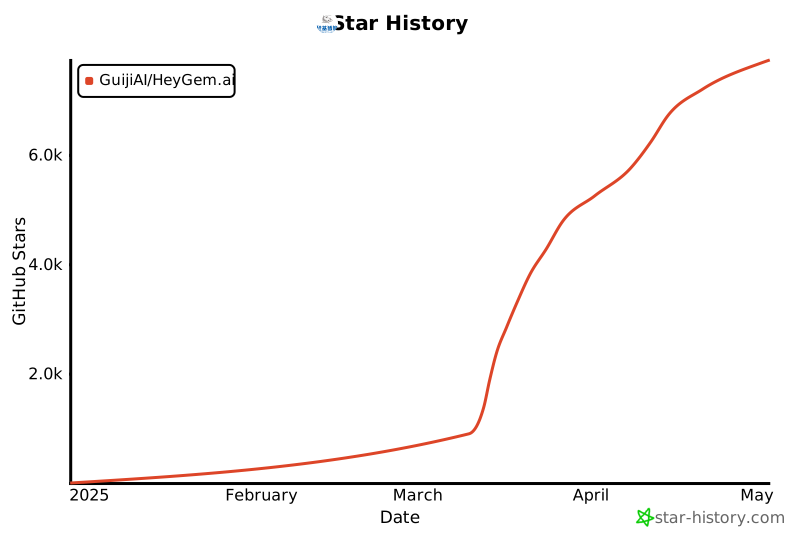](https://www.star-history.com/#GuijiAI/HeyGem.ai&Date)
Heygem is a fully offline video synthesis tool designed for Windows systems that can precisely clone your appearance and voice, digitalizing your image. You can create videos by driving virtual avatars through text and voice. No internet connection is required, protecting your privacy while enjoying convenient and efficient digital experiences.
- Core Features
- Precise Appearance and Voice Cloning: Using advanced AI algorithms to capture human facial features with high precision, including facial features, contours, etc., to build realistic virtual models. It can also precisely clone voices, capturing and reproducing subtle characteristics of human voices, supporting various voice parameter settings to create highly similar cloning effects.
- Text and Voice-Driven Virtual Avatars: Understanding text content through natural language processing technology, converting text into natural and fluent speech to drive virtual avatars. Voice input can also be used directly, allowing virtual avatars to perform corresponding actions and facial expressions based on the rhythm and intonation of the voice, making the virtual avatar's performance more natural and vivid.
- Efficient Video Synthesis: Highly synchronizing digital human video images with sound, achieving natural and smooth lip-syncing, intelligently optimizing audio-video synchronization effects.
- Multi-language Support: Scripts support eight languages - English, Japanese, Korean, Chinese, French, German, Arabic, and Spanish.
- Key Advantages
- Fully Offline Operation: No internet connection required, effectively protecting user privacy, allowing users to create in a secure, independent environment, avoiding potential data leaks during network transmission.
- User-Friendly: Clean and intuitive interface, easy to use even for beginners with no technical background, quickly mastering the software's usage to start their digital human creation journey.
- Multiple Model Support: Supports importing multiple models and managing them through one-click startup packages, making it convenient for users to choose suitable models based on different creative needs and application scenarios.
- Technical Support
- Voice Cloning Technology: Using advanced technologies like artificial intelligence to generate similar or identical voices based on given voice samples, covering context, intonation, speed, and other aspects of speech.
- Automatic Speech Recognition: Technology that converts human speech vocabulary content into computer-readable input (text format), enabling computers to "understand" human speech.
- Computer Vision Technology: Used in video synthesis for visual processing, including facial recognition and lip movement analysis, ensuring virtual avatar lip movements match voice and text content.
## Dependencies
1. Nodejs 18
2. Docker Images
- docker pull guiji2025/fun-asr
- docker pull guiji2025/fish-speech-ziming
- docker pull guiji2025/heygem.ai
## Windows Installation
### Prerequisites
1. Must have D Drive: Mainly used for storing digital human and project data
- Free space requirement: More than 30GB
2. C Drive: Used for storing service image files
- Free space requirement: More than 100GB
- If less than 100GB is available, after installing Docker, you can choose a different disk folder with more than 100GB of remaining space at the location shown below.

3. System Requirements:
- Currently supports Windows 10 19042.1526 or higher
4. Recommended Configuration:
- CPU: 13th Gen Intel Core i5-13400F
- Memory: 32GB
- Graphics Card: RTX 4070
5. Ensure you have an NVIDIA graphics card with properly installed drivers
NVIDIA driver download link: https://www.nvidia.cn/drivers/lookup/

### Installing Windows Docker
1. Use the command `wsl --list --verbose` to check if WSL is installed. If it shows as below, it's already installed and no further installation is needed.

> - WSL installation command: `wsl --install`
> - May fail due to network issues, try multiple times
> - During installation, you'll need to set and remember a new username and password
2. Update WSL using `wsl --update`.

3. [Download Docker for Windows](https://www.docker.com/), choose the appropriate installation package based on your CPU architecture.
4. When you see this interface, installation is successful.

5. Run Docker

6. Accept the agreement and skip login on first run


### Installing the Server
Installation using Docker, docker-compose as follows:
1. The `docker-compose.yml` file is in the `/deploy` directory.
2. Execute `docker-compose up -d` in the `/deploy` directory, if you want to use the lite version, execute `docker-compose -f docker-compose-lite.yml up -d`
3. Wait patiently (about half an hour, speed depends on network), download will consume about 70GB of traffic, make sure to use WiFi
4. When you see three services in Docker, it indicates success (the lite version has only one service `heygem-gen-video`)

### Client
1. Directly download the [officially built installation package](https://github.com/GuijiAI/HeyGem.ai/releases)
2. Double-click `HeyGem-x.x.x-setup.exe` to install
## Ubuntu 22.04 Installation
### Recommended Configuration
- CPU: 13th Gen Intel Core i5-13400F
- Memory: 32GB or more (required)
- Graphics Card: RTX-4070 (ensure you have an NVIDIA graphics card and the driver is correctly installed)
- Hard Disk: More than 100GB of free space
### Install Docker
> First, check if Docker is installed using `docker --version`. If it is installed, skip the following steps.
1. Directly download the [officially built installation package](https://github.com/GuijiAI/HeyGem.ai/releases) for the Linux version
2. Double-click `HeyGem-x.x.x.AppImage` to launch, no installation required
> Reminder: On Ubuntu systems, if you are using the `root` user to access the desktop, double-clicking `HeyGem-x.x.x.AppImage` may not work. You need to execute `./HeyGem-x.x.x.AppImage --no-sandbox` in the terminal, adding the `--no-sandbox` parameter.
## Open APIs
We have opened APIs for model training and video synthesis. After Docker starts, several ports will be exposed locally, accessible through `http://127.0.0.1`.
For specific code, refer to:
- src/main/service/model.js
- src/main/service/video.js
- src/main/service/voice.js
### Model Training
1. Separate video into silent video + audio
2. Place audio in `D:\heygem_data\voice\data`
> `D:\heygem_data\voice\data` is agreed with the `guiji2025/fish-speech-ziming` service, can be modified in docker-compose
3. Call the `http://127.0.0.1:18180/v1/preprocess_and_tran` interface
> Parameter example:
>
> ```json
> {
> "format": ".wav",
> "reference_audio": "xxxxxx/xxxxx.wav",
> "lang": "zh"
> }
> ```
>
> Response example:
>
> ```json
> {
> "asr_format_audio_url": "xxxx/x/xxx/xxx.wav",
> "reference_audio_text": "xxxxxxxxxxxx"
> }
> ```
>
> **Record the response results as they will be needed for subsequent audio synthesis**
### Audio Synthesis
Interface: `http://127.0.0.1:18180/v1/invoke`
```json
// Request parameters
{
"speaker": "{uuid}", // A unique UUID
"text": "xxxxxxxxxx", // Text content to synthesize
"format": "wav", // Fixed parameter
"topP": 0.7, // Fixed parameter
"max_new_tokens": 1024, // Fixed parameter
"chunk_length": 100, // Fixed parameter
"repetition_penalty": 1.2, // Fixed parameter
"temperature": 0.7, // Fixed parameter
"need_asr": false, // Fixed parameter
"streaming": false, // Fixed parameter
"is_fixed_seed": 0, // Fixed parameter
"is_norm": 0, // Fixed parameter
"reference_audio": "{voice.asr_format_audio_url}", // Return value from previous "Model Training" step
"reference_text": "{voice.reference_audio_text}" // Return value from previous "Model Training" step
}
```
### Video Synthesis
- Synthesis interface: `http://127.0.0.1:8383/easy/submit`
```json
// Request parameters
{
"audio_url": "{audioPath}", // Audio path
"video_url": "{videoPath}", // Video path
"code": "{uuid}", // Unique key
"chaofen": 0, // Fixed value
"watermark_switch": 0, // Fixed value
"pn": 1 // Fixed value
}
```
- Progress query: `http://127.0.0.1:8383/easy/query?code=${taskCode}`
> GET request, the parameter `taskCode` is the `code` from the synthesis interface input above
## Self-Check Steps Before Asking Questions
1. Check if all three services are in Running status

2. Confirm that your machine has an NVIDIA graphics card and drivers are correctly installed.
All computing power for this project is local. The three services won't start without an NVIDIA graphics card or proper drivers.
3. Ensure both server and client are updated to the latest version. The project is newly open-sourced, the community is very active, and updates are frequent. Your issue might have been resolved in a new version.
- Server: Go to `/deploy` directory and re-execute `docker-compose up -d`
- Client: `pull` code and re-`build`
4. [GitHub Issues](https://github.com/GuijiAI/HeyGem.ai/issues) are continuously updated, issues are being resolved and closed daily. Check frequently, your issue might already be resolved.
## Question Template
1. Problem Description
Describe the reproduction steps in detail, with screenshots if possible.
2. Provide Error Logs
- How to get client logs:

- Server logs:
Find the key location, or click on our three Docker services, and "Copy" as shown below.

## Contact Us
```
James@toolwiz.com
```
## License
[LICENSE](./LICENSE)
## Acknowledgments
- ASR based on [fun-asr](https://github.com/modelscope/FunASR)
- TTS based on [fish-speech-ziming](https://github.com/fishaudio/fish-speech)
## Star History
[](https://www.star-history.com/#GuijiAI/HeyGem.ai&Date)