# python-a2a
**Repository Path**: wshmaple/python-a2a
## Basic Information
- **Project Name**: python-a2a
- **Description**: No description available
- **Primary Language**: Python
- **License**: MIT
- **Default Branch**: main
- **Homepage**: None
- **GVP Project**: No
## Statistics
- **Stars**: 0
- **Forks**: 0
- **Created**: 2025-04-23
- **Last Updated**: 2025-04-24
## Categories & Tags
**Categories**: Uncategorized
**Tags**: None
## README
# Python A2A
[](https://pypi.org/project/python-a2a/)
[](https://pypi.org/project/python-a2a/)
[](https://opensource.org/licenses/MIT)
[](https://pepy.tech/project/python-a2a)
[](https://python-a2a.readthedocs.io/en/latest/?badge=latest)
[](https://github.com/psf/black)
[](https://pycqa.github.io/isort/)
[](https://github.com/astral-sh/uv)
[](https://github.com/themanojdesai/python-a2a/stargazers)
**The Definitive Python Implementation of Google's Agent-to-Agent (A2A) Protocol with Model Context Protocol (MCP) Integration**
## 🌟 Overview
Python A2A is a comprehensive, production-ready library for implementing Google's [Agent-to-Agent (A2A) protocol](https://google.github.io/A2A/) with full support for the [Model Context Protocol (MCP)](https://contextual.ai/introducing-mcp/). It provides everything you need to build interoperable AI agent ecosystems that can collaborate seamlessly to solve complex problems.
The A2A protocol establishes a standard communication format that enables AI agents to interact regardless of their underlying implementation, while MCP extends this capability by providing a standardized way for agents to access external tools and data sources. Python A2A makes these protocols accessible with an intuitive API that developers of all skill levels can use to build sophisticated multi-agent systems.
## 📋 What's New in v0.4.X
- **Agent Network System**: Manage and discover multiple agents with the new `AgentNetwork` class
- **Real-time Streaming**: Implement streaming responses with `StreamingClient` for responsive UIs
- **Workflow Engine**: Define complex multi-agent workflows using the new fluent API with conditional branching and parallel execution
- **AI-Powered Router**: Automatically route queries to the most appropriate agent with the `AIAgentRouter`
- **Command Line Interface**: Control your agents from the terminal with the new CLI tool
- **Enhanced Asynchronous Support**: Better async/await support throughout the library
- **New Connection Options**: Improved error handling and retry logic for more robust agent communication
## ✨ Why Choose Python A2A?
- **Complete Implementation**: Fully implements the official A2A specification with zero compromises
- **MCP Integration**: First-class support for Model Context Protocol for powerful tool-using agents
- **Enterprise Ready**: Built for production environments with robust error handling and validation
- **Framework Agnostic**: Works with any Python framework (Flask, FastAPI, Django, etc.)
- **LLM Provider Flexibility**: Native integrations with OpenAI, Anthropic, AWS Bedrock, and more
- **Minimal Dependencies**: Core functionality requires only the `requests` library
- **Excellent Developer Experience**: Comprehensive documentation, type hints, and examples
## 📦 Installation
### Using pip (traditional)
Install the base package with minimal dependencies:
```bash
pip install python-a2a # Only requires requests library
```
Or install with optional components based on your needs:
```bash
# For Flask-based server support
pip install "python-a2a[server]"
# For OpenAI integration
pip install "python-a2a[openai]"
# For Anthropic Claude integration
pip install "python-a2a[anthropic]"
# For AWS-Bedrock integration
pip install "python-a2a[bedrock]"
# For MCP support (Model Context Protocol)
pip install "python-a2a[mcp]"
# For all optional dependencies
pip install "python-a2a[all]"
```
### Using UV (recommended)
[UV](https://github.com/astral-sh/uv) is a modern Python package management tool that's faster and more reliable than pip. To install with UV:
```bash
# Install UV if you don't have it already
curl -LsSf https://astral.sh/uv/install.sh | sh
# Install the base package
uv install python-a2a
# For Flask-based server support
uv install "python-a2a[server]"
# For OpenAI integration
uv install "python-a2a[openai]"
# For Anthropic Claude integration
uv install "python-a2a[anthropic]"
# For AWS-Bedrock integration
uv install "python-a2a[bedrock]"
# For MCP support (Model Context Protocol)
uv install "python-a2a[mcp]"
# For all optional dependencies
uv install "python-a2a[all]"
```
### Development Installation
For development, UV is recommended for its speed:
```bash
# Clone the repository
git clone https://github.com/themanojdesai/python-a2a.git
cd python-a2a
# Create a virtual environment and install development dependencies
uv venv
source .venv/bin/activate # On Windows: .venv\Scripts\activate
uv pip install -e ".[dev]"
```
> 💡 **Tip**: Click the code blocks to copy them to your clipboard.
## 🚀 Quick Start Examples
### 1. Create a Simple A2A Agent with Skills
```python
from python_a2a import A2AServer, skill, agent, run_server, TaskStatus, TaskState
@agent(
name="Weather Agent",
description="Provides weather information",
version="1.0.0"
)
class WeatherAgent(A2AServer):
@skill(
name="Get Weather",
description="Get current weather for a location",
tags=["weather", "forecast"]
)
def get_weather(self, location):
"""Get weather for a location."""
# Mock implementation
return f"It's sunny and 75°F in {location}"
def handle_task(self, task):
# Extract location from message
message_data = task.message or {}
content = message_data.get("content", {})
text = content.get("text", "") if isinstance(content, dict) else ""
if "weather" in text.lower() and "in" in text.lower():
location = text.split("in", 1)[1].strip().rstrip("?.")
# Get weather and create response
weather_text = self.get_weather(location)
task.artifacts = [{
"parts": [{"type": "text", "text": weather_text}]
}]
task.status = TaskStatus(state=TaskState.COMPLETED)
else:
task.status = TaskStatus(
state=TaskState.INPUT_REQUIRED,
message={"role": "agent", "content": {"type": "text",
"text": "Please ask about weather in a specific location."}}
)
return task
# Run the server
if __name__ == "__main__":
agent = WeatherAgent()
run_server(agent, port=5000)
```
### 2. Build an Agent Network with Multiple Agents
```python
from python_a2a import AgentNetwork, A2AClient, AIAgentRouter
# Create an agent network
network = AgentNetwork(name="Travel Assistant Network")
# Add agents to the network
network.add("weather", "http://localhost:5001")
network.add("hotels", "http://localhost:5002")
network.add("attractions", "http://localhost:5003")
# Create a router to intelligently direct queries to the best agent
router = AIAgentRouter(
llm_client=A2AClient("http://localhost:5000/openai"), # LLM for making routing decisions
agent_network=network
)
# Route a query to the appropriate agent
agent_name, confidence = router.route_query("What's the weather like in Paris?")
print(f"Routing to {agent_name} with {confidence:.2f} confidence")
# Get the selected agent and ask the question
agent = network.get_agent(agent_name)
response = agent.ask("What's the weather like in Paris?")
print(f"Response: {response}")
# List all available agents
print("\nAvailable Agents:")
for agent_info in network.list_agents():
print(f"- {agent_info['name']}: {agent_info['description']}")
```
### 3. Stream Responses for Real-time Updates
```python
import asyncio
from python_a2a import StreamingClient, Message, TextContent, MessageRole
from python_a2a import Task, TaskStatus, TaskState
async def main():
# Create a streaming client
client = StreamingClient("http://localhost:5000")
# Stream a simple message
message = Message(
content=TextContent(text="Write a short story about space exploration"),
role=MessageRole.USER
)
print("Streaming response:")
print("-" * 50)
# Define a callback function to process chunks
def print_chunk(chunk):
print(chunk, end="", flush=True)
# Stream the response with the callback
async for chunk in client.stream_response(message, chunk_callback=print_chunk):
pass # Chunks are handled by the callback
print("\n" + "-" * 50)
# Alternatively, create and stream a task
task = await client.create_task("Explain quantum computing in simple terms")
print("\nStreaming task response:")
print("-" * 50)
# Stream the task execution
async for chunk in client.stream_task(task, chunk_callback=lambda c: print(c.get("text", ""), end="", flush=True)):
pass
if __name__ == "__main__":
asyncio.run(main())
```
### 4. Define Complex Workflows with Multiple Agents
```python
from python_a2a import AgentNetwork, Flow, AIAgentRouter
import asyncio
async def main():
# Create an agent network
network = AgentNetwork()
network.add("weather", "http://localhost:5001")
network.add("recommendations", "http://localhost:5002")
network.add("booking", "http://localhost:5003")
# Create a router
router = AIAgentRouter(
llm_client=network.get_agent("weather"), # Using one agent as LLM for routing
agent_network=network
)
# Define a workflow with conditional logic
flow = Flow(agent_network=network, router=router, name="Travel Planning Workflow")
# Start by getting the weather
flow.ask("weather", "What's the weather in {destination}?")
# Conditionally branch based on weather
flow.if_contains("sunny")
# If sunny, recommend outdoor activities
flow.ask("recommendations", "Recommend outdoor activities in {destination}")
# End the condition and add an else branch
flow.else_branch()
# If not sunny, recommend indoor activities
flow.ask("recommendations", "Recommend indoor activities in {destination}")
# End the if-else block
flow.end_if()
# Add parallel processing steps
(flow.parallel()
.ask("booking", "Find hotels in {destination}")
.branch()
.ask("booking", "Find restaurants in {destination}")
.end_parallel())
# Execute the workflow with initial context
result = await flow.run({
"destination": "Paris",
"travel_dates": "June 12-20"
})
print("Workflow result:")
print(result)
if __name__ == "__main__":
asyncio.run(main())
```
### 5. Use the Command Line Interface
```bash
# Start an OpenAI-powered agent
a2a openai --api-key YOUR_API_KEY --model gpt-4 --port 5000
# In another terminal, send a message to the agent
a2a send http://localhost:5000 "Explain quantum computing in simple terms"
# Stream a response with real-time updates
a2a stream http://localhost:5000 "Write a short story about aliens visiting Earth"
# Start an MCP server with custom tools
a2a mcp-serve --name "Calculator MCP" --script calculator_tools.py --port 5001
# Create an agent network
a2a network --add weather=http://localhost:5001 recommendations=http://localhost:5002 --save network.json
# Run a workflow from a script
a2a workflow --script travel_workflow.py --agents weather=http://localhost:5001 recommendations=http://localhost:5002
```
## 🧩 Core Features
### Agent Networks
Python A2A now includes a powerful system for managing multiple agents:
```python
from python_a2a import AgentNetwork, A2AClient
# Create a network of agents
network = AgentNetwork(name="Medical Assistant Network")
# Add agents in different ways
network.add("diagnosis", "http://localhost:5001") # From URL
network.add("medications", A2AClient("http://localhost:5002")) # From client instance
# Discover agents from a list of URLs
discovered_count = network.discover_agents([
"http://localhost:5003",
"http://localhost:5004",
"http://localhost:5005"
])
print(f"Discovered {discovered_count} new agents")
# List all agents in the network
for agent_info in network.list_agents():
print(f"Agent: {agent_info['name']}")
print(f"URL: {agent_info['url']}")
if 'description' in agent_info:
print(f"Description: {agent_info['description']}")
print()
# Get a specific agent
agent = network.get_agent("diagnosis")
response = agent.ask("What are the symptoms of the flu?")
```
### Real-time Streaming
Get real-time responses from agents with streaming support:
```python
import asyncio
from python_a2a import StreamingClient
async def main():
client = StreamingClient("http://localhost:5000")
# Define a callback to process each chunk as it arrives
def handle_chunk(chunk):
if isinstance(chunk, str):
print(chunk, end="", flush=True)
elif isinstance(chunk, dict) and "text" in chunk:
print(chunk["text"], end="", flush=True)
# Stream a response in real-time
print("Generating a story...")
async for chunk in client.stream_response(
"Write me a short story about a robot that learns to paint",
chunk_callback=handle_chunk
):
pass # Processing is done in the callback
print("\nDone!")
if __name__ == "__main__":
asyncio.run(main())
```
### Workflow Engine
The new workflow engine allows you to define complex agent interactions:
```python
from python_a2a import AgentNetwork, Flow
import asyncio
async def main():
# Set up agent network
network = AgentNetwork()
network.add("research", "http://localhost:5001")
network.add("summarizer", "http://localhost:5002")
network.add("factchecker", "http://localhost:5003")
# Define a workflow for research report generation
flow = Flow(agent_network=network, name="Research Report Workflow")
# First, gather initial research
flow.ask("research", "Research the latest developments in {topic}")
# Then process the results in parallel
parallel_results = (flow.parallel()
# Branch 1: Create a summary
.ask("summarizer", "Summarize this research: {latest_result}")
# Branch 2: Verify key facts
.branch()
.ask("factchecker", "Verify these key facts: {latest_result}")
# End parallel processing and collect results
.end_parallel(max_concurrency=2))
# Extract insights based on verification results
flow.execute_function(
lambda results, context: f"Summary: {results['1']}\nVerified Facts: {results['2']}",
parallel_results
)
# Execute the workflow
result = await flow.run({
"topic": "quantum computing advancements in 2025"
})
print(result)
if __name__ == "__main__":
asyncio.run(main())
```
### AI-Powered Router
Intelligent routing to select the best agent for each query:
```python
from python_a2a import AgentNetwork, AIAgentRouter, A2AClient
import asyncio
async def main():
# Create a network with specialized agents
network = AgentNetwork()
network.add("math", "http://localhost:5001")
network.add("history", "http://localhost:5002")
network.add("science", "http://localhost:5003")
network.add("literature", "http://localhost:5004")
# Create a router using an LLM for decision making
router = AIAgentRouter(
llm_client=A2AClient("http://localhost:5000/openai"),
agent_network=network
)
# Sample queries to route
queries = [
"What is the formula for the area of a circle?",
"Who wrote The Great Gatsby?",
"When did World War II end?",
"How does photosynthesis work?",
"What are Newton's laws of motion?"
]
# Route each query to the best agent
for query in queries:
agent_name, confidence = router.route_query(query)
agent = network.get_agent(agent_name)
print(f"Query: {query}")
print(f"Routed to: {agent_name} (confidence: {confidence:.2f})")
# Get response from the selected agent
response = agent.ask(query)
print(f"Response: {response[:100]}...\n")
if __name__ == "__main__":
asyncio.run(main())
```
### Command Line Interface
The new CLI provides easy access to agent functionality:
```bash
# Send a message to an agent
a2a send http://localhost:5000 "What is artificial intelligence?"
# Stream a response in real-time
a2a stream http://localhost:5000 "Generate a step-by-step tutorial for making pasta"
# Start an OpenAI-powered A2A server
a2a openai --model gpt-4 --system-prompt "You are a helpful coding assistant"
# Start an Anthropic-powered A2A server
a2a anthropic --model claude-3-opus-20240229 --system-prompt "You are a friendly AI teacher"
# Start an MCP server with tools
a2a mcp-serve --name "Data Analysis MCP" --port 5001 --script analysis_tools.py
# Start an MCP-enabled A2A agent
a2a mcp-agent --servers data=http://localhost:5001 calc=http://localhost:5002
# Call an MCP tool directly
a2a mcp-call http://localhost:5001 analyze_csv --params file=data.csv columns=price,date
# Manage agent networks
a2a network --add weather=http://localhost:5001 travel=http://localhost:5002 --save network.json
# Run a workflow from a script
a2a workflow --script research_workflow.py --context initial_data.json
```
## 📖 Architecture & Design Principles
Python A2A is built on three core design principles:
1. **Protocol First**: Adheres strictly to the A2A and MCP protocol specifications for maximum interoperability
2. **Modularity**: All components are designed to be composable and replaceable
3. **Progressive Enhancement**: Start simple and add complexity only as needed
The architecture consists of seven main components:
- **Models**: Data structures representing A2A messages, tasks, and agent cards
- **Client**: Components for sending messages to A2A agents and managing agent networks
- **Server**: Components for building A2A-compatible agents
- **MCP**: Tools for implementing Model Context Protocol servers and clients
- **Workflow**: Engine for orchestrating complex agent interactions
- **Utils**: Helper functions for common tasks
- **CLI**: Command-line interface for interacting with agents
## 🗺️ Use Cases
Python A2A can be used to build a wide range of AI systems:
### Research & Development
- **Experimentation Framework**: Easily swap out different LLM backends while keeping the same agent interface
- **Benchmark Suite**: Compare performance of different agent implementations on standardized tasks
- **Streaming Research Assistants**: Create responsive research tools with real-time output using streaming
### Enterprise Systems
- **AI Orchestration**: Coordinate multiple AI agents across different departments using agent networks
- **Legacy System Integration**: Wrap legacy systems with A2A interfaces for AI accessibility
- **Complex Workflows**: Create sophisticated business processes with multi-agent workflows and conditional branching
### Customer-Facing Applications
- **Multi-Stage Assistants**: Break complex user queries into subtasks handled by specialized agents
- **Tool-Using Agents**: Connect LLMs to database agents, calculation agents, and more using MCP
- **Real-time Chat Interfaces**: Build responsive chat applications with streaming response support
### Education & Training
- **AI Education**: Create educational systems that demonstrate agent collaboration
- **Simulation Environments**: Build simulated environments where multiple agents interact
- **Educational Workflows**: Design step-by-step learning processes with feedback loops
## 🛠️ Real-World Examples
### Multi-Agent Customer Support System
Let's build an advanced customer support system using the new features in Python A2A 0.4.0:
```python
from python_a2a import A2AServer, AgentNetwork, AIAgentRouter, Flow, StreamingClient
from python_a2a.mcp import FastMCP, A2AMCPAgent, text_response
import asyncio
# Create specialized MCP servers for different functions
product_db_mcp = FastMCP(name="Product Database")
@product_db_mcp.tool()
async def search_products(query: str) -> dict:
"""Search for products in the database."""
# In a real implementation, this would query a database
return {"products": [{"id": 101, "name": "Super Laptop", "price": 999.99}]}
@product_db_mcp.tool()
async def get_product_details(product_id: int) -> dict:
"""Get detailed information about a product."""
return {
"id": product_id,
"name": "Super Laptop",
"description": "Powerful laptop with 16GB RAM and 512GB SSD",
"price": 999.99,
"availability": "In Stock"
}
# Create specialized agents for different functions
@agent(name="Support Agent", description="Customer support specialist")
class SupportAgent(A2AServer, A2AMCPAgent):
def __init__(self):
A2AServer.__init__(self)
A2AMCPAgent.__init__(
self,
name="Support Agent",
description="Handles customer inquiries",
mcp_servers={"products": product_db_mcp}
)
async def handle_task_async(self, task):
# Process customer query
text = task.message.get("content", {}).get("text", "")
if "product" in text.lower():
# Search for products
search_results = await self.call_mcp_tool("products", "search_products", query=text)
if search_results.get("products"):
product = search_results["products"][0]
details = await self.call_mcp_tool("products", "get_product_details", product_id=product["id"])
task.artifacts = [{
"parts": [{"type": "text", "text": f"I found this product: {details['name']}\n\n"
f"Price: ${details['price']}\n"
f"Description: {details['description']}\n"
f"Availability: {details['availability']}"}]
}]
else:
task.artifacts = [{
"parts": [{"type": "text", "text": "I couldn't find any products matching your query."}]
}]
else:
task.artifacts = [{
"parts": [{"type": "text", "text": "How can I help you with our products today?"}]
}]
return task
# Create a network of agents
async def setup_agent_network():
network = AgentNetwork(name="Customer Support Network")
# Add agents to the network
network.add("support", "http://localhost:5001")
network.add("billing", "http://localhost:5002")
network.add("technical", "http://localhost:5003")
# Create a router
router = AIAgentRouter(
llm_client=network.get_agent("support"),
agent_network=network
)
# Define a workflow for handling customer inquiries
flow = Flow(agent_network=network, router=router, name="Customer Support Workflow")
# Route the initial query
flow.auto_route("{customer_query}")
# If the query is about a technical issue, follow up with specific questions
flow.if_contains("technical")
flow.ask("technical", "What operating system are you using? Please provide details about {latest_result}")
flow.else_if_contains("billing")
flow.ask("billing", "Can you provide your order number related to {latest_result}")
flow.else_branch()
flow.ask("support", "Thank you for your query. Let me check on {latest_result}")
flow.end_if()
return network, flow
# Main customer support application
async def main():
# Set up the agent network and workflow
network, workflow = await setup_agent_network()
# Create a streaming client to get real-time responses
client = StreamingClient("http://localhost:5001")
# Simulate a customer query
print("Customer: I need information about your laptop products")
# Stream the response
print("\nSupport Agent (streaming):")
def print_chunk(chunk):
print(chunk, end="", flush=True)
# Create and stream a task
task = await client.create_task("I need information about your laptop products")
async for chunk in client.stream_task(task, chunk_callback=print_chunk):
pass # Chunks are handled by the callback
print("\n\nNext Steps:")
# Run the workflow with the customer query
result = await workflow.run({
"customer_query": "I'm having technical problems with my Super Laptop"
})
print(result)
# Run the application
if __name__ == "__main__":
# In a real application, you would start each agent in a separate process
asyncio.run(main())
```
## 📚 Documentation
Comprehensive documentation for Python A2A is now available at [ReadTheDocs](https://python-a2a.readthedocs.io/en/latest/index.html).
### Building Documentation Locally
To build the documentation locally:
1. Install the required dependencies:
```bash
pip install -e ".[all]"
pip install -r docs/requirements.txt
```
2. Navigate to the `docs` directory:
```bash
cd docs
```
3. Build the HTML documentation:
```bash
make html
```
4. Open the generated documentation in your browser:
```bash
# On macOS
open _build/html/index.html
# On Linux
xdg-open _build/html/index.html
# On Windows
start _build/html/index.html
```
### Contributing to Documentation
If you want to contribute to the documentation, please follow the structure in the `docs` directory and write documentation in reStructuredText (.rst) format. The documentation system uses Sphinx and is automatically built and deployed to ReadTheDocs when changes are pushed to the main branch.
## 🔄 Related Projects
Here are some related projects in the AI agent and interoperability space:
- [**Google A2A**](https://github.com/google/A2A) - The official Google A2A protocol specification
- [**AutoGen**](https://github.com/microsoft/autogen) - Microsoft's framework for multi-agent conversations
- [**LangChain**](https://github.com/langchain-ai/langchain) - Framework for building applications with LLMs
- [**CrewAI**](https://github.com/joaomdmoura/crewAI) - Framework for orchestrating role-playing agents
- [**MCP**](https://github.com/contextco/mcp) - The Model Context Protocol for tool-using agents
## 👥 Contributors
Thanks to all our contributors!
 Want to contribute? Check out our [contributing guide](https://python-a2a.readthedocs.io/en/latest/contributing.html).
## 🤝 Community & Support
- **[GitHub Issues](https://github.com/themanojdesai/python-a2a/issues)**: Report bugs or request features
- **[GitHub Discussions](https://github.com/themanojdesai/python-a2a/discussions)**: Ask questions and share ideas
- **[Contributing Guide](https://python-a2a.readthedocs.io/en/latest/contributing.html)**: Learn how to contribute to the project
- **[ReadTheDocs](https://python-a2a.readthedocs.io/en/latest/)**: Visit our documentation site
## 📝 Citing this Project
If you use Python A2A in your research or academic work, please cite it as:
```
@software{desai2025pythona2a,
author = {Desai, Manoj},
title = {Python A2A: A Comprehensive Implementation of the Agent-to-Agent Protocol},
url = {https://github.com/themanojdesai/python-a2a},
version = {0.4.0},
year = {2025},
}
```
## ⭐ Star This Repository
If you find this library useful, please consider giving it a star on GitHub! It helps others discover the project and motivates further development.
[](https://github.com/themanojdesai/python-a2a/stargazers)
### Star History
[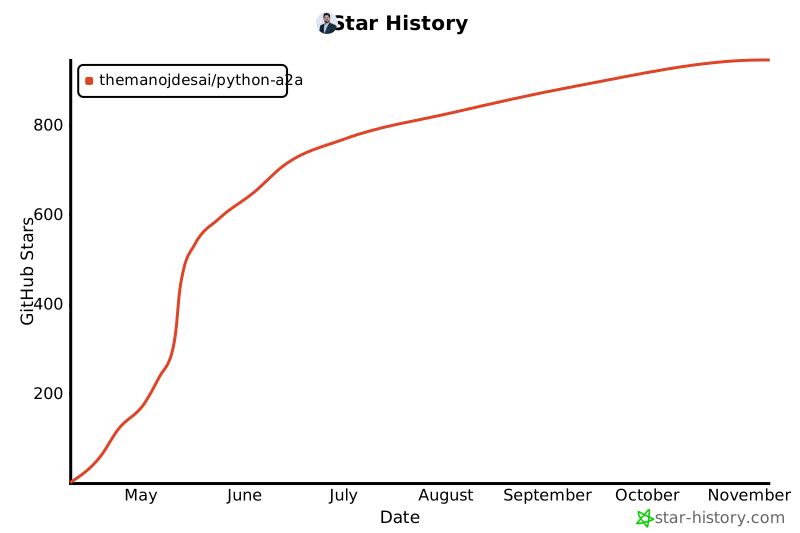](https://star-history.com/#themanojdesai/python-a2a&Date)
## 🙏 Acknowledgements
- The [Google A2A team](https://github.com/google/A2A) for creating the A2A protocol
- The [Contextual AI team](https://contextual.ai/) for the Model Context Protocol
- All our [contributors](https://github.com/themanojdesai/python-a2a/graphs/contributors) for their valuable input
## 👨💻 Author
**Manoj Desai**
- GitHub: [themanojdesai](https://github.com/themanojdesai)
- LinkedIn: [themanojdesai](https://www.linkedin.com/in/themanojdesai/)
- Medium: [@the_manoj_desai](https://medium.com/@the_manoj_desai)
## 📄 License
This project is licensed under the MIT License - see the [LICENSE](LICENSE) file for details.
---
Made with ❤️ by [Manoj Desai](https://github.com/themanojdesai)
Want to contribute? Check out our [contributing guide](https://python-a2a.readthedocs.io/en/latest/contributing.html).
## 🤝 Community & Support
- **[GitHub Issues](https://github.com/themanojdesai/python-a2a/issues)**: Report bugs or request features
- **[GitHub Discussions](https://github.com/themanojdesai/python-a2a/discussions)**: Ask questions and share ideas
- **[Contributing Guide](https://python-a2a.readthedocs.io/en/latest/contributing.html)**: Learn how to contribute to the project
- **[ReadTheDocs](https://python-a2a.readthedocs.io/en/latest/)**: Visit our documentation site
## 📝 Citing this Project
If you use Python A2A in your research or academic work, please cite it as:
```
@software{desai2025pythona2a,
author = {Desai, Manoj},
title = {Python A2A: A Comprehensive Implementation of the Agent-to-Agent Protocol},
url = {https://github.com/themanojdesai/python-a2a},
version = {0.4.0},
year = {2025},
}
```
## ⭐ Star This Repository
If you find this library useful, please consider giving it a star on GitHub! It helps others discover the project and motivates further development.
[](https://github.com/themanojdesai/python-a2a/stargazers)
### Star History
[](https://star-history.com/#themanojdesai/python-a2a&Date)
## 🙏 Acknowledgements
- The [Google A2A team](https://github.com/google/A2A) for creating the A2A protocol
- The [Contextual AI team](https://contextual.ai/) for the Model Context Protocol
- All our [contributors](https://github.com/themanojdesai/python-a2a/graphs/contributors) for their valuable input
## 👨💻 Author
**Manoj Desai**
- GitHub: [themanojdesai](https://github.com/themanojdesai)
- LinkedIn: [themanojdesai](https://www.linkedin.com/in/themanojdesai/)
- Medium: [@the_manoj_desai](https://medium.com/@the_manoj_desai)
## 📄 License
This project is licensed under the MIT License - see the [LICENSE](LICENSE) file for details.
---
Made with ❤️ by [Manoj Desai](https://github.com/themanojdesai)