# webkubectl
**Repository Path**: yllan/KubeOperator-webkubectl
## Basic Information
- **Project Name**: webkubectl
- **Description**: No description available
- **Primary Language**: Unknown
- **License**: Apache-2.0
- **Default Branch**: master
- **Homepage**: None
- **GVP Project**: No
## Statistics
- **Stars**: 1
- **Forks**: 0
- **Created**: 2022-01-05
- **Last Updated**: 2022-01-07
## Categories & Tags
**Categories**: Uncategorized
**Tags**: None
## README
[英文 README.md](https://github.com/KubeOperator/webkubectl/blob/master/README.md)
#  Web Kubectl - 在Web浏览器中运行kubectl命令
[](https://hub.docker.com/r/kubeoperator/webkubectl)
[](https://goreportcard.com/report/github.com/kubeoperator/webkubectl)
[](https://github.com/KubeOperator/webkubectl/actions/workflows/publish-to-dockerhub.yml)




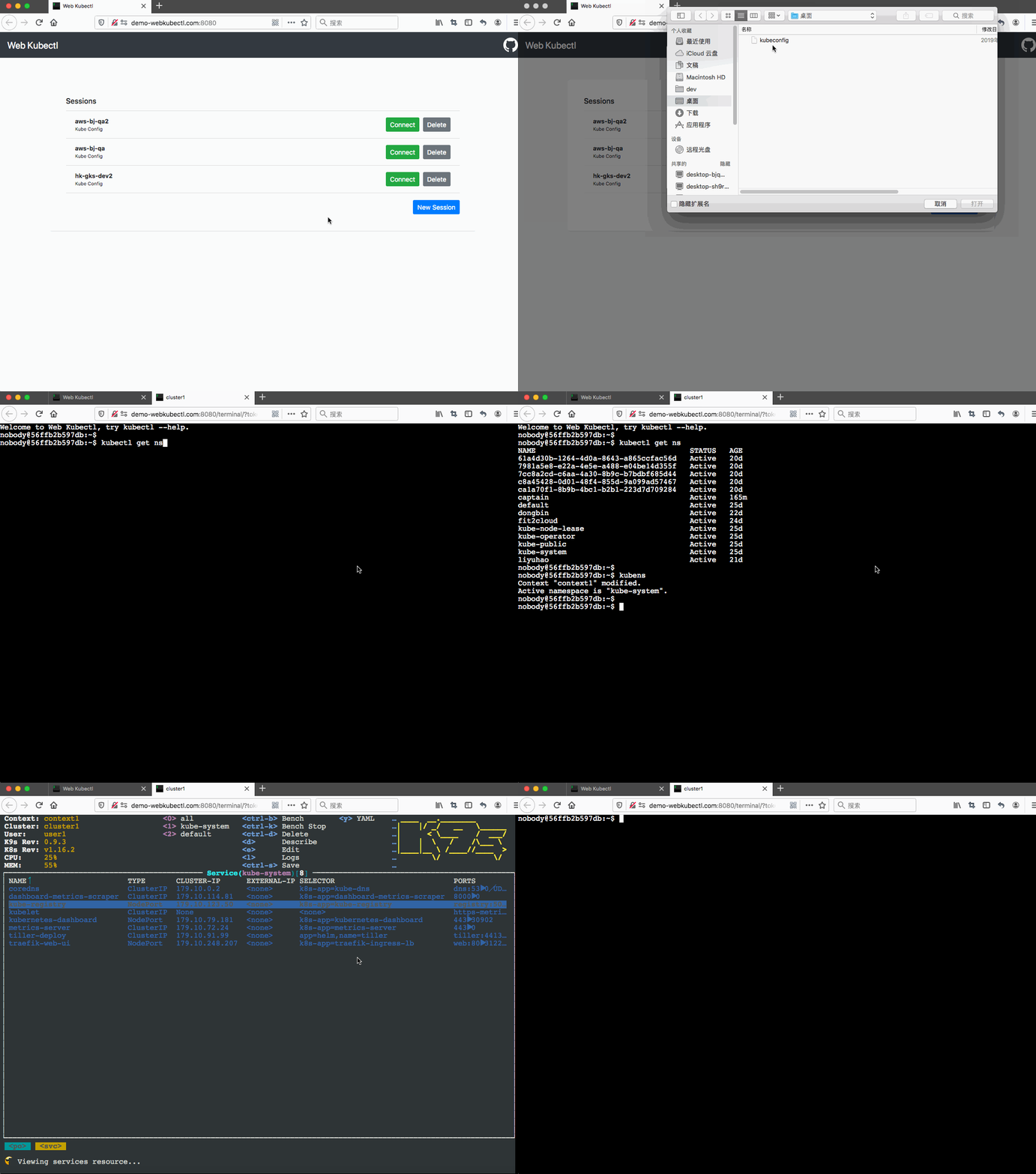
# 目标
Web Kubectl帮助您管理kubernetes集群的凭据,并在Web浏览器中运行kubectl命令,从而不必在本地PC或其他服务器上安装kubectl,并且Web Kubectl也适用于团队多人同时使用,此外还可以使用API集成到您自己的应用中。
# 优势
- **支持多用户和多个Kubernetes集群**:一个Web Kubectl部署可用于一个团队,尽管团队各个成员都在同时连接不同的Kubernetes集群、使用不同的Kubernetes权限。
- **会话隔离**:所有的在线会话都是隔离的,每个会话都有自己的命名空间和存储空间,对其他存储空间不可见。
- **支持[kubeconfig](https://kubernetes.io/docs/concepts/configuration/organize-cluster-access-kubeconfig/)文件和[bearer token](https://kubernetes.io/docs/reference/access-authn-authz/authentication/#service-account-tokens)**:您可以提供kubeconfig文件或bearer token以通过Web Kubectl连接Kubernetes集群。
- **易于使用和集成**:使用Web Kubectl首页可以快速入门,或者使用API与您的应用集成。
- **管理VPC中的Kubernetes集群**:通过Web Kubectl您可以管理那些在VPC中、您自己的电脑无法直接连接的Kubernetes集群。
```sh
_______________________________________________________________________
| Local Network | DMZ | VPC/Datacenter |
| | | |
| | _______________ | ---------------- |
| --------------- | | | /~~~~~>| Kubernetes A | |
| | Your Laptop |~~~~~~~>| Web Kubectl | / | ---------------- |
| --------------- | | | \ | |
| | --------------- \ | ---------------- |
| | \~~~~>| Kubernetes B | |
| | | ---------------- |
-----------------------------------------------------------------------
```
# 架构
Web Kubectl 使用[webkubectl/gotty](https://github.com/KubeOperator/webkubectl/tree/master/gotty)在Web浏览器中运行基于JavaScript的Shell终端。
当打开一个新会话时,将为该会话创建一个临时Linux命名空间,以确保所有会话都是隔离的,每个会话都有自己的命名空间和存储,同时为当前会话生成.kube/config文件。
会话结束后,临时命名空间和存储将被删除。
# 安装
```sh
$ docker run --name="webkubectl" -p 8080:8080 -d --privileged kubeoperator/webkubectl
```
高级环境变量
| ENV | Type | Default Value | Description|
| :--- | :--- | :---| :---|
| SESSION_STORAGE_SIZE | string | 10M | 单会话的存储大小限制 |
| KUBECTL_INSECURE_SKIP_TLS_VERIFY | bool | true | kubectl命令是否跳过tls验证 |
| GOTTY_OPTIONS | string | --port 8080 --permit-write --permit-arguments | 查看 [Gotty Options](https://github.com/KubeOperator/webkubectl/blob/master/gotty/GOTTY_USAGE.md#options) |
| WELCOME_BANNER | string | Welcome to Web Kubectl, try kubectl --help. | Web终端打开后的欢迎横幅 |
# 使用
## 使用首页
在浏览器中打开下方的网址。
```sh
http://:
```
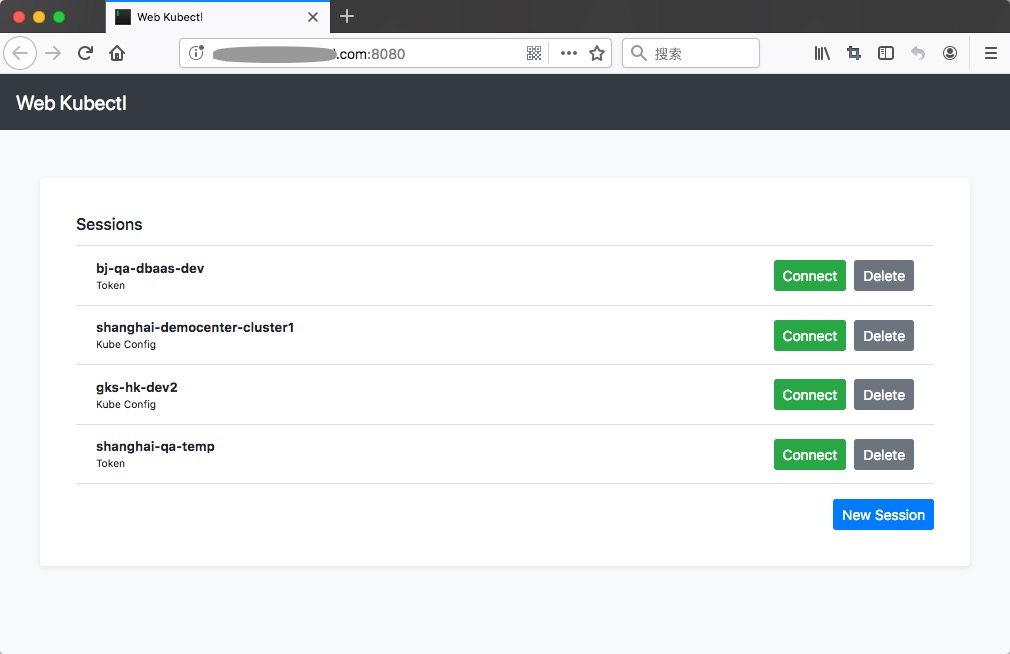
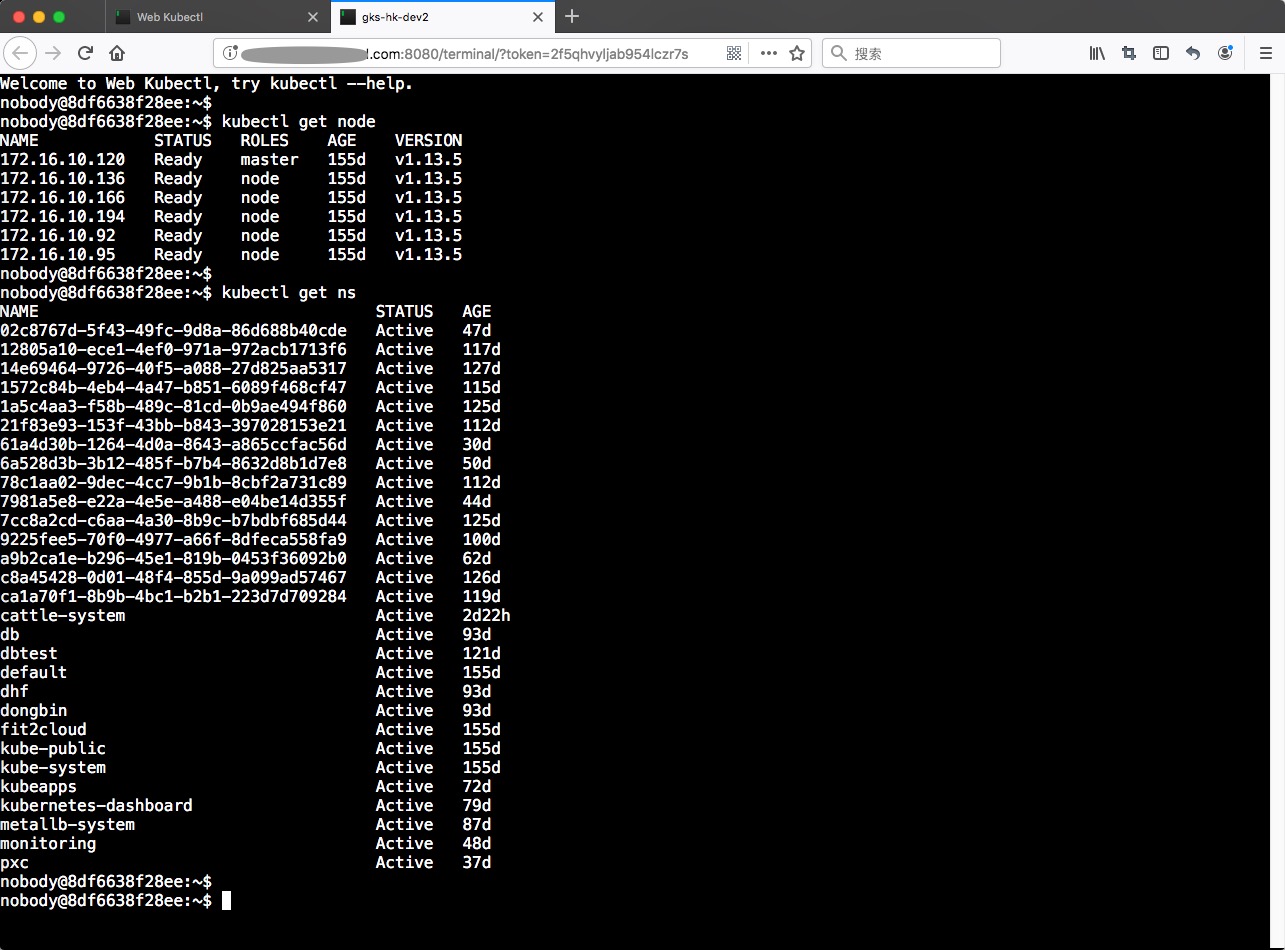
在打开的页面中,您可以管理您自己的kubeconfig文件或bearer token凭据,这些凭据存储在您本地浏览器的Local Storage中。然后选择一个会话,单击“连接”在弹出的Web终端中使用kubectl命令。
## 使用 API
#### 通过Kubernetes API Server地址和bearer token获取终端Token
```sh
$ curl http://:/api/kube-token -X POST -d '{"name":"gks-hk-dev","apiServer":"https://k8s-cluster:6443","token":"token-content"}'
#response
$ {"success":true,"token":"mkolj4hgbutfgy1thgp1","message":""}
```
请求参数
| 参数名 | 参数类型 | 参数描述|
| :--- | :--- | :---|
| name | string | 会话名称 |
| apiServer | string | Kubernetes API Server地址 |
| token | string | Kubernetes Bearer Token |
响应结果
| 参数名 | 参数类型 | 参数描述|
| :--- | :--- | :---|
| success | bool | 请求处理成功为true,否则false |
| token | string | 打开终端时使用的Token |
| message | string | 错误信息 |
#### 通过kubeconfig文件获取终端Token
```sh
$ curl http://:/api/kube-config -X POST -d '{"name":"k8s-cluster-bj1","kubeConfig":""}'
#response
$ {"success":true,"token":"mkolj4hgbutfgy1thgp1","message":""}
```
请求参数
| 参数名 | 参数类型 | 参数描述|
| :--- | :--- | :---|
| name | string | 会话名称 |
| kubeConfig | string | Base64编码后的kubeconfig文件内容 |
响应结果
| 参数名 | 参数类型 | 参数描述|
| :--- | :--- | :---|
| success | bool | 请求处理成功为true,否则false |
| token | string | 打开终端时使用的Token |
| message | string | 错误信息 |
#### 使用API响应中的Token打开终端
```sh
http://:/terminal/?token=
```
# 安全
- **终端Token验证**:从API响应中获取的终端Token使用一次后将立即失效,如果一直不使用,则在5分钟后过期。
- **Authentication**:默认情况下,无需进行任何身份验证即可访问所有资源,若要限制匿名访问,可以启用gotty的基本身份验证,请参见[操作方法](https://github.com/KubeOperator/webkubectl/blob/master/gotty/GOTTY_USAGE.md#options)。
- **SSL/TLS**:默认情况下,服务器与客户端之间的所有流量均未加密,我们建议您启用gotty的SSL / TLS选项,请参见[操作方法](https://github.com/KubeOperator/webkubectl/blob/master/gotty/GOTTY_USAGE.md#options)。或者,您可以在代理后面部署Web Kubectl并为该代理启用SSL / TLS,请注意,您的代理需要支持WebSocket协议。
# 扩展
- [kubectl插件](https://github.com/topics/kubectl-plugins): [ahmetb/kubectx](https://github.com/ahmetb/kubectx)
- [ahmetb/kubectl-aliases](https://github.com/ahmetb/kubectl-aliases)
- [derailed/k9s](https://github.com/derailed/k9s)
- [helm/helm](https://github.com/helm/helm)
# 依赖
- [webkubectl/gotty](https://github.com/KubeOperator/webkubectl/tree/master/gotty)
- [ahmetb/kubectx](https://github.com/ahmetb/kubectx)
- [ahmetb/kubectl-aliases](https://github.com/ahmetb/kubectl-aliases)
- [junegunn/fzf](https://github.com/junegunn/fzf)
- [derailed/k9s](https://github.com/derailed/k9s)
- [helm/helm](https://github.com/helm/helm)
# 许可
Copyright (c) 2014-2022 FIT2CLOUD 飞致云
[https://www.fit2cloud.com](https://www.fit2cloud.com)
Web Kubectl is licensed under the Apache License, Version 2.0.
___
# 类似项目
- [https://github.com/fanux/fist/tree/master/terminal](https://github.com/fanux/fist/tree/master/terminal): 另一个可在Web终端运行kubectl的项目。
- [https://github.com/rancher](https://github.com/rancher): 在Rancher的集群视图中,可以启动基于Web的kubectl,但是我们没有找到源代码。
- [https://github.com/du2016/web-terminal-in-go](https://github.com/du2016/web-terminal-in-go): 连接K8S中容器的Web终端。
- [https://github.com/lf1029698952/kube-webshell](https://github.com/lf1029698952/kube-webshell): 跟上一行类似,也是连接K8S中容器的Web终端。
# 广告
> ### [KubeOperator](https://kubeoperator.io/)
> KubeOperator 是一个开源项目,在离线网络环境下,通过可视化 Web UI 在 VMware、Openstack 或者物理机上部署和管理生产级别的 Kubernetes 集群。
> [https://kubeoperator.io](https://kubeoperator.io)
> [https://github.com/kubeoperator/kubeoperator](https://github.com/kubeoperator/kubeoperator)