# handsontable
**Repository Path**: ywbo/handsontable
## Basic Information
- **Project Name**: handsontable
- **Description**: Handsontable - JavaScript/HTML5 Data Grid Component with Spreadsheet Look & Feel. Available for React, Vue and Angular.
- **Primary Language**: JavaScript
- **License**: Not specified
- **Default Branch**: master
- **Homepage**: None
- **GVP Project**: No
## Statistics
- **Stars**: 0
- **Forks**: 0
- **Created**: 2021-07-30
- **Last Updated**: 2022-06-08
## Categories & Tags
**Categories**: Uncategorized
**Tags**: None
## README
[](//handsontable.com)
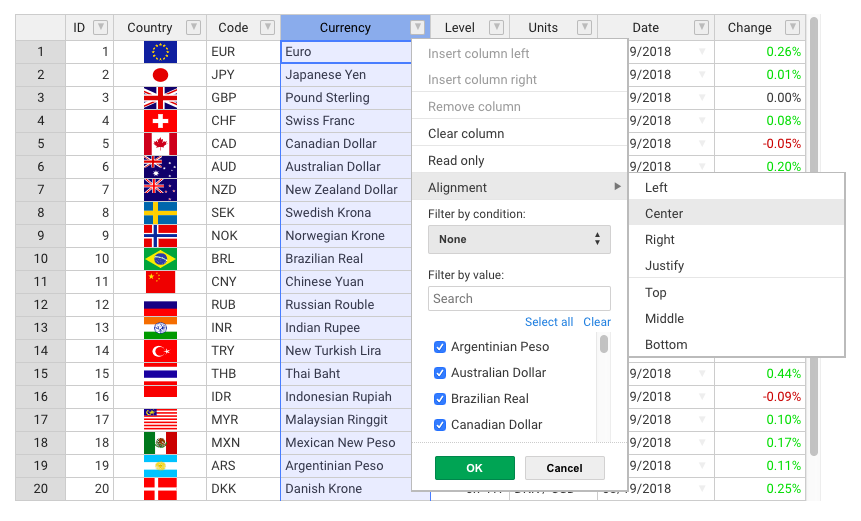
**Handsontable** is a JavaScript/HTML5 data grid component with spreadsheet look & feel.
It provides easy data binding, data validation, filtering, sorting and CRUD operations.
Handsontable works with [Vue](//github.com/handsontable/vue-handsontable-official), [React](//github.com/handsontable/react-handsontable) and [Angular](//github.com/handsontable/angular-handsontable).
## Installation
Use npm to install the latest version.
```
npm install handsontable
```
You can use Yarn, NuGet or [other methods](//handsontable.com/download) as well. You can load it directly from [jsDelivr](//www.jsdelivr.com/package/npm/handsontable).
## Usage
Create a placeholder - an HTML element holding a place for a data grid.
```html
```
Import Handsontable and its stylesheet.
```js
import Handsontable from "handsontable";
import 'handsontable/dist/handsontable.full.css';
```
Alternatively, you can simply embed it in your HTML file.
```html
```
Now turn your placeholder into a data grid with sample data.
```js
const data = [
['', 'Tesla', 'Volvo', 'Toyota', 'Ford'],
['2019', 10, 11, 12, 13],
['2020', 20, 11, 14, 13],
['2021', 30, 15, 12, 13]
];
const container = document.getElementById('example');
const hot = new Handsontable(container, {
data: data,
rowHeaders: true,
colHeaders: true
});
```
##### [See the live demo](//handsontable.com/examples)
## Features
A list of some of the most popular features:
- Multiple column sorting
- Non-contiguous selection
- Filtering data
- Export to file
- Validating data
- Conditional formatting
- Merging cells
- Custom cell types
- Freezing rows/columns
- Moving rows/columns
- Resizing rows/columns
- Hiding rows/columns
- Context menu
- Comments
- Auto-fill option
## Framework support
Use one of the available wrappers to use Handsontable with your favorite framework:
- [Handsontable for Vue](//github.com/handsontable/vue-handsontable-official)
- [Handsontable for React](//github.com/handsontable/react-handsontable)
- [Handsontable for Angular](//github.com/handsontable/angular-handsontable)
## Documentation
- [Developer guides](//handsontable.com/docs)
- [API Reference](//handsontable.com/docs/Core.html)
- [Release notes](//handsontable.com/docs/tutorial-release-notes.html)
- [Twitter](//twitter.com/handsontable) (News and updates)
## Support and contribution
We provide support for all users through [GitHub issues](//github.com/handsontable/handsontable/issues). If you have a commercial license then you can add a new ticket through the [contact form](//handsontable.com/contact?category=technical_support).
If you would like to contribute to this project, make sure you first read the [guide for contributors](//github.com/handsontable/handsontable/blob/master/CONTRIBUTING.md).
## Browser compatibility
Handsontable is compatible with modern browsers such as Chrome, Firefox, Safari, Opera, and Edge. It also supports Internet Explorer 9 to 11 but with limited performance.
## License
Handsontable is dual-licensed. You can either use a free license for all your non-commercial projects or purchase a commercial license. See the table below for a comparison of these two.
Free license
Paid license
For non-commercial purposes such as teaching, academic research, personal experimentation, and evaluating on development and testing servers.
## License key
**The license key is obligatory since [Handsontable 7.0.0](//github.com/handsontable/handsontable/releases/tag/7.0.0) (released in March 2019).**
If you use Handsontable for purposes not intended toward monetary compensation such as, but not limited to, teaching, academic research, evaluation, testing and experimentation, pass the phrase `'non-commercial-and-evaluation'`, as presented below:
```js
const hot = new Handsontable(container, {
data: data,
rowHeaders: true,
colHeaders: true,
licenseKey: 'non-commercial-and-evaluation'
});
```
If, on the other hand, you use Handsontable in a project that supports your commercial activity, then you must purchase the license key at [handsontable.com](//handsontable.com/pricing).
The license key is validated in an offline mode. No connection is made to any server. [Learn more](//handsontable.com/docs/tutorial-license-key.html) about how it works.
Created by [Handsoncode](//handsoncode.net) with ❤ and ☕ in [Tricity](//en.wikipedia.org/wiki/Tricity,_Poland).